
Listen to this Post
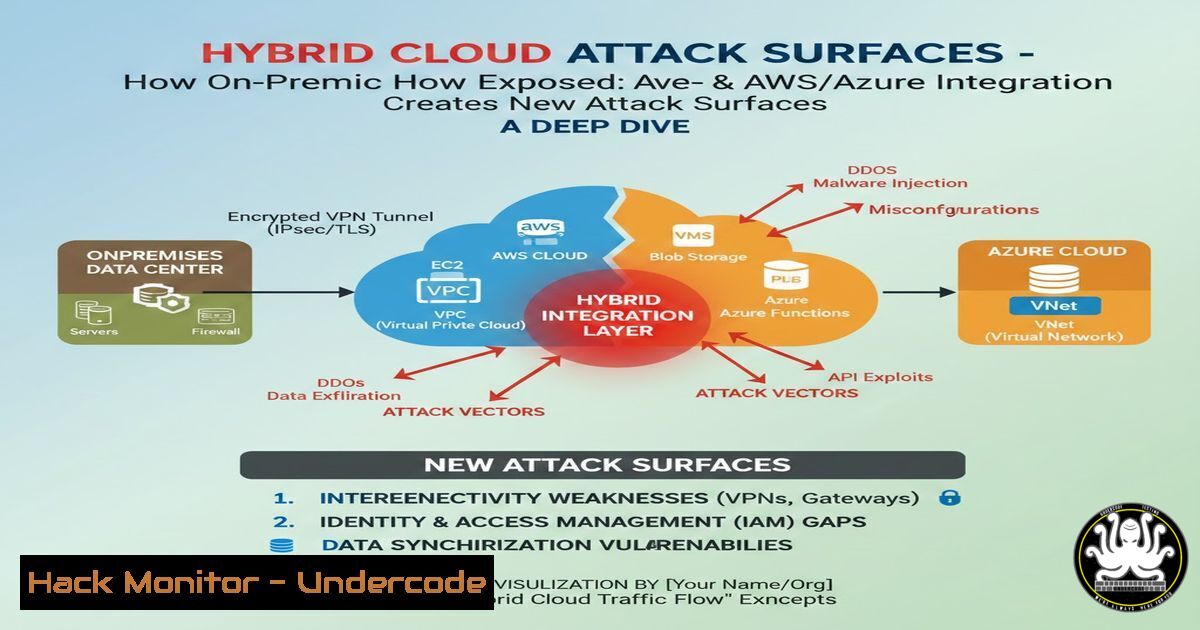
Introduction:
Modern enterprises increasingly adopt hybrid data center architectures that seamlessly blend on-premises infrastructure with public cloud platforms like AWS and Azure. While this integration boosts agility and scalability, it also introduces complex traffic flows—east-west (server-to-server) and north-south (user-to-application)—that expand the attack surface. Misconfigured VPN tunnels, exposed API endpoints, and unmonitored east-west traffic can lead to data breaches and lateral movement by adversaries. This article dissects hybrid cloud traffic patterns, provides step‑by‑step configuration guides for secure connectivity, and equips you with commands to harden your hybrid environment.
Learning Objectives:
- Understand the anatomy of hybrid cloud traffic, including east-west and north-south flows.
- Identify critical security risks in VPN, SD-WAN, and cloud-native networking.
- Implement secure connectivity, monitoring, and hardening techniques using Linux/Windows commands and cloud CLI tools.
You Should Know:
- Mapping Hybrid Cloud Traffic: East-West vs. North-South Flows
Hybrid data centers route traffic between on-premises servers, branch offices, and cloud VPCs/VNets. North-south traffic enters/exits the data center (e.g., users accessing apps), while east-west traffic moves laterally between servers or containers—often within the same cloud region or across on-prem and cloud.
Step‑by‑step traffic analysis:
- On a Linux on-prem server, capture packets to identify flows:
sudo tcpdump -i eth0 -w hybrid-traffic.pcap
- On Windows, use `netsh` to start a trace:
netsh trace start provider=Microsoft-Windows-TCPIP capture=yes maxsize=500
netsh trace stop
- Analyze the capture with Wireshark or `tshark` to distinguish east-west (internal IP ↔ internal IP) from north-south (internal ↔ public IP).
Key insight: Unrestricted east-west traffic is a prime vector for attackers after initial compromise—segment your networks.
- Building a Secure Site‑to‑Site VPN Between On-Prem and AWS
A VPN gateway is the backbone of hybrid connectivity. Misconfigurations (e.g., using pre‑shared keys alone) can expose the tunnel to brute‑force or downgrade attacks.
Step‑by‑step AWS VPN setup with strongSwan (Linux on‑prem):
- In AWS, create a Virtual Private Gateway and attach it to your VPC.
- Create a Customer Gateway with your on‑prem public IP and choose IKEv2 with strong encryption (AES256, SHA256).
- Create a VPN Connection and download the configuration.
4. On your Linux on‑prem firewall, install strongSwan:
sudo apt install strongswan strongswan-pki
5. Edit `/etc/ipsec.conf` with the parameters from AWS (example):
conn aws-vpn
left=%defaultroute
leftid=<on-prem-public-ip>
leftsubnet=10.0.0.0/16
right=<aws-vpn-endpoint-ip>
rightsubnet=10.200.0.0/16
ike=aes256-sha256-modp2048!
esp=aes256-sha256!
keyexchange=ikev2
auto=start
6. Set pre‑shared key or certificates in `/etc/ipsec.secrets`.
- Restart IPsec:
sudo ipsec restart. Verify withsudo ipsec status.
Windows counterpart: Use built‑in VPN client or configure RRAS for IKEv2, but strongSwan is preferred for granular control.
3. Hardening East-West Traffic with Micro‑Segmentation
In cloud environments, default “allow all” inside a VPC can let an attacker pivot easily. Implement micro‑segmentation using network security groups (NSGs) in Azure or security groups in AWS.
Azure CLI example to restrict east-west traffic:
 Create an NSG with a rule that denies all internal traffic except specific ports
az network nsg create --resource-group MyRG --name MyNSG
az network nsg rule create --resource-group MyRG --nsg-name MyNSG \
--name DenyEastWest --priority 200 --direction Inbound --access Deny \
--protocol Tcp --source-address-prefixes VirtualNetwork \
--destination-address-prefixes VirtualNetwork --destination-port-ranges ''
 Then allow only required app ports (e.g., 443) from specific subnets
az network nsg rule create ... --access Allow --destination-port-ranges 443
AWS CLI for security group lockdown:
 Revoke default allow-all within the group
aws ec2 revoke-security-group-ingress --group-id sg-xxxx --protocol all --source-group sg-xxxx
 Add specific rules
aws ec2 authorize-security-group-ingress --group-id sg-xxxx --protocol tcp --port 443 --source-group sg-xxxx
- Securely Integrating AI Services (AWS SageMaker, Azure AI)
AI services often require access to on‑prem data. Instead of exposing them to the internet, use private endpoints (AWS PrivateLink, Azure Private Link).
Step‑by‑step for Azure Private Link to AI service:
- Create a Private Endpoint in your VNet for, say, Azure Cognitive Services.
- Disable public network access on the AI resource.
- Verify connectivity from an on‑prem VM (via VPN) using
nslookup:nslookup <ai-service-name>.cognitiveservices.azure.com
It should resolve to a private IP in your VNet.
- Test with a simple API call using curl:
curl -X POST "https://<ai-private-endpoint>/text/analytics/v3.0/sentiment" \
-H "Ocp-Apim-Subscription-Key: <key>" \
-H "Content-Type: application/json" \
-d "{\"documents\":[{\"id\":\"1\",\"text\":\"Hello world\"}]}"
AWS equivalent: Use VPC Endpoints for SageMaker or Comprehend, and attach endpoint policies to restrict access.
5. Monitoring Hybrid Traffic with Cloud-Native Tools
Visibility is critical. Enable VPC Flow Logs in AWS and Network Watcher in Azure, then aggregate logs in a SIEM.
Enable AWS VPC Flow Logs via CLI:
aws ec2 create-flow-logs --resource-type VPC --resource-ids vpc-xxx \
--traffic-type ALL --log-destination-type cloud-watch-logs \
--log-group-name HybridFlowLogs --deliver-logs-permission-arn arn:aws:iam::xxx:role/FlowLogsRole
On Linux, use `jq` to parse flow log JSON from CloudWatch:
aws logs get-log-events --log-group-name HybridFlowLogs --log-stream-name eni-xxx | jq '.events[].message'
Azure Network Watcher connection monitor:
 Create a connection monitor to test latency between on-prem and Azure VM
az network watcher connection-monitor create --location westus --name HybridMonitor \
--source-resource <on-prem-vm-id> --dest-resource <azure-vm-id> \
--dest-port 443 --protocol TCP
6. Hardening Cloud IAM and Encryption
Stolen credentials can bypass all network controls. Enforce least privilege and encrypt data in transit.
AWS IAM policy to restrict access to a specific VPC endpoint:
{
"Statement": [{
"Effect": "Deny",
"Action": "s3:",
"Resource": "",
"Condition": {
"StringNotEquals": {
"aws:sourceVpce": "vpce-xxx"
}
}
}]
}
Apply via AWS CLI: `aws iam put-user-policy …`
Encrypt on‑prem to cloud traffic: Always use IPsec with strong ciphers (AES‑GCM) and enable TLS 1.3 for application traffic. On Linux, you can check cipher support with:
nmap --script ssl-enum-ciphers -p 443 <cloud-app-endpoint>
7. Simulating a VPN Downgrade Attack and Mitigation
Attackers may try to force a VPN to use weak algorithms. Test your VPN’s resistance using ike-scan:
sudo ike-scan -M --trans=(1,1,1,2) <vpn-gateway-ip>
If the gateway responds with a compatible weak transform, it’s vulnerable.
Mitigation: On strongSwan, disable legacy algorithms by setting `ike=aes256-sha256-modp2048!` (the exclamation mark enforces strict matching). On cloud side, ensure your VPN endpoints reject weak proposals (check cloud provider documentation).
What Undercode Say:
- Visibility is non‑negotiable: East-west traffic often remains unmonitored; attackers exploit this blind spot. Implement flow logs and anomaly detection.
- Automate security policies: Manual configurations lead to drift. Use Infrastructure as Code (Terraform, CloudFormation) to enforce consistent security groups, VPN settings, and IAM roles.
- Zero Trust for hybrid clouds: Never trust any traffic implicitly—segment, encrypt, and continuously verify every flow, whether north‑south or east‑west.
Analysis: The hybrid data center trend blurs traditional perimeter security. As AI services become embedded in these architectures, the risk of data exfiltration via private endpoints grows. Security teams must shift from reactive monitoring to proactive traffic modeling and automated response. The commands and configurations above provide a foundation, but they must be woven into a holistic DevSecOps pipeline.
Prediction:
Within the next two years, AI‑driven network orchestration will automate traffic steering and threat response in hybrid clouds. However, adversaries will also leverage AI to discover subtle misconfigurations in VPN policies and cloud IAM faster than human defenders can patch them. The battleground will move to the control plane—attackers will target the APIs that manage hybrid connectivity, making API security and hardened CI/CD pipelines the top priority for 2026.
▶️ Related Video (72% Match):
🎯Let’s Practice For Free:
IT/Security Reporter URL:
Reported By: Dhari Alobaidi – Hackers Feeds
Extra Hub: Undercode MoN
Basic Verification: Pass ✅


