
Listen to this Post
Introduction:
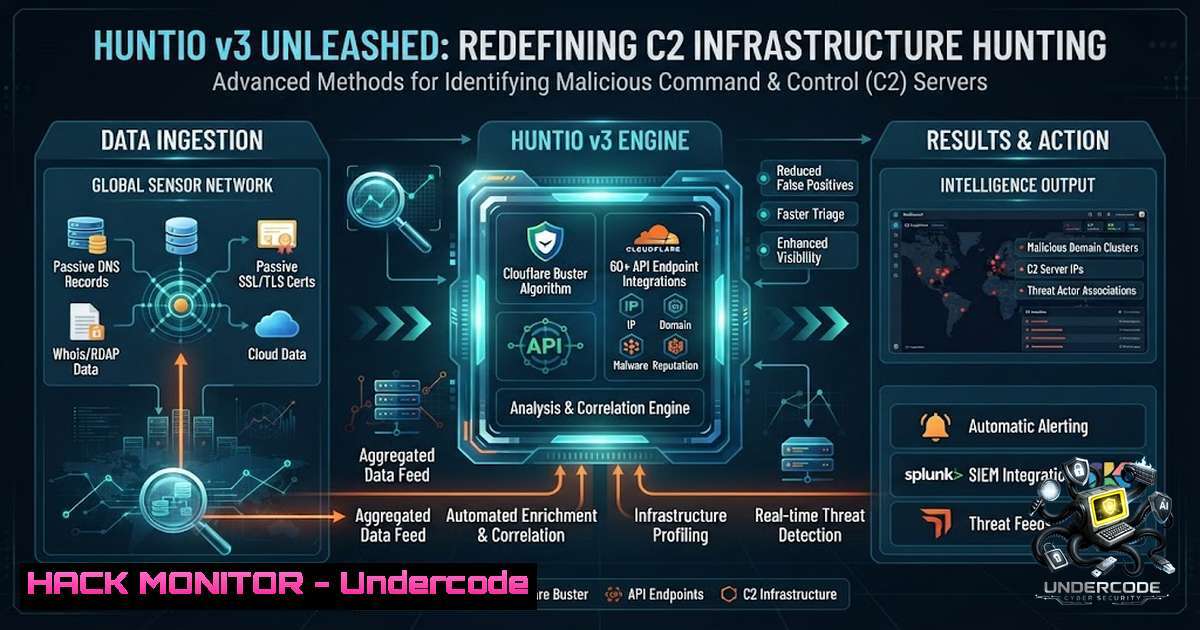
In the cat-and-mouse game of cyber threat intelligence, a single IP address, domain, or file hash is rarely the full story—it is merely a doorway. Traditional indicator-of-compromise (IOC) enrichment stops at the lookup, leaving analysts to manually piece together fragmented data across multiple platforms. Hunt.io 3.0 fundamentally shifts this paradigm by transforming simple indicators into investigation-ready intelligence, delivering full infrastructure context from a single pivot point within one unified platform. This release equips defenders with Passive DNS History, Cloudflare Buster, visual Netblock exploration, and over 60 new API endpoints, enabling security teams to reconstruct attacker infrastructure over time, uncover hidden clusters, and operationalize threat intelligence at scale.
Learning Objectives:
- Master infrastructure-centric threat hunting using Passive DNS History and visual Netblock browsing to map adversarial C2 networks across 200+ registrars.
- Operationalize Hunt.io’s 60+ API endpoints and remote MCP server to automate enrichment pipelines, SOAR workflows, and custom threat hunting tooling.
- Apply HuntSQL and AttackCapture code search to correlate attacker infrastructure, exploited CVEs, and abused cloud services into a single investigative workflow.
You Should Know:
- Passive DNS History & Cloudflare Buster: Reconstructing Attacker Infrastructure Over Time
Attackers rotate IPs and burn domains, but the hosting layer underneath remains remarkably stable. Hunt.io v3’s Passive DNS History allows analysts to query historical DNS records for any domain or IP, revealing infrastructure relationships that would otherwise remain invisible. By visualizing when a domain resolved to a particular IP and what other domains shared that IP over time, investigators can reconstruct the full lifecycle of a C2 campaign.
The Cloudflare Buster feature is particularly powerful for penetrating infrastructure hidden behind Cloudflare’s reverse proxy. Many threat actors use Cloudflare to obscure their origin servers, but Hunt.io v3 can bypass this by identifying the actual hosting provider and origin IP through DNS history analysis and provider-centric fingerprinting.
Step‑by‑step guide: Using Passive DNS History to Uncover Hidden C2 Clusters
- Start with a single indicator – Enter a known malicious domain (e.g.,
evil-c2[.]com) into Hunt.io’s search bar. - Query DNS History – Navigate to the DNS History tab to view all historical A and AAAA records for the domain. Note the IP addresses it has resolved to over time.
- Identify shared infrastructure – For each IP address, click the “Related Domains” view to see what other domains resolved to the same IP during overlapping timeframes. This often reveals sibling C2 domains operated by the same threat actor.
- Apply Cloudflare Buster – If the domain is behind Cloudflare, activate the Cloudflare Buster feature. Hunt.io will analyze historical DNS records and SSL certificate data to surface the origin server’s IP and hosting provider.
- Visualize the netblock – Use the visual Netblock browsing feature to see all IPs within the same /24 or /22 subnet that have hosted suspicious domains. This exposes the attacker’s infrastructure sprawl across an entire hosting provider’s address space.
- Export findings – Download the enriched dataset via the API or CSV export for integration into your TIP or SIEM.
Linux Command (DNS enumeration alternative):
 Query historical DNS records using SecurityTrails API (alternative to Hunt.io's Passive DNS)
curl -s -H "APIKEY: YOUR_API_KEY" "https://api.securitytrails.com/v1/domain/evil-c2.com/history/a" | jq '.records[] | {ip: .ip, first_seen: .first_seen, last_seen: .last_seen}'

Bulk IP-to-domain reverse DNS lookup
for ip in $(cat ips.txt); do dig -x $ip +short; done
2. AttackCapture & HuntSQL: Code-Level Threat Intelligence
Hunt.io v3’s AttackCapture is a game-changer for threat hunting at the code level. It indexes open directories, staged attack files, and exploit code from across the internet, making them searchable through AI-categorized facets. During a routine hunting session, Hunt.io’s AttackCapture File Manager surfaced an open directory on `213.136.80[.]73` (Contabo GmbH) hosting a complete Sliver-integrated SMTP proxy deployment toolkit—no authentication required. Twelve files totaling 29.1 MB, including three Chisel binaries, five Python deployers, and four JSON state artifacts, were accessible. A second open directory on port 9443 exposed the operator’s live `/tmp` directory with 767 files containing active scanners, Spring Boot exploitation tooling, and a live Sliver C2 configuration.
HuntSQL enables analysts to write custom queries across AttackCapture, C2 feeds, and vulnerability intelligence tables, correlating attacker infrastructure with observed campaigns and exploited CVEs.
Step‑by‑step guide: Hunting Open Directories with AttackCapture
- Access AttackCapture – Navigate to the AttackCapture module in Hunt.io v3.
- Search by intent – Use AI-generated facets such as “Intent: Exploitation,” “Package Type: Deployer,” or “Function: Credential Harvesting” to narrow down results.
- Filter by file hash – Enter a known malicious SHA256 (e.g., from a Sliver binary) to find hosts serving the same file. AttackCapture supports SHA256 queries and file content previews.
- Review host briefs – Pull AI-generated host and file briefs to understand the context of each exposed directory without manually inspecting raw data.
- Export and pivot – Download host archives or export the findings via the AttackCapture API endpoint. Then pivot to the IP Enrichment module to view the host’s risk profile, port history, JARM fingerprint, and IOC timeline.
- Write HuntSQL queries – Use HuntSQL to automate detection of similar open directories across the entire dataset:
SELECT host, port, path, file_hashes
FROM attackcapture
WHERE path LIKE '%/chisel%' AND file_hashes IN ('KNOWN_SLIVER_HASH')
ORDER BY first_indexed DESC
Windows Command (open directory discovery with PowerShell):
 Check for open HTTP directories on a target IP range
1..254 | ForEach-Object {
$ip = "192.168.1.$_"
try {
$response = Invoke-WebRequest -Uri "http://$ip:8444/" -TimeoutSec 2 -ErrorAction Stop
if ($response.StatusCode -eq 200) { Write-Host "Open directory found: $ip" }
} catch {}
}
- Provider Radar & Registrar Intelligence: Mapping Malicious Provisioning Patterns
Hunt.io v3 introduces Provider Radar with intelligence on 200+ registrars, enabling defenders to identify malicious provisioning patterns before campaigns become operational. By analyzing which hosting providers and registrars are disproportionately used by threat actors, analysts can proactively block entire netblocks or monitor for new domain registrations that exhibit suspicious patterns.
In a recent study, Hunt.io mapped threat-activity-enabling infrastructure across 10 Eastern European countries, covering Belarus, Bulgaria, the Czech Republic, Hungary, Poland, Moldova, Romania, Russia, Slovakia, and Ukraine. Across 302 distinct hosting providers, they identified more than 3,900 active threat-activity-enabling servers—with a single Bulgarian provider accounting for more than half of all detections. This level of concentration only becomes visible when analyzing the hosting layer itself, not individual IPs or domains.
Step‑by‑step guide: Using Provider Radar for Proactive Defense
- Access Provider Radar – Navigate to the Provider Radar dashboard (formerly Host Radar).
- Filter by threat activity – Apply filters for “Threat Activity Enablers” to see which providers host the highest concentration of malicious infrastructure.
- Drill down by registrar – Use Registrar Intelligence to see which domain registrars are most frequently used by attackers. Look for patterns such as bulk registrations, privacy protection services, or specific top-level domains.
- Investigate provider netblocks – Click on any provider to view all netblocks (CIDR ranges) associated with that provider. Use visual Netblock browsing to see the distribution of malicious hosts within each range.
- Create blocklists – Export the list of high-risk netblocks and registrars for ingestion into your firewall, IDS/IPS, or SIEM. Configure automated alerts for any new domain registrations matching these patterns.
- Correlate with CVE intelligence – Use the integrated CVE investigation workflow to see if any of the provider’s hosted IPs are associated with weaponized vulnerabilities.
Linux Command (bulk WHOIS lookup for registrar intelligence):
 Bulk WHOIS lookup for domains in a suspicious list
for domain in $(cat domains.txt); do
whois $domain | grep -E "Registrar:|Creation Date:" | head -2
done

Query ASN for a given IP to identify hosting provider
whois -h whois.cymru.com " -v $(cat ips.txt)" | column -t
4. Vulnerability Intelligence & CVE Investigation Workflow
Hunt.io v3 integrates CVE investigation workflows directly into the threat hunting process. Analysts can drill down into specific CVEs, navigate across related CVEs, and access enriched daily digests of weaponized vulnerabilities. This enables defenders to prioritize patching and detection based on real-world threat activity rather than generic CVSS scores.
The platform correlates CVE data with AttackCapture findings, showing which exploits are actively being used in the wild and what infrastructure is hosting them. For example, if a new critical vulnerability is disclosed, analysts can immediately query Hunt.io to see if any known threat actors are already exploiting it and what IPs or domains are involved.
Step‑by‑step guide: CVE-Driven Threat Hunting
- Navigate to Vulnerability Intelligence – Access the Vulnerability Intelligence module.
- Search by CVE – Enter a CVE ID (e.g.,
CVE-2026-12345) to view its risk profile, weaponized status, and associated threat actor activity. - View daily threat counts – Check the daily threat count to see how many times this CVE has been observed in attack campaigns over time.
- Drill down to infrastructure – Click on any threat actor or campaign associated with the CVE to see the IPs, domains, and hosting providers used.
- Cross-1avigate – Use the cross-CVE navigation to identify related vulnerabilities that are often exploited together in multi-stage attacks.
- Create detection rules – Based on the observed exploitation patterns, write Suricata or Snort rules to detect network traffic matching the CVE’s exploit characteristics. Alternatively, use HuntSQL to continuously monitor for new infrastructure matching the CVE’s IOCs.
- Automate with API – Pull the CVE intelligence via the Vulnerability Intelligence API endpoint and integrate it into your patch management or vulnerability scanning pipeline.
Linux Command (CVE lookup and exploitation check):
 Check if a CVE has known exploits using the NVD API
curl -s "https://services.nvd.nist.gov/rest/json/cves/2.0?cveId=CVE-2026-12345" | jq '.vulnerabilities[bash].cve | {id: .id, description: .descriptions[bash].value, cvss: .metrics.cvssMetricV31[bash].cvssData.baseScore}'

Search for exploit code in AttackCapture (conceptual HuntSQL alternative)
 This would typically be done via Hunt.io's UI or API
- Operational Integration: 60+ API Endpoints and Remote MCP Server
Hunt.io v3 is designed for operational integration, not just analyst workflows. The platform ships with 60+ new API endpoints covering C2 feeds, AttackCapture, IP enrichment, DNS, Vulnerability Intelligence, IOC Hunter, Threat Actors, and Signals. The API is built on OpenAPI 3.0 with JSON and YAML spec files available for download, enabling direct import into Postman or client generation in Python, Go, or any other language.
The remote MCP (Model Context Protocol) server at `mcp.hunt.io` with OAuth support allows AI tools and large language models to connect directly to Hunt.io’s intelligence, with 18 tools available for automated threat hunting. This enables organizations to embed Hunt.io into Threat Intelligence Platforms (TIPs), SOAR workflows, enrichment pipelines, and custom threat hunting tooling, enabling scalable, automated cyber threat intelligence operations.
Step‑by‑step guide: Integrating Hunt.io API into a SOAR Workflow
- Download OpenAPI spec – From the Hunt.io v3 API documentation, download the OpenAPI 3.0 JSON or YAML specification file.
- Import into Postman – Import the spec into Postman to explore all available endpoints and generate example requests.
- Generate a client – Use the OpenAPI generator to create a Python or Go client:
openapi-generator generate -i huntio-api.yaml -g python -o ./huntio-client
- Authenticate – Obtain an API key from the Hunt.io portal. Use it in the `Authorization` header for all requests.
- Build enrichment pipeline – Write a script that takes an IP or domain from your SIEM, calls the IP Enrichment endpoint, and returns a risk score, port history, and related infrastructure.
- Automate C2 feed ingestion – Download the full C2 infrastructure feed as gzip-compressed NDJSON, with options to exclude domains by popularity list or custom blocklist. Ingest this feed into your firewall or IDS for automated blocking.
- Connect MCP server – Configure your AI assistant or custom tool to connect to `mcp.hunt.io` with OAuth. Use the 18 available tools to perform natural-language threat hunting queries.
Python Example (IP Enrichment via API):
import requests
import json

API_KEY = "YOUR_API_KEY"
IP = "213.136.80.73"

headers = {"Authorization": f"Bearer {API_KEY}"}
response = requests.get(f"https://api.hunt.io/v3/ip/{IP}/enrich", headers=headers)
data = response.json()

print(f"Risk Profile: {data['risk_profile']}")
print(f"JARM Fingerprint: {data['jarm']}")
print(f"Related C2 Domains: {data['related_domains']}")
What Undercode Say:
- Context is everything – Hunt.io v3 proves that threat hunting is not about collecting more IOCs but about understanding infrastructure relationships. Passive DNS History and visual Netblock browsing turn isolated indicators into actionable intelligence by revealing how attackers provision and maintain their C2 networks over time.
- Automation is the force multiplier – With 60+ API endpoints and a remote MCP server, Hunt.io v3 enables organizations to operationalize threat intelligence at scale. The ability to embed Hunt.io directly into SOAR workflows and enrichment pipelines means that threat hunting is no longer a manual, analyst-only activity—it becomes an automated, continuous process.
The shift from IOC enrichment to investigation-ready intelligence is profound. Traditional threat intelligence platforms provide static lists of bad IPs and domains, but Hunt.io v3 provides the full infrastructure context—what else is on that IP, what domains resolved to it historically, what hosting provider it belongs to, and what CVEs are being exploited there. This reduces manual correlation effort dramatically and enables defenders to stay ahead of adversaries.
The AttackCapture discovery of PCPJack’s open directories is a textbook example of proactive threat hunting. Instead of waiting for an IOC to be published, Hunt.io’s continuous scanning of open directories and AI-powered categorization allowed analysts to uncover a complete attacker toolkit—including Sliver C2 configurations and credential harvesters—before the operators could rotate their infrastructure.
The provider-level analysis of Eastern European hosting environments demonstrates the power of infrastructure-centric hunting. By mapping threat-activity-enabling servers across 302 providers, Hunt.io revealed that a single Bulgarian provider accounted for more than half of all detections—a pattern that would be invisible when tracking individual IPs. This kind of intelligence enables proactive blocking of entire netblocks and early warning of emerging campaigns.
Finally, the integration of CVE investigation workflows into the threat hunting process bridges the gap between vulnerability management and threat detection. Defenders can now prioritize patching based on actual exploitation activity rather than theoretical CVSS scores, and they can immediately hunt for infrastructure associated with newly disclosed vulnerabilities.
Prediction:
- +1 Hunt.io v3’s infrastructure-centric approach will become the industry standard for CTI platforms over the next 12–18 months. As more organizations recognize that individual IOCs are insufficient for proactive defense, demand for platforms that provide full infrastructure context—Passive DNS, provider intelligence, and visual netblock mapping—will surge.
- +1 The remote MCP server and 60+ API endpoints position Hunt.io as a foundational layer for AI-driven threat hunting. As security teams adopt AI assistants and autonomous agents for threat detection, Hunt.io’s programmatic access will enable real-time, natural-language querying of attacker infrastructure, dramatically reducing investigation time from hours to minutes.
- -1 The proliferation of infrastructure-as-a-service and ephemeral cloud environments will make infrastructure attribution increasingly challenging. Attackers are already leveraging serverless functions, containerized workloads, and short-lived IPs to evade detection. Hunt.io and similar platforms will need to continuously evolve their data collection and correlation capabilities to keep pace with these adversarial adaptations.
- -1 The Eastern Europe infrastructure report highlights a critical challenge: distinguishing between legitimate, unwanted, and malicious use of hosting providers. As Hunt.io co-founder acknowledged, the presence of certain software does not automatically indicate malicious intent. Future iterations of the platform will need to incorporate more nuanced risk scoring and contextual analysis to avoid false positives and reputational harm to legitimate providers.
- +1 The integration of CVE intelligence with infrastructure hunting will drive a new wave of threat-informed defense. Organizations will move beyond reactive patching to proactive threat hunting based on real-world exploitation patterns, reducing the window of vulnerability from days or weeks to hours.
▶️ Related Video (74% Match):
🎯Let’s Practice For Free:
🎓 Live Courses & Certifications:
Join Undercode Academy for Verified Certifications
🚀 Request a Custom Project:
Secure, high-velocity infrastructure and disruptive technological engineering. Contact our engineering team for high-tier development and proprietary systems:
[email protected]
💎 Smart Architecture | 🛡️ Secure by Design | ⭐ Trusted by Thousands
IT/Security Reporter URL:
Reported By: Mthomasson Huntio – Hackers Feeds
Extra Hub: Undercode MoN
Basic Verification: Pass ✅


