
Listen to this Post
Introduction:
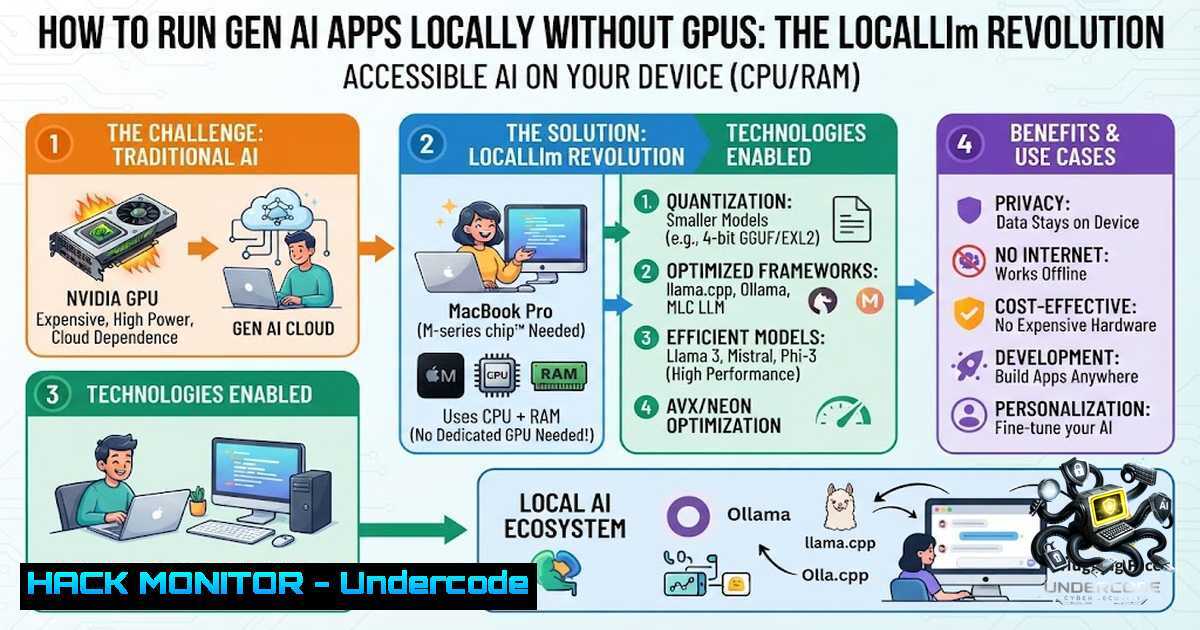
The AI development landscape has been fundamentally constrained by the scarcity and high cost of GPUs, creating a significant barrier for developers and organizations looking to leverage large language models (LLMs). Google’s “localllm” emerges as a game-changing solution that enables developers to harness the power of LLMs directly on CPUs and memory within Google Cloud Workstations, eliminating GPU dependency while improving performance and cost efficiency. This breakthrough leverages quantized models optimized for local devices, offering seamless development capabilities that revolutionize how we approach AI application development.
Learning Objectives:
- Understand how localllm enables GPU-free LLM execution on local CPUs and memory
- Learn to set up and configure localllm with quantized models from HuggingFace
- Master security best practices for running local LLMs in development environments
- Explore cost optimization strategies and performance tuning techniques
- Gain hands-on experience with command-line utilities and integration patterns
You Should Know:
1. Understanding localllm Architecture and Core Concepts
localllm is a set of tools and libraries that provides easy access to quantized models from HuggingFace through a command-line utility. At its core, the solution addresses the GPU scarcity challenge that has plagued AI developers, enabling LLM power on CPU and memory within Google Cloud Workstations. The key innovation lies in leveraging quantized models that improve performance, reduce memory utilization, and speed up inference.
Step-by-step guide explaining what this does and how to use it:
The architecture follows a three-component approach similar to the LEMON system, where a cloud LLM decomposes complex tasks into manageable subtasks and prompt generation, while a local LLM executes these subtasks in a privacy-preserving manner. For localllm specifically:
- Model Quantization: Models are compressed from 32-bit floating point to 8-bit or 4-bit integers, reducing memory footprint by 75-90% while maintaining acceptable accuracy
- Local Execution Engine: The quantized model runs directly on CPU using optimized inference libraries (LLaMA.cpp, GPTQ, or GGML)
- Cloud Workstation Integration: Google Cloud Workstations provide the compute environment with sufficient CPU and memory resources
Linux Commands for Setup:
 Install localllm CLI
pip install localllm

Download a quantized model from HuggingFace
localllm download --model "TheBloke/Llama-2-7B-Chat-GGUF" --quantization Q4_K_M

Run inference locally
localllm run --model ./models/llama-2-7b.Q4_K_M.gguf --prompt "Explain quantum computing"
Windows PowerShell Commands:
 Install localllm
pip install localllm

Set environment variables for optimal performance
$env:OMP_NUM_THREADS = 4
$env:LLAMA_CPP_THREADS = 4

Run model with specific parameters
localllm run --model .\models\llama-2-7b.Q4_K_M.gguf --threads 4 --ctx-size 2048
- Security and Privacy Considerations for Local LLM Deployment
One of the most compelling advantages of localllm is enhanced data security through local processing on CPU and memory. When you run LLMs locally, sensitive data never leaves your environment, eliminating risks associated with cloud-based API calls where prompts and responses may be logged or intercepted.
Step-by-step guide explaining what this does and how to use it:
- Data Residency Control: All processing occurs within your Google Cloud Workstation or local environment
- No External API Calls: Unlike cloud-based LLM services, localllm doesn’t transmit data to external endpoints
- Isolation Capabilities: Run localllm in containerized environments for additional security layers
- Audit Logging: Implement local logging to track all model interactions
Security Hardening Commands:
 Run localllm in a Docker container with network restrictions
docker run --1etwork none --memory 8g -v ./models:/models localllm:latest

Implement local firewall rules to block outgoing connections
sudo iptables -A OUTPUT -p tcp --dport 443 -j DROP  Block HTTPS outbound

Set up local audit logging
localllm run --model ./models/llama-2-7b.Q4_K_M.gguf --log-level DEBUG --log-file ./audit.log
Windows Security Configuration:
 Configure Windows Firewall to block localllm outbound
New-1etFirewallRule -DisplayName "Block localllm Outbound" -Direction Outbound -Action Block -Program "C:\Python\Scripts\localllm.exe"

Enable Windows Defender Application Guard for isolation
 (Requires Windows 10/11 Pro or Enterprise)
3. Performance Optimization and Resource Management
localllm delivers improved performance, reduced memory footprint, faster inference, enhanced productivity, and significant cost efficiency. However, maximizing these benefits requires understanding resource allocation and optimization techniques.
Step-by-step guide explaining what this does and how to use it:
- Thread Optimization: Configure optimal thread counts based on your CPU core count
- Batch Processing: Process multiple prompts in batches to maximize throughput
- Context Window Management: Adjust context size based on your use case requirements
- Caching Strategies: Implement response caching for repeated queries
- Model Selection: Choose appropriate model sizes (3B, 7B, 13B parameters) based on your hardware
Linux Performance Tuning:
 Check CPU information
lscpu

Set thread affinity for better performance
taskset -c 0-7 localllm run --model ./models/model.gguf --threads 8

Monitor resource usage
htop
 or
nvidia-smi  If GPU is available as fallback

Enable memory swapping for large models
sudo fallocate -l 16G /swapfile
sudo chmod 600 /swapfile
sudo mkswap /swapfile
sudo swapon /swapfile
Windows Performance Monitoring:
 Monitor CPU and memory usage
Get-Counter "\Processor(_Total)\% Processor Time"
Get-Counter "\Memory\Available MBytes"

Set process priority for localllm
Get-Process localllm | ForEach-Object { $_.PriorityClass = "High" }
4. Integration with Google Cloud Workstations
localllm is designed to work seamlessly with Google Cloud Workstations, providing a holistic development experience. This integration enables developers to access powerful compute resources without the complexity of managing infrastructure.
Step-by-step guide explaining what this does and how to use it:
- Provision a Google Cloud Workstation with sufficient CPU and memory (16+ cores, 64GB+ RAM recommended)
2. Install localllm within the workstation environment
- Configure persistent storage for model files to avoid repeated downloads
4. Set up development environment with IDE integration
5. Implement CI/CD pipelines for automated model updates
Configuration Commands:
 Authenticate with Google Cloud
gcloud auth login

Create a workstation configuration
gcloud workstations configs create localllm-config \
--region=us-central1 \
--machine-type=e2-standard-16 \
--boot-disk-size=100GB

Create and start workstation
gcloud workstations create localllm-ws \
--config=localllm-config \
--region=us-central1

SSH into workstation
gcloud workstations ssh localllm-ws --region=us-central1
5. Command-Line Utilities and Developer Workflow
The localllm CLI utility provides a comprehensive set of commands for model management, inference, and debugging. Understanding these commands is essential for efficient development.
Step-by-step guide explaining what this does and how to use it:
- Model Discovery: Search and discover available quantized models
2. Download Management: Download models with resumable support
3. Inference Execution: Run inference with various parameters
4. Performance Benchmarking: Test different models and configurations
- Model Conversion: Convert models to different quantization formats
Essential localllm Commands:
 List available models
localllm list --source huggingface --filter "Llama-2"

Download with specific quantization
localllm download --model "TheBloke/Mistral-7B-Instruct-v0.1-GGUF" --quantization Q5_K_M --output ./models/

Run interactive chat session
localllm chat --model ./models/mistral-7b.Q5_K_M.gguf --system "You are a helpful AI assistant"

Benchmark performance
localllm benchmark --model ./models/model.gguf --prompts ./test_prompts.txt --iterations 100

Export model for production
localllm export --model ./models/model.gguf --format onnx --output ./models/model.onnx
6. Security Implications and Mitigation Strategies
While localllm offers enhanced data security through local processing, organizations must still address several security considerations. The decoupling of LLMs from internet reliance presents both opportunities and challenges.
Step-by-step guide explaining what this does and how to use it:
- Model Integrity Verification: Verify model checksums to prevent supply chain attacks
- Access Control: Implement role-based access to model execution
- Input Validation: Sanitize prompts to prevent prompt injection attacks
- Output Filtering: Implement content filters for generated responses
- Regular Updates: Keep localllm and models updated with security patches
Security Implementation Commands:
 Verify model integrity
sha256sum ./models/llama-2-7b.Q4_K_M.gguf
 Compare with known good hash from official source

Implement prompt sanitization with Python
python -c "
import re
def sanitize_prompt(prompt):
 Remove potential injection patterns
prompt = re.sub(r'<.?>', '', prompt)
return prompt[:1000]  Limit length
"

Set file permissions for models
chmod 644 ./models/.gguf
chown localllm:localllm ./models/ -R

Implement rate limiting
localllm run --model ./models/model.gguf --rate-limit 10 --window 60
What Undercode Say:
- Key Takeaway 1: localllm democratizes AI development by eliminating the GPU barrier, enabling developers to build and test Gen AI applications on standard CPU infrastructure. This significantly reduces the cost of entry for AI development while maintaining data privacy through local processing.
-
Key Takeaway 2: The solution’s reliance on quantized models optimized for local devices represents a fundamental shift in how we approach AI infrastructure. Organizations can now deploy LLMs in sensitive environments where data cannot leave the premises, opening new possibilities for healthcare, finance, and government applications.
Analysis:
The localllm initiative from Google, developed in partnership with HuggingFace, addresses three critical pain points in AI development: GPU scarcity, data privacy concerns, and cost optimization. By enabling LLM execution on CPUs, it reduces the barrier to entry for AI development while maintaining enterprise-grade security. The quantized model approach, while potentially sacrificing some accuracy, provides a practical trade-off that makes local LLM deployment viable for a wide range of use cases.
However, organizations must carefully consider the performance implications—running LLMs on CPUs is inherently slower than GPU acceleration, and the quantization process can introduce accuracy degradation for complex tasks. The solution is best suited for development, testing, and production workloads where response time requirements are not extremely stringent.
The security benefits are substantial: data never leaves the local environment, eliminating risks associated with API-based LLM services. This makes localllm particularly attractive for regulated industries and applications handling sensitive information.
Prediction:
- +1 The democratization of AI development through solutions like localllm will accelerate innovation by enabling smaller teams and organizations to experiment with and deploy LLM applications without significant hardware investment.
- +1 The trend toward local AI processing will continue to grow, driven by privacy regulations and data sovereignty requirements, making localllm a foundational technology for enterprise AI adoption.
- -1 Organizations that fail to implement proper security controls around local LLM deployments may face data leakage risks, as models could inadvertently expose sensitive training data through prompt responses.
- -1 The performance limitations of CPU-based inference may create a two-tier AI landscape where only well-funded organizations can deploy high-performance models, potentially widening the AI capability gap.
- +1 The integration of localllm with cloud workstations creates a hybrid model that balances local processing with cloud scalability, offering a flexible architecture that can adapt to varying workload demands.
▶️ Related Video (84% Match):
🎯Let’s Practice For Free:
🎓 Live Courses & Certifications:
Join Undercode Academy for Verified Certifications
🚀 Request a Custom Project:
Secure, high-velocity infrastructure and disruptive technological engineering. Contact our engineering team for high-tier development and proprietary systems:
[email protected]
💎 Smart Architecture | 🛡️ Secure by Design | ⭐ Trusted by Thousands
IT/Security Reporter URL:
Reported By: Zakhar Kornyakov – Hackers Feeds
Extra Hub: Undercode MoN
Basic Verification: Pass ✅


