Listen to this Post
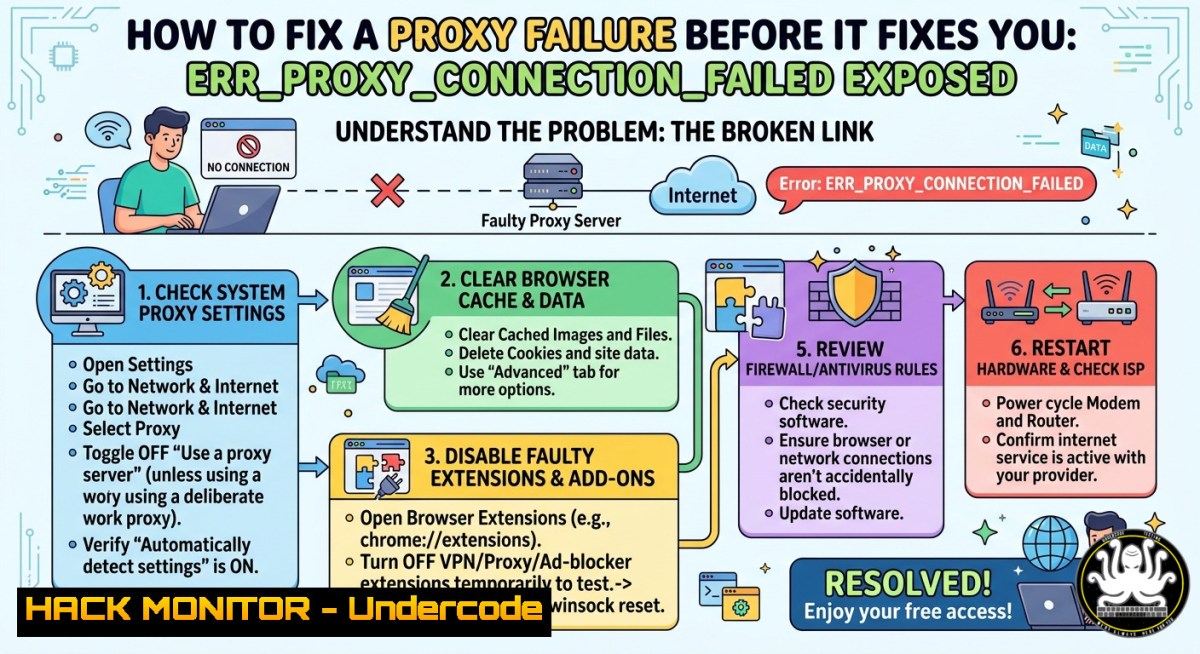
Introduction:
Proxy servers act as intermediaries between your device and the internet, filtering traffic, caching content, and enforcing security policies. When a proxy connection fails—indicated by the browser error ERR_PROXY_CONNECTION_FAILED—users lose access to external networks, but the deeper risk lies in misconfigured proxies that attackers can exploit to intercept or redirect sensitive data. Understanding the root causes and remediation steps is essential for both IT troubleshooting and cybersecurity hygiene.
Learning Objectives:
- Diagnose and resolve proxy connection failures across Windows and Linux environments using native commands.
- Identify security risks associated with improperly configured proxies, including man-in-the-middle (MITM) attacks.
- Apply hardening techniques to proxy settings, validate connectivity, and leverage monitoring tools to prevent exploitation.
You Should Know:
- Diagnosing the Proxy Failure on Windows and Linux
A proxy connection failure typically stems from incorrect manual settings, expired authentication, or a downed proxy server. Below are step-by-step guides to verify and test your configuration.
Step-by-step guide for Windows:
- Open Command Prompt as Administrator. Check current system proxy settings using:
netsh winhttp show proxy
This displays the active proxy server and bypass list.
-
View per-user proxy configurations stored in the registry:
reg query "HKCU\Software\Microsoft\Windows\CurrentVersion\Internet Settings" /v ProxyEnable
reg query "HKCU\Software\Microsoft\Windows\CurrentVersion\Internet Settings" /v ProxyServer
A `ProxyEnable` value of `1` means a proxy is enabled.
-
Reset WinHTTP proxy to direct access (bypass proxy):
netsh winhttp reset proxy
Caution: Only reset if you are sure the proxy server is unreachable or misconfigured.
-
Test connectivity bypassing the proxy using `curl` with the `–noproxy` flag:
curl --noproxy "" https://api.ipify.org
If this returns your public IP but a proxied request fails, the proxy endpoint is likely down.
Step-by-step guide for Linux:
1. Check environment variables for proxy settings:
env | grep -i proxy
echo $http_proxy $https_proxy $no_proxy
2. View system-wide proxy settings (Debian/Ubuntu):
cat /etc/environment | grep -i proxy
- Test the proxy server responsiveness using `nc` (netcat) or
curl:curl -x http://proxy.example.com:8080 -I https://www.google.com --connect-timeout 5
Replace `proxy.example.com:8080` with your proxy address. A timeout or `Connection refused` indicates the proxy is unreachable.
-
Temporarily unset proxy variables to bypass and confirm the issue:
unset http_proxy https_proxy
curl https://api.ipify.org
Security Insight: Attackers often deploy rogue proxy auto-config (PAC) files or exploit misconfigured WPAD (Web Proxy Auto-Discovery) to redirect traffic. Always validate the proxy server’s certificate if using HTTPS proxying.
- Hardening Proxy Configurations Against MITM and Data Leakage
An incorrectly secured proxy can expose internal IP addresses, authentication tokens, and browsing habits. Follow these steps to harden your proxy environment.
Step-by-step hardening for Windows/Corporate environments:
- Enforce proxy settings via Group Policy to prevent users from overriding them. Navigate to
Administrative Templates > Windows Components > Internet Explorer > Make proxy settings per-machine (rather than per-user). -
Require authenticated proxies. Use `netsh winhttp set proxy proxy-server=”http=securedproxy.corp.com:8080;https=securedproxy.corp.com:8080″` and ensure credentials are passed via integrated Windows authentication (Kerberos/NTLM) rather than plaintext.
3. Block non-proxied outbound traffic using Windows Firewall:
New-NetFirewallRule -DisplayName "Block Direct Internet" -Direction Outbound -Action Block -RemoteAddress 0.0.0.0/0 -Protocol Any
Then create an allow rule only for the proxy server IP.
Step-by-step hardening for Linux/cloud environments:
- Configure `squid` proxy with SSL inspection and access controls. Edit
/etc/squid/squid.conf:http_port 3128 ssl-bump cert=/etc/squid/ssl_cert/myCA.pem generate-host-certificates=on dynamic_cert_mem_cache_size=4MB acl allowed_net src 192.168.1.0/24 http_access allow allowed_net http_access deny all
-
Enforce that all outbound HTTP/HTTPS traffic must go through the proxy using
iptables:sudo iptables -A OUTPUT -p tcp --dport 80 -j DNAT --to-destination proxy_ip:3128 sudo iptables -A OUTPUT -p tcp --dport 443 -j DNAT --to-destination proxy_ip:3128
-
Monitor proxy logs for anomalies using `fail2ban` or integrate with a SIEM. Example: check for repeated `ERR_PROXY_CONNECTION_FAILED` events in `/var/log/squid/access.log` – spikes may indicate DoS or misconfiguration.
You Should Know: Unencrypted proxy protocols (HTTP proxy) transmit all traffic in plaintext, allowing any network eavesdropper to capture credentials. Always prefer HTTPS or SOCKS5 over TLS.
- Using AI and Automation to Predict and Mitigate Proxy Failures
Machine learning models can analyze proxy logs to predict failures before they disrupt operations. This tutorial uses open-source tools to build a simple anomaly detector.
Step-by-step setup for anomaly detection:
- Collect proxy logs (e.g., Squid or Apache). For Linux, export logs to CSV:
sudo cat /var/log/squid/access.log | awk '{print $1, $4, $7, $9}' > proxy_data.txt
Fields: timestamp, client IP, URL, HTTP status.
2. Install Python and required libraries:
pip install pandas scikit-learn matplotlib
- Build a simple isolation forest model to flag unusual response codes (e.g., 407 Proxy Auth Required or 503 Proxy Unavailable):
import pandas as pd
from sklearn.ensemble import IsolationForest
Assume df contains features like response_time, status_code, connection_errors
model = IsolationForest(contamination=0.05)
df['anomaly'] = model.fit_predict(df[['response_time', 'error_count']])
print(df[df['anomaly'] == -1])  anomalies
-
Set up a cron job or Windows Task Scheduler to run the script every 5 minutes and alert via webhook if anomaly rate exceeds threshold.
Security benefit: AI can detect reconnaissance patterns where attackers probe different proxy ports (e.g., 8080, 3128, 1080) to discover open proxies, triggering automated blocking via fail2ban.
4. Advanced Proxy Troubleshooting with Curl and Wireshark
When basic checks fail, deep packet inspection reveals whether the proxy server is dropping connections or returning corrupted responses.
Step-by-step guide using curl:
1. Verbose mode shows every handshake step:
curl -v -x http://proxy_ip:8080 https://example.com
Look for ` Connected to proxy_ip` and > CONNECT example.com:443 HTTP/1.1. If you see Proxy CONNECT aborted, the proxy rejects the tunnel.
2. Force HTTP/1.0 to bypass protocol mismatch:
curl --proxy1.0 http://proxy_ip:8080 https://example.com
- Test with a different User-Agent; some proxies filter by header:
curl -x http://proxy_ip:8080 -A "Mozilla/5.0 (Windows NT 10.0; Win64; x64)" https://api.ipify.org
Step-by-step using Wireshark (Windows/Linux GUI):
- Capture on the interface that communicates with the proxy server. Apply filter:
tcp.port == 8080 or tcp.port == 3128
-
Look for TCP retransmissions or RST packets. A `[RST, ACK]` from the proxy server after a CONNECT request suggests ACL denial.
-
For SSL-bumping proxies, inspect the `Server Hello` certificate – an invalid or self-signed certificate indicates a MITM proxy that may be legitimate (corporate inspection) or malicious.
Command-line alternative using tshark:
sudo tshark -i eth0 -f "tcp port 8080" -Y "http.response.code == 407" -T fields -e ip.src -e http.proxy_authenticate
This reveals source IPs receiving proxy authentication challenges (HTTP 407).
5. Mitigating Exploits That Leverage Proxy Misconfigurations
Attackers commonly exploit proxy failures to redirect users to phishing pages or to bypass content filters. Below are mitigation steps.
Step-by-step mitigation:
- Disable automatic proxy discovery (WPAD) unless strictly required. On Windows:
– Open Internet Options > Connections > LAN settings.
– Uncheck “Automatically detect settings”.
– Push via GPO: Computer Configuration > Administrative Templates > Windows Components > Internet Explorer > Turn off Automatic Proxy Result Caching.
- On Linux, disable WPAD by removing `wpad` from DNS search list. Edit
/etc/resolv.conf:Remove 'search' entries containing wpad
-
Implement proxy-aware network segmentation. Use iptables to reject outbound traffic that bypasses the corporate proxy:
sudo iptables -A OUTPUT -d ! proxy_ip -p tcp --dport 80 -j REJECT
sudo iptables -A OUTPUT -d ! proxy_ip -p tcp --dport 443 -j REJECT
-
Regularly validate your proxy configuration against known CVEs. Use Nmap to scan for open proxy vulnerabilities:
nmap -p 8080 --script http-open-proxy <proxy_server_IP>
A result indicating `open proxy` means anyone on the internet can route traffic through your proxy – a critical risk.
You Should Know: The `ERR_PROXY_CONNECTION_FAILED` error itself is not an exploit, but it often precedes an attacker’s attempt to force failover to a malicious proxy via DHCP poisoning (malicious WPAD response). Always monitor DHCP logs for unauthorized WPAD options (option 252).
What Undercode Say:
- Key Takeaway 1: A failed proxy connection is rarely just a connectivity glitch; it can reveal underlying security gaps such as missing authentication, cleartext transmission, or rogue WPAD scripts.
- Key Takeaway 2: Proactive hardening – including firewall rules, authenticated proxies, and anomaly detection – turns a routine troubleshooting exercise into a defense-in-depth strategy.
Analysis: Many IT teams treat `ERR_PROXY_CONNECTION_FAILED` as a user-level inconvenience, but we see it as a symptom of potential compromise. Attackers increasingly target proxy auto-configuration to silently redirect traffic. By combining native OS commands (netsh, env, iptables) with AI-driven log analysis, organizations can not only restore connectivity faster but also detect early indicators of proxy-based attacks. The commands and tutorials above equip both sysadmins and security analysts to transition from reactive “fix it” mode to proactive “harden it” mode.
Prediction:
As remote work expands, misconfigured corporate proxies and home-user proxy chains will become favored entry points for adversary-in-the-middle attacks. Within 18 months, we expect automated AI agents to routinely scan for `ERR_PROXY_CONNECTION_FAILED` patterns across enterprise telemetry, triggering zero-trust re-authentication and dynamic proxy failover to cloud-based secure web gateways (SWG). Proxy failures will cease to be a simple helpdesk ticket and become a prioritized security incident.
▶️ Related Video (84% Match):
🎯Let’s Practice For Free:
IT/Security Reporter URL:
Reported By: 1yz02 %D8%A5%D9%86 – Hackers Feeds
Extra Hub: Undercode MoN
Basic Verification: Pass ✅


