Listen to this Post
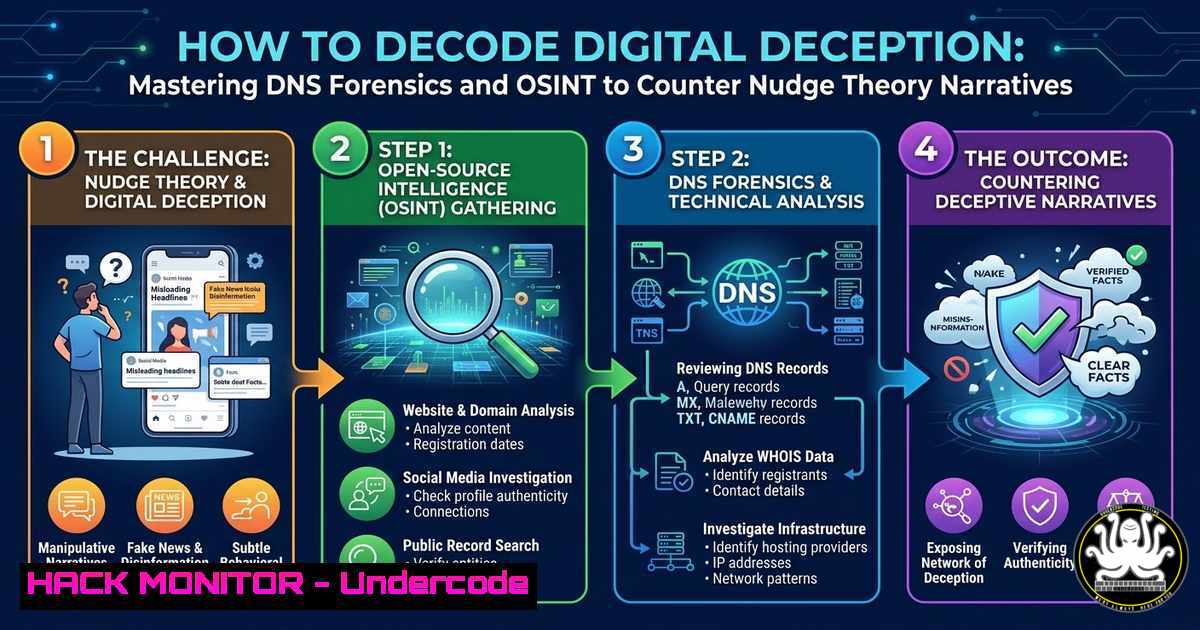
Introduction:
In an era where geopolitical narratives are weaponized as readily as malware, the technical community must recognize that disinformation campaigns and “nudge theory” tactics are not just social phenomena—they are active cyber threats. These campaigns often rely on compromised domains, synthetic media, and DNS manipulation to shape perceptions and bypass traditional security perimeters. For cybersecurity professionals, IT engineers, and AI specialists, understanding how to dissect the technical infrastructure behind these influence operations is no longer optional; it is essential for defending digital ecosystems and ensuring information integrity.
Learning Objectives:
- Analyze DNS vulnerabilities and infrastructure to trace the origin of disinformation campaigns.
- Utilize OSINT (Open Source Intelligence) techniques to validate content authenticity and identify coordinated inauthentic behavior.
- Implement Linux and Windows command-line tools for network forensics and threat hunting related to influence operations.
- Configure browser and system settings to detect and block tracking mechanisms used for behavioral conditioning.
You Should Know:
- DNS Forensics: Unmasking the Infrastructure Behind the Narrative
The post highlights a global pattern of “incessant conditioning and brainwashing through false government narratives.” From a technical perspective, these narratives often propagate through a complex web of domains, subdomains, and compromised infrastructure. DNS forensics allows us to trace the digital breadcrumbs of such operations. For instance, a sudden spike in DNS queries for a newly registered domain that mimics a legitimate news outlet can be a precursor to a phishing or disinformation campaign.
Step-by-Step Guide:
- Query DNS Records (Linux/Windows): Use `dig` or `nslookup` to analyze the DNS records of suspicious domains. Look for recently created A, MX, or TXT records that might indicate malicious intent.
- Linux: `dig suspicious-site.com ANY +noall +answer`
– Windows: `nslookup -type=any suspicious-site.com`
– Analyze Passive DNS: Utilize tools like VirusTotal or SecurityTrails to view historical DNS data. This reveals if a domain has a history of being used for malware distribution or phishing, which often correlates with the infrastructure supporting false flag operations. - Check Certificate Transparency Logs: Use `crt.sh` to search for SSL/TLS certificates issued for the domain. A certificate issued days before a major geopolitical event might indicate a hastily prepared operation.
- OSINT for Narrative Analysis: Validating Truth in a Sea of Disinformation
The commentary on “false government narratives” underscores the need for robust validation techniques. OSINT (Open Source Intelligence) is the cybersecurity professional’s toolkit for verifying the authenticity of content and identifying coordinated campaigns. This involves analyzing metadata, image provenance, and social media amplification networks.
Step-by-Step Guide:
- Image Metadata Analysis: Use `exiftool` (available on both Linux and Windows) to extract metadata from images associated with the narrative. Look for inconsistencies in creation dates, GPS coordinates, or software signatures that might indicate manipulation.
- Command: `exiftool -a -u suspect_image.jpg`
– URL Analysis: Use tools like `curl` to inspect HTTP headers of links. Look for redirects, tracking parameters, and the final destination. - Linux: `curl -I https://suspicious-link.com`
- Social Network Analysis (SNA): Use open-source tools like Gephi or Maltego to map relationships between accounts amplifying a specific narrative. Identify bot networks or coordinated inauthentic behavior that artificially inflate the reach of a story.
3. Hardening Against Nudge Theory and Tracking
The post mentions “Nudge Theories” used to condition behavior. In the digital realm, this translates to dark patterns, personalized ad tracking, and browser fingerprinting used to manipulate user decisions. Hardening your digital environment is a direct countermeasure to these psychological manipulation tactics.
Step-by-Step Guide:
- Browser Hardening (Firefox): Navigate to `about:config` and set `privacy.trackingprotection.fingerprinting.enabled` to
true. This prevents websites from collecting detailed hardware and software data used for profiling. - DNS Filtering: Implement a DNS-level blocker like Pi-hole (Linux) or use a service like NextDNS (cross-platform) to block known ad servers, trackers, and domains associated with disinformation networks. This creates a network-wide defense against behavioral conditioning.
- Windows Group Policy: To disable telemetry and targeted advertising IDs, use the Local Group Policy Editor (
gpedit.msc). Navigate to `Computer Configuration > Administrative Templates > Windows Components > Data Collection and Preview Builds` and set `Allow Telemetry` to0 - Security.
- Threat Hunting with SIEM Logs for Influence Operations
Large-scale influence operations often leave traces in network logs. Correlating web traffic patterns with known threat actor groups can reveal an active campaign. This is akin to threat hunting for APTs, but the payload is narrative rather than ransomware.
Step-by-Step Guide:
- Linux Command Line (Log Analysis): Use
grep,awk, and `cut` to parse web server logs for anomalous user agents or referrers that point to known propaganda outlets. - Example: `grep “Mozilla/5.0 (Windows NT 10.0; Win64; x64)” access.log | awk ‘{print $1}’ | sort | uniq -c | sort -nr` to count unique IPs using a specific user agent.
- Windows PowerShell: Use `Get-WinEvent` to filter security logs for unusual process creations that might be associated with data exfiltration of user profiles used in micro-targeting.
- Command: `Get-WinEvent -FilterHashtable @{LogName=’Security’; ID=4688} | Where-Object {$_.Properties
.Value -like "powershell"}` </li> </ul> <h2 style="color: yellow;">5. API Security and AI-Generated Content Validation</h2> AI-generated content (deepfakes, synthetic articles) is a critical component of modern influence campaigns. AI engineering skills are vital for both generating and detecting such content. API security is crucial here, as malicious actors often leverage legitimate AI APIs to scale their disinformation efforts. <h2 style="color: yellow;">Step-by-Step Guide:</h2> <ul> <li>Detect AI-Generated Text: Use open-source models like GPTZero or custom Python scripts that analyze perplexity and burstiness scores of text to differentiate human-written from AI-generated content.</li> <li>Python Snippet: [bash] import transformers model = transformers.AutoModelForCausalLM.from_pretrained("roberta-base") tokenizer = transformers.AutoTokenizer.from_pretrained("roberta-base") Analyze perplexity of the text - API Security Hardening: If your organization uses AI APIs, ensure strict rate limiting, input validation, and logging are in place. Monitor for anomalous API calls that might be generating massive volumes of synthetic content for a coordinated campaign.
6. Vulnerability Exploitation and Mitigation in Media Platforms
The “devastation” and “instability” mentioned are mirrored in the digital realm by unpatched vulnerabilities in social media platforms and content management systems. These flaws are exploited to push false narratives, amplify propaganda, or steal credentials used in disinformation campaigns.
Step-by-Step Guide:
- Mitigation: Implement a robust patch management cycle using tools like `apt-get update && apt-get upgrade` (Debian/Ubuntu) or Windows Update. Ensure all content management systems (WordPress, Joomla) are updated to the latest versions.
- Exploitation Simulation: Use tools like `sqlmap` (Linux) to test for SQL injection vulnerabilities on web applications that host political content. This identifies entry points that attackers could use to deface sites or inject false narratives.
- Command: `sqlmap -u “http://target-site.com/page?id=1” –dbs`
What Undercode Say:
- Key Takeaway 1: Geopolitical narratives are now a technical problem. The infrastructure that hosts, distributes, and amplifies disinformation (DNS, domains, APIs) must be treated with the same forensic rigor as malware infrastructure.
- Key Takeaway 2: Proactive defense against digital conditioning requires a layered approach: DNS filtering, browser hardening, and OSINT verification skills are the new baseline for security hygiene.
- Analysis: The lines between cyber warfare, information warfare, and geopolitical conflict are increasingly blurred. Cybersecurity professionals must evolve from purely technical defenders to contextual analysts who can trace the digital fingerprints of influence operations. The mention of “false flags” and “nudge theories” in a professional context highlights a growing awareness that security isn’t just about patching vulnerabilities, but also about understanding the psychology and infrastructure behind modern threats. The technical community holds the tools—from `dig` to AI detectors—to verify truth and hold malicious actors accountable, irrespective of the narrative they project.
Prediction:
As nation-state actors increasingly integrate AI-driven content generation with sophisticated DNS and API infrastructure, we will see the emergence of specialized “narrative defense” roles within cybersecurity teams. These roles will combine threat intelligence, OSINT, and AI engineering to autonomously detect and disrupt influence campaigns in real-time, making information integrity a core pillar of corporate and national security strategies, much like endpoint protection is today.
▶️ Related Video (78% Match):
🎯Let’s Practice For Free:
IT/Security Reporter URL:
Reported By: Andy Jenkinson – Hackers Feeds
Extra Hub: Undercode MoN
Basic Verification: Pass ✅


