Listen to this Post
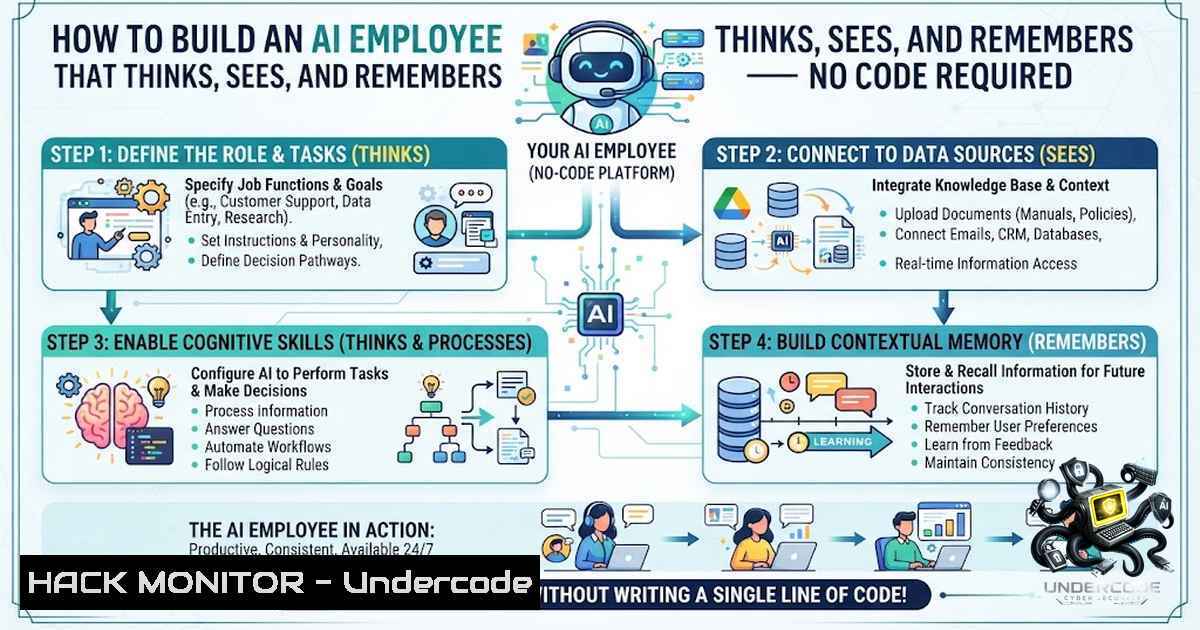
Introduction:
The AI revolution has moved beyond simple chatbots. Today’s businesses require autonomous systems capable of understanding context, processing multiple content types, and delivering instant, accurate responses. Retrieval-Augmented Generation (RAG) combines vector databases with large language models to ground AI responses in your actual business data — eliminating hallucinations and providing verifiable answers. When integrated with WhatsApp via n8n’s automation platform, this creates a 24/7 AI knowledge assistant that can handle text, images, PDFs, DOCX, XLSX, and CSV files — transforming how organizations manage customer support, internal knowledge bases, and operational workflows.
Learning Objectives:
- Understand how to architect a multimodal AI knowledge assistant using n8n, OpenAI, and WhatsApp Business API
- Master RAG implementation with vector databases (Pinecone, Supabase pgvector) for accurate document retrieval
- Build and deploy a production-ready workflow that processes text, images, audio, and documents autonomously
- Understanding the Architecture: From Simple Automation to AI Employees
The shift from basic automation to “AI employees” represents a fundamental change in how we think about workflow orchestration. Traditional automation handles repetitive, rule-based tasks. An AI employee, by contrast, understands intent, maintains context across conversations, and retrieves relevant information from your entire knowledge base to generate contextual responses.
The architecture described in the original post comprises several layers:
- Trigger Layer: WhatsApp Business API webhook that captures incoming messages
- Router Layer: Smart routing that determines message type (text, image, document, voice)
- Processing Layer: OpenAI GPT for conversation, Vision AI for image analysis, Whisper for audio transcription
- Knowledge Layer: Vector database (Pinecone/Supabase) storing document embeddings for semantic search
- Memory Layer: Conversation memory buffer maintaining context across interactions
- Response Layer: Automated reply delivery via WhatsApp
This modular approach allows each component to scale independently while maintaining seamless integration.
2. Setting Up the WhatsApp Business API Webhook
The foundation of any WhatsApp automation is the webhook configuration. Here’s the step-by-step setup:
Step 1: Create a Meta App
- Navigate to Meta for Developers and create a new app
- Select “Business” as the app type
- Add the WhatsApp product to your app
Step 2: Configure Webhook in Facebook Developer Console
- Go to your app dashboard → WhatsApp → Configuration
- Set the callback URL to your n8n webhook URL (e.g., `https://your-18n-domain.com/webhook/whatsapp`)
- Set the verify token (create a random string and save it)
- Subscribe to the messages webhook topic
Step 3: Subscribe Your WhatsApp Business Account
After configuring the webhook, subscribe your WhatsApp Business Account to the app using this cURL command:
curl -X POST \
'https://graph.facebook.com/v21.0/WHATSAPP_BUSINESS_ACCOUNT_ID/subscribed_apps' \
-H 'Authorization: Bearer YOUR_ACCESS_TOKEN'
Step 4: Configure n8n WhatsApp Trigger
- In n8n, add a WhatsApp Trigger node
- Set the credential type to WhatsApp Business Cloud API
- Add your Phone Number ID and Access Token (from Meta Developer Console)
- The node automatically generates a webhook URL — copy this to your Meta webhook configuration
Step 5: Verify the Connection
Send a test message from your WhatsApp to the business number. The webhook should receive the payload and trigger your n8n workflow.
3. Building the Multimodal Message Router
Not all messages are created equal. Your AI assistant needs to detect and route different content types appropriately.
Message Type Detection Flow:
In your n8n workflow, add an IF node after the WhatsApp Trigger to check the message type:
IF: {{ $json.message.type }} === "text" → Route to text handler
IF: {{ $json.message.type }} === "image" → Route to vision handler
IF: {{ $json.message.type }} === "document" → Route to document handler
IF: {{ $json.message.type }} === "audio" → Route to voice handler
For Image Processing (OpenAI Vision) :
- Use an HTTP Request node to download the image from WhatsApp’s media URL
- Use an OpenAI Node with model `gpt-4o` and the image as input
- The system prompt should instruct: “Analyze this image and describe its contents in detail”
For Document Processing (PDF, DOCX, XLSX, CSV) :
- Download the file via HTTP Request
- For PDFs: Use PDF Extract node or a Python script with libraries like `PyPDF2` or `pdfplumber`
– For DOCX: Use HTTP Request with Microsoft Graph API or a Python script with `python-docx`
– For XLSX/CSV: Use Spreadsheet nodes or Python with `pandas`Python Script for PDF Text Extraction (n8n Code Node) :
import PyPDF2
from io import BytesIO

Get the PDF file from the previous node
pdf_file = BytesIO(_input[bash]['json']['data'])

Extract text
reader = PyPDF2.PdfReader(pdf_file)
text = ""
for page in reader.pages:
text += page.extract_text()</p></li>
</ul>

<p>return [{"json": {"extracted_text": text, "source": _input[bash]['json']['filename']}}]
4. Implementing RAG with Vector Databases
Retrieval-Augmented Generation is the intelligence layer that makes your AI assistant genuinely useful. Instead of relying solely on the LLM’s training data, RAG retrieves relevant information from your documents and provides it as context for the LLM.
Step 1: Choose Your Vector Database
| Database | Best For | Setup Complexity |
|-|-||
| Pinecone | Managed, fast, generous free tier | Low |
| Supabase pgvector | If you’re already on Supabase | Medium |
| Weaviate | Hybrid search (vector + keyword) | Medium || Qdrant | Open-source, self-hostable | High |
Step 2: Create the Vector Store Schema (Supabase pgvector)
-- Enable pgvector extension
CREATE EXTENSION IF NOT EXISTS vector;

-- Create table for document embeddings
CREATE TABLE knowledge_base (
id SERIAL PRIMARY KEY,
content TEXT,
metadata JSONB,
embedding VECTOR(1536) -- OpenAI embeddings dimension
);

-- Create similarity search function
CREATE OR REPLACE FUNCTION match_knowledge(
query_embedding VECTOR(1536),
match_count INT DEFAULT 10
) RETURNS TABLE(
id INT,
content TEXT,
metadata JSONB,
similarity FLOAT
) LANGUAGE plpgsql AS $$
BEGIN
RETURN QUERY
SELECT
knowledge_base.id,
knowledge_base.content,
knowledge_base.metadata,
1 - (knowledge_base.embedding <=> query_embedding) AS similarity
FROM knowledge_base
ORDER BY knowledge_base.embedding <=> query_embedding
LIMIT match_count;
END;
$$;
Step 3: Document Ingestion Workflow
Create a separate n8n workflow for document ingestion:
1. Trigger: Manual or scheduled (daily)
- Load Documents: Google Drive, Notion, or file upload nodes
- Chunk Documents: Split into 500-token segments with 50-token overlap
4. Generate Embeddings: OpenAI `text-embedding-3-small` model
- Store in Vector DB: Pinecone or Supabase upsert
JavaScript Chunking Code for n8n Code Node :
function chunkText(text, maxTokens = 500) {
const words = text.split(' ');
const chunks = [];
for (let i = 0; i < words.length; i += maxTokens) {
chunks.push({
text: words.slice(i, i + maxTokens).join(' '),
chunk_index: Math.floor(i / maxTokens),
metadata: {
source: $input.item.json.source || 'unknown',
timestamp: new Date().toISOString()
}
});
}
return chunks;
}

const content = $input.item.json.content || '';
return chunkText(content);
Step 4: Query Handling Workflow
When a user asks a question:
1. Generate query embedding using OpenAI `text-embedding-3-small`
- Perform vector similarity search in Pinecone/Supabase (top 5-10 results)
3. Assemble retrieved chunks into a context prompt
- Send to OpenAI GPT with the RAG prompt template:
System: You are a helpful AI assistant. Answer the user's question based on the following context. If the answer cannot be found in the context, say so.

Context:
{retrieved_chunks}

User Question: {user_question}

Answer:
5. Implementing AI Memory for Contextual Conversations
One of the key features of the AI knowledge bot is its ability to remember previous conversations. Here’s how to implement conversation memory in n8n:
Option A: Simple Memory Buffer (n8n Built-in)
- Add a Memory node after the WhatsApp Trigger
- Configure it to store conversation history per user (keyed by phone number)
- Set the buffer size (e.g., last 5 exchanges)
Option B: Persistent Memory with Supabase
- Create a `conversations` table in Supabase
- Store each exchange with
user_id,timestamp,user_message, `assistant_response`
– Retrieve last N messages for context
Supabase Table Schema:
CREATE TABLE conversations (
id SERIAL PRIMARY KEY,
user_id TEXT NOT NULL,
user_message TEXT,
assistant_response TEXT,
timestamp TIMESTAMP DEFAULT NOW()
);

-- Retrieve last 5 messages for a user
SELECT  FROM conversations
WHERE user_id = 'PHONE_NUMBER'
ORDER BY timestamp DESC
LIMIT 5;
n8n Implementation:
- After receiving a message, query Supabase for the user’s conversation history
2. Format the history as a context string
- Include it in the RAG prompt alongside retrieved documents
- After generating the response, save both the question and answer to Supabase
6. Deploying the Complete Workflow
Prerequisites Checklist:
- n8n instance (cloud at n8n.cloud or self-hosted)
- WhatsApp Business API credentials (Phone Number ID, Access Token)
- OpenAI API key with access to GPT-4, Vision, Whisper, and Embeddings
- Vector database (Pinecone API key or Supabase credentials)
- (Optional) Google Drive/Sheets for document storage
Complete Workflow Structure:
[WhatsApp Trigger]
→ [IF: Message Type Router]
→ [bash] → [Memory Retrieval] → [RAG Search] → [OpenAI GPT] → [WhatsApp Send]
→ [bash] → [HTTP Download] → [OpenAI Vision] → [OpenAI GPT] → [WhatsApp Send]
→ [bash] → [HTTP Download] → [PDF/Excel Extract] → [RAG Index] → [WhatsApp Send]
→ [bash] → [HTTP Download] → [OpenAI Whisper] → [OpenAI GPT] → [bash] → [WhatsApp Send]
Testing Strategy:
- Start with text-only messages to validate the RAG pipeline
2. Add image processing with a sample screenshot
3. Test document upload with a small PDF
4. Verify memory by asking follow-up questions
5. Monitor n8n execution logs for errors
7. Security and Hardening Considerations
When deploying an AI assistant that handles business data, security is paramount:
API Key Management:
- Store all credentials in n8n’s Credentials Manager (encrypted at rest)
- Use environment variables for sensitive values in self-hosted deployments
- Rotate API keys regularly
Webhook Security:
- Validate incoming webhooks by checking the verify token
- Use HTTPS for all endpoints
- Implement IP whitelisting for Meta’s webhook IP ranges
Data Privacy:
- Implement data retention policies for conversation logs
- Use metadata filtering to restrict document access per user
- Consider PII redaction before sending data to OpenAI
Rate Limiting:
- Implement per-user rate limiting to prevent abuse
- Set OpenAI API usage alerts
- Use n8n’s queue mode for high-volume deployments
Cost Control:
- Monitor token usage per conversation
- Use cheaper models (
gpt-4o-mini) for routine queries - Cache frequent queries in the vector database
What Undercode Say:
- Key Takeaway 1: The shift from simple automation to “AI employees” represents a fundamental architectural change — from rule-based triggers to autonomous, context-aware systems that understand intent and maintain state across interactions. The integration of RAG with WhatsApp creates a truly intelligent interface that businesses can deploy today.
-
Key Takeaway 2: Multimodal processing (text, images, documents, voice) is no longer a luxury but a requirement for production AI systems. The ability to handle diverse content types through a single WhatsApp interface dramatically reduces friction for end-users and expands the range of use cases from simple FAQ bots to comprehensive knowledge management systems.
Analysis:
What makes this particular implementation noteworthy is its pragmatic use of no-code/low-code tools (n8n) combined with state-of-the-art AI capabilities (OpenAI’s multimodal models, RAG architectures). The original poster correctly identifies that businesses don’t need “another chatbot” — they need systems that can actually replace entire workflows. The WhatsApp integration is particularly strategic given WhatsApp’s 2+ billion user base and its dominance in business communication across Asia, Latin America, and Europe.
The technical architecture demonstrates mature thinking: separating document ingestion from query handling, implementing proper memory management, and using vector databases for semantic retrieval. The mention of “autonomous AI agents” suggests this is moving toward agentic workflows where the system can take actions (booking appointments, updating records) rather than just answering questions.
However, organizations should be mindful of the operational costs — OpenAI API usage can escalate quickly with document processing and multimodal inputs. Proper chunking strategies, caching, and model selection are critical for cost management. Additionally, data privacy and compliance (GDPR, HIPAA) must be addressed before deploying such systems in regulated industries.
Prediction:
- +1 The democratization of AI employee creation through platforms like n8n will accelerate significantly in 2026-2027, with small and medium businesses deploying custom AI assistants without engineering teams within weeks rather than months.
-
+1 RAG-powered WhatsApp assistants will become the default customer support channel for businesses in emerging markets, displacing traditional IVR systems and reducing support costs by 40-60%.
-
-1 The proliferation of AI agents on messaging platforms will create new attack surfaces — prompt injection, data extraction, and conversation manipulation will emerge as critical security concerns requiring new defensive frameworks.
-
+1 The integration of AI memory with vector databases will evolve toward “perpetual memory” systems that maintain context indefinitely, enabling truly personalized AI assistants that understand individual users across years of interactions.
-
-1 Regulatory scrutiny will increase as AI employees handle sensitive customer data, particularly around consent, data retention, and the “right to explanation” for automated decisions.
-
+1 The next evolution will be AI employees that not only respond but proactively engage — sending personalized recommendations, detecting anomalies, and initiating workflows based on business rules and user behavior patterns.
-
+1 Open-source alternatives to proprietary vector databases and LLMs (Ollama, Llama, Qdrant) will gain traction, enabling cost-effective, privacy-preserving AI employees for security-conscious organizations.
▶️ Related Video (78% Match):
https://www.youtube.com/watch?v=0FSElOlfFCg
🎯Let’s Practice For Free:
🎓 Live Courses & Certifications:
Join Undercode Academy for Verified Certifications
🚀 Request a Custom Project:
Secure, high-velocity infrastructure and disruptive technological engineering. Contact our engineering team for high-tier development and proprietary systems:
[email protected]
💎 Smart Architecture | 🛡️ Secure by Design | ⭐ Trusted by ThousandsIT/Security Reporter URL:
Reported By: Md Rakibul – Hackers Feeds
Extra Hub: Undercode MoN
Basic Verification: Pass ✅🔐JOIN OUR CYBER WORLD [ CVE News • HackMonitor • UndercodeNews ]
📢 Follow UndercodeTesting & Stay Tuned:


