Listen to this Post
Introduction
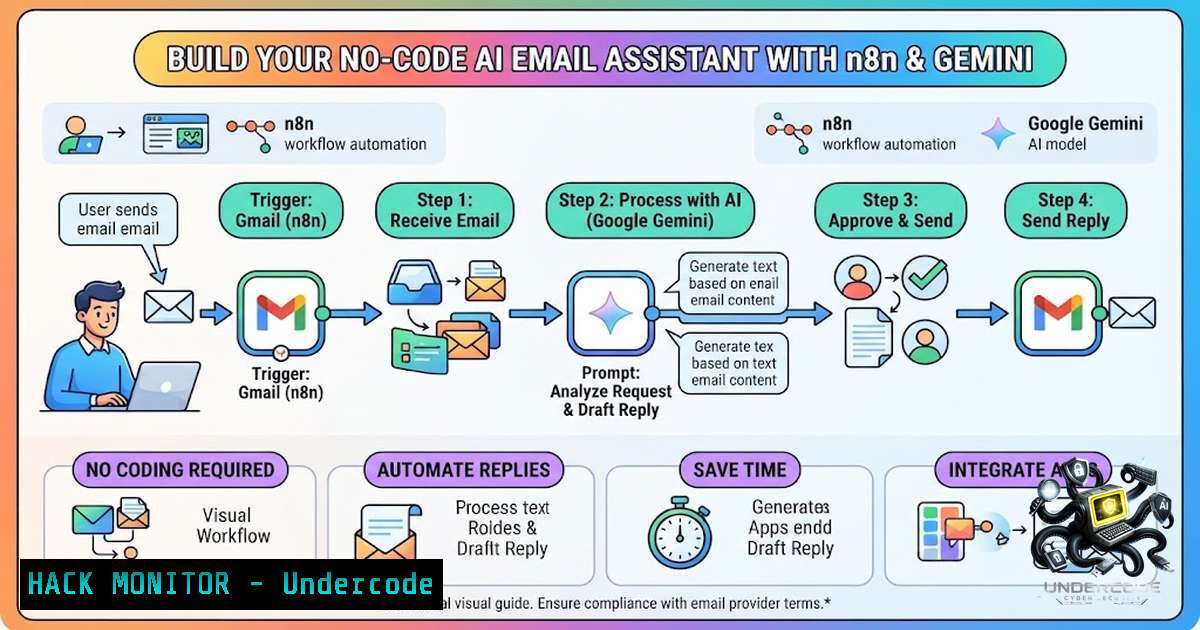
In an era where every small business is racing to do more with less, the ability to automate customer communication without sacrificing personalization has become a competitive necessity. The integration of n8n—an open-source workflow automation tool—with Google Gemini’s large language model creates a powerful AI email assistant that can detect new messages, understand intent, and generate professional replies automatically. This approach transforms email management from a reactive chore into a proactive, intelligent system that scales with your business.
Learning Objectives
- Understand the architecture of an AI-powered email automation workflow using n8n and Google Gemini.
- Learn how to configure IMAP email triggers, Gemini API credentials, and response generation logic.
- Implement a human-in-the-loop review mechanism for handling ambiguous or high-stakes customer emails.
- Understanding the Core Architecture: Triggers, AI, and Actions
The foundation of any AI email assistant lies in its workflow architecture. In n8n, this is built as a series of connected nodes, where each node performs a specific task. The typical flow begins with an Email Trigger (IMAP) node, which monitors your mailbox for new messages. Once a new email is detected, the workflow passes its content to an AI Agent node powered by Google Gemini.
The AI agent doesn’t just generate a reply—it analyzes the email’s intent, classifies its urgency, and decides whether an automated response is appropriate. For instance, a simple inquiry about business hours might trigger an immediate auto-reply, while a complex complaint mixed with a question would be flagged for human review.
Step‑by‑step setup:
- Install n8n: You can use n8n.cloud or self-host it locally. For self-hosting on Linux:
Install n8n globally via npm
npm install n8n -g
Start n8n
n8n start
For Windows (using WSL2):
 Inside WSL2 Ubuntu
npm install n8n -g
n8n start
- Create an IMAP credential in n8n’s Credentials section. You’ll need your email server’s hostname, port (typically 993 for IMAP over SSL), and your login credentials.
3. Add a Google Gemini API credential:
- Visit Google AI Studio.
- Click “Create API key in new project” and copy the key.
- In n8n, create a new Google PaLM API credential and paste your API key.
- Import a workflow template (optional): Download a pre-built JSON workflow (e.g., from GitHub) and import it via n8n’s Import from File option.
2. Configuring the Email Trigger (IMAP) Node
The IMAP Email node is the starting point of your automation. It acts as a trigger that fires whenever a new email arrives in your specified mailbox. Proper configuration ensures your workflow only processes relevant messages and avoids infinite loops.
Key parameters:
- Credential to connect with: Select the IMAP credential you created.
- Mailbox Name: Enter `INBOX` or a specific folder like
Support. - Action: Choose whether to mark emails as read upon fetching.
- Download Attachments: Toggle on only if you need to process attachments (increases processing time).
- Format: `Resolved` returns full email data with attachments as binary; `Simple` returns basic fields.
Custom Email Rules: To filter only unread emails, use the rule UNSEEN. For more complex filters (e.g., only from specific domains), refer to node-imap search criteria.
Security consideration: Use OAuth2 for Gmail instead of basic authentication whenever possible. For self-hosted setups, store credentials using n8n’s environment variables rather than hardcoding them in the workflow.
3. Integrating Google Gemini for Intelligent Response Generation
Google Gemini serves as the “brain” of your email assistant. It receives the email content, understands the context, and generates a professional reply. The quality of the response depends heavily on the system prompt you provide.
System prompt example (customize for your brand voice):
You are a professional customer support assistant for [Company Name].
Your task is to reply to customer emails in a friendly, helpful tone.
If the email contains a complaint mixed with a question, flag it for human review.
Otherwise, generate a concise, actionable reply that addresses all points raised.
Node configuration:
- Select the Google Gemini node (or Google PaLM).
- Choose your model (e.g., `gemini-2.5-pro` or `gemini-2.5-flash` for faster responses).
- Connect the system prompt and the email content (from the IMAP node) as input.
- Set temperature to `0.3` for consistent, factual replies, or higher for more creative responses.
Example code snippet (for custom API integration outside n8n):
import google.generativeai as genai

genai.configure(api_key="YOUR_API_KEY")
model = genai.GenerativeModel('gemini-2.5-pro')
response = model.generate_content("Draft a reply to: 'When will my order ship?'")
print(response.text)
4. Implementing a Human-in-the-Loop Review Mechanism
As highlighted in the original post, not every email should be auto-replied. Ambiguous messages—especially those blending complaints with questions—require human judgment. n8n makes it easy to implement a review step using conditional logic and approval nodes.
How to set it up:
- Add an AI Classifier node before the reply generator. This node uses Gemini to categorize the email into:
– Category 0: Needs immediate reply (auto-send).
– Category 1: Important notification (send summary to human).
– Category 2: Spam/unimportant (ignore or archive).
2. Branch the workflow based on the classification:
- If `Category 0` → proceed to the reply generator and auto-send.
- If `Category 1` → send a summary to a Slack channel or Telegram for human approval.
- If `Category 2` → archive or delete.
- For the human review path: Use an n8n Webhook or Telegram node to send the email summary and proposed reply. Wait for a human to approve or modify the response before sending.
Security best practice: Ensure your approval workflow includes audit logging—record who approved what and when. This is critical for compliance and accountability.
- Automating the Send Action and Handling Edge Cases
Once a reply is generated (and approved, if required), the final step is sending it. n8n provides a Gmail node (or SMTP node) for this purpose.
Gmail node configuration:
- Operation: Send Email.
- To: Extract from the original email’s `From` field.
- Subject: You can use the original subject prefixed with “Re:” or generate a new one.
- Body: The AI-generated reply.
- In-Reply-To: Set the original message ID to maintain thread continuity.
Critical edge cases to handle:
- Auto-reply loops: Ensure your workflow does not reply to emails from
noreply@,mailer-daemon@, or any address with `Auto-Submitted` headers. Add a filter to skip these. - Rate limiting: Implement a delay between sends to avoid hitting Gmail’s sending limits. Use n8n’s Wait node.
- Error handling: Add an Error Trigger node to notify an admin if the workflow fails (e.g., API key expired, IMAP connection lost).
Linux/Windows command for monitoring (self-hosted n8n):
 Check n8n logs for errors
tail -f ~/.n8n/logs/n8n.log

On Windows (PowerShell)
Get-Content -Path $env:USERPROFILE.n8n\logs\n8n.log -Wait
6. Security Hardening for Production Deployment
Deploying an AI email assistant introduces significant security risks if not properly hardened. Treat your API keys like database root passwords—never store them in code or config files.
Essential security measures:
- Use environment variables for all secrets: In n8n, set `N8N_ENCRYPTION_KEY` and store API keys in `.env` files.
- Restrict API key scopes: When creating Gemini API keys, limit them to only the necessary permissions.
- Enable SPF, DKIM, and DMARC for your sending domain to prevent spoofing and ensure deliverability.
- Implement OAuth2 for Gmail instead of password-based authentication.
- Encrypt email transport using STARTTLS or MTA-STS.
Cloud hardening checklist (for cloud-hosted n8n):
- Disable root/admin account daily operations.
- Enforce phishing-resistant MFA for all admin accounts.
- Regularly audit third-party app access and OAuth grants.
Example `.env` file:
N8N_ENCRYPTION_KEY=your-encryption-key
GEMINI_API_KEY=your-gemini-key
IMAP_PASSWORD=your-email-password
7. Scaling to an Agentic Workflow
As noted by Udit Rawat in the comments, the real value emerges when your workflow becomes agentic—where the system not only replies but also classifies intent, retrieves business context, and triggers downstream actions. For instance, an agent could:
– Detect a support ticket and create a Jira issue automatically.
– Identify a sales lead and add them to a CRM.
– Escalate urgent complaints to a manager via Slack.
To build an agentic workflow in n8n:
- Use the AI Agent node as the orchestrator.
- Connect Tool nodes for each action (e.g., Gmail Send, Google Sheets Append, Slack Post).
- Add a Memory Buffer node to maintain conversation context across interactions.
- Define a comprehensive system prompt that instructs the agent when to use each tool.
Example prompt for an agentic assistant:
You are an AI operations assistant. Your tools:
- send_email: Compose and send emails via Gmail.
- add_lead: Append new leads to Google Sheets.
- create_ticket: Create a support ticket in Jira.
- escalate: Send an urgent alert to the Slack escalations channel.

Always classify the email first. If it's a sales inquiry, use add_lead.
If it's a technical issue, use create_ticket. If it's a complaint, use escalate.
What Undercode Say
- Key Takeaway 1: The most powerful AI email assistants are not just reply generators—they are intelligent orchestrators that combine event triggers, context analysis, and automated actions to create scalable, consistent systems.
- Key Takeaway 2: Human-in-the-loop is not a failure of automation; it’s a strategic design choice. Ambiguous emails require human judgment, and the workflow should gracefully defer to a human reviewer rather than risking an inappropriate auto-reply.
Analysis: The discussion around this project reveals a maturing perspective on AI automation. Early adopters often chase full autonomy, but experienced practitioners recognize that the optimal balance lies in augmented intelligence—where AI handles the routine, and humans focus on the exceptional. The modular, pipeline-based approach praised by Rabia Ahmed and the agentic vision articulated by Udit Rawat both point toward a future where workflows are not linear but dynamic, adapting to context and intent. The security considerations raised by Rayhan Ahmed underscore that trust in automation must be earned through rigorous testing and fail-safes.
Prediction
- +1 The adoption of AI email assistants will accelerate as no-code platforms like n8n democratize access to LLMs, enabling even non-technical business owners to build sophisticated automations.
- +1 Agentic workflows will become the new standard, with AI agents not just replying but proactively managing entire communication pipelines—from lead qualification to customer retention.
- -1 The proliferation of auto-generated emails risks increasing noise and reducing genuine human connection. Businesses that over-automate without proper human oversight may damage customer relationships.
- -1 Security threats will evolve alongside these systems. Expect a rise in prompt injection attacks and API key theft, making robust security hardening non-1egotiable for production deployments.
- +1 However, the integration of human-in-the-loop approval mechanisms will mitigate many of these risks, creating a hybrid model that combines the efficiency of AI with the discernment of human judgment.
▶️ Related Video (74% Match):
🎯Let’s Practice For Free:
🎓 Live Courses & Certifications:
Join Undercode Academy for Verified Certifications
🚀 Request a Custom Project:
Secure, high-velocity infrastructure and disruptive technological engineering. Contact our engineering team for high-tier development and proprietary systems:
[email protected]
💎 Smart Architecture | 🛡️ Secure by Design | ⭐ Trusted by Thousands
IT/Security Reporter URL:
Reported By: Blessing Jonah – Hackers Feeds
Extra Hub: Undercode MoN
Basic Verification: Pass ✅


