Listen to this Post
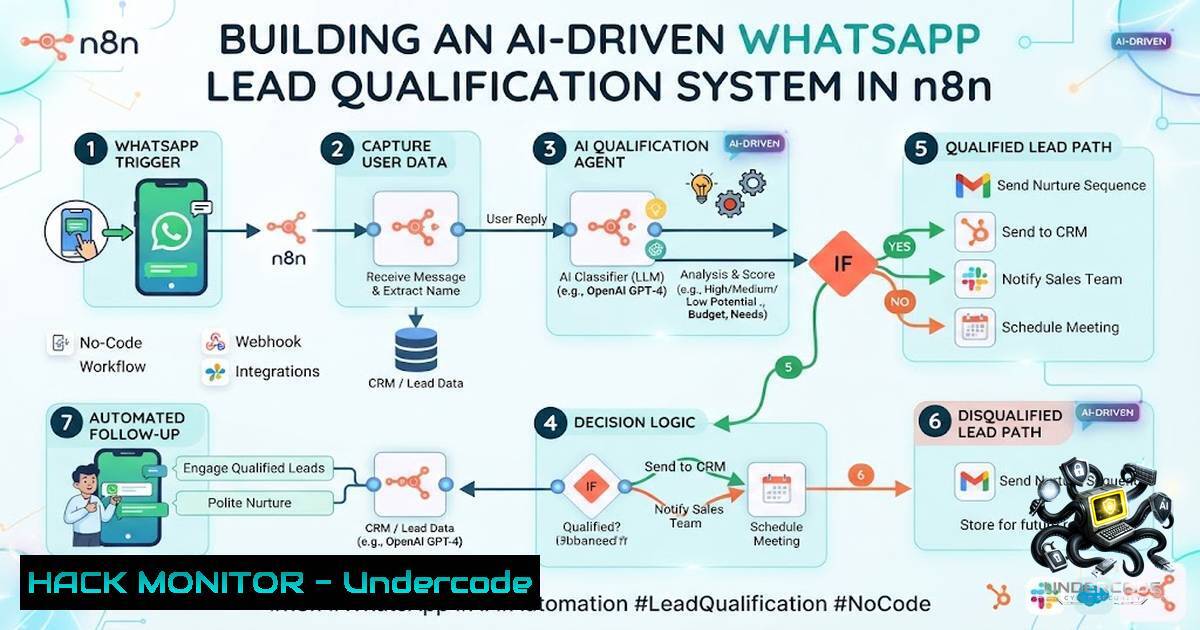
Introduction:
The modern sales funnel is often broken not by a lack of leads, but by inefficient lead management. When a potential customer sends a WhatsApp message, the clock starts ticking; if the sales team is busy or the CRM is outdated, that lead goes cold and revenue is lost. To solve this, we explore a comprehensive backend workflow that leverages n8n, Grok API, Supabase, and Slack to automate the entire lifecycle of a WhatsApp conversation, from qualification to human handoff.
Learning Objectives:
- Understand how to integrate the WhatsApp Cloud API with an automation platform like n8n.
- Learn how to implement AI-driven intent classification using the Grok API.
- Discover how to build a scheduled sync workflow to prevent leads from falling through the cracks.
You Should Know:
1. Setting Up the WhatsApp Webhook Listener
The foundation of this system is the ability to capture every incoming WhatsApp message in real-time. This is achieved by setting up a webhook via the WhatsApp Cloud API (Meta Developer Portal) that points to an n8n webhook URL. When a user sends a message, Meta pushes a POST request to n8n, which parses the payload.
Step‑by‑step guide:
- Meta Setup: Navigate to your Meta Developer App, go to WhatsApp > Configuration, and set the Callback URL to your n8n instance (e.g., `https://your-18n-domain.com/webhook/whatsapp-inbound`). Verify the token.
- n8n Workflow Trigger: In n8n, use the “Webhook” node set to “POST” and filter for the specific endpoint.
- Parsing Logic: Use an “IF” node to distinguish between “messages” and “statuses”. For this workflow, focus on the `text` object within the payload.
- Security Check: Validate the `x-hub-signature-256` header to ensure the request is genuinely from Meta (implemented via a Function node).
// Example function to parse incoming message
const body = $input.item.json.body;
const entry = body.entry[bash];
const changes = entry.changes[bash];
const value = changes.value;
const messages = value.messages;

if (messages && messages[bash]) {
const msg = messages[bash];
return [{
json: {
from: msg.from,
text: msg.text.body,
timestamp: msg.timestamp,
type: 'customer'
}
}];
}
2. AI-Driven Intent Classification with Grok API
Once the message is received, the system uses the Grok API (via X.ai) to analyze the text. The goal is to determine if the message is a sales inquiry, a support request, or spam, and to extract key entities like budget or timelines.
Step‑by‑step guide:
- HTTP Request Node: Configure an HTTP Request node pointing to
https://api.x.ai/v1/chat/completions` with the Grok model (e.g.,grok-1-latest`). - Prompt Engineering: Craft a system prompt: “You are a lead qualification agent. Classify the message as ‘Hot’, ‘Warm’, or ‘Cold’. Extract product interest, budget range, and urgency. Respond in JSON format.”
- Authentication: Use Bearer token authentication with your X.ai API key.
- Output Parsing: The Function node following the request will parse the AI response.
// Payload for Grok API
{
"model": "grok-1-latest",
"messages": [
{"role": "system", "content": "Respond in JSON with keys: classification, product, budget, urgency."},
{"role": "user", "content": "I need a custom ERP system for my warehouse within 2 months."}
],
"temperature": 0.3,
"response_format": { "type": "json_object" }
}
3. Centralized Data Storage in Supabase PostgreSQL
Every interaction is logged permanently in Supabase. This serves as the Single Source of Truth (SSOT) for the CRM. The workflow inserts the raw message, the AI classification, and the timestamp into a `leads` table.
Step‑by‑step guide:
- Supabase Setup: Create a table `leads` with columns:
id (uuid),phone_number (text),message (text),classification (text),status (text),contacted (boolean),created_at (timestamp). - Postgres Node: Use the “Postgres” node in n8n to execute an `INSERT` query.
- Upsert Logic: Use `ON CONFLICT` to update existing conversations if the same phone number messages again.
-- Table schema definition
CREATE TABLE leads (
id UUID DEFAULT gen_random_uuid() PRIMARY KEY,
phone_number VARCHAR(20) NOT NULL,
message TEXT,
classification VARCHAR(20),
status VARCHAR(20) DEFAULT 'new',
contacted BOOLEAN DEFAULT FALSE,
created_at TIMESTAMP DEFAULT NOW()
);

-- Upsert query example
INSERT INTO leads (phone_number, message, classification, status)
VALUES ('+1234567890', 'I need a CRM', 'Hot', 'new')
ON CONFLICT (phone_number)
DO UPDATE SET message = EXCLUDED.message, classification = EXCLUDED.classification;
4. Building the Decision Router
This is the core business logic. Based on the AI classification, the workflow routes the conversation:
– Hot Lead: Immediately notify sales via Slack.
– Warm Lead: Send an automated reply asking for more details.
– Cold Lead: Archive and ignore.
Step‑by‑step guide:
- Switch Node: Use an n8n “Switch” node to check the `classification` field.
- Case A (Hot): Trigger a “Slack” node to send a message to a dedicated channel with the lead’s phone number, text, and a link to the conversation.
- Case B (Warm): Trigger a “WhatsApp Cloud API” node to send a templated message (e.g., “Thank you! Could you specify your budget?”).
- Case C (Cold): Update the Supabase status to “Archived” and stop the workflow.
5. Scheduled Escalation Workflow
The most critical feature preventing lost leads is the scheduled workflow that runs every 2 minutes. It queries Supabase for qualified leads (status=’new’, contacted=FALSE) that haven’t been touched in the last 15 minutes.
Step‑by‑step guide:
- Schedule Trigger: Use the n8n “Schedule Trigger” node set to “Every 2 Minutes”.
- Database Query: Execute a query to fetch pending leads:
SELECT FROM leads WHERE status='new' AND contacted=FALSE AND created_at < NOW() - INTERVAL '15 minutes'. - Aggregation: Use an “Aggregate” node to loop through the results.
- Send Reminder: For each lead, send a direct WhatsApp message to the Sales Manager’s phone number via the Cloud API, containing the lead’s phone and query.
- Wait for DONE: The system will wait for a specific keyword (“DONE”) from the manager, which triggers the final update.
-- Query to fetch pending leads
SELECT  FROM leads WHERE status = 'new' AND contacted = false AND created_at < NOW() - INTERVAL '15 minutes';
6. Human Handoff and Status Management
Once the manager receives the reminder and resolves the query, they reply “DONE” to the system. The inbound webhook captures this and triggers a secondary branch.
Step‑by‑step guide:
- Flag Detection: In the initial webhook workflow, include an “IF” node to check if the incoming message equals “DONE”.
- Update Query: If “DONE” is detected, run an `UPDATE` query in Supabase to set `contacted = TRUE` and
status = 'Resolved'. - Log Activity: Insert a record into an `activities` table to track that the manager responded.
-- Update query for completion
UPDATE leads SET contacted = TRUE, status = 'Resolved' WHERE phone_number = '+1234567890';
7. Security and Resilience Considerations
In production, security is paramount. The system must handle API failures gracefully and ensure that sensitive customer data is encrypted.
Step‑by‑step guide:
- Error Handling: Wrap critical nodes in “Error Trigger” nodes to catch failures (e.g., Grok API timeout). Implement retry logic (up to 3 attempts) with a “Wait” node.
- Rate Limiting: Implement a “Redis” node to cache phone numbers and prevent duplicate processing within a 60-second window.
- API Key Rotation: Store API keys (Supabase, Meta, Grok) in n8n’s environment variables, not hardcoded in the workflow.
- Windows/Linux Commands: For on-premise deployment, use `pm2` (Linux) or NSSM (Windows) to keep the n8n process running persistently.
What Undercode Say:
- Key Takeaway 1: The real value lies in building a resilient backend workflow that handles exceptions. The system should not break if the AI is down; it must route to a fallback human agent automatically.
- Key Takeaway 2: Automating the “reminder” loop (the 2-minute scheduler) is what solves the “cold lead” problem. This human-in-the-loop approach ensures that no inquiry is forgotten, bridging the gap between AI efficiency and human empathy.
Analysis:
Mudassar’s system demonstrates a shift from “Chatbot” thinking to “Process Automation” thinking. While chatbots merely engage, this system orchestrates the entire sales department’s reaction to a query. The critical innovation is the combination of AI for filtering and scheduling for persistence. The “DONE” keyword trigger is a clever UX hack that turns the sales manager’s mobile device into a CRM controller without requiring them to log into a dashboard. Furthermore, the inclusion of Postgres for history logging allows for future analytics (e.g., “What times do we get the most leads?”). The only missing piece is multi-modal support (voice/attachments), which he notes he is working on, indicating a forward-looking approach to richer data capture that will further improve AI classification accuracy.
Prediction:
- +1 In the next 12-18 months, we will see these “AI Orchestration” layers become standard middleware for SMBs. Businesses will no longer buy “CRMs” but “Conversational Backends” that plug into their existing comms (WhatsApp, Slack, Email) as the primary interface.
- +1 The introduction of multi-modal AI (handling voice notes and images) will reduce friction. A lead can send a picture of a broken machine part, and the AI will classify it as an urgent support ticket, automatically escalating it to the engineering team without human text transcription.
- -1 The “2-minute reminder” loop, while effective, could lead to notification fatigue and burnout for sales managers. If the AI over-classifies leads as “Hot” (high false positives), managers will start ignoring the system. This highlights the critical need for continuous fine-tuning of the Grok prompts and confidence thresholds.
- +1 However, businesses that implement this specific workflow architecture (n8n + Supabase + AI) will reduce their lead response time from hours to seconds, directly correlating to a measurable increase in conversion rates (studies show a 7x reduction in time to lead reduces friction).
▶️ Related Video (86% Match):
🎯Let’s Practice For Free:
🎓 Live Courses & Certifications:
Join Undercode Academy for Verified Certifications
🚀 Request a Custom Project:
Secure, high-velocity infrastructure and disruptive technological engineering. Contact our engineering team for high-tier development and proprietary systems:
[email protected]
💎 Smart Architecture | 🛡️ Secure by Design | ⭐ Trusted by Thousands
IT/Security Reporter URL:
Reported By: Mudassar Sandhu – Hackers Feeds
Extra Hub: Undercode MoN
Basic Verification: Pass ✅


