
Listen to this Post
Introduction:
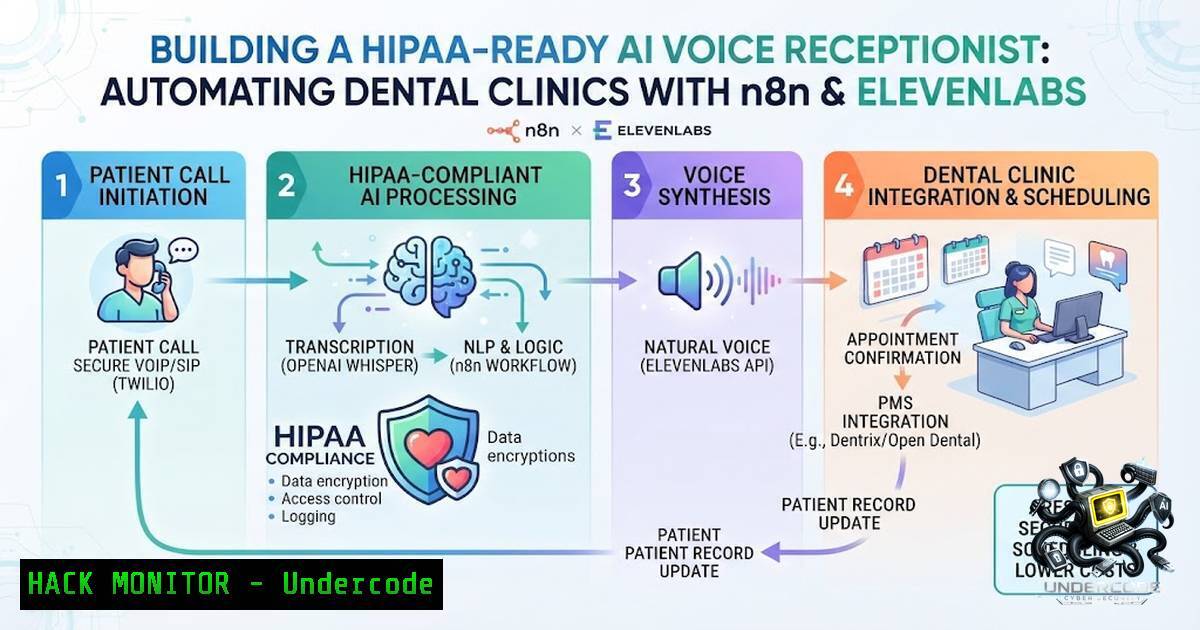
The integration of Large Language Models (LLMs) with workflow automation platforms is rapidly transforming the healthcare administrative landscape. By combining n8n’s open-source workflow automation with ElevenLabs’ advanced text-to-speech (TTS) capabilities, developers can create AI agents capable of handling complex, multi-step tasks like appointment scheduling and patient communication. This article provides a technical deep dive into building a secure, scalable AI voice receptionist for dental clinics, focusing on workflow validation, API security, and the critical transition from simple spreadsheets to HIPAA-compliant databases.
Learning Objectives:
- Understand the architecture of an AI voice agent workflow using n8n and ElevenLabs.
- Implement secure API authentication and data validation for automated appointment handling.
- Learn to transition a proof-of-concept (PoC) from Google Sheets to a production-ready database with a dedicated dashboard.
You Should Know:
- Workflow Orchestration with n8n and ElevenLabs API Integration
The core of the AI receptionist lies in the seamless interaction between the voice synthesis API and the automation logic. n8n acts as the middleware, receiving triggers from a telephony service (e.g., Twilio or Vapi), processing the speech-to-text result, generating a response via an LLM (like OpenAI’s GPT-4), and finally synthesizing speech via ElevenLabs before returning the audio to the caller.
Step‑by‑step guide to setting up the n8n webhook and processing flow:
– Trigger: Configure an n8n “Webhook” node to listen for incoming POST requests from your telephony provider. The payload typically contains the caller’s phone number and the transcribed text (transcript).
– AI Processing: Connect an “HTTP Request” node to send the transcript to an LLM (e.g., OpenAI) with a system prompt defining the agent’s role (e.g., “You are a dental clinic receptionist”).
– Data Lookup: If the action is “check availability,” use a “Google Sheets” node to read the current schedule from a specific range.
– Action Execution: Based on the LLM’s intent classification, use a “Switch” node to branch logic:
– Book: “Google Sheets” node to append a new row.
– Cancel: “Google Sheets” node to update or delete a row.
– Transfer: “IF” node to conditionally return a `transfer` parameter to the telephony API.
– Voice Generation: Use an “HTTP Request” node to call the ElevenLabs API (`https://api.elevenlabs.io/v1/text-to-speech/{voice_id}`) with the LLM’s response as the payload.
– Response: Return the audio URL or base64-encoded audio to the telephony provider to be played to the caller.
2. Securing the API Pipeline and Webhook Endpoints
Security is paramount in healthcare automation. Exposing a webhook to the internet without proper validation is a significant risk, as it could lead to data exfiltration or Denial of Service (DoS) attacks. The n8n endpoint must be hardened to ensure only legitimate telephony providers can trigger the workflow.
Step‑by‑step guide to implementing API security:
- Basic Auth / API Key: In your n8n Webhook node, enable “Basic Auth” or “Header Auth.” Generate a strong, complex API key and store it as an environment variable. The telephony provider must include this key in the `Authorization` header.
- IP Whitelisting: Restrict inbound traffic to the specific IP ranges of your telephony provider (e.g., Twilio’s IP ranges). Use a firewall (like `iptables` on Linux or a Cloud WAF) to reject traffic from non-authorized sources.
- Payload Validation: In n8n, use the “IF” node to validate incoming data. Check for the presence of required fields (
session_id,transcript,caller_number) and ensure the `session_id` format matches your expected pattern to prevent injection attacks. - Environment Variables: Never hardcode API keys in the workflow. Use n8n’s environment variable system (e.g.,
{{$env.ELEVENLABS_API_KEY}}) to keep sensitive data out of version control.
3. Data Handling and Logic for Appointment Management
The transition from a simple Google Sheets backend to a proper database is critical for concurrency and security. While Google Sheets is excellent for PoC validation, it lacks the atomicity and locking mechanisms required to prevent double-booking.
Step‑by‑step guide to hardening the data logic:
- Concurrency Control: In your workflow, implement a “Get Row” action immediately before the “Update Row” action in Google Sheets to ensure the slot is still available.
- Data Sanitization: Use the “Set” node in n8n to transform and sanitize user inputs. For example, ensure the appointment date format (YYYY-MM-DD) is standardized and the reason for visit is limited to a predefined character set.
- Logging: Add an “Execute Command” node (via n8n) to write detailed logs of each interaction to a file (
/var/log/ai_receptionist.log) for debugging and auditing. Use timestamps to track the workflow execution time. - Email Confirmation: Use the “Email (IMAP)” or “Gmail” node in n8n to trigger a confirmation email. Generate a unique token for the appointment and include an “Unsubscribe” link in compliance with CAN-SPAM regulations.
- Transitioning from Google Sheets to a Production Database
As the project scales, moving from a spreadsheet to a dedicated database is essential for performance, security, and reliability. PostgreSQL is a robust choice due to its ACID compliance and support for JSON data.
Step‑by‑step guide for database integration and migration:
- Database Setup: On a Linux server, install PostgreSQL using
sudo apt update && sudo apt install postgresql postgresql-contrib. Create a database and user:sudo -u postgres psql CREATE DATABASE dental_clinic; CREATE USER app_user WITH PASSWORD 'StrongP@ssw0rd'; GRANT ALL PRIVILEGES ON DATABASE dental_clinic TO app_user;
- Table Structure: Create a table using the command line:
CREATE TABLE appointments (
id SERIAL PRIMARY KEY,
patient_name VARCHAR(255) NOT NULL,
phone_number VARCHAR(15) NOT NULL,
appointment_time TIMESTAMP NOT NULL,
status VARCHAR(20) DEFAULT 'scheduled',
created_at TIMESTAMP DEFAULT NOW()
);
- n8n Integration: Replace the “Google Sheets” nodes with “Postgres” nodes in n8n. Use parameterized queries to prevent SQL injection:
INSERT INTO appointments (patient_name, phone_number, appointment_time)
VALUES ($1, $2, $3);
- Monitoring: Integrate the `pg_stat_activity` view to monitor queries. Set up an alert for high latency using a simple bash script:
Check for long-running queries > 5 seconds
psql -d dental_clinic -c "SELECT pid, now() - pg_stat_activity.query_start AS duration, query FROM pg_stat_activity WHERE now() - pg_stat_activity.query_start > interval '5 seconds';"
- Building a Dashboard and Setting up the Frontend
The dashboard serves as the clinic’s interface to view appointments and listen to call recordings. For a lightweight, secure solution, consider building a Flask or Node.js application that communicates with the database.
Step‑by‑step guide to building a secure dashboard:
- Authentication: Use OAuth2 (e.g., Auth0) for the dashboard login. Never store credentials for dentists; use Single Sign-On (SSO).
- API Endpoint: Create a simple GET endpoint in the dashboard that fetches the 50 most recent appointments from the PostgreSQL database, ordered by
appointment_time. - Search Functionality: Implement a search bar that queries the `patient_name` and `phone_number` columns using the `LIKE` keyword.
- Security Headers: Ensure the dashboard has `Content-Security-Policy: default-src ‘self’` and `X-Frame-Options: DENY` to mitigate XSS and clickjacking.
- Deployment: Use `systemd` to run the dashboard as a service. For Linux, create a service file:
[bash]
Description=Clinic Dashboard
After=network.target
[bash]
ExecStart=/usr/bin/python3 /var/www/dashboard/app.py
Restart=always
[bash]
WantedBy=multi-user.target
What Undercode Say:
- Key Takeaway 1: The architecture of AI agents must prioritize workflow validation over frontend aesthetics; a reliable workflow in n8n is the foundation upon which scalable features are built.
- Key Takeaway 2: Security is not a feature but a prerequisite. Hardening webhooks, securing API keys, and moving to SQL databases are essential steps to transition a PoC to a production environment.
Analysis: The application successfully demonstrates the power of Agentic AI in automating mundane administrative tasks, freeing up human resources for patient care. However, the current approach relies heavily on the stability of the internet connection and the API availability of third-party services (n8n, ElevenLabs, OpenAI). For production, one must implement failover mechanisms, such as a fallback text-to-speech engine, and robust error handling to manage timeouts gracefully. The move to a proper database marks a significant improvement in data integrity, but the system also needs to address the long-term storage and encryption of Protected Health Information (PHI) to comply with regulations. Integrating SMS confirmation as a fallback if the email fails would also increase reliability and patient satisfaction.
Prediction:
- +1: Voice AI agents will become the standard for frontline healthcare administration within the next 18 months, driven by the need to improve operational efficiency and reduce overhead costs.
- +1: The open-source ecosystem (n8n, Hugging Face models) will democratize AI adoption in healthcare, enabling small clinics to deploy tools previously only available to large enterprises.
- -1: The lack of standardized data security frameworks for AI voice agents poses a significant risk. We predict a rise in breaches targeting weakly secured API endpoints, prompting stricter regulatory oversight and security auditing requirements for AI vendors.
▶️ Related Video (78% Match):
🎯Let’s Practice For Free:
🎓 Live Courses & Certifications:
Join Undercode Academy for Verified Certifications
🚀 Request a Custom Project:
Secure, high-velocity infrastructure and disruptive technological engineering. Contact our engineering team for high-tier development and proprietary systems:
[email protected]
💎 Smart Architecture | 🛡️ Secure by Design | ⭐ Trusted by Thousands
IT/Security Reporter URL:
Reported By: Abubakar Bin – Hackers Feeds
Extra Hub: Undercode MoN
Basic Verification: Pass ✅


