Listen to this Post
Introduction:
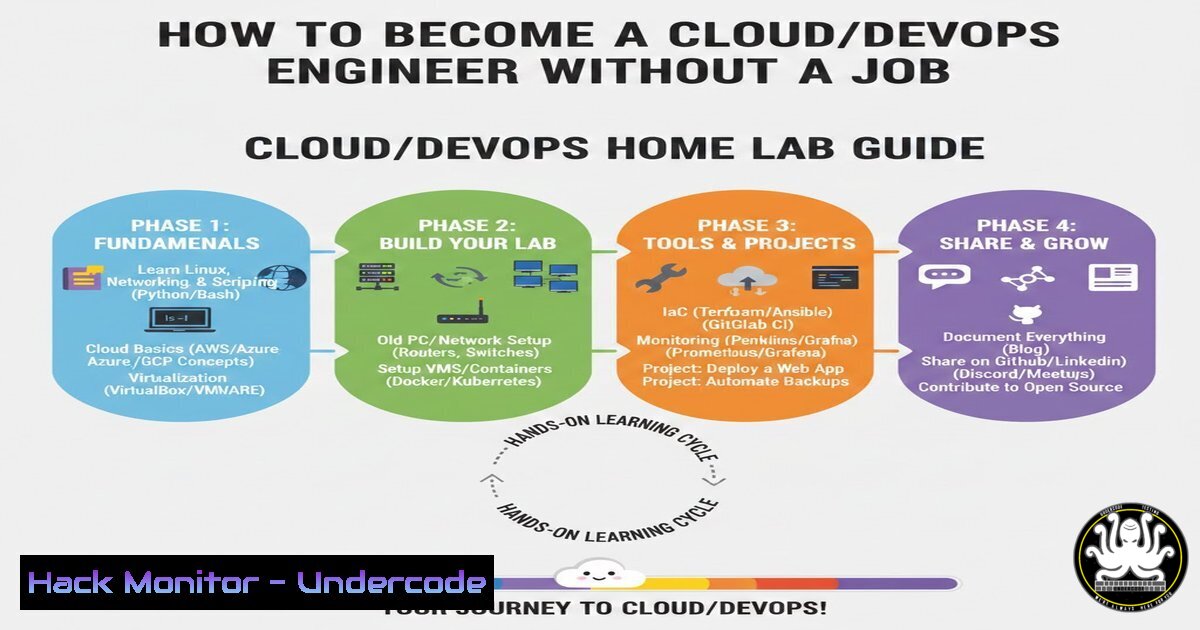
In the competitive fields of Cloud Computing and DevOps, the classic “catch-22” of needing experience to get a job is a significant barrier. However, as highlighted by Zerah Abba, the most effective way to break in is not to wait for permission, but to create your own production-like environment. From a cybersecurity perspective, this proactive approach is critical; understanding how to build, break, and fix systems in a controlled “home lab” is the only way to truly grasp infrastructure vulnerabilities and resilience before handling real client data.
Learning Objectives:
- Objective 1: Establish a functional home lab environment to simulate real-world cloud and DevOps workflows.
- Objective 2: Master the core tools of the trade (Git, Docker, Kubernetes, Terraform) through hands-on configuration and troubleshooting.
- Objective 3: Implement security hardening and vulnerability mitigation techniques within a self-hosted infrastructure.
You Should Know:
1. Building Your “Breakable” Home Lab with Virtualization
Before you can fix things, you must be able to break them safely. Instead of paying for cloud credits immediately, start locally using a hypervisor. This allows you to simulate server crashes, network failures, and security misconfigurations without financial risk or legal repercussions.
Step‑by‑step guide:
- Install a Hypervisor: Download and install VirtualBox (Cross-platform) or VMware Workstation Player (Free for Windows/Linux).
- Create Virtual Machines (VMs): Spin up at least two Linux servers (e.g., Ubuntu Server 22.04 LTS) and one Windows Server evaluation copy.
– Linux Command (to check IP after install): `ip a`
– Windows Command (to check IP): `ipconfig`
3. Simulate a “Breach”: Deliberately misconfigure an SSH server on your Linux VM to allow root login with a password.
– Command: `sudo nano /etc/ssh/sshd_config`
– Change `PermitRootLogin prohibit-password` to PermitRootLogin yes.
– Restart SSH: `sudo systemctl restart ssh`
– Note: This is a massive security flaw. Later, you will fix it by enforcing key-based authentication only.
- Mastering Version Control with Git (The “Fix Things” Stage)
Engineers collaborate using Git. You don’t need a job to practice this. You need to understand branching strategies and how to revert changes when you inevitably break something.
Step‑by‑step guide:
- Initialize a Project: On your local machine (or Linux VM), create a directory for a “Infrastructure as Code” project.
mkdir my-infra-project
cd my-infra-project
git init
echo " My Infrastructure" > README.md
git add . && git commit -m "Initial commit"
- Create a “Broken” Branch: Simulate a feature that introduces a vulnerability (e.g., a firewall rule that opens all ports).
git checkout -b feature/bad-firewall-rule
echo "Opening all ports (VULNERABLE)" >> firewall.conf
git add . && git commit -m "Added firewall config"
- The Fix: Switch back to main, create a hotfix branch, and fix the configuration.
git checkout main
git checkout -b hotfix/secure-firewall
echo "Closing all ports except 22 and 80" > firewall.conf
git add . && git commit -m "Hotfix: Secured firewall rules"
3. Containerizing Applications with Docker
Containers are the standard for deployment. You must learn to build, run, and (crucially) scan them for vulnerabilities.
Step‑by‑step guide:
- Install Docker: Follow the official docs for your OS, or on Ubuntu:
sudo apt update
sudo apt install docker.io -y
sudo systemctl start docker
sudo usermod -aG docker $USER
Log out and back in for group changes to take effect.
2. Create a Vulnerable Dockerfile:
FROM ubuntu:latest
RUN apt-get update && apt-get install wget -y
CMD ["bash"]
This is bad practice; `latest` tags change and `wget` adds attack surface.
3. Build and Scan:
docker build -t my-test-app .
docker scan my-test-app
The `docker scan` command will reveal vulnerabilities in the base image, teaching you why using specific, minimal base images (like ubuntu:jammy-22.04) is a security best practice.
4. Automating Infrastructure with Terraform (Cloud Hardening)
Terraform allows you to define your cloud infrastructure in code. You can practice with local providers or free tiers on AWS/Azure/GCP.
Step‑by‑step guide:
1. Install Terraform: Download from the official website.
- Write a Config to Create a Secure S3 Bucket (AWS Example): Create a file
main.tf.provider "aws" { region = "us-east-1" }</li> </ol> resource "aws_s3_bucket" "secure_bucket" { bucket = "my-secure-learning-bucket-1234" Block public access by default (Security Hardening) } resource "aws_s3_bucket_public_access_block" "secure_bucket_block" { bucket = aws_s3_bucket.secure_bucket.id block_public_acls = true block_public_policy = true ignore_public_acls = true restrict_public_buckets = true }3. Apply and Destroy: Run the commands to see infrastructure appear and disappear. This teaches you that cloud resources are ephemeral and code-managed.
terraform init
terraform plan
terraform apply -auto-approve
terraform destroy -auto-approve
5. Orchestrating with Kubernetes (The “Production” Simulation)
Kubernetes (K8s) is complex. You don’t need a cloud cluster; use Minikube or Kind to learn locally.
Step‑by‑step guide:
1. Start a Local Cluster (Minikube):
minikube start --cpus=4 --memory=8192
2. Deploy a Web App and Expose It Insecurely: Create a deployment and a service of type
NodePort. This exposes an internal app port to your host machine.kubectl create deployment hello-minikube --image=k8s.gcr.io/echoserver:1.4 kubectl expose deployment hello-minikube --type=NodePort --port=8080 minikube service hello-minikube --url
3. Harden the Deployment: Modify the deployment to run as a non-root user and with a read-only root filesystem.
kubectl edit deployment hello-minikube
Add the following security context under the `spec.template.spec` section:
securityContext:
runAsNonRoot: true
runAsUser: 1000
containers:
- name: echoserver
securityContext:
readOnlyRootFilesystem: true
If the app fails to start after this, you have just learned a vital lesson about application dependencies and security contexts.
6. Implementing API Security with a Reverse Proxy
APIs are a primary attack vector. Set up an Nginx reverse proxy to protect a mock API.
Step‑by‑step guide:
1. Install Nginx on a Linux VM:
sudo apt update && sudo apt install nginx -y
2. Configure Rate Limiting: Edit the Nginx config (
/etc/nginx/sites-available/default) to protect a mock backend.limit_req_zone $binary_remote_addr zone=mylimit:10m rate=5r/s; server { listen 80; server_name _; location /api/ { limit_req zone=mylimit burst=10 nodelay; proxy_pass http://localhost:5000/; Your mock API proxy_set_header Host $host; proxy_set_header X-Real-IP $remote_addr; } }3. Test the Rate Limit: Use `curl` or `ab` (Apache Bench) to flood the endpoint and watch Nginx block excessive requests. This teaches you how to mitigate DoS and brute-force attacks at the perimeter.
What Undercode Say:
- Key Takeaway 1: Permission is obsolete. The only barrier to entry in DevOps and Cloud is access to a laptop and the internet. By building a home lab, you generate the exact troubleshooting experience employers demand, proving you can navigate production incidents without causing them.
- Key Takeaway 2: Security is not an afterthought; it is a built-in feature of the engineering process. By deliberately building insecure systems and then hardening them (e.g., fixing SSH, scanning Docker images, setting Kubernetes security contexts), you develop a “security-first” mindset that is invaluable for protecting enterprise assets.
- Analysis: Zerah Abba’s approach dismantles the traditional hiring paradox. It shifts the focus from credentialism to demonstrable skill. For the cybersecurity community, this is the gold standard. A candidate who has broken and fixed a Kubernetes cluster, mitigated a DDoS with Nginx, and patched a vulnerable container is infinitely more valuable than one who has only passed theoretical exams. This method builds muscle memory for incident response and secure architecture design, turning theoretical knowledge into practical, battle-tested wisdom.
Prediction:
As AI tools lower the barrier to writing code, the demand for engineers who can operate, secure, and troubleshoot complex distributed systems will skyrocket. The future belongs not to those who waited for a job title to learn, but to the “builders” who used free tools to simulate the complexities of the cloud. We will see a rise in “portfolio-driven hiring,” where a public GitHub repository full of Terraform scripts and security hardening commits becomes more valuable than a traditional degree. The next generation of cybersecurity leaders will emerge from these self-made digital sandboxes.
▶️ Related Video (78% Match):
🎯Let’s Practice For Free:
IT/Security Reporter URL:
Reported By: Zerah Abba – Hackers Feeds
Extra Hub: Undercode MoN
Basic Verification: Pass ✅🔐JOIN OUR CYBER WORLD [ CVE News • HackMonitor • UndercodeNews ]
📢 Follow UndercodeTesting & Stay Tuned:


