
Listen to this Post
Introduction:
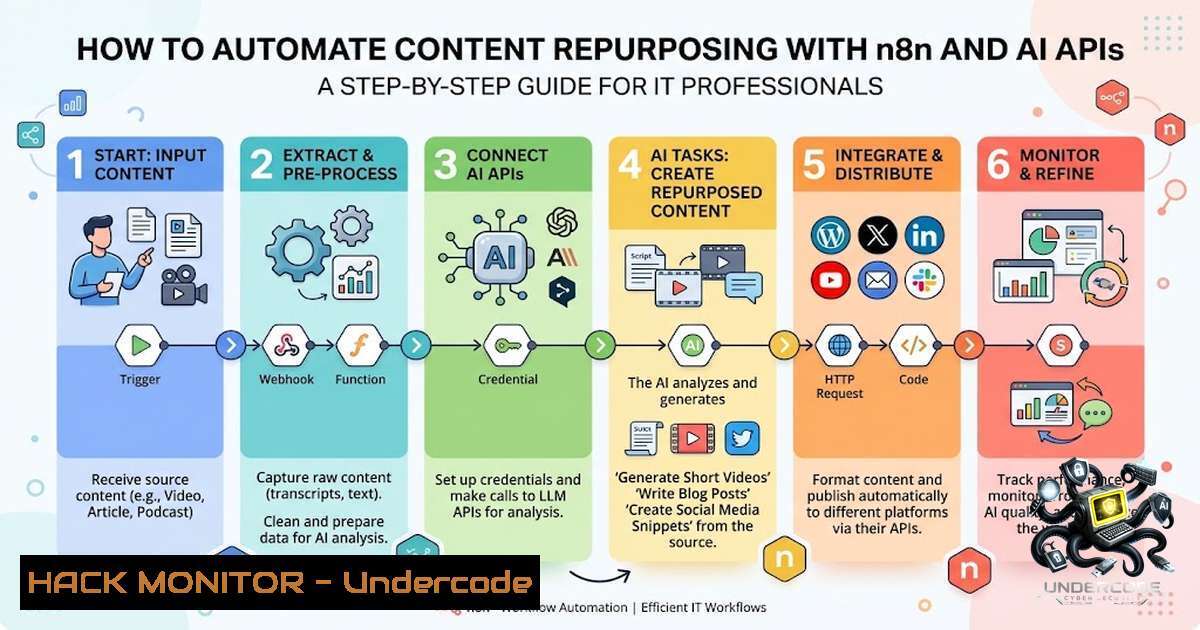
Automating content distribution is no longer a luxury but a necessity for IT professionals and businesses aiming to maximize their digital footprint without burning out. This article explores a workflow automation that leverages n8n, an open-source workflow automation tool, and AI APIs like OpenAI’s ChatGPT to transform a single piece of long-form content into multiple social media snippets. By integrating these technologies, you can save up to 10 hours a week, reduce manual errors, and ensure consistent brand messaging across platforms, all while maintaining the technical rigor required for secure and efficient API integrations.
Learning Objectives & Secrets:
- Objective 1: Set up an n8n workflow to ingest long-form content (e.g., blog posts, videos) via webhook or file input.
- Objective 2 (Secret Tip): Use conditional logic in n8n to dynamically adjust AI prompts based on content type (e.g., technical vs. general) for more relevant outputs.
- Objective 3 (Secret Tip): Implement error-handling nodes in n8n to retry API calls on failure and log errors to a file for debugging, ensuring high availability in production.
You Should Know:
1. Setting Up n8n for Content Ingestion
n8n is a powerful workflow automation tool that can be self-hosted or used via its cloud version. To begin, install n8n on your server using Docker:
docker run -it --rm --1ame n8n -p 5678:5678 -v ~/.n8n:/home/node/.n8n n8nio/n8n
Access the UI at http://localhost:5678`. Create a new workflow and add a Webhook node to receive content. Configure it to accept POST requests with JSON payloads containing your content. For testing, you can usecurl`:
curl -X POST http://localhost:5678/webhook-test/your-webhook-id -H "Content-Type: application/json" -d '{"content": "Your long-form blog post here..."}'
This node acts as the entry point for your automation, allowing integration with CMS platforms or manual submissions.
- Integrating AI APIs with n8n for Content Generation
After ingestion, add an HTTP Request node to call the OpenAI API. Configure the node as follows:
– Method: POST
– URL: `https://api.openai.com/v1/chat/completions`
– Headers: `Authorization: Bearer YOUR_OPENAI_API_KEY` and `Content-Type: application/json`
– Body: JSON with model, messages, and temperature. For example:
{
"model": "gpt-4",
"messages": [
{"role": "system", "content": "You are a content repurposing assistant. Extract key points and generate 3 social media posts, 5 tweets, and an Instagram carousel script."},
{"role": "user", "content": "{{ $json.content }}"}
],
"temperature": 0.7
}
Use n8n’s expression language to dynamically inject the content. For Windows environments, you can also run n8n via Node.js:
npm install n8n -g
n8n start
3. Linux and Windows Commands for API Security
To secure your API keys, avoid hardcoding them. Use environment variables:
– Linux: `export OPENAI_API_KEY=your_key_here`
– Windows (CMD): `set OPENAI_API_KEY=your_key_here`
– Windows (PowerShell): `$env:OPENAI_API_KEY=”your_key_here”`
In n8n, reference these variables using {{$env.OPENAI_API_KEY}}. Additionally, implement rate limiting in n8n using a Wait node to avoid hitting API limits.
4. Configuring Output Processing and Error Handling
After receiving the AI response, use an Item Lists node to split the generated outputs into separate items. Then, add an Error Trigger node to handle failures. Configure it to log errors to a file using a Execute Command node:
echo "Error: {{ $json.error }}" >> error.log
This ensures your workflow doesn’t break silently and you can debug issues promptly.
5. Integrating with Social Media Schedulers
To queue content, use n8n’s native integrations or HTTP Request nodes. For example, to post to Buffer, configure an HTTP Request node with the Buffer API endpoint:
– URL: `https://api.bufferapp.com/1/updates/create.json`
– Method: POST
– Headers: `Authorization: Bearer YOUR_BUFFER_ACCESS_TOKEN`
– Body: `{“text”: “{{ $json.tweet }}”, “profile_ids”: [“profile_id”]}`
Alternatively, use n8n’s built-in nodes for Twitter, LinkedIn, or custom webhooks to connect to any scheduler.
- Advanced: Using OpenAI Responses API for Enhanced Control
For more granular control, use OpenAI’s Responses API with predefined functions to structure outputs. For instance, you can enforce JSON output to easily parse and route content:{ "response_format": { "type": "json_object" }, "messages": [...] }Parse the JSON in n8n using a Code node with JavaScript:
const items = $input.all();
const parsed = JSON.parse(items[bash].json.choices[bash].message.content);
return parsed;
This makes downstream processing more reliable.
7. Monitoring and Logging Workflow Execution
Implement a Telegram or Email node to send notifications on successful or failed runs. Add a Aggregate node to summarize stats (e.g., number of posts generated) and include them in the notification. For persistent logging, set up a File node to append execution logs:
Date: {{ $now }} | Status: Success | Posts: 3 | Tweets: 5
This audit trail is crucial for production workflows.
What Undercode Say:
- Key Takeaway 1: Automating content repurposing with n8n and AI APIs significantly reduces manual effort, allowing professionals to focus on high-value tasks like system architecture and client engagement.
- Key Takeaway 2: The setup requires careful API key management and error handling to ensure reliability, making it a robust solution for IT teams looking to scale content operations without increasing headcount.
Expected Output:
The workflow will ingest a blog post, generate 3 social media posts, 5 tweets, and an Instagram carousel script, and queue them directly into your scheduler. This reduces content distribution time by over 80%, ensuring your content reaches a wider audience with minimal effort.
Prediction:
- +1: The integration of AI with workflow automation will become a standard practice in content marketing, leading to more personalized and timely content delivery.
- +1: Open-source tools like n8n will gain more adoption, fostering a community-driven ecosystem for automation.
- -1: Increased reliance on AI APIs may lead to higher operational costs, especially for high-volume content producers.
- +1: The ability to repurpose content efficiently will level the playing field for small businesses, enabling them to compete with larger enterprises.
- -1: Over-automation may risk generating generic or low-quality content if prompts are not fine-tuned regularly.
- +1: Developers will create more sophisticated nodes and integrations, further simplifying the automation process.
- -1: Security risks, such as API key leaks, will necessitate stronger encryption and monitoring practices.
- +1: The time saved can be reinvested into innovation, potentially accelerating digital transformation in various sectors.
- +1: As AI models improve, the quality of generated content will approach human-level creativity, enhancing user engagement.
- -1: The automation may reduce the demand for manual content creators, shifting job roles toward AI supervision and system maintenance.
▶️ Related Video (76% Match):
🎯Let’s Practice For Free:
🎓 Live Courses & Certifications:
Join Undercode Academy for Verified Certifications
🚀 Request a Custom Project:
Secure, high-velocity infrastructure and disruptive technological engineering. Contact our engineering team for high-tier development and proprietary systems:
[email protected]
💎 Smart Architecture | 🛡️ Secure by Design | ⭐ Trusted by Thousands
IT/Security Reporter URL:
Reported By: https://lnkd.in/p/eD4FsmpB – Hackers Feeds
Extra Hub: Undercode MoN
Basic Verification: Pass ✅


