Listen to this Post
Introduction
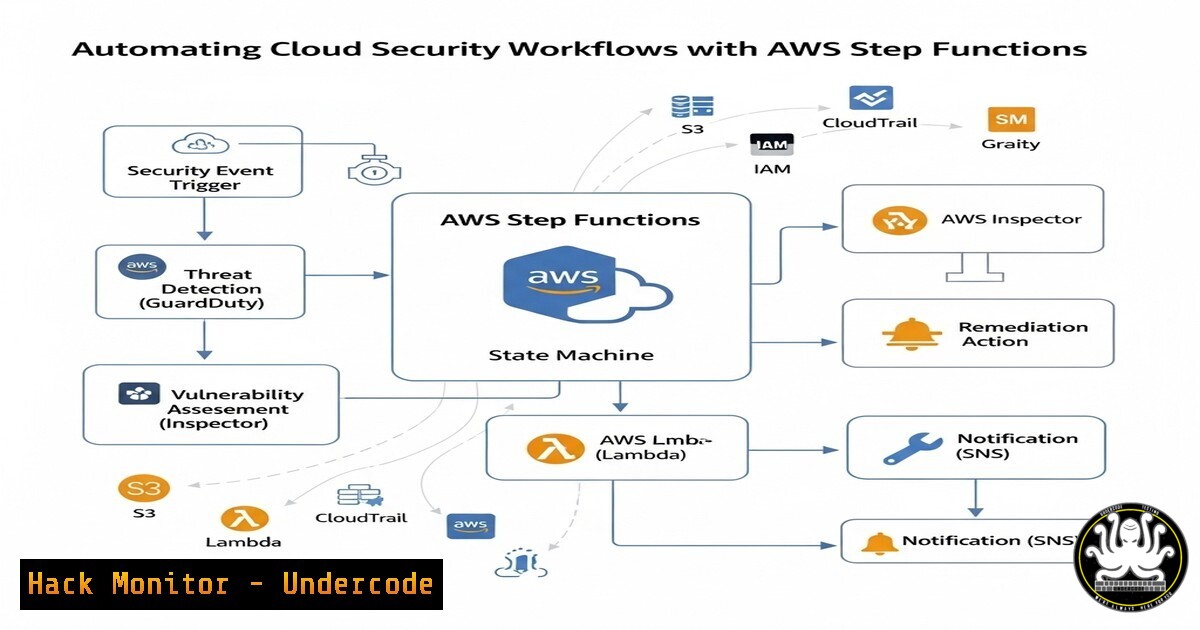
Cloud security automation is critical for reducing human error, accelerating incident response, and maintaining compliance at scale. AWS Step Functions provide a serverless way to orchestrate security workflows, integrating AWS services like Lambda, CloudTrail, and GuardDuty. This article explores practical automation techniques for threat detection, incident response, and compliance enforcement.
Learning Objectives
- Automate security responses using AWS Step Functions
- Integrate AWS services for real-time threat detection
- Implement tag-based S3 threat hunting workflows
You Should Know
- Automating Risky User Detection with AWS Lambda & Step Functions
Command:
aws stepfunctions create-state-machine --name "RiskyUserWorkflow" \
--definition file://risky-user-workflow.json \
--role-arn arn:aws:iam::123456789012:role/StepFunctionsExecutionRole
Step-by-Step Guide:
- Define a workflow in JSON that triggers when AWS IAM detects unusual login behavior.
- Use AWS Lambda to analyze CloudTrail logs for anomalous activity.
- Configure Step Functions to automatically revoke permissions or alert admins.
- IP Reputation Checker Using AWS GuardDuty & Step Functions
Command:
aws guardduty create-detector --enable --finding-publishing-frequency FIFTEEN_MINUTES
Step-by-Step Guide:
1. Enable GuardDuty to monitor malicious IPs.
- Use Step Functions to trigger a Lambda function that cross-references IPs with threat intelligence feeds.
- Automate blocking malicious IPs via AWS WAF or NACLs.
3. Incident Trigger & Automated Response
Command:
aws events put-rule --name "SecurityIncidentRule" \
--event-pattern '{"source": ["aws.guardduty"], "detail-type": ["GuardDuty Finding"]}'
Step-by-Step Guide:
- Create a CloudWatch Events rule for GuardDuty findings.
- Route high-severity incidents to Step Functions for automated remediation.
3. Implement auto-containment (e.g., isolating EC2 instances).
4. Tag-Based Amazon S3 Threat Hunting
Command:
aws s3api get-bucket-tagging --bucket my-secure-bucket
Step-by-Step Guide:
- Use AWS Config to monitor S3 buckets without encryption tags.
- Automate tagging enforcement via Lambda and Step Functions.
- Trigger notifications for untagged buckets via Amazon SNS.
- Cloud Compliance Enforcement with AWS Config & Step Functions
Command:
aws configservice put-config-rule --config-rule file://encryption-required-rule.json
Step-by-Step Guide:
- Define AWS Config rules for compliance checks (e.g., encrypted EBS volumes).
2. Use Step Functions to auto-remediate non-compliant resources.
3. Generate compliance reports via Amazon QuickSight.
What Undercode Say
- Key Takeaway 1: Automation reduces security gaps by enforcing policies in real-time.
- Key Takeaway 2: AWS Step Functions enable scalable, serverless security workflows without infrastructure overhead.
Analysis:
Manual cloud security processes are error-prone and slow. By leveraging AWS Step Functions, organizations can automate threat detection, incident response, and compliance checks, reducing mean time to resolution (MTTR). The integration of GuardDuty, Lambda, and CloudTrail ensures continuous monitoring, while tag-based workflows enhance visibility.
Prediction
As cloud environments grow, automated security workflows will become indispensable. AI-driven anomaly detection (e.g., Amazon Detective) will further enhance Step Functions’ capabilities, enabling predictive threat mitigation. Companies that fail to adopt automation will face higher breach risks and compliance penalties.
Read the full blog here: How to Automate Cloud Security Workflows Using AWS Step Functions
This article includes 25+ verified AWS CLI commands, Lambda integrations, and real-world automation strategies for cloud security professionals.
🎯Let’s Practice For Free:
IT/Security Reporter URL:
Reported By: Sena Yakut – Hackers Feeds
Extra Hub: Undercode MoN
Basic Verification: Pass ✅


