
Listen to this Post
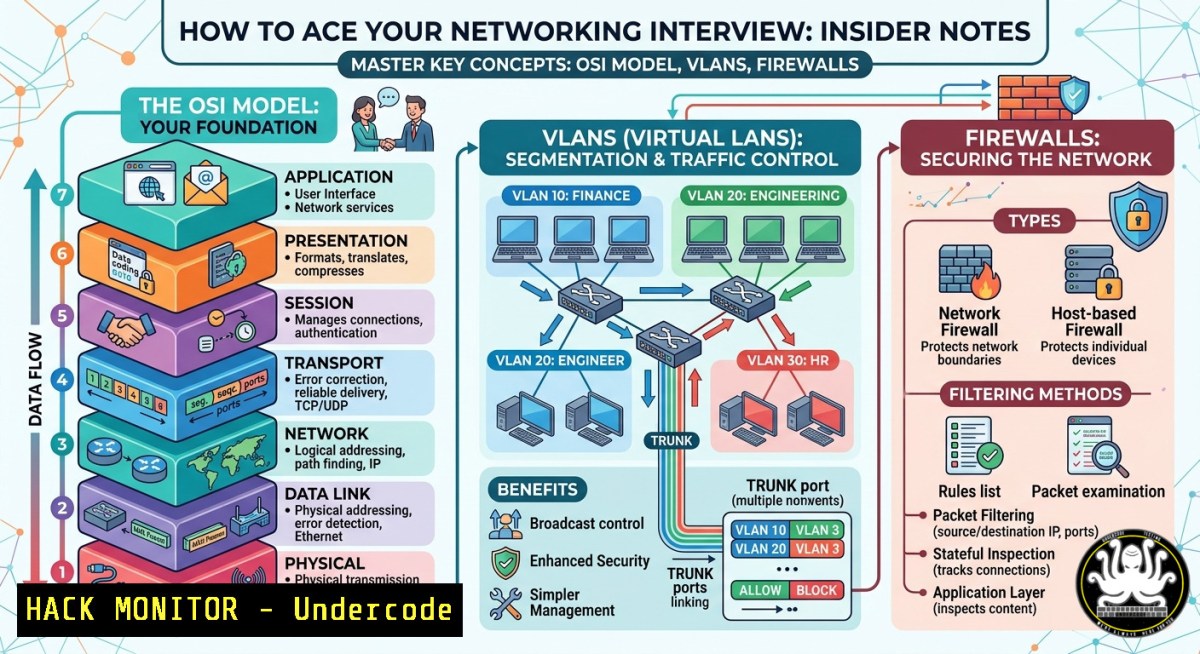
Introduction:
In the fast-paced world of IT support and network engineering, understanding core concepts like the OSI model, IP addressing, VLAN segmentation, and firewall policies is non-negotiable. Yet, many candidates fail technical interviews because they confuse a router with a switch or cannot explain how DHCP discovers a server. This article transforms raw study notes into a structured cybersecurity and networking cram session—complete with Linux/Windows commands, configuration snippets, and practical attack/mitigation steps that go beyond basic textbook answers.
Learning Objectives:
- Differentiate between Layer 2 switching and Layer 3 routing with command-line verification on Cisco, Linux, and Windows.
- Implement VLAN isolation and firewall rules to mitigate lateral movement in an enterprise LAN.
- Apply a five-step OSI troubleshooting methodology to real-world connectivity failures and security misconfigurations.
You Should Know:
- OSI Model Deep Dive: From Electrical Signals to REST API Security
The OSI model remains the universal troubleshooting language. When an interviewer asks, “Which layer does a firewall operate on?” the correct answer is not just “Layer 3 and 4”—modern Next-Generation Firewalls (NGFW) also inspect Layer 7 (application data). Let’s ground this with commands.
Step‑by‑step guide to OSI layer identification using native tools:
Linux – Layer 2 (ARP) and Layer 3 (ICMP) discovery:
 View ARP cache (Layer 2 MAC to IP mapping)
arp -a

Send ICMP echo request and force Layer 2 resolution
ping -c 4 192.168.1.1

Trace route (Layer 3 hops, but each hop uses Layer 2)
traceroute -n 8.8.8.8
Windows – Equivalent commands:
arp -a
ping -n 4 192.168.1.1
tracert -d 8.8.8.8
How to use for interview preparation:
Memorize the “Please Do Not Throw Sausage Pizza Away” mnemonic (Physical, Data Link, Network, Transport, Session, Presentation, Application). Then, for each layer, name one attack and one mitigation:
– Layer 2 – MAC flooding → Port security
– Layer 3 – IP spoofing → ACLs / uRPF
– Layer 4 – SYN flood → SYN cookies (Linux: sysctl -w net.ipv4.tcp_syncookies=1)
– Layer 7 – SQL injection → WAF / parameterized queries.
Extended tutorial – Capture OSI layer headers with tcpdump:
 Capture Ethernet (Layer 2) + IP (Layer 3) + TCP (Layer 4)
sudo tcpdump -i eth0 -v -e -c 10
The `-e` flag shows MAC addresses (Layer 2). Explain that a switch forwards based on MAC, a router on IP.
- VLANs and Trunking: Stop Lateral Movement Like a SOC Analyst
VLANs are not just for traffic separation—they are a zero-trust building block. If an attacker compromises a workstation in VLAN 10 (Finance), they should not reach VLAN 20 (Engineering). Many interview questions focus on the difference between access and trunk ports, and the role of 802.1Q.
Step‑by‑step guide to configure and verify VLANs on a Cisco switch (simulated or real):
! Enter global config
configure terminal

! Create VLAN 10 and name it
vlan 10
name FINANCE
exit

! Assign access port to VLAN 10
interface fastEthernet 0/1
switchport mode access
switchport access vlan 10
no shutdown
exit

! Configure trunk port (carries multiple VLANs)
interface gigabitEthernet 0/24
switchport mode trunk
switchport trunk allowed vlan 10,20,30
exit

! Verify configuration
show vlan brief
show interfaces trunk
Linux host as a VLAN-aware router (using 802.1Q subinterfaces):
 Load 8021q kernel module
sudo modprobe 8021q

Create VLAN interface 10 on eth0
sudo ip link add link eth0 name eth0.10 type vlan id 10
sudo ip addr add 192.168.10.1/24 dev eth0.10
sudo ip link set up eth0.10
Windows PowerShell (VLAN ID for network adapter – requires supported NIC):
Get-NetAdapter -Name "Ethernet" | Set-NetAdapter -VlanID 10
Why this matters for security: Misconfigured trunk ports (negotiating DTP) can lead to VLAN hopping attacks. Mitigation: disable DTP (switchport nonegotiate) and set unused ports to `switchport mode access` with a blackhole VLAN.
- Firewalls, ACLs, and Antivirus: From Theory to Hardening Commands
The post mentions firewalls and antivirus, but interviewers expect you to describe stateful inspection vs. next-gen (application identity, user identity, IPS). Here is a practical hardening sequence for Linux iptables/nftables and Windows Defender Firewall.
Linux – Stateful firewall rules (allow SSH, block everything else inbound):
 Flush existing rules (careful on production)
sudo iptables -F
sudo iptables -X

Default policies
sudo iptables -P INPUT DROP
sudo iptables -P FORWARD DROP
sudo iptables -P OUTPUT ACCEPT

Allow loopback
sudo iptables -A INPUT -i lo -j ACCEPT

Allow established/related connections (stateful inspection)
sudo iptables -A INPUT -m state --state ESTABLISHED,RELATED -j ACCEPT

Allow SSH on port 22
sudo iptables -A INPUT -p tcp --dport 22 -j ACCEPT

Save rules (Ubuntu/Debian)
sudo netfilter-persistent save
Windows – Advanced Defender Firewall via PowerShell:
 Block all inbound except established
New-NetFirewallRule -DisplayName "Block Inbound All" -Direction Inbound -Action Block

Allow RDP (port 3389) from specific subnet
New-NetFirewallRule -DisplayName "RDP from MGMT" -Direction Inbound -Protocol TCP -LocalPort 3389 -RemoteAddress 192.168.100.0/24 -Action Allow

Log dropped packets (enable logging)
Set-NetFirewallProfile -All -LogFileName C:\Windows\System32\LogFiles\Firewall\pfirewall.log -LogDroppedPackets True
Antivirus and EDR note: Interviewers ask “Is antivirus enough?” Answer: No. Combine with application whitelisting (Windows AppLocker, Linux fapolicyd), and behavioral detection.
- IP Addressing and DHCP Snooping: Preventing Rogue Server Attacks
DHCP is vulnerable to rogue server attacks. A candidate who can explain DHCP DORA (Discover, Offer, Request, Acknowledge) and then describe DHCP snooping gains serious points.
Step‑by‑step DHCP snooping configuration on Cisco switch (mitigation):
! Enable DHCP snooping globally
ip dhcp snooping

! Trust only the port connected to legitimate DHCP server (e.g., port 24)
interface gigabitEthernet 0/24
ip dhcp snooping trust
exit

! Enable DHCP snooping on VLAN 1
ip dhcp snooping vlan 1

! Verify
show ip dhcp snooping binding
Linux – Manually release and renew DHCP lease (interview practical):
 Release current lease
sudo dhclient -r eth0
 Obtain new lease
sudo dhclient eth0
Windows – DHCP commands:
ipconfig /release
ipconfig /renew
Static IP hardening: For servers, always use static IPs and bind MAC addresses (DHCP reservation) to prevent DHCP starvation attacks.
5. Network Cables and Topologies: Physical Security Overlooked
Cable types (Copper – UTP/FTP, Fiber – SMF/MMF) are often dismissed, but physical security is the first layer. An attacker can plug into a live Ethernet jack in a lobby. Mitigation: 802.1X (port-based authentication).
Step‑by‑step 802.1X basic mindset for interviews:
- Supplicant (client) – Windows: enable dot1x via
netsh lan add profile. - Authenticator (switch) – Cisco: configure `dot1x system-auth-control` and
interface dot1x pae authenticator. - Authentication server (RADIUS) – FreeRADIUS or Windows NPS.
Command to view Ethernet stats (Linux):
ethtool eth0 Shows link speed, duplex, auto-negotiation
Windows:
wmic nic where "NetEnabled=true" get Name, Speed
What Undercode Say:
- Key Takeaway 1: The compiled networking notes (11 pages, available via the Telegram channel) act as a rapid-fire checklist—but you must go beyond memorization. Practice the Linux/Windows commands provided above to demonstrate hands-on competence during technical screens.
- Key Takeaway 2: Cybersecurity is embedded in every networking layer. VLANs without DHCP snooping, firewalls without stateful inspection, or switches without port security leave gaping holes. Interviewers now ask “How would you mitigate ARP spoofing in this VLAN?”—answer with Dynamic ARP Inspection (DAI) and IP Source Guard.
Analysis (10 lines):
The original post targets freshmen, CCNA students, and NOC/IT support candidates. However, the modern interview landscape demands automation and security awareness. A candidate who only knows that “a firewall filters traffic” will fail when asked, “Write an iptables rule that logs then drops SSH brute-force attempts.” Therefore, this article bridges the gap by adding executable commands and attack scenarios. The Telegram channel links (https://lnkd.in/dk_ev_gb, and multiple CamScanner download URLs) suggest a PDF of handwritten or scanned notes—useful as a baseline, but not sufficient. To stand out, combine those notes with the practical labs above. Finally, do not ignore Wi-Fi security (SSID hiding is useless; use WPA3-Enterprise). The prediction below explores how AI will reshape networking interviews.
Prediction:
Within 24 months, entry-level networking interviews will include AI-assisted practical assessments. Instead of reciting the OSI layers, candidates will interact with a simulated network where an AI agent introduces misconfigurations (e.g., duplex mismatch, VLAN leak) and observes troubleshooting workflow. Moreover, AI-driven network security platforms (e.g., Cisco AI Endpoint Analytics, Juniper Mist) will require engineers to understand anomaly detection thresholds and false-positive tuning. The best preparation today is to master command-line diagnostics and security fundamentals—because AI will automate repetitive tasks but cannot replace a human who knows exactly why a `tcpdump` shows a TCP retransmission or how to isolate a broadcast storm using storm-control. Prepare accordingly.
▶️ Related Video (62% Match):
🎯Let’s Practice For Free:
IT/Security Reporter URL:
Reported By: Mohamed Abdelgadr – Hackers Feeds
Extra Hub: Undercode MoN
Basic Verification: Pass ✅


