Listen to this Post
Introduction
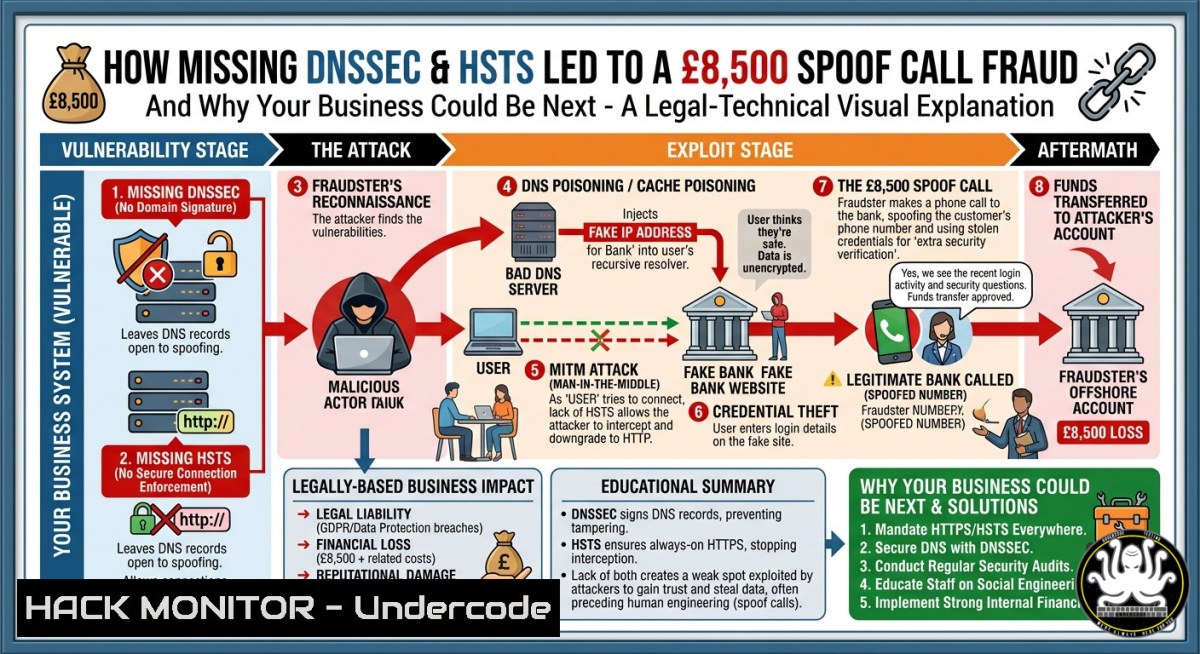
A simple online car advert turned into an £8,500 nightmare when a fraudster spoofed Auto Trader UK’s identity, exploiting basic but missing security layers: DNSSEC and HSTS. Without domain validation and strict transport security, attackers can intercept customer emails, clone communications, and launch highly targeted vishing attacks that even savvy users fall for.
Learning Objectives
- Understand how missing DNSSEC enables email interception and DNS spoofing attacks
- Learn to verify, configure, and enforce DNSSEC and HSTS on Linux/Windows servers
- Implement layered email authentication (SPF, DKIM, DMARC) and fraud detection tools
You Should Know
- DNS Spoofing and Email Interception – How Attackers Hijack Customer Conversations
When Auto Trader confirmed they have no DNSSEC, their DNS zone became vulnerable to cache poisoning and man-in-the-middle attacks. Here’s how a fraudster likely intercepted the victim’s email after an advert change, then placed a convincing spoof call.
Step‑by‑step attack chain:
- Victim updates car advert → Auto Trader sends automated confirmation email.
- Attacker, with network proximity or control over a rogue DNS resolver, poisons the DNS cache for Auto Trader’s domain.
- The victim’s email client receives a manipulated DNS response, rerouting email through the attacker’s server.
- Attacker reads the email, obtains all PII (name, advert details, phone number), and calls the victim within hours – impersonating Auto Trader support.
Commands to test your own domain’s DNSSEC status (Linux/macOS):
 Check if DNSSEC is enabled for a domain
dig autotrader.co.uk +dnssec +multi

Look for 'ad' flag and RRSIG records – if missing, DNSSEC is off
 Verify using drill (more detailed)
drill -D autotrader.co.uk

Windows PowerShell alternative
Resolve-DnsName -Name autotrader.co.uk -Type ANY | Format-List
To validate a signed zone:
 Download the zone and verify with dnssec-verify (bind9 tools)
dnssec-verify -z example.com.db
- Implementing DNSSEC on Linux (BIND9) and Windows Server
Activating DNSSEC signs your DNS records, preventing attackers from injecting false responses. Below are verified steps for the two most common platforms.
Linux (BIND9) – Step by step:
1. Generate DNSSEC keys:
cd /etc/bind
dnssec-keygen -a NSEC3RSASHA1 -b 2048 -n ZONE example.com
dnssec-keygen -f KSK -a NSEC3RSASHA1 -b 4096 -n ZONE example.com
2. Sign the zone:
dnssec-signzone -A -3 $(head -c 1000 /dev/random | sha1sum | cut -b 1-16) \
-N INCREMENT -o example.com -t db.example.com
3. Update named.conf to include the signed zone file and keys.
4. Publish DS records at your domain registrar.
Windows Server (DNS role) – DNSSEC:
- Open DNS Manager → Right‑click zone → DNSSEC → Sign the zone.
- Use Key Master server, choose cryptographic algorithm (RSA/SHA‑256 recommended).
- Select Sign and secure the zone – export the DS record for your registrar.
4. Run verification:
Get-DnsServerZoneSigning -Name example.com
Test-DnsServer -IPAddress 8.8.8.8 -ZoneName example.com -Dnssec
3. Enforcing HSTS to Block Protocol Downgrade Attacks
HSTS (HTTP Strict Transport Security) forces browsers to always use HTTPS. Without it, attackers can strip HTTPS links to HTTP, intercepting credentials and session cookies – even after a DNSSEC‑protected lookup.
Web server configurations:
Apache (.htaccess or vhost):
Header always set Strict-Transport-Security "max-age=31536000; includeSubDomains; preload"
Nginx (server block):
add_header Strict-Transport-Security "max-age=31536000; includeSubDomains; preload" always;
IIS (Windows):
Add to web.config:
<system.webServer>
<rewrite>
<outboundRules>
<rule name="Add HSTS Header">
<match serverVariable="RESPONSE_Strict_Transport_Security" pattern="." />
<action type="Rewrite" value="max-age=31536000; includeSubDomains; preload" />
</rule>
</outboundRules>
</rewrite>
</system.webServer>
Verification:
curl -I https://example.com | grep -i strict-transport-security
Submit your domain to the HSTS Preload List for built‑in browser protection.
- Email Authentication (SPF, DKIM, DMARC) – Stopping Interception Before It Starts
Email interception thrives when receiving servers cannot verify sender integrity. Implement these three layers immediately.
SPF (Sender Policy Framework): Define which IPs send your email.
`TXT record: “v=spf1 ip4:192.0.2.0/24 include:_spf.google.com ~all”`
DKIM (DomainKeys Identified Mail): Sign outgoing emails with a private key.
 Generate DKIM keys on Linux (opendkim)
opendkim-genkey -D /etc/dkimkeys/ -d example.com -s default
 Add selector record: default._domainkey TXT "v=DKIM1; k=rsa; p=MIGfMA0G..."
DMARC (Domain‑based Message Authentication): Instruct receivers how to handle unauthenticated mail.
`TXT record: _dmarc.example.com “v=DMARC1; p=reject; rua=mailto:[email protected]”`
Testing tools:
 Check SPF
dig +short TXT example.com | grep spf
 Check DMARC
dig +short TXT _dmarc.example.com
 Windows
Resolve-DnsName -Type TXT _dmarc.example.com
5. Detecting Insider Threats and Compromised Servers
Ewan Duncan raised the possibility of corrupt staff. Whether insider or external breach, monitor for anomalous DNS queries and unexpected email routing.
Linux – monitor DNS query logs:
 Track ALL DNS queries from your network (requires tcpdump)
sudo tcpdump -i eth0 -n -s 0 port 53 -vvv
 Real‑time alerting for suspicious domains using dnstwist (typosquatting)
dnstwist --registered autotrader.co.uk | grep "DNS A"
Windows – enable DNS debug logging:
- DNS Manager → Right‑click server → Properties → Debug Logging.
- Check “Log packets for debugging” → specify file path.
3. Use PowerShell to monitor:
Get-WinEvent -LogName "DNS Server" -MaxEvents 50 | Where-Object {$_.Message -like "query"}
Insider threat mitigation:
- Implement mandatory access controls (SELinux/AppLocker).
- Rotate DNSSEC key signing keys (KSK) every 3–6 months.
- Require dual‑approval for DNS zone changes.
- Compliance Gaps: PCI‑DSS and GDPR Do Mandate DNSSEC
Auto Trader’s claim that DNSSEC isn’t “explicitly mandated” by GDPR misses the point. GDPR 32 requires “appropriate technical and organisational measures” – and PCI‑DSS v3.2.1 Requirement 2.2 explicitly demands secure system configuration, including “DNS security controls such as DNSSEC.” Any payment‑processing domain is non‑compliant without it.
Quick self‑audit command (Linux):
 Scan your domain for missing security headers and DNSSEC
nmap --script dns-nsec3-enum,ssl-enum-ciphers,http-security-headers -p 443 example.com
- Protecting Customers Against Spoof Calls – The ‘WhoAmIPaying’ Layer
Simon Lyons suggested www.whoamipaying.co.uk – a tool that reveals the true beneficiary of a payment. Banks and marketplaces should integrate such verification into their payment flows.
How to build a simple check for your own site (API approach):
 Query company registration and bank account details (UK example)
curl -X GET "https://api.openbanking.org.uk/confirmation-of-payee/v1/accounts" \
-H "Authorization: Bearer YOUR_TOKEN" \
-d '{"account_number":"12345678","sort_code":"60-00-00"}'
User‑friendly advice:
- Never trust inbound calls – hang up and call back on a verified number.
- Use payment confirmation services before transferring money.
What Undercode Say
- “Auto Trader’s refusal to implement DNSSEC or HSTS despite detailed notice is not a technical oversight – it’s a business risk transfer to customers.”
The fraudster didn’t need a sophisticated zero‑day; they exploited missing DNS authentication and absent HTTPS enforcement. These are controls the NCSC has called “critical” for years. -
“Banks should not underwrite negligence. If a merchant fails basic PCI‑DSS and DNSSEC, the liability for fraudulent transactions should shift entirely to that merchant.”
Andy Jenkinson notes that the victim’s bank covered the £8,500 only after legal escalation. Until compliance failures carry direct financial consequences, companies will treat security as optional.
Analysis: This incident demonstrates that old‑school vishing remains devastatingly effective when combined with technical gaps. The attack surface isn’t just software vulnerabilities – it’s the absence of layered defences. DNSSEC would have made email interception significantly harder; HSTS would have prevented any downgrade attack. For security professionals, this is a case study in why “not mandated” is never a valid risk assessment.
Prediction
Within 18 months, regulators will explicitly tie DNSSEC and HSTS enforcement to GDPR’s “state of the art” security requirement. Expect class‑action lawsuits against e‑commerce platforms that fail these basic controls. Meanwhile, fraudsters will increasingly automate the interception‑to‑call pipeline using AI‑driven voice spoofing – making manual vishing campaigns scalable. Organisations that do not deploy DNSSEC, HSTS, and DMARC by Q3 2026 will face not only breach costs but also regulatory fines and insurance refusals. The era of “optional” internet security is ending.
▶️ Related Video (68% Match):
🎯Let’s Practice For Free:
IT/Security Reporter URL:
Reported By: Andy Jenkinson – Hackers Feeds
Extra Hub: Undercode MoN
Basic Verification: Pass ✅
🎓 Live Courses & Certifications:
Join Undercode Academy for Verified Certifications
🚀 Request a Custom Project:
Secure, high-velocity infrastructure and disruptive technological engineering. Contact our engineering team for high-tier development and proprietary systems:
[email protected]


