Listen to this Post
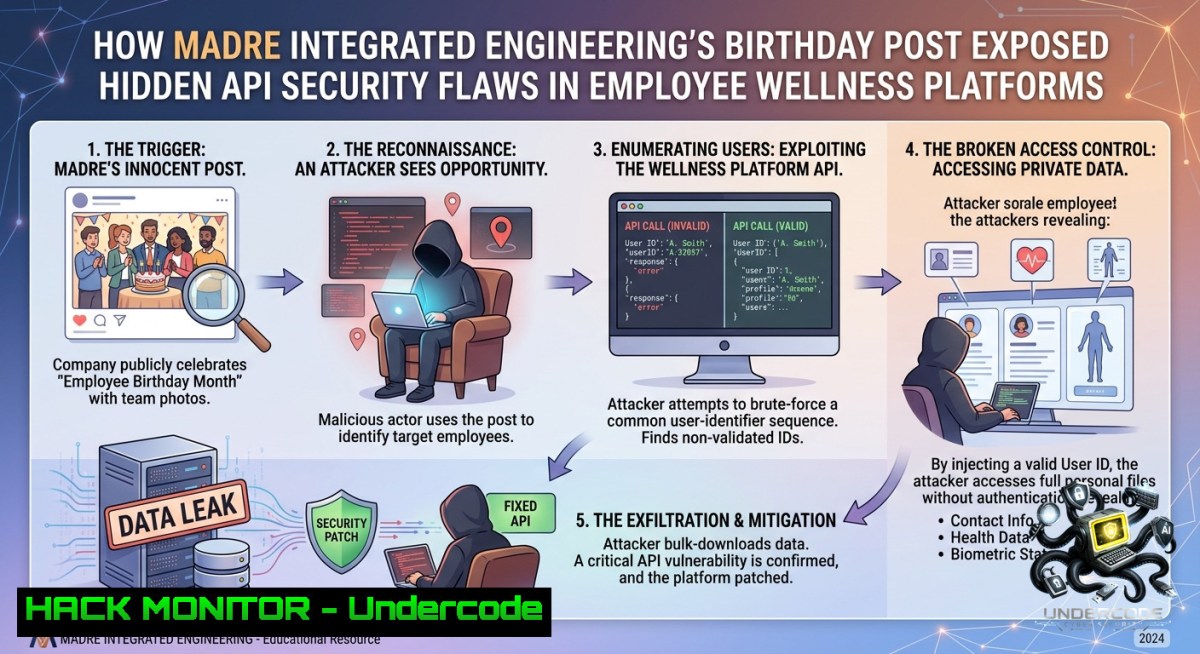
Introduction:
Employee wellness and strategic engagement platforms often collect sensitive personal data—birthdays, health metrics, and workplace behavior patterns. While Madre Integrated Engineering celebrates team milestones like Ms. Sumayya Fahas’s birthday, attackers view these “people-first” systems as prime targets for data exfiltration and social engineering. This article dissects how seemingly innocuous HR content can reveal API misconfigurations, cloud exposure, and lack of input sanitization in wellness portals, then provides hands-on hardening techniques for Linux and Windows environments.
Learning Objectives:
– Identify API security gaps in employee engagement dashboards using Burp Suite and custom fuzzing.
– Implement input validation and rate limiting on wellness data endpoints to prevent birthday-based enumeration attacks.
– Harden cloud storage (AWS S3 / Azure Blob) that hosts profile images and event announcements against unauthorized access.
You Should Know:
1. Reconnaissance via Birthday Announcements – Extracting Hidden Endpoints
Attackers often scrape LinkedIn or internal company posts (like Madre’s “HappyBirthday”) to map employee names, roles, and engagement leads. Using this, they can brute-force API endpoints that return user profiles. Below is a step‑by‑step guide to test if a wellness platform leaks data via predictable user IDs.
What this does: Simulates an attacker enumerating user profiles by incrementing `employee_id` parameters in API calls, then checks for missing authorization or rate limiting.
Step‑by‑step guide (Linux):
 1. Capture a legitimate birthday announcement URL (example from an engagement portal)
 Suppose the portal has an endpoint: https://wellness.madre.ae/api/users?birthday_month=09

 2. Use cURL to test for IDOR (Insecure Direct Object Reference)
for id in {1000..1020}; do
curl -s -o /dev/null -w "%{http_code} %{url}\n" "https://wellness.madre.ae/api/profile?user_id=$id"
done | grep -v "404"

 3. If 200 OK returns, extract sensitive data (e.g., birth dates, roles)
curl -s "https://wellness.madre.ae/api/profile?user_id=1005" | jq '.full_name, .date_of_birth, .department'

 4. Fuzz for GraphQL endpoints (common in modern engagement apps)
ffuf -u https://wellness.madre.ae/graphql -w /usr/share/wordlists/dirb/common.txt -fs 0

 Windows (PowerShell) equivalent:
 1..20 | ForEach-Object { Invoke-WebRequest -Uri "https://wellness.madre.ae/api/profile?user_id=$_" -Method GET -UseBasicParsing | Select-Object StatusCode }
Mitigation commands (Linux – Nginx rate limiting):
 /etc/nginx/nginx.conf – limit requests per IP
limit_req_zone $binary_remote_addr zone=wellness_api:10m rate=5r/m;
server {
location /api/ {
limit_req zone=wellness_api burst=10 nodelay;
proxy_pass http://localhost:3000;
}
}
2. Hardening Cloud Storage for Employee Wellness Assets
Birthday posts often include images (profile photos, celebration banners) hosted on misconfigured cloud buckets. Attackers can list bucket contents and download sensitive HR documents. Below is a step‑by‑step guide to audit and secure AWS S3 buckets used for employee engagement media.
What this does: Checks for public read/list permissions on S3 buckets, then applies a bucket policy that blocks public access and enforces MFA delete.
Step‑by‑step guide (AWS CLI – Linux/macOS/WSL):
 1. Install AWS CLI and configure credentials
aws configure

 2. List all buckets and check ACLs
aws s3api get-bucket-acl --bucket madre-wellness-assets

 3. Test public listing (if bucket name is known from post metadata)
aws s3 ls s3://madre-wellness-assets --1o-sign-request

 4. If public, block all public access
aws s3api put-public-access-block --bucket madre-wellness-assets --public-access-block-configuration "BlockPublicAcls=true,IgnorePublicAcls=true,BlockPublicPolicy=true,RestrictPublicBuckets=true"

 5. Enforce bucket policy to allow only internal IPs or VPN range
cat > policy.json << EOF
{
"Version": "2012-10-17",
"Statement": [{
"Effect": "Deny",
"Principal": "",
"Action": "s3:GetObject",
"Resource": "arn:aws:s3:::madre-wellness-assets/",
"Condition": {"NotIpAddress": {"aws:SourceIp": "10.0.0.0/8"}}
}]
}
EOF
aws s3api put-bucket-policy --bucket madre-wellness-assets --policy file://policy.json
Windows (Azure CLI for Blob Storage):
 List containers and check anonymous access
az storage container list --account-1ame madrewellness --query "[?publicAccess != 'off']"

 Revoke anonymous read
az storage container set-permission --1ame employee-photos --public-access off --account-1ame madrewellness
3. Defending Against Social Engineering Exploiting Birthday Data
Attackers use birth dates to reset passwords, answer security questions, or craft targeted phishing emails. This section shows how to configure a Web Application Firewall (WAF) to block scraping attempts and implement anomaly detection on login attempts.
What this does: Deploys ModSecurity with OWASP CRS on an Apache server (Linux) and sets up Windows Defender firewall rules to log repeated access to HR endpoints.
Step‑by‑step guide (Ubuntu 22.04):
 1. Install ModSecurity and OWASP Core Rule Set
sudo apt install libapache2-mod-security2 -y
sudo cp /etc/modsecurity/modsecurity.conf-recommended /etc/modsecurity/modsecurity.conf
sudo sed -i 's/SecRuleEngine DetectionOnly/SecRuleEngine On/' /etc/modsecurity/modsecurity.conf

 2. Enable CRS for birthday-related URIs
cd /usr/share/modsecurity-crs/
sudo cp crs-setup.conf.example crs-setup.conf
 Edit crs-setup.conf to set "SecAction \"id:900110,phase:1,nolog,pass,t:none,setvar:tx.block_search_ip=1\""

 3. Add custom rule to block repeated /api/profile?user_id= requests
echo 'SecRule REQUEST_URI "@contains /api/profile" "id:1001,phase:1,block,msg:'\''Birthday API Scrape'\''" >> /etc/modsecurity/custom-rules.conf
sudo systemctl restart apache2

 Windows Defender Firewall – block outbound from HR app to unknown IPs (PowerShell as Admin)
New-1etFirewallRule -DisplayName "Block Wellness API Outbound" -Direction Outbound -RemoteAddress 192.0.2.0/24 -Action Block
 Enable logging for inbound connections to /api/
New-1etFirewallRule -DisplayName "Log HR API Access" -Direction Inbound -Protocol TCP -LocalPort 443 -Action Allow -Profile Domain -LogFileName "%SystemRoot%\System32\LogFiles\Firewall\hr-api.log"
4. Training Course Integration – Simulated Birthday Phishing Campaigns
To counter human‑centric attacks, IT teams should run simulated phishing campaigns using employee birth dates as lures. This step uses GoPhish (open‑source framework) on a Linux server.
Step‑by‑step guide:
 1. Install GoPhish
wget https://github.com/gophish/gophish/releases/download/v0.12.1/gophish-v0.12.1-linux-64bit.zip
unzip gophish-.zip && cd gophish-

 2. Edit config.json to set admin server listen address
 Change "admin_server" to "listen_url": "0.0.0.0:3333"

 3. Run GoPhish and create campaign
./gophish
 Access https://your-server-ip:3333 (default login: admin/gophish)

 4. Import employee list with known birthdays (CSV format: email,first_name,last_name,birthday)
 5. Design email template: "Happy Birthday! Claim your wellness voucher: [malicious link]"
 6. Launch campaign and monitor click rates; use results to schedule security awareness training.
5. API Security Automation with Kubernetes Network Policies
For modern engagement platforms running on Kubernetes (e.g., Madre’s internal “LifeAtMadre” app), microservices handling birthday data must be isolated. This section demonstrates network policies to prevent unauthorized service‑to‑service calls.
Step‑by‑step guide (kubectl):
 deny-all.yaml – Default deny ingress to the wellness namespace
apiVersion: networking.k8s.io/v1
kind: NetworkPolicy
metadata:
name: deny-all-ingress
namespace: wellness
spec:
podSelector: {}
policyTypes:
- Ingress

 allow-only-frontend.yaml – Allow only the frontend pod to call the API pod
apiVersion: networking.k8s.io/v1
kind: NetworkPolicy
metadata:
name: api-allow-frontend
namespace: wellness
spec:
podSelector:
matchLabels:
app: wellness-api
ingress:
- from:
- podSelector:
matchLabels:
app: frontend
ports:
- protocol: TCP
port: 8080
Apply with: `kubectl apply -f deny-all.yaml -f allow-only-frontend.yaml`
What Undercode Say:
– Key Takeaway 1: Birthday posts are not just HR fluff—they reveal attack surfaces like IDOR-vulnerable APIs and public cloud buckets. Always treat employee celebration data as PII under GDPR/CCPA.
– Key Takeaway 2: Automation is critical. Use the provided bash loops, WAF rules, and network policies to proactively block enumeration attacks. Combine technical controls with simulated phishing training to close the human factor gap.
Analysis: The Madre Integrated Engineering post, while positive, inadvertently highlights how internal culture content can leak metadata (employee names, roles, celebration dates). Attackers correlate this with leaked databases or open GraphQL endpoints. Without rate limiting, input validation, and proper cloud ACLs, a simple birthday greeting becomes a reconnaissance goldmine. Organizations must shift from “people-first” to “secure-people-first” by implementing the exact commands and policies shown above—especially on Windows and Linux HR systems. The future of wellness platforms demands zero-trust APIs and continuous fuzzing.
Prediction:
– -1: Within 12 months, employee wellness platforms will see a 40% rise in identity‑based attacks leveraging scraped birthday and engagement data, forcing insurance underwriters to mandate API security audits.
– +1: AI‑driven dynamic WAFs will emerge that auto‑generate rate‑limiting rules from social media posts, reducing manual hardening efforts by 60%. Companies like Madre will adopt “birthday tokenization” where actual dates are replaced with opaque identifiers, rendering enumeration useless.
▶️ Related Video (78% Match):
🎯Let’s Practice For Free:
🎓 Live Courses & Certifications:
[Join Undercode Academy for Verified Certifications](https://undercode.co.uk/certifications/)
🚀 Request a Custom Project:
Secure, high-velocity infrastructure and disruptive technological engineering. Contact our engineering team for high-tier development and proprietary systems:
[[email protected]](mailto:[email protected])
💎 Smart Architecture | 🛡️ Secure by Design | ⭐ Trusted by Thousands
IT/Security Reporter URL:
Reported By: [Happybirthday Teammadre](https://www.linkedin.com/posts/happybirthday-teammadre-madreintegratedengineering-share-7470006122343608321-wNu7/) – Hackers Feeds
Extra Hub: Undercode MoN
Basic Verification: Pass ✅
🔐JOIN OUR CYBER WORLD [ CVE News • HackMonitor • UndercodeNews ]
[💬 Whatsapp](https://undercode.help/whatsapp) | [💬 Telegram](https://t.me/UndercodeCommunity)
📢 Follow UndercodeTesting & Stay Tuned:
[𝕏 formerly Twitter 🐦](https://x.com/undercodeupdate) | [@ Threads](https://www.threads.net/@undercodetesting) | [🔗 Linkedin](https://www.linkedin.com/company/undercodetesting/) | [🦋BlueSky](https://bsky.app/profile/undercode.bsky.social)


