Listen to this Post
Introduction:
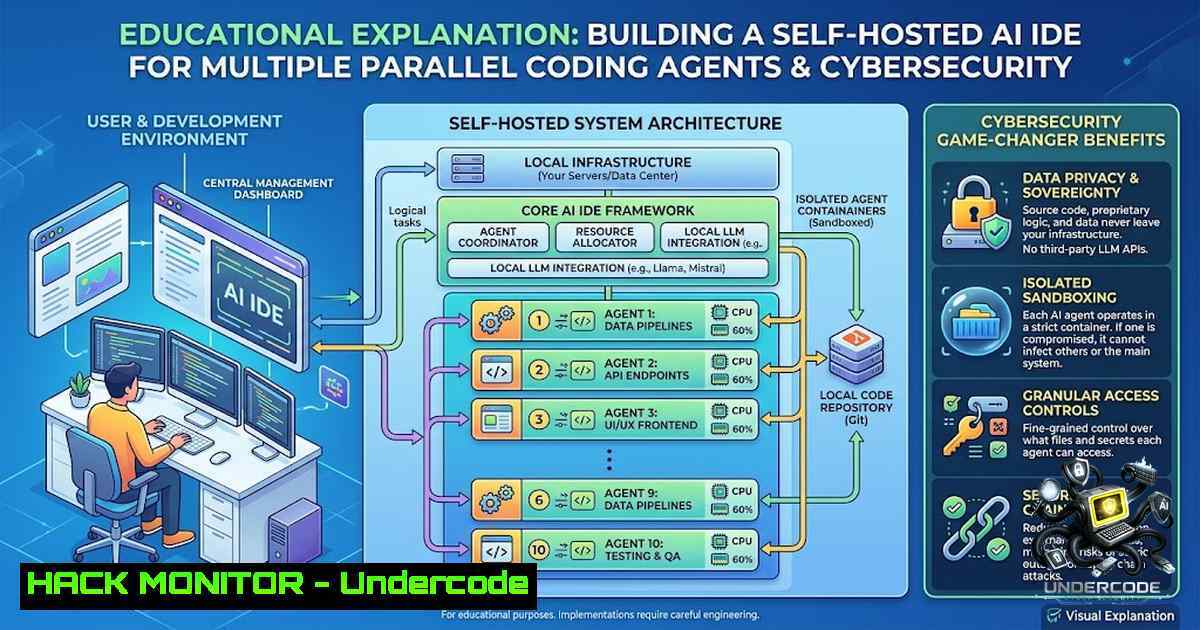
As AI coding agents become ubiquitous, the traditional IDE is buckling under the weight of concurrent sessions, fragmented memory, and opaque agent activity. The result is not just a productivity bottleneck, but a significant security blind spot—when dozens of agents interact with your codebase, API keys, and Git history, visibility and control are paramount. This article explores the architecture of a custom-built IDE designed to orchestrate a fleet of AI agents, breaking down the technical implementations, security hardening measures, and commands needed to replicate or adapt this powerful workflow safely.
Learning Objectives:
- Understand the architecture required to manage multiple concurrent AI coding sessions securely.
- Implement robust session isolation and monitoring to prevent cross-contamination of credentials and code.
- Configure a shared, version-controlled knowledge base (Obsidian vault) with strict access controls and routing protocols.
You Should Know:
- Mastering the Terminal Grid: Live Logging and Incident Response
The core of this custom IDE is the auto-tiling terminal grid that manages up to 10 parallel Claude Code sessions. While this is a massive productivity boost, it turns the terminal into a high-volume security event log. Each session represents a potentially vulnerable process that can execute commands, read/write files, and interact with APIs.
Step‑by‑step guide explaining what this does and how to use it:
- Implement Per-Session Logging: Each session generates a JSONL (JSON Lines) file. This is crucial for audit trails.
– Linux Command: `tail -f /var/log/claude-sessions/session_$(date +%Y%m%d).jsonl | jq ‘.timestamp, .agent_id, .action, .status’`
– Windows (PowerShell) Command: `Get-Content -Path “C:\ClaudeLogs\session_$(Get-Date -Format ‘yyyyMMdd’).jsonl” -Wait | ConvertFrom-Json | Select-Object timestamp, agent_id, action, status`
2. Real-Time Monitoring for Anomalies: Use `grep` or `Select-String` to watch for suspicious patterns like unexpected file writes to `/etc/` or C:\Windows\System32\drivers\etc\.
– Linux: `tail -f session.log | grep –line-buffered -E “WARNING|ERROR|/etc/passwd|chmod 777″`
– Windows: `Get-Content -Wait session.log | Select-String -Pattern “WARNING|ERROR|:\\Windows\\System32″`
3. Session Termination on Alert: Automate a kill script if a session executes a dangerous command. This is the first line of defense against a rogue agent or a prompt injection attack.
- The Routing Protocol: Securing Memory and Preventing Knowledge Leakage
The system uses a routing protocol to direct each session to write its “memory” (reusable knowledge, patterns, and learned behaviors) to a shared Obsidian vault. This is a double-edged sword for security. A shared knowledge base can exponentially accelerate development, but if not properly segmented, it can lead to massive data leakage across projects.
Step‑by‑step guide explaining what this does and how to use it:
- Directory Symlinking for Unified Memory: The IDE redirects per-project memory folders into a single shared Obsidian vault.
– Linux/macOS: `ln -s /path/to/shared/vault /project/.memory`
– Windows (Admin CMD): `mklink /D C:\project\.memory C:\shared_vault`
– Security Note: This symlink can be a vector for path traversal attacks if not handled carefully. Ensure the IDE validates the target path.
2. Implement Access Control Lists (ACLs): Not all memory should be accessible to all agents.
– Linux ACL: `setfacl -m u:claude_agent:r-x /path/to/shared/vault/secure/` to grant read-only access to a specific agent.
– Windows ACL: Use `icacls “C:\shared_vault\secure” /grant “claude_agent:(RX)”`
3. Route Configuration: The “routing protocol” is a set of environment variables or a configuration file that tells each session where to write. A robust security practice is to enforce a strict taxonomy (e.g., project_X/knowledge, global/security-patterns).
– Configuration Snippet (YAML):
routing:
default: /shared_vault/global/
projects:
project_alpha: /shared_vault/projects/alpha/
project_beta: /shared_vault/projects/beta/
4. Automated Backup and Version Control: The Obsidian vault should be a Git repository. This allows you to roll back any malicious or erroneous writes.
– Command: `git add . && git commit -m “Auto-commit from session $(session_id)”`
3. Incremental Parsing and Caching: Optimizing for Large-Scale Forensics
The developer noted that re-parsing every session’s JSONL history was slow. The solution was incremental parsing and caching. From a security perspective, this is critical for rapidly querying historical logs during an incident investigation.
Step‑by‑step guide explaining what this does and how to use it:
- Implement a Cache Invalidation Strategy: Store the parsed state of the log file in a separate cache file (e.g.,
.cache.json).
– Logic: Before parsing, check the last modified timestamp of the session.log. If it’s unchanged, load the parsed data from the cache.
– Command: `stat -c %Y session.log` (Linux) to get the modification time.
2. Incremental Reads: Instead of reading the entire JSONL file, read only from the last known byte offset.
– Python Snippet:
with open('session.log', 'rb') as f:
f.seek(offset)  Jump to last known position
for line in f:
process(json.loads(line.decode('utf-8')))
offset = f.tell()  Update offset
3. Security Benefit: This allows you to query for specific attack patterns (e.g., SQL injection attempts, hardcoded secrets) across thousands of lines of history without performance degradation, enabling rapid threat hunting.
4. Git Panel Integration: Hardening the CI/CD Pipeline
The IDE includes a full Git panel for branch switching, staging, and stash management. This integrates the code generation pipeline directly with version control, which is a prime target for supply chain attacks.
Step‑by‑step guide explaining what this does and how to use it:
- Pre-Commit Hooks: The IDE must enforce pre-commit hooks to scan for secrets and vulnerabilities before code is committed.
– Git Hook (pre-commit): Create a file .git/hooks/pre-commit.
!/bin/sh
 Run a secret scanner
trufflehog git file://. --only-verified > /dev/null
if [ $? -1e 0 ]; then
echo "Commit blocked: Secrets found in staged files."
exit 1
fi
2. Branch Protection Rules: The Git panel should only allow pushing to protected branches (e.g., main, release) if a signed commit is present. This prevents an AI agent from directly pushing vulnerable code to production.
– Command: `git commit -S -m “Signed commit from agent”` to create a GPG-signed commit.
3. Stashing and Isolated Development: Encourage the use of `git stash` to save work-in-progress before an AI agent tries a risky refactoring.
– Command: `git stash push -m “WIP before agent session”`
5. Capabilities Inventory (Caps): Controlling Tool Access
The IDE maintains a live inventory of every skill, agent, MCP server, and hook. This “Caps” system is the central security policy engine. It defines what tools a specific session can see and use.
Step‑by‑step guide explaining what this does and how to use it:
- Precedence Resolution: The IDE must resolve the precedence of tools (e.g., local config vs. global config). This is similar to the `PATH` environment variable.
– Security Implication: An attacker could create a malicious MCP server with the same name as a legitimate one and place it higher in the precedence chain.
2. Principle of Least Privilege: Configure the `Caps` inventory to restrict tools.
– Example: Agent A (for frontend) should not have access to the `aws-cli` or `kubectl` tools.
3. Whitelist and Blacklist: Implement a policy that whitelists approved tools and blacklists dangerous ones.
– Configuration File (caps_policy.yaml):
policies:
- agent: "frontend_agent"
allowed: ["npm", "yarn", "prettier"]
denied: ["rm -rf /", "chmod 777 /"]
What Undercode Say:
- The shift from a chat-based AI assistant to a multi-agent orchestration platform is a fundamental security paradigm shift, demanding centralized logging and access control.
- Incremental parsing and caching are not just performance optimizations; they are essential for swift incident response and forensic analysis on large-scale agent interactions.
- The routing protocol for memory is a brilliant concept that necessitates stringent Access Control Lists (ACLs) to prevent catastrophic data leakage across projects.
- Integrating Git directly into the IDE without robust pre-commit hooks and GPG signing is a recipe for disaster in a CI/CD environment.
- The “Caps” inventory is the security kernel of this system; it must be hardened, read-only, and strictly enforced to prevent privilege escalation by malicious agents.
Prediction:
- +1: This architecture will pioneer the concept of “Agent Orchestration Platforms,” becoming a standard for enterprise AI development, significantly boosting developer productivity while centralizing security management.
- -1: As these systems become more prevalent, they will become prime targets for sophisticated supply chain attacks, where malicious agents are injected into the grid to silently exfiltrate data or introduce backdoors into the codebase.
- +1: The requirement for robust, version-controlled memory systems will lead to new standards in knowledge management and compliance, making it easier to prove due diligence in AI-assisted development.
- -1: The complexity of managing 10+ parallel sessions will lead to “alert fatigue” and potential misconfigurations, where a single exposed API key in one session could compromise the entire shared memory vault and all projects.
- +1: We will see the rise of specialized security scanners designed specifically for these AI agent logs, moving beyond traditional static analysis to behavioral analysis of AI coding agents.
▶️ Related Video (68% Match):
🎯Let’s Practice For Free:
🎓 Live Courses & Certifications:
Join Undercode Academy for Verified Certifications
🚀 Request a Custom Project:
Secure, high-velocity infrastructure and disruptive technological engineering. Contact our engineering team for high-tier development and proprietary systems:
[email protected]
💎 Smart Architecture | 🛡️ Secure by Design | ⭐ Trusted by Thousands
IT/Security Reporter URL:
Reported By: Pnvoroshilov Buildinpublic – Hackers Feeds
Extra Hub: Undercode MoN
Basic Verification: Pass ✅


