Listen to this Post
Introduction:
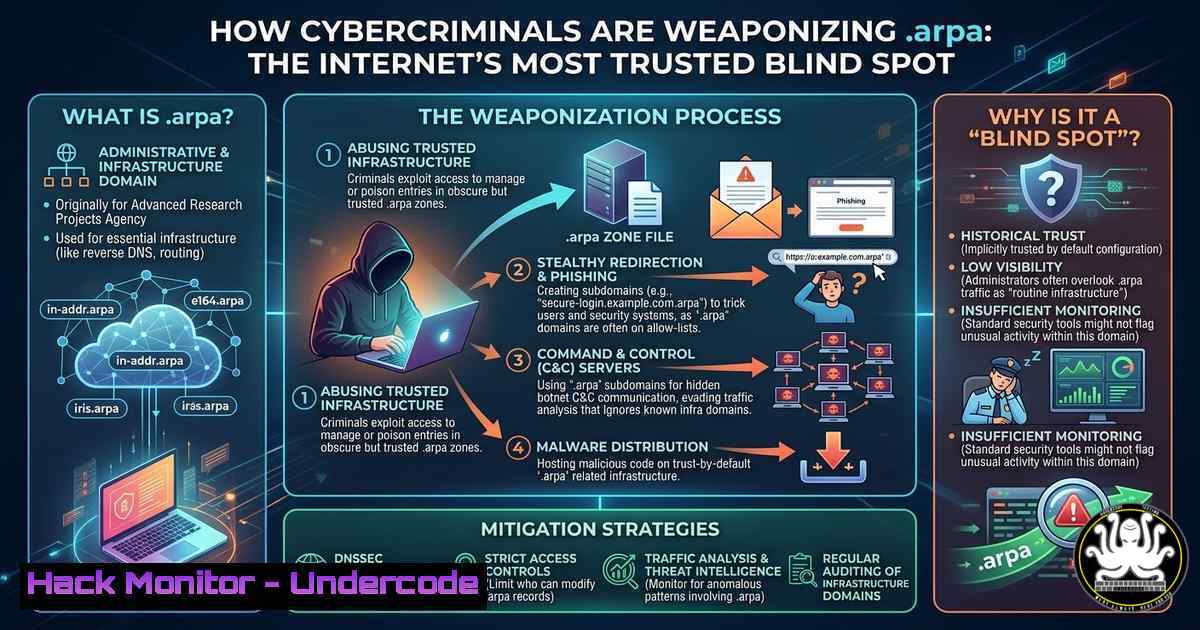
The Domain Name System (DNS) is the backbone of the internet, translating human-readable names into machine-readable IP addresses. However, a newly uncovered attack vector reveals that cybercriminals are exploiting the .arpa top-level domain—a space reserved strictly for internet infrastructure like reverse DNS lookups—to host phishing servers. Because security tools rarely scrutinize these “trusted” infrastructure domains, attackers are using IPv6 address manipulation to create legitimate-looking .arpa hostnames that bypass traditional defenses, leading to stealthy credential theft and financial fraud.
Learning Objectives:
- Understand how attackers exploit .arpa domains and IPv6 reverse DNS records to conceal phishing infrastructure.
- Learn to identify and investigate suspicious .arpa hostnames using command-line tools and DNS analysis.
- Implement detection and mitigation strategies to close this critical security blind spot.
You Should Know:
- Understanding the .arpa Exploit: From Infrastructure to Attack Vector
The .arpa domain is a special-use TLD (Top-Level Domain) designated for technical infrastructure, primarily for reverse DNS lookups (in-addr.arpa for IPv4 and ip6.arpa for IPv6). Unlike ordinary domains, .arpa names are not meant to host websites. Attackers exploit this assumption by acquiring control over IPv6 address ranges and manipulating the associated reverse DNS (PTR) records. By setting PTR records to point to a crafted .arpa hostname, they can make the domain web-resolvable and point it to phishing servers—often hosted behind major CDNs to evade IP-based blocks.
Step‑by‑step guide explaining what this does and how to use it:
To understand how an attacker sets up this infrastructure, it’s crucial to analyze how reverse DNS works. Normally, when you query an IP address, a PTR record returns a hostname. In this attack, the adversary controls the IPv6 prefix and sets a PTR record that resolves to a malicious .arpa subdomain. Here’s how to inspect such records:
Linux/macOS:
 Perform a reverse DNS lookup on an IPv6 address
dig -x 2001:db8::1

Query the PTR record specifically for an ip6.arpa domain
dig ptr 1.0.0.0.0.0.0.0.0.0.0.0.0.0.0.0.0.0.0.0.0.0.0.0.8.b.d.0.1.0.0.2.ip6.arpa

Use nslookup for reverse resolution
nslookup -type=ptr 2001:db8::1
Windows (PowerShell):
 Resolve IP to hostname
 Using nslookup
nslookup -type=ptr 2001:db8::1
If a malicious PTR record is set, it will return a domain like malicious-site.ip6.arpa, which the attacker then configures as a CNAME or AAAA record pointing to their phishing server. Defenders should monitor for web traffic to `.arpa` domains—a clear anomaly—and inspect PTR records for newly observed IPv6 ranges.
- Detecting Malicious .arpa Activity with SIEM and Log Analysis
Traditional security tools often ignore `.arpa` domains in web traffic because they are considered infrastructure. To detect this abuse, security teams must proactively configure monitoring for these domains. Attackers often use CDNs (like Cloudflare or Fastly) to hide the true origin of the phishing server, making the `.arpa` domain the only visible indicator.
Step‑by‑step guide explaining what this does and how to use it:
Implement log aggregation and SIEM rules to flag any HTTP/HTTPS request where the `Host` header or requested domain contains .arpa. Additionally, monitor DNS logs for unusual PTR record queries or resolutions.
Example Splunk Query:
index=web sourcetype=access_log "Host: .arpa"
| stats count by client_ip, host
Example ELK/KQL Query:
// Kibana/Lens
host.keyword: .arpa

// Microsoft Sentinel KQL
WebProxyLogs
| where Url contains ".arpa"
| summarize count() by ClientIP, Url
Linux Command to Monitor Live DNS Queries:
 Monitor DNS traffic for .arpa queries
sudo tcpdump -i any -n port 53 | grep -i ".arpa"
Integrate these rules into your alerting pipeline. A single request to a `.arpa` domain from an internal host could indicate a user clicking a phishing link, while outbound requests to `.arpa` from a server might signal compromised infrastructure.
3. Mitigation: Blocking and Hardening Against DNS Abuse
Since `.arpa` domains should never be used for web services, organizations can implement strict network-level controls to prevent access. This involves deploying firewall rules, DNS filtering, and updating proxy configurations to block all `.arpa` traffic unless explicitly required for infrastructure purposes (like internal reverse DNS).
Step‑by‑step guide explaining what this does and how to use it:
Firewall Rule (iptables example):
 Block outbound HTTP/HTTPS to .arpa domains via DNS filtering
 This requires a DNS sinkhole, but a basic approach is to block based on resolved IPs
 For a more robust solution, use DNS filtering services.

Alternatively, block at the application layer with Squid proxy:
 In squid.conf add:
acl arpa_domains dstdomain .arpa
http_access deny arpa_domains
DNS Sinkhole with Pi-hole or BIND:
- Add a local zone for `.arpa` to resolve to a sinkhole IP (e.g., 0.0.0.0) to prevent resolution.
- In BIND, create a zone file:
zone "arpa" {
type master;
file "/etc/bind/db.arpa-block";
};
And in `db.arpa-block`:
$TTL 86400
@ IN SOA localhost. root.localhost. (1 604800 86400 2419200 86400)
@ IN NS localhost.
 IN A 0.0.0.0
For cloud environments, implement AWS Network Firewall or Azure Firewall rules to deny egress traffic to any domain ending in .arpa.
- API Security: Automating Threat Intelligence for .arpa Abuse
To stay ahead of attackers, security teams should automate the collection and analysis of newly observed `.arpa` hostnames. This involves using threat intelligence feeds, passive DNS databases, and APIs to correlate PTR records with malicious activity.
Step‑by‑step guide explaining what this does and how to use it:
Python Script to Query VirusTotal or SecurityTrails for .arpa Domains:
import requests

Example: Querying VirusTotal for .arpa domain reports
api_key = "YOUR_API_KEY"
domain = "malicious-site.ip6.arpa"
url = f"https://www.virustotal.com/api/v3/domains/{domain}"
headers = {"x-apikey": api_key}

response = requests.get(url, headers=headers)
if response.status_code == 200:
data = response.json()
if data['data']['attributes']['last_analysis_stats']['malicious'] > 0:
print(f"Alert: {domain} is flagged as malicious!")
Using Passive DNS (CIRCL.lu):
curl -s "https://www.circl.lu/pdns/query/ip6.arpa" | jq '.[] | select(.rrtype=="PTR")'
Integrate these scripts into a scheduled job (e.g., cron or Jenkins) to automatically alert on new `.arpa` PTR records associated with your IP space or observed in external intelligence feeds.
5. Vulnerability Exploitation and Mitigation in Cloud Environments
Cloud misconfigurations are a primary enabler for this attack. If an organization’s cloud provider allows tenants to control reverse DNS for their IPv6 ranges without proper verification, attackers can claim unused IP space and set arbitrary PTR records. Mitigation involves strict IAM policies and using cloud-native security tools.
Step‑by‑step guide explaining what this does and how to use it:
AWS Hardening:
- Review IAM policies to ensure only authorized roles can modify EC2 reverse DNS (via
ec2:ModifyNetworkInterfaceAttribute). - Enable AWS Shield Advanced and GuardDuty to monitor for suspicious DNS patterns.
- Use AWS Config rules to detect when reverse DNS records are modified for non-approved IP ranges.
Azure Hardening:
- Restrict permissions for modifying public IP address reverse DNS via Azure Policy.
- Monitor Azure DNS logs for changes to PTR records.
- Deploy Azure Firewall with Threat Intelligence-based filtering to block known malicious domains.
Command to Check Reverse DNS in AWS CLI:
aws ec2 describe-network-interfaces --query 'NetworkInterfaces[].Association.PublicDnsName' --output table
What Undercode Say:
- Key Takeaway 1: The abuse of `.arpa` domains reveals a critical gap in traditional security models that assume infrastructure domains are inherently safe.
- Key Takeaway 2: Proactive detection requires shifting left—monitoring for `.arpa` in HTTP traffic, DNS logs, and PTR records—and implementing strict outbound filtering.
- Key Takeaway 3: Cloud environments must enforce least privilege for reverse DNS configuration to prevent attackers from weaponizing unused IPv6 space.
This attack vector demonstrates a sophisticated understanding of DNS fundamentals and trust relationships. As defenders, we must recalibrate our monitoring to include the very plumbing of the internet. The use of `.arpa` for phishing is not just a technical exploit—it’s a psychological one, leveraging the assumption that “infrastructure” equals “benign.” By combining DNS analysis, SIEM correlation, and automated threat intelligence, organizations can close this blind spot. The era of ignoring `.arpa` is over; it’s now a front line in the battle against credential theft.
Prediction:
As detection for traditional phishing domains improves, attackers will continue to pivot to even more obscure and trusted namespaces. Expect to see increased abuse of other special-use TLDs (like .local, .internal, and .example) and deeper manipulation of DNSSEC and encrypted DNS protocols (DoH/DoT) to hide malicious infrastructure. Security tools will need to evolve beyond domain reputation scoring to incorporate infrastructure context, including reverse DNS analysis and IPv6 space ownership validation, as standard detection mechanisms.
▶️ Related Video (88% Match):
🎯Let’s Practice For Free:
IT/Security Reporter URL:
Reported By: Andy Jenkinson – Hackers Feeds
Extra Hub: Undercode MoN
Basic Verification: Pass ✅


