
Listen to this Post
Introduction:
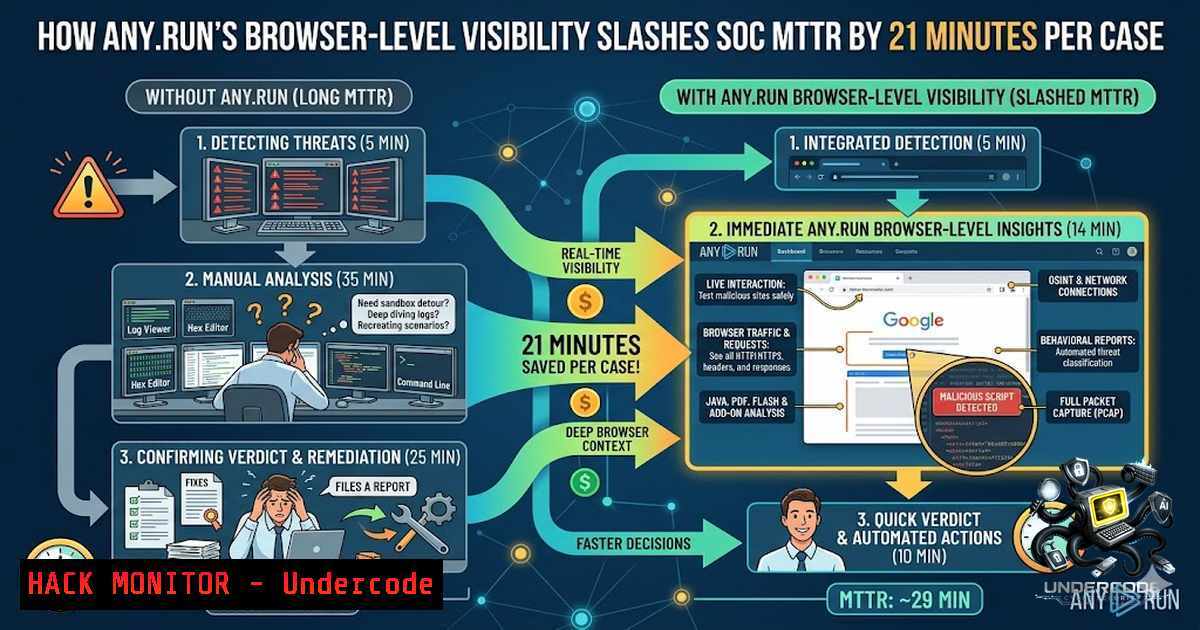
Modern Security Operations Centers (SOCs) are drowning in alerts while attackers grow increasingly sophisticated. The fundamental challenge isn’t a lack of tools—it’s a lack of visibility. Traditional security solutions rely on static analysis and fragmented workflows that leave critical blind spots, particularly in encrypted traffic and dynamic phishing pages. ANY.RUN’s Interactive Sandbox addresses this by delivering browser-level visibility that lets analysts observe threats in real time as they unfold, cutting mean time to respond (MTTR) by up to 21 minutes per case and boosting detection rates by over 36%.
Learning Objectives:
- Understand how browser-level visibility in interactive sandboxes transforms phishing detection and incident response
- Master the technical implementation of automatic SSL decryption for inspecting encrypted HTTPS traffic
- Learn to integrate sandbox analysis with SIEM, SOAR, and XDR platforms via API and SDK
- Acquire hands-on commands and techniques for analyzing malware across Windows, Linux, and Android environments
- Develop actionable workflows to reduce alert fatigue and accelerate Tier 1 triage
- The Browser-Level Visibility Revolution: Moving Beyond Static Analysis
Modern phishing campaigns are no longer simple static pages. Attackers deploy dynamic JavaScript, layered redirect chains, iframe injections, CAPTCHA-protected landing pages, and credential-harvesting flows that evolve in real time. Traditional URL scanners capture only a screenshot of the final page, missing the complete attack path—redirects, scripts, DOM changes, and intermediate states that reveal malicious intent.
ANY.RUN’s in-browser data inspection changes this paradigm by executing suspicious URLs in a real browser environment and capturing every interaction: redirects, script execution, form submissions, and DOM manipulations. This dynamic browser-level visibility gives SOC analysts the full attack chain from phishing lure to payload within seconds—context that previously took up to an hour to assemble manually.
Step-by-Step: Analyzing a Suspicious URL with Browser-Level Visibility
- Submit the URL – Paste the suspicious link into ANY.RUN’s Interactive Sandbox interface
- Select the environment – Choose from Windows, Linux (Ubuntu/Debian), macOS, or Android VMs
- Observe real-time execution – Watch the page load, scripts execute, and redirects fire in your browser
- Inspect the full context – Review captured redirect chains, DOM changes, script activity, and user-facing content in a unified view
- Extract IOCs – Automatically collect domains, IPs, file hashes, and process artifacts
- Generate the report – Export findings in MITRE ATT&CK format, STIX/MISP, or custom text reports
Linux Command for Manual URL Analysis (Supplemental):
 Extract all redirect locations from a URL using curl
curl -IL https://suspicious-domain[.]com 2>/dev/null | grep -i location

Analyze JavaScript obfuscation
js-beautify suspicious.js | grep -E "eval|atob|decode|unescape"

Extract domains from PCAP
tshark -r capture.pcap -Y "dns.qry.name" -T fields -e dns.qry.name | sort -u
Windows PowerShell Alternative:
 Resolve DNS and trace routing
Resolve-DnsName suspicious-domain[.]com | fl
Test-1etConnection suspicious-domain[.]com -TraceRoute

Extract URLs from a suspicious file
Select-String -Path .\suspicious.html -Pattern "https?://[^\s\"']+" | ForEach-Object { $_.Matches.Value }
2. Automatic SSL Decryption: Unlocking Encrypted Phishing Traffic
Encrypted HTTPS traffic remains one of the largest obstacles in phishing detection. Credential theft, redirect chains, and token-based attacks hide inside traffic that appears legitimate, forcing SOC teams to spend excessive time on validation. Traditional man-in-the-middle (MITM) interception is resource-intensive and can disrupt realistic analysis.
ANY.RUN’s automatic SSL decryption solves this by extracting encryption keys directly from process memory during sandbox execution. The sandbox detonates the sample, pulls session keys from memory, decrypts traffic internally, and applies Suricata IDS rules and detection signatures immediately. This approach achieved a 5x increase in SSL-decrypted phishing detection and added 60,000+ confirmed malicious URLs to Threat Intelligence Lookup monthly.
How Automatic SSL Decryption Works (Technical Deep Dive):
- Sample detonation – The suspicious file or URL executes in an isolated VM
- Process memory extraction – The sandbox hooks into the browser or application process to retrieve session keys
- Internal decryption – HTTPS traffic is decrypted using extracted keys without external interception
- Rule application – Suricata rules, YARA signatures, and behavior detections run against plaintext traffic
- IOC generation – Indicators are extracted and made available for SIEM/SOAR integration
Validating SSL/TLS Security Posture (Linux):
 Test SSL/TLS configuration of a suspicious domain
openssl s_client -connect suspicious-domain[.]com:443 -servername suspicious-domain[.]com -showcerts </dev/null

Check for weak ciphers
nmap --script ssl-enum-ciphers -p 443 suspicious-domain[.]com

Extract certificate details
echo | openssl s_client -servername suspicious-domain[.]com -connect suspicious-domain[.]com:443 2>/dev/null | openssl x509 -text -1oout
Windows Command for Certificate Inspection:
 Retrieve SSL certificate chain
[System.Net.ServicePointManager]::ServerCertificateValidationCallback = {$true}
$req = [System.Net.WebRequest]::Create("https://suspicious-domain[.]com")
$req.GetResponse() | Out-1ull
$req.ServicePoint.Certificate | fl
- API-Driven Integration: Connecting Sandbox Intelligence to Your SOC Stack
Manual data transfer between security tools creates delays and introduces errors. ANY.RUN addresses this through a comprehensive API, Python SDK, and pre-built connectors for SIEM, SOAR, EDR, and TIP platforms. The sandbox integrates with Splunk, Rapid7 InsightIDR, Cortex XSOAR, and other major platforms, enabling automated submission, analysis, and enrichment workflows.
The automated mode can fully detonate complex phishing attacks independently—including solving CAPTCHAs and scanning QR codes—reducing Tier 1 workload by up to 20%.
Python SDK Integration Example:
from anyrun_sdk import AnyRunSandbox

Initialize the sandbox client
client = AnyRunSandbox(api_key="YOUR_API_KEY")

Submit a file for analysis
task = client.submit_file(
file_path="./suspicious_sample.exe",
os_type="windows",
environment="Windows 10"
)

Monitor analysis progress
while not task.is_complete():
time.sleep(5)

Retrieve results
report = task.get_report()
iocs = report.get_indicators()

Export to SIEM format
for indicator in iocs:
print(f"{indicator.type}: {indicator.value}")
Cortex XSOAR Playbook Integration:
 ANY.RUN detonate file playbook snippet (Linux environment)
"""Performs ANY.RUN API call to verify integration is operational"""
try:
with BaseSandboxConnector(get_authentication(params)) as connector:
connector.check_authorization()
except Exception as e:
return_error(f"ANY.RUN authentication failed: {str(e)}")
SIEM Enrichment via API (Splunk Example):
 Query ANY.RUN TI Lookup for IOC enrichment
curl -X GET "https://api.any.run/v1/ti-lookup/indicator?value=malicious-domain[.]com" \
-H "Authorization: Api-Key YOUR_API_KEY" \
-H "Content-Type: application/json"
- Cross-Platform Threat Analysis: Windows, Linux, macOS, and Android
Modern enterprises operate across diverse environments, and attackers target all of them. ANY.RUN supports analysis across Windows (7, 10, 11, Server), Linux (Ubuntu, Debian), macOS, and Android (ARM-based) VMs. This cross-platform capability ensures SOC teams can investigate threats regardless of the target operating system.
Linux Malware Analysis Commands (Within Sandbox Environment):
 Monitor process activity in real time
ps aux --sort=-%mem | head -20

Track file system changes
inotifywait -m -r /tmp /var/tmp /home 2>/dev/null

Inspect network connections
ss -tunap | grep ESTABLISHED
lsof -i -P -1 | grep LISTEN

Check for persistence mechanisms
crontab -l 2>/dev/null
cat /etc/cron.d/ 2>/dev/null
systemctl list-unit-files --state=enabled

Analyze ELF binaries
file suspicious_elf
strings suspicious_elf | grep -E "http|https|.com|.org|.net"
ldd suspicious_elf  Check library dependencies
strace -f -e trace=network ./suspicious_elf 2>&1
Windows Malware Analysis Commands (Within Sandbox):
:: Monitor running processes
tasklist /v /fo table

:: Check network connections
netstat -ano | findstr ESTABLISHED

:: Examine scheduled tasks
schtasks /query /fo LIST /v

:: Check Windows Registry for persistence
reg query HKLM\Software\Microsoft\Windows\CurrentVersion\Run
reg query HKCU\Software\Microsoft\Windows\CurrentVersion\Run

:: Analyze PE files
dumpbin /headers suspicious.exe
dumpbin /imports suspicious.exe
Android APK Analysis:
 Decompile APK for static analysis
apktool d suspicious.apk -o decompiled/

Extract manifest permissions
aapt dump permissions suspicious.apk

Analyze dex code
dex2jar suspicious.apk -o suspicious.jar
jd-gui suspicious.jar  GUI decompilation
5. Automated Interactivity: Solving CAPTCHAs and Bypassing Evasion
Evasive malware and phishing pages increasingly use CAPTCHAs, QR codes, and multi-stage triggers to bypass automated scanners. ANY.RUN’s automated interactivity mode handles these challenges programmatically, detonating complex attacks without manual intervention.
Automated Interactivity Workflow:
- Submit the sample – File, URL, or QR code enters the sandbox
- CAPTCHA detection – The system identifies CAPTCHA-protected pages
- Automated solving – CAPTCHA challenges are resolved programmatically
- Chain progression – The attack chain continues through redirects and payload delivery
- Full visibility – Complete attack chain is captured and reported
Manual CAPTCHA Bypass Analysis (Supplemental):
 Python script to identify CAPTCHA-protected phishing pages
import requests
from bs4 import BeautifulSoup

def check_captcha(url):
response = requests.get(url, verify=False)
soup = BeautifulSoup(response.text, 'html.parser')

Common CAPTCHA indicators
captcha_indicators = ['g-recaptcha', 'h-captcha', 'captcha', 'verify']
for indicator in captcha_indicators:
if indicator in response.text.lower():
print(f"[!] CAPTCHA detected: {indicator}")
return True
return False
6. Threat Intelligence Enrichment and IOC Extraction
Detection doesn’t end with a single analysis. Attackers constantly rotate infrastructure, requiring continuous intelligence updates. ANY.RUN’s Threat Intelligence Lookup provides access to 60,000+ confirmed malicious URLs added monthly, with YARA Search capabilities for advanced hunting.
IOC Extraction Commands:
 Extract domains from sandbox PCAP
tshark -r analysis.pcap -Y "dns.flags.response == 1" -T fields -e dns.qry.name | sort -u

Extract IPs from network traffic
tshark -r analysis.pcap -T fields -e ip.src -e ip.dst | sort -u

Generate YARA rule from extracted patterns
cat > suspicious.yara << 'EOF'
rule SuspiciousBehavior {
strings:
$url1 = "malicious-domain[.]com" nocase
$url2 = "phishing-kit[.]xyz" nocase
$reg_key = "Software\Microsoft\Windows\CurrentVersion\Run" wide
condition:
any of them
}
EOF

Scan with YARA
yara -r suspicious.yara /path/to/suspicious/files/
MITRE ATT&CK Mapping (Extracted from Sandbox Reports):
- T1566.001 – Phishing: Spearphishing Attachment
- T1566.002 – Phishing: Spearphishing Link
- T1059.001 – Command and Scripting Interpreter: PowerShell
- T1071.001 – Application Layer Protocol: Web Protocols
- T1556 – Modify Authentication Process
What Undercode Say:
- Browser-level visibility is the new SOC superpower – Static analysis and screenshots are no longer sufficient. Real-time browser execution reveals the complete attack chain that attackers rely on, from redirects to credential harvesting.
-
SSL decryption at the sandbox level changes the game – By extracting keys from process memory rather than using MITM, ANY.RUN achieves scalable phishing detection without disrupting realistic analysis environments.
-
Automation doesn’t replace analysts; it empowers them – Automated interactivity handles CAPTCHAs and QR codes, reducing Tier 1 workload by 20% and enabling junior analysts to handle complex cases independently.
-
Cross-platform coverage is non-1egotiable – With support for Windows, Linux, macOS, and Android, SOC teams can investigate threats across the entire enterprise attack surface without switching tools.
-
Integration is the force multiplier – API-driven connections to SIEM, SOAR, and XDR platforms transform sandbox intelligence from isolated findings into actionable, automated defense mechanisms.
Prediction:
-
+1 Browser-level visibility will become the baseline expectation for all security analysis platforms within 18–24 months, rendering static URL scanners obsolete.
-
+1 Automated SSL decryption will drive a 40–50% reduction in undetected phishing incidents as more sandbox providers adopt memory-based key extraction techniques.
-
-1 Attackers will respond by developing more sophisticated anti-sandbox techniques, including environment fingerprinting and time-based payloads, creating an ongoing arms race.
-
+1 API-driven security orchestration will continue to accelerate, with 70%+ of enterprise SOCs adopting automated sandbox-to-SIEM workflows by 2027.
-
-1 Organizations that fail to adopt interactive sandbox analysis will face widening detection gaps, with missed incident rates increasing by 25–30% annually.
-
+1 The democratization of advanced threat analysis through browser-based interfaces will enable Tier 1 analysts to perform complex investigations that previously required senior expertise, addressing the global cybersecurity talent shortage.
▶️ Related Video (82% Match):
https://www.youtube.com/watch?v=0Tb7g42GXnk
🎯Let’s Practice For Free:
🎓 Live Courses & Certifications:
Join Undercode Academy for Verified Certifications
🚀 Request a Custom Project:
Secure, high-velocity infrastructure and disruptive technological engineering. Contact our engineering team for high-tier development and proprietary systems:
[email protected]
💎 Smart Architecture | 🛡️ Secure by Design | ⭐ Trusted by Thousands
IT/Security Reporter URL:
Reported By: Give Your – Hackers Feeds
Extra Hub: Undercode MoN
Basic Verification: Pass ✅


