Listen to this Post
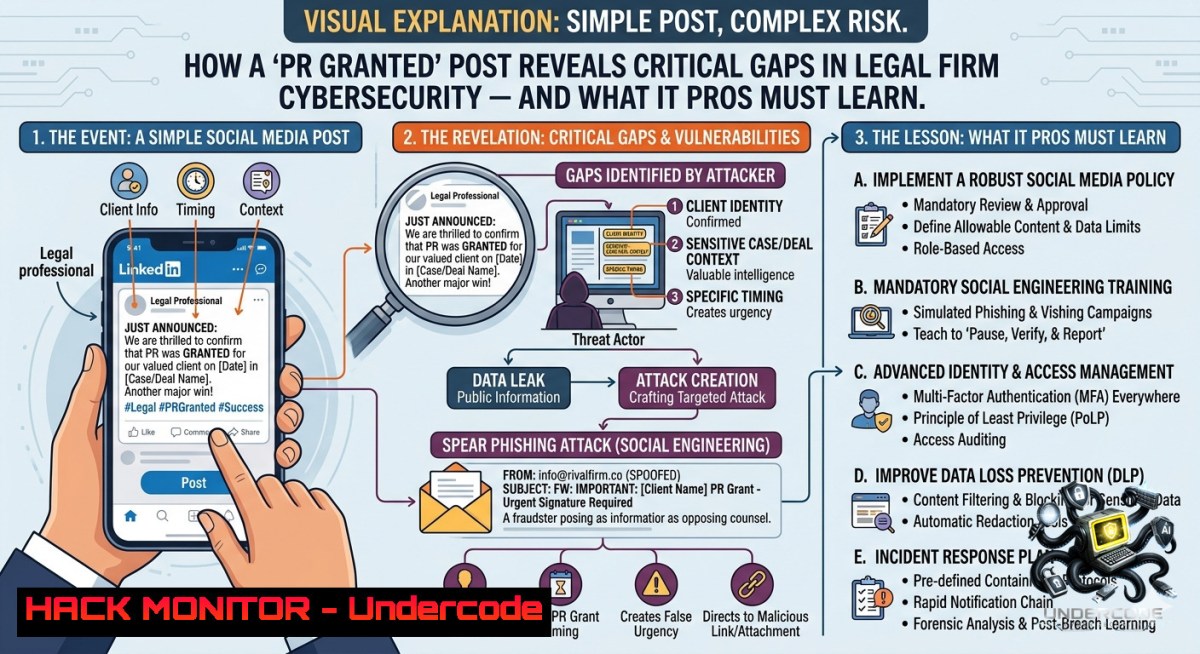
Introduction:
The emotional celebration of an Australian Permanent Residency grant, as shared by Aurelia Legal Pty Ltd, masks an often-overlooked reality: law firms handling sensitive immigration data are prime targets for cyber threats. Client documents include passports, financial records, birth certificates, and personal identifiers – a goldmine for identity thieves and nation-state actors. This article extracts technical lessons from such seemingly innocuous social media posts, focusing on secure document handling, API security for visa application systems, and AI-driven threat detection for legal practices.
Learning Objectives:
- Implement end-to-end encryption for client document workflows using Linux and Windows native tools.
- Harden cloud-based case management systems against data exfiltration via misconfigured APIs.
- Deploy AI-based anomaly detection to flag unauthorized access to immigration case files.
You Should Know:
1. Encrypting Sensitive Client Documents Before Cloud Upload
Legal firms often store scanned passports, employment contracts, and bank statements in cloud drives like SharePoint or Google Drive. Without client-side encryption, a breached cloud account exposes everything.
What this does:
Encrypts files locally so that even if the cloud provider is compromised or credentials are stolen, the data remains unreadable without the decryption key.
Step‑by‑step guide for Linux (using GPG):
- Install GPG: `sudo apt install gpg -y` (Debian/Ubuntu) or `sudo dnf install gnupg2` (RHEL/Fedora).
- Generate a key pair for the firm: `gpg –full-generate-key` (choose RSA 4096).
- Export the public key to share with clients:
gpg --export -a "Aurelia Legal" > aurelia_public.asc. - Encrypt a client’s PDF:
gpg --encrypt --recipient "[email protected]" --output document.pdf.gpg document.pdf. - Upload only the `.gpg` file to the cloud. Decryption on a secure workstation:
gpg --decrypt document.pdf.gpg > document.pdf.
Step‑by‑step guide for Windows (using built-in EFS or VeraCrypt):
– EFS (Enterprise edition): Right-click folder → Properties → Advanced → Check “Encrypt contents to secure data” → Apply. Backup the encryption certificate via certmgr.msc.
– VeraCrypt (free, cross-platform):
1. Download VeraCrypt.
- Create a 1GB encrypted container: Volumes → Create New Volume → Standard VeraCrypt volume → Select file path (e.g.,
C:\ClientData\Bryan_Lim.hc) → Encryption AES-SHA-512 → Set password. - Mount the container as drive Z: and move all client documents inside.
4. After work, dismount: VeraCrypt → Dismount.
API Security for Document Submission:
If the firm uses a web portal for clients to upload documents, ensure the API endpoint validates file types and size, and never exposes S3 bucket URLs directly. Example insecure request:
`POST /upload?bucket=client-docs&file=passport.pdf`
Mitigation: Generate time‑limited signed URLs using AWS SDK:
import boto3
s3 = boto3.client('s3')
url = s3.generate_presigned_url('put_object', Params={'Bucket': 'secure-legal', 'Key': 'user123/passport.pdf'}, ExpiresIn=300)
Return this URL to the client instead of direct upload.
2. Hardening Case Management Systems Against Credential Harvesting
Many legal practice management software (e.g., LEAP, Actionstep, Clio) are cloud‑based and accessed via web browsers. Phishing campaigns targeting legal staff are rising.
What this does:
Implements multi‑factor authentication (MFA) enforcement, conditional access policies, and logs anomalous login patterns (e.g., from unusual geolocations or at 3 AM).
Step‑by‑step guide for Microsoft 365 (common for legal firms):
1. Enable security defaults in Azure AD: Portal → Azure Active Directory → Properties → Manage Security defaults → Enable. This forces MFA for all users.
2. Create a Conditional Access policy:
- Assign to all users.
- Cloud apps: Select your case management app (e.g., “Clio”).
- Conditions: Locations → Block untrusted IP ranges (TOR exit nodes, high‑risk countries).
- Grant: Require MFA and compliant device.
- Enable unified audit log: In Microsoft 365 Compliance center → Audit → Search audit log for events like “Failed sign‑in” and “File accessed externally”.
- For Linux workstations accessing web apps, use `openssl` to validate certificates and avoid man‑in‑the‑middle:
openssl s_client -connect your-firm.casemanager.com:443 -servername your-firm.casemanager.com
Windows PowerShell script to detect suspicious logins from Azure AD:
Install-Module -1ame MSOnline
Connect-MsolService
Get-MsolUser -All | Where-Object {$_.StrongAuthenticationRequirements -eq $null} | Set-MsolUser -StrongAuthenticationRequirements @{AuthenticationMethod = "OneWaySMS"}
Get-MsolUser -All | Select-Object UserPrincipalName,LastBadPasswordAttempt,SignInNames
Vulnerability exploitation example:
An attacker sends a fake “Visa update” email with a link to a lookalike login page (e.g., aurelialegal-okta.com). Staff credentials are stolen. Mitigation: Deploy DMARC, DKIM, and SPF records. Check existing records:
`nslookup -type=txt aurelialegal.com.au`
If missing, add SPF: `v=spf1 include:spf.protection.outlook.com -all`
3. AI‑Based Anomaly Detection for Immigration File Access
Modern SIEM tools can use unsupervised machine learning to detect unusual access patterns, such as a paralegal downloading an entire family’s 500‑page immigration history at 2 AM.
What this does:
Trains a model on normal user behavior (time of access, volume of data, type of documents) and alerts when deviations exceed a threshold.
Step‑by‑step guide using open‑source Wazuh + custom ML:
1. Install Wazuh manager on Ubuntu:
curl -s https://packages.wazuh.com/4.x/apt/key | sudo apt-key add -
echo "deb https://packages.wazuh.com/4.x/apt/ stable main" | sudo tee /etc/apt/sources.list.d/wazuh.list
sudo apt update && sudo apt install wazuh-manager
2. On Windows workstations, install Wazuh agent and monitor file access events (Event ID 4663).
3. Forward logs to a Python script using Wazuh’s integration. Example script using `scikit-learn` to detect outliers in download volume:
from sklearn.ensemble import IsolationForest
import numpy as np
 Sample historical data: [hour, file_size_kb, files]
X_train = np.array([[9,500,3],[10,1200,2],[14,800,5],[15,2500,7],[22,100,1]])
model = IsolationForest(contamination=0.1)
model.fit(X_train)
 New event
new_access = [[2, 50000, 80]]  2 AM, 50MB, 80 files
if model.predict(new_access)[bash] == -1:
print("Anomaly: Bulk download outside normal pattern")
4. Configure Wazuh to trigger an alert and block the user’s IP via firewall:
`sudo ufw deny from `
Training course recommendation:
- “AI for Cybersecurity” (Coursera – deeplearning.ai)
- “Certified AI Security Professional (CAISP)” by SecOps Institute
- Secure Deletion of Old Client Data After Visa Grant
Once a PR is granted, law firms may be legally required to retain data for a period (e.g., 7 years under Australian Privacy Act), but afterwards, it must be irreversibly destroyed to prevent future breaches.
What this does:
Overwrites deleted files multiple times to prevent forensic recovery.
Linux command for secure deletion:
`shred -vfz -1 7 /path/to/client_folder/`
– `-v` verbose, `-f` force, `-z` adds final zero overwrite, `-1 7` overwrites 7 times.
Windows command using cipher.exe (secure erase free space):
`cipher /w:C:\ClientData\Bryan_Lim` – overwrites deleted files on that drive.
For SSDs (wear‑leveling makes `shred` less effective): use ATA Secure Erase.
Boot Linux live USB and run:
sudo hdparm --user-master u --security-set-pass p /dev/sda
sudo hdparm --user-master u --security-erase p /dev/sda
- Social Media OSINT Risks – What That “PR Granted” Post Reveals
The celebratory post includes a client’s full name (“Bryan Lim”), the law firm, and the exact visa outcome. This can be used by attackers to craft spear‑phishing emails referencing the PR grant, asking Bryan to “verify his bank details for final processing.”
Mitigation for law firms:
- Avoid publishing full names of clients in success stories. Use “B.L.” or generic “Client X”.
- Redact any case numbers or application IDs.
- Implement a social media policy that requires IT review of all client‑related posts.
Technical step – search for leaked emails referencing the firm:
Use `theHarvester` on Kali Linux to find exposed addresses:
`theHarvester -d aurelialegal.com.au -b google,linkedin`
If emails appear, enforce password rotation and add them to a monitoring list in HaveIBeenPwned’s domain service.
What Undercode Say:
- Key Takeaway 1: A simple “PR granted” announcement from a legal firm exposes multiple attack vectors – client name, firm contact details, and implicit trust. IT teams must treat every public post as potential OSINT for adversaries.
- Key Takeaway 2: Combining native OS tools (GPG, shred, cipher) with cloud API hardening and AI anomaly detection creates a defense‑in‑depth strategy for sensitive legal data. No single control is sufficient.
Analysis: The legal industry lags behind finance in cybersecurity spending, yet handles equally sensitive PII. The Australian Privacy Act (APP 11) mandates reasonable steps to protect data, but “reasonable” is interpreted in court. After a breach, regulators examine whether encryption, MFA, and logging were in place. The commands and configurations above directly address these expectations. Furthermore, AI‑based detection is becoming baseline – manual log reviews cannot keep pace with 24/7 access attempts. Training staff to recognize phishing (e.g., fake “visa confirmation” links) is as critical as technical controls. Finally, data retention policies must include secure deletion; shredded files from a decade‑old PR case cannot haunt the firm later.
Prediction:
- -1: Within 24 months, a major Australian migration law firm will suffer a data breach traced to a misconfigured API endpoint, leaking thousands of visa applicant biometrics. This will trigger APRA‑style mandatory breach notification fines exceeding AUD $2M.
- +1: Law firms that adopt client‑side encryption (GPG/VeraCrypt) and AI‑driven SIEM will see cyber insurance premiums drop by 30-40%, and will use “zero‑trust” certification as a competitive differentiator in migration services.
- -1: Attackers will shift from ransomware to data‑for‑visa extortion – threatening to expose fake documentation unless the victim pays in cryptocurrency. This will push regulators to enforce real‑time scanning of all legal firm traffic.
- +1: Automated AI tools trained on immigration case patterns will reduce false positive anomaly alerts by 70%, allowing lean IT teams to focus on true threats. Open‑source frameworks like Wazuh + scikit‑learn will become standard in small legal practices.
🎯Let’s Practice For Free:
🎓 Live Courses & Certifications:
Join Undercode Academy for Verified Certifications
🚀 Request a Custom Project:
Secure, high-velocity infrastructure and disruptive technological engineering. Contact our engineering team for high-tier development and proprietary systems:
[email protected]
💎 Smart Architecture | 🛡️ Secure by Design | ⭐ Trusted by Thousands
IT/Security Reporter URL:
Reported By: Permanentresidency Australianpr – Hackers Feeds
Extra Hub: Undercode MoN
Basic Verification: Pass ✅


