Listen to this Post
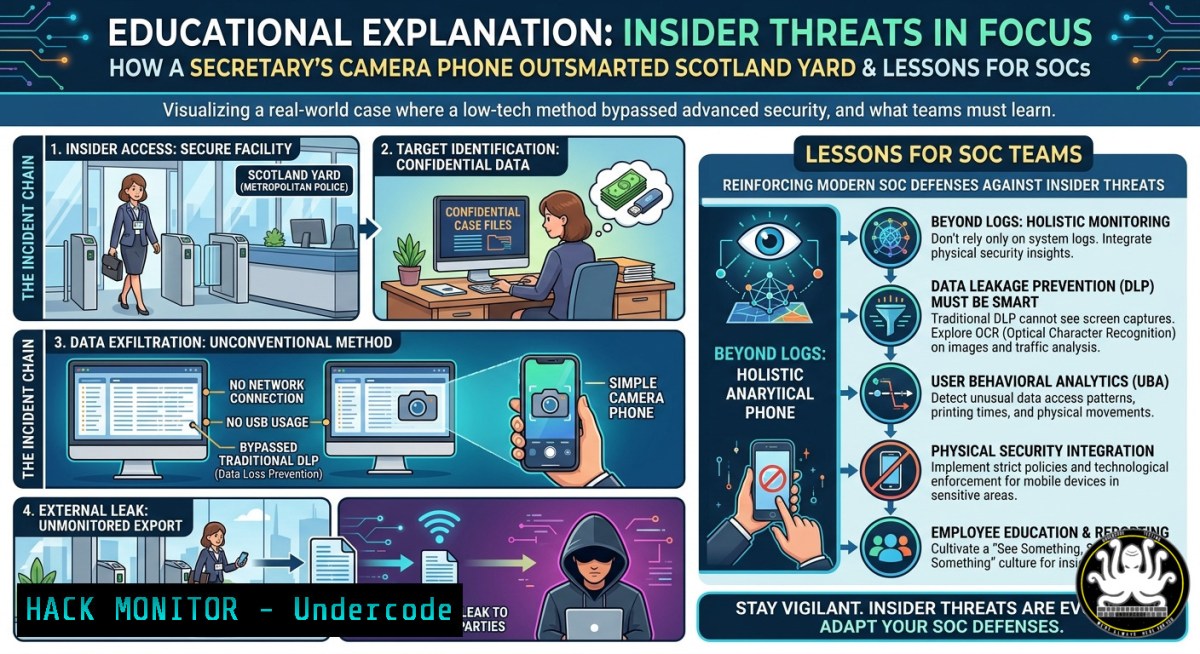
Introduction:
In 2005, an innocent man was shot dead by London police, who then fabricated a cover story. A secretary named Lana Vandenberghe, working at the police watchdog, secretly photographed internal documents exposing the lies and leaked them to the media. This real-world whistleblower case is a masterclass in insider threat tactics – using low-tech methods (a camera) to exfiltrate high-value data, bypassing digital access controls. For cybersecurity professionals, it highlights critical gaps in data loss prevention (DLP), user behavior analytics, and physical security controls around sensitive information.
Learning Objectives:
- Understand how low-tech data exfiltration (photographing screens/paper) evades traditional DLP and endpoint monitoring.
- Implement Linux/Windows commands and SIEM rules to detect anomalous file access, after-hours logins, and bulk printing or screenshot activities.
- Apply insider threat mitigation frameworks (NIST 800-53, MITRE ATT&CK TA0005 – Defense Evasion) to protect whistleblower-level data.
You Should Know:
- The Low-Tech Exfiltration That DLP Won’t Catch – And How to Stop It
Lana used her personal camera to photograph documents on her desk after hours. No USB drive, no email attachment, no network transfer – completely invisible to endpoint DLP agents. This technique maps to MITRE T1052 (Exfiltration via Physical Medium) and T1113 (Screen Capture). Most organizations focus on digital channels, ignoring analog camera risks.
Step‑by‑step guide – What you can do:
- Linux: Monitor USB device insertion (even cameras as storage) using `udevadm monitor –property` and log to
auditd. For physical camera detection, use `lsusb` to watch for unusual devices, but no direct blocking. Instead, enforce clear-desk policies and install CCTV at document handling zones. - Windows: Enable PowerShell logging to detect camera app usage:
`Get-WinEvent -FilterHashtable @{LogName=’Microsoft-Windows-Shell-Core/Operational’; ID=9706} | Where-Object {$_.Message -like ‘camera’}`
Also audit removable storage: `reg add HKLM\SOFTWARE\Policies\Microsoft\Windows\DeviceInstall\Restrictions /v DenyRemovableDevices /t REG_DWORD /d 1` - DLP Configuration: In Microsoft Purview, create a policy for “unusual exfiltration” – alert on file access times outside working hours (9PM–5AM) combined with printing or screen capture. Use sensitivity labels to watermark documents with user ID, so a photo of a paper can be traced back.
What Undercode Say:
- Low‑tech exfiltration is the top blind spot in modern SOCs. You can’t log what a camera sees.
- After‑hours file access without a corresponding digital transfer is a high‑risk indicator – treat it as suspicious even without a USB write.
- Forensic Artifacts Left by Photographing Documents – Even Without Digital Footprints
Although a camera leaves no network trail, the physical act of accessing, spreading, and photographing paper documents leaves system logs: file open events, print spooler records, and screen unlock times. Lana stayed late – that means interactive logon sessions after normal hours. The police watchdog’s failure to correlate these logs led to her going undetected for weeks.
Step‑by‑step forensic commands:
- Windows Security Event Logs (after-hour access detection):
`Get-WinEvent -FilterHashtable @{LogName=’Security’; ID=4624} | Where-Object {$_.TimeCreated.Hour -ge 20 -or $_.TimeCreated.Hour -le 5}`
Filter for logon type 2 (interactive) or 10 (remote interactive). Cross-reference with file access events (ID 4663) on sensitive file shares. - Linux (auditd rule to monitor file reads on sensitive directories):
`auditctl -w /sensitive_data/ -p r -k whistleblower_risk`
Then search: `ausearch -k whistleblower_risk –start 2025-01-01 20:00:00 –end 2025-01-02 06:00:00`
– Print spooler forensics (Windows):
`Get-WinEvent -LogName ‘Microsoft-Windows-PrintService/Operational’ | Where-Object {$_.Id -eq 307}` – shows every document printed, with user, filename, and timestamp. Lana’s documents likely were never printed (she used originals), but any anomaly in printing patterns indicates preparation for analog exfiltration.
What Undercode Say:
- After‑hours interactive logon + sequential access to multiple unrelated sensitive files = high probability of deliberate data harvesting.
- Print logs are under‑monitored. A sudden spike in print jobs or printing of HR/legal documents should trigger an immediate alert.
- Insider Threat Kill Chain – Mapping the Menezes Leak to MITRE ATT&CK
The whistleblower’s actions followed a classic insider kill chain:
– Reconnaissance (T1592): Lana observed which files crossed her desk and identified the most damning evidence.
– Collection (T1530): She photographed documents (T1113).
– Exfiltration (T1052): Physical removal of the camera from the building.
– Impact (T1565): Data leak to ITN.
Defenders can build SIEM rules for each phase.
Step‑by‑step SIEM rules (Splunk/ELK examples):
- Reconnaissance detection: Alert on unusual file listing commands (e.g., `dir /s` or `ls -laR` on sensitive shares). In Windows, enable command line logging via Group Policy:
`Computer Configuration > Administrative Templates > System > Audit Process Creation > Include command line`
Then query: `index=windows EventCode=4688 CommandLine=”dir” OR CommandLine=”ls”`
- Collection detection: Monitor for screenshot tools (Snipping Tool, Greenshot) via process creation events (4688). For Linux, audit `import` command from ImageMagick:
`auditctl -a always,exit -F arch=b64 -S execve -F path=/usr/bin/import -k screen_capture` - Exfiltration detection (physical): Use badge reader logs to track employees leaving with large bags or unusual hours. Integrate with SIEM:
`index=badge_logs action=exit after_hours= user=` – correlate with file access events just before exit.
What Undercode Say:
- Most insider threat programs focus on digital exfiltration (USB, email) and miss the camera phone vector entirely.
- Combining physical access logs with digital file activity is the only way to catch the “office photographer.”
- Cloud & API Security Parallels – The “Camera” in Your Cloud Environment
Just as a camera bypasses DLP, an unmonitored API call with a `GET` request to a cloud storage bucket can exfiltrate data without triggering typical file copy alerts. Attackers use `curl` or Python scripts from compromised laptops – no removable media needed. This is the digital equivalent of photographing a screen.
Step‑by‑step cloud hardening commands:
- Azure: Monitor for bulk download from Blob Storage using Log Analytics:
`StorageBlobLogs | where OperationName == “GetBlob” | summarize Count = count() by AccountName, UserAgent, CallerIpAddress | where Count > 100`
Create alert rule for >50 `GetBlob` operations in 5 minutes from a single IP. - AWS CloudTrail: Detect `GetObject` spikes:
`eventName = ‘GetObject’ AND userIdentity.type = ‘IAMUser’ | stats count() by sourceIPAddress, eventTime | where count > 100`
Use AWS GuardDuty for anomalous API calls – enable “Data exfiltration” findings. - API Security (Kong/NGINX): Rate-limit endpoints that return sensitive data. Example NGINX:
limit_req_zone $binary_remote_addr zone=sensitive:10m rate=10r/m;
location /api/hr-docs {
limit_req zone=sensitive burst=5;
proxy_pass http://backend;
}
What Undercode Say:
- “Camera exfiltration” in the cloud means API scraping – it’s silent, logged only as normal GET requests. You must baseline normal access volumes.
- User‑agent anomaly detection (e.g., a Python script vs. a browser) is the cloud equivalent of noticing a camera phone in a SCIF.
- Training Courses & Mitigation Playbooks – From Whistleblower to Secure Culture
The IPCC failed because they focused on punitive measures after the leak, not preventative controls. Proactive training on insider threat and secure document handling is essential. Courses should include:
- SANS SEC388: Intro to Cloud and Insider Threat Detection – covers user behavior analytics.
- MITRE Engage: Insider threat adversary emulation exercises (e.g., red team tries to exfiltrate via camera).
- ISACA’s CISM domain 3: Information Security Program Development – includes whistleblower hotlines to reduce the need for leaks.
Playbook steps to implement today:
- Clear desk policy enforcement – Use AI camera monitoring (e.g., IntelliVision) to detect unattended sensitive papers.
- Restrict after‑hours access – For non‑essential personnel, use time‑based conditional access in Azure AD:
`New-AzureADPolicy -Definition @(‘{“TenantRestrictionRules”:[{“Name”:”No after hours”,”Rule”:”(currentDateTime between 9:00 and 17:00)”}]}’)`
3. User awareness – Train staff that photographing documents is a terminal offense, but also create an anonymous ethics line so they don’t become whistleblowers.
What Undercode Say:
- A culture that punishes whistleblowers (like arresting Lana) drives leaks underground – anonymous reporting channels reduce the need for covert exfiltration.
- Technical controls alone will fail. You need a “protect the truth” policy combined with DLP, or employees will find analog workarounds.
Prediction:
As remote and hybrid work persist, camera‑based exfiltration (using personal smartphones to photograph company screens during Zoom calls) will surge. Future SOCs will deploy computer vision on webcam feeds (opt‑in, privacy‑preserving) to detect when a user photographs their own monitor. Meanwhile, AI‑driven user behavior analytics will correlate after‑hours file access with physical movement via Bluetooth badge integration. Organizations that ignore the “camera threat” will face the same public reckoning as the Metropolitan Police – exposed not by a digital hack, but by one person with a phone and a conscience.
▶️ Related Video (76% Match):
🎯Let’s Practice For Free:
IT/Security Reporter URL:
Reported By: Artur Nadolny – Hackers Feeds
Extra Hub: Undercode MoN
Basic Verification: Pass ✅
🎓 Live Courses & Certifications:
Join Undercode Academy for Verified Certifications
🚀 Request a Custom Project:
Secure, high-velocity infrastructure and disruptive technological engineering. Contact our engineering team for high-tier development and proprietary systems:
[email protected]


