Listen to this Post
Introduction:
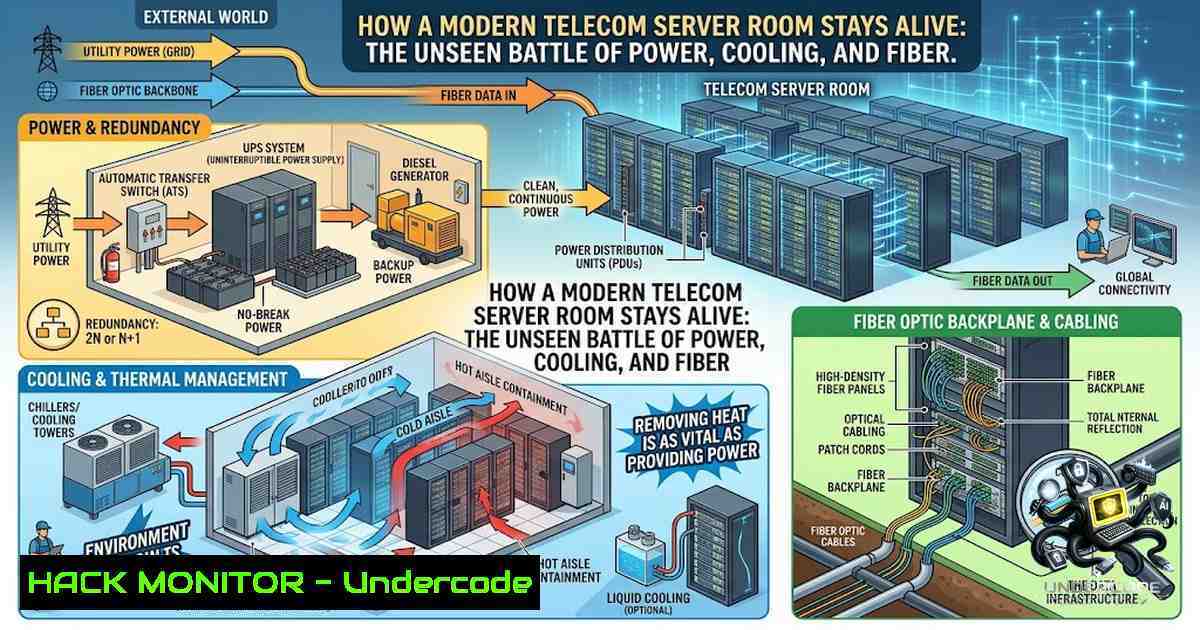
Behind every seamless video call, instant message, and cloud transaction lies a highly engineered environment that most IT professionals never see: the telecom server room. This is where -48V DC power systems, redundant battery banks, optical distribution frames, and precision cooling infrastructure converge to deliver the “five nines” (99.999%) uptime that modern digital life demands. As networks evolve toward 5G and cloud-1ative architectures, understanding the physical layer of telecom infrastructure is no longer optional—it is a core competency for any serious network engineer.
Learning Objectives:
- Master the architecture and operation of -48V DC power systems, including rectifiers, battery backup, and distribution in telecom environments
- Implement hot-aisle/cold-aisle containment and precision cooling strategies to optimize thermal efficiency and reduce energy consumption
- Design structured fiber optic cabling using Optical Distribution Frames (ODFs) with proper bend radius management and splice tray organization
- Apply physical security hardening and DCIM monitoring to protect infrastructure from both external threats and insider risks
- Powering the Beast: Understanding -48V DC Telecom Power Systems
Unlike standard data centers that run on AC power, telecom server rooms operate on a -48V DC architecture—a standard rooted in historical telephone network design that remains the gold standard today. The system consists of three core components: rectifiers that convert AC mains to DC, a distributed battery plant for backup, and a DC distribution panel that feeds equipment.
The negative voltage configuration reduces corrosion on copper cables and provides a safety advantage: -48V systems are less likely to cause electrolytic damage in wet environments. Modern central office power plants use microprocessor-controlled rectifiers that monitor battery health, voltage levels, and alarm status in real time.
Step-by-Step: Verifying Telecom Power Health
Linux Command – Monitor UPS/PDU status via SNMP:
snmpwalk -v2c -c public 192.168.1.100 1.3.6.1.4.1.318.1.1.1.1.1.1.0
 Returns UPS battery capacity, input voltage, and load percentage
Windows Command – Check power configuration and battery status:
powercfg /batteryreport
 Generates a detailed HTML report of battery health and usage history
Get-WmiObject -Class Win32_Battery | Select-Object EstimatedChargeRemaining, EstimatedRunTime
Cisco IOS Command – Verify power supply status on network devices:
show power inline
show environment power
show inventory | include PWR
Best Practice: Always size battery banks to support at least 4–8 hours of runtime at full load, with generator backup for extended outages. Follow ANSI/TIA-942 tier standards: Tier II (N+1 redundancy) provides 99.749% availability, while Tier IV (2N+2) delivers 99.995%.
2. Thermal Warfare: Cooling Strategies That Prevent Meltdown
Cooling consumes 30–40% of total telecom facility energy consumption. Poor thermal management not only wastes power but dramatically shortens equipment lifespan. The industry standard solution is hot-aisle/cold-aisle containment—a strategy that separates cold supply air from hot exhaust air to prevent mixing and recirculation.
Step-by-Step: Implementing Hot-Aisle/Cold-Aisle Containment
- Audit current airflow: Use thermal imaging or temperature sensors to identify hot spots. Deploy temperature probes at rack inlet and outlet points.
-
Arrange racks in alternating rows: Cold aisles face the front of servers (cold air intake), hot aisles face the rear (exhaust). All servers in a row must face the same direction.
-
Install aisle containment: Use ceiling-mounted panels or vertical barriers to seal cold aisles. Cold aisle containment (CAC) reduces bypass airflow and can lower mean inlet temperature by up to 5.0°C.
-
Optimize underfloor or overhead distribution: For raised-floor environments, use perforated tiles only in cold aisles. For overhead systems, direct supply vents toward cold aisles.
-
Monitor and adjust: Use Computational Fluid Dynamics (CFD) modeling to validate airflow patterns and identify recirculation zones.
Linux Command – Monitor Temperature Sensors via IPMI:
ipmitool sensor list | grep -E "Temp|Fan"
 Lists all temperature and fan speed sensors on server hardware
Windows Command – Check hardware temperatures using WMI:
Get-WmiObject -1amespace "root/WMI" -Class MSAcpi_ThermalZoneTemperature | Select-Object CurrentTemperature
 Divide result by 10 to get Celsius
Pro Tip: Maintain inlet temperature between 18–27°C and relative humidity between 40–60% to comply with ASHRAE guidelines. Never let humidity drop below 20%—static discharge risks increase dramatically.
- Fiber Optic Distribution: The Nervous System of the Server Room
Optical Distribution Frames (ODFs) are the central junction points where incoming fiber cables are spliced, terminated, and patched to network equipment. A single ODF can handle thousands of splices, making proper cable management non-1egotiable.
Step-by-Step: ODF Installation and Cable Management
- Plan cable entry and routing: Determine entry points for incoming street fiber and internal patch cords. Maintain at least a 30mm bend radius for all fiber cables to prevent microbends and signal loss.
-
Install splice trays: Fusion splice incoming fibers to pigtails inside splice trays. Use proper splice protectors and seat trays fully—never stack splices loosely.
-
Organize patch cords: Use vertical and horizontal cable managers with finger ducts to separate patch cords by color and function. Label every fiber and port clearly for quick identification.
-
Maintain service loops: Leave enough slack (1–2 meters) at each connection point to allow for future moves, adds, and changes (MACs) without re-splicing.
-
Document everything: Maintain a detailed spreadsheet or DCIM record of every fiber connection, splice location, and patch panel port assignment.
Command – Test Fiber Connectivity and Signal Strength:
 Linux - Check SFP transceiver status and optical power
ethtool -m eth0
 Look for Rx Power and Tx Power values (in dBm)

Cisco IOS - Check optical transceiver diagnostics
show interfaces transceiver details
show controllers ethernet-controller phy
Critical Note: Always use fusion splicing over mechanical splicing for permanent connections—fusion splices introduce less than 0.05 dB loss compared to 0.3–0.5 dB for mechanical splices. For high-density environments (5,000+ splices per frame), consider mass fusion splicing to reduce installation time.
4. Physical Security: Locking Down the Digital Fortress
The most sophisticated firewall is useless if an attacker gains physical access to the server room. Physical security must be layered, starting from the building perimeter down to individual rack cabinets.
Step-by-Step: Implementing a Layered Physical Security Model
- Access control: Replace physical keys with electronic access control systems using HID cards, fobs, or biometric authentication (fingerprint/iris). Log every access attempt.
-
Surveillance: Deploy CCTV cameras covering all equipment racks, entry/exit points, and aisle ways. Store video recordings for at least 90 days to support incident investigations.
-
Rack-level security: Use server racks with locking mesh doors. This provides a second layer of defense if unauthorized individuals gain room access.
-
Network-based physical security: Enable 802.1X certificate-based authentication for all devices connecting to the management network. Create individual user accounts with role-based access controls.
-
Remote access hardening: Use secure VPNs with multi-factor authentication for any remote management. Never expose management interfaces directly to the internet.
Command – Audit Physical Access Logs on Windows Server:
Get-WinEvent -LogName Security | Where-Object { $_.Id -in 4624,4625,4672 } | Select-Object TimeCreated, Id, Message -First 20
 Retrieves recent successful logins (4624), failed logins (4625), and special privileges (4672)
Linux Command – Check SSH and physical console access logs:
 Check recent SSH login attempts
sudo last -a | head -20
 Check failed authentication attempts
sudo lastb -a | head -20
 Monitor real-time authentication logs
sudo tail -f /var/log/auth.log
5. DCIM: The Command Center for Infrastructure Intelligence
Data Center Infrastructure Management (DCIM) software provides unified visibility into power, cooling, space, and connectivity across the entire facility. Modern DCIM platforms track asset lifecycles, provide real-time alerts, and enable capacity planning through automated data collection.
Step-by-Step: Deploying a DCIM Monitoring Solution
- Inventory all assets: Document every server, switch, router, firewall, PDU, and cooling unit with make, model, serial number, and physical location (rack unit position).
-
Deploy sensors: Install temperature, humidity, airflow, and power consumption sensors at strategic points—rack inlet/outlet, cold aisle, hot aisle, and return air paths.
-
Integrate with SNMP: Enable SNMP on all network devices and PDUs to pull real-time metrics into the DCIM platform.
-
Configure alerting: Set thresholds for temperature (warning at 25°C, critical at 30°C), humidity (warning <30% or >60%), and power load (warning at 80% of capacity).
-
Establish baseline and trend analysis: Use 30–90 days of data to establish normal operating ranges, then configure automated anomaly detection.
Linux Command – Set Up SNMP Monitoring:
 Install SNMP daemon on Ubuntu/Debian
sudo apt-get install snmpd snmp

Configure community string (replace 'public' with secure string)
sudo nano /etc/snmp/snmpd.conf
 Add: rocommunity public 192.168.0.0/16

Restart and enable SNMP
sudo systemctl restart snmpd
sudo systemctl enable snmpd

Test SNMP query
snmpwalk -v2c -c public localhost system
Windows Command – Enable SNMP Service:
 Install SNMP feature
Install-WindowsFeature -1ame SNMP-Service

Configure SNMP community string
Set-SnmpCommunity -CommunityName "public" -Permission ReadOnly

Restart SNMP service
Restart-Service -1ame SNMP
6. Structured Cabling: The Foundation of Troubleshooting Speed
Disorganized cabling is the number one cause of extended troubleshooting times and accidental outages in telecom rooms. A well-structured cabling system reduces mean time to repair (MTTR) and enables rapid equipment replacement without disturbing adjacent connections.
Step-by-Step: Structured Cabling Best Practices
- Plan before you pull: Document every cable run on paper or in DCIM before installation. Specify length, pathway, and termination points.
-
Use horizontal and vertical cable managers: Install managers in every rack to separate power cables from data cables and fiber from copper.
-
Color-code by function: Use standard colors—blue for horizontal cabling, orange for fiber, red for critical/cross-connect, green for network, and black for power.
-
Apply cable retention: Use Velcro straps (never zip ties—they damage cables) at regular intervals to secure bundles. Avoid power strips dangling in mid-air.
-
Label both ends: Every cable must have a unique identifier label at both ends, matching a master cable schedule.
Command – Document Network Cable Connections (LLDP/CDP):
 Linux - Enable and view LLDP neighbors
sudo apt-get install lldpd
sudo systemctl start lldpd
sudo lldpctl

Cisco IOS - View CDP neighbors and connected ports
show cdp neighbors detail
show lldp neighbors detail
Windows Command – View Network Adapter Information:
Get-1etAdapter | Select-Object Name, InterfaceDescription, LinkSpeed, Status
 Lists all network interfaces with speeds and status
Get-1etIPConfiguration | Select-Object InterfaceAlias, IPv4Address, IPv6Address
What Undercode Say:
- Key Takeaway 1: The -48V DC power architecture is not legacy technology—it is a deliberate engineering choice that provides safety, corrosion resistance, and compatibility with the vast installed base of telecom equipment. Understanding its operation, from rectifiers to battery plants, is essential for any network engineer working in carrier or enterprise environments.
-
Key Takeaway 2: Thermal management is the single largest operational expense in telecom facilities, consuming up to 40% of total energy. Hot-aisle/cold-aisle containment with proper CFD validation can reduce cooling costs by 15–25% while extending equipment life by 2–3 years. This is not just an engineering preference—it is a financial imperative.
-
Key Takeaway 3: The convergence of physical infrastructure with digital monitoring (DCIM) represents the future of telecom operations. Organizations that treat DCIM as an afterthought will struggle with capacity planning, energy efficiency, and incident response. Those that integrate DCIM from day one gain a competitive advantage in reliability and operational cost.
-
Key Takeaway 4: Physical security is often the weakest link in telecom infrastructure. Biometric access controls, 90-day CCTV retention, and 802.1X network authentication are not optional in today’s threat landscape—they are baseline requirements. A single physical breach can compromise years of cybersecurity investment.
Analysis: The modern telecom server room sits at the intersection of electrical engineering, network architecture, and facility management. The skills required to design, build, and maintain these environments are increasingly rare as the industry shifts toward software-defined networking and cloud abstraction. However, the physical layer remains the foundation upon which all digital services are built. Network engineers who understand power distribution, thermal dynamics, fiber optics, and physical security will find themselves in high demand as 5G rollouts and edge computing deployments accelerate. The integration of AI-driven DCIM platforms promises to automate many routine monitoring tasks, but the human expertise to interpret alerts, troubleshoot physical issues, and plan capacity expansions will remain irreplaceable.
Prediction:
- +1 The adoption of AI-powered DCIM platforms will reduce cooling energy consumption by an additional 10–15% over the next three years through predictive thermal modeling and dynamic airflow adjustments, making telecom facilities more sustainable and cost-effective.
-
+1 The demand for network engineers with hands-on experience in -48V power systems, fiber optics, and physical infrastructure will increase by 30–40% as 5G and edge computing deployments require more distributed, resilient physical sites.
-
-1 The skills gap in physical infrastructure management will lead to a 15–20% increase in facility-related outages over the next two years, as organizations prioritize software skills over hardware and power expertise in their hiring practices.
-
-1 Legacy telecom facilities that fail to upgrade to hot-aisle/cold-aisle containment and DCIM monitoring will see their operational costs rise 25–30% faster than peers who modernize, making them uncompetitive in the cloud-first era.
-
+1 Standardization of ODF design and fiber management will accelerate with the adoption of hyperscale-inspired best practices, reducing MAC times by 40–50% and enabling faster network reconfiguration for dynamic service delivery.
▶️ Related Video (66% Match):
https://www.youtube.com/watch?v=-WyyrKbUruA
🎯Let’s Practice For Free:
🎓 Live Courses & Certifications:
Join Undercode Academy for Verified Certifications
🚀 Request a Custom Project:
Secure, high-velocity infrastructure and disruptive technological engineering. Contact our engineering team for high-tier development and proprietary systems:
[email protected]
💎 Smart Architecture | 🛡️ Secure by Design | ⭐ Trusted by Thousands
IT/Security Reporter URL:
Reported By: Sayed Hamza – Hackers Feeds
Extra Hub: Undercode MoN
Basic Verification: Pass ✅


