
Listen to this Post
Introduction:
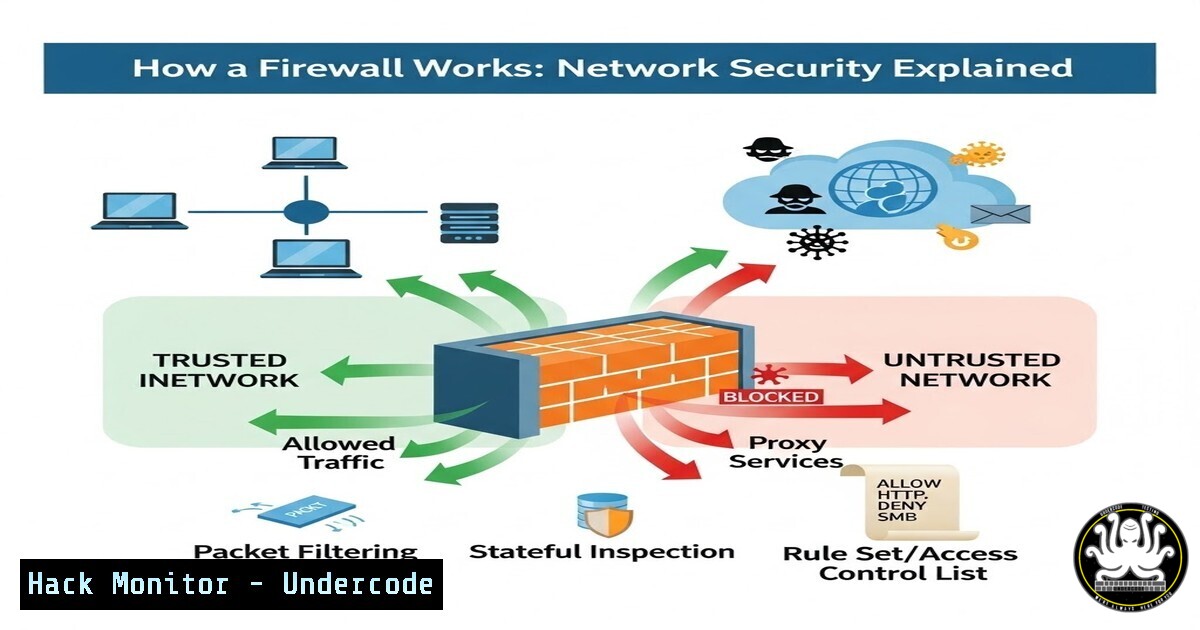
Most professionals view a firewall as a simple “block and allow” mechanism for hackers, but this oversimplification leads to misconfigured infrastructure and silent security gaps. In reality, a firewall operates as a sophisticated traffic controller that analyzes packets, maintains session states, and enforces business logic at multiple layers of the OSI model. Understanding the mechanics behind stateful inspection and deep packet inspection is critical for anyone managing modern IT environments.
Learning Objectives:
- Understand the core mechanics of stateful packet filtering versus legacy stateless approaches
- Learn how to analyze and optimize firewall rule ordering to prevent security gaps
- Master practical commands for inspecting firewall configurations across Linux, Windows, and cloud environments
- Identify the difference between shallow packet filtering and deep application-layer inspection
- Apply Zero Trust principles to firewall rule design and logging strategies
You Should Know:
- The Anatomy of Packet Filtering: From Header to Verdict
Every packet entering or leaving your network carries a passport of metadata. The firewall acts as an immigration officer, but instead of a stamp, it delivers an action based on a rule table. When a packet arrives, the firewall extracts the source IP, destination IP, port number, and protocol flag. It then traverses its rule base sequentially until it finds a match.
To see this in action on a Linux system, you can examine the current packet flow rules using iptables:
 List all rules with line numbers to understand traversal order
sudo iptables -L -n -v --line-numbers

For IPv6 rules
sudo ip6tables -L -n -v --line-numbers
On a Windows environment, the native Windows Firewall can be queried via PowerShell to understand active rules:
 Get all firewall rules with display names and enabled status
Get-NetFirewallRule | Where-Object { $_.Enabled -eq 'True' } | Format-Table Name, DisplayName, Direction, Action

View the actual filter conditions (ports, addresses) for a specific rule
Get-NetFirewallRule -DisplayGroup "File and Printer Sharing" | Get-NetFirewallPortFilter
The output reveals the “First match wins” principle. If an overly permissive rule (e.g., “Allow All”) sits above a specific restrictive rule, the restrictive rule never executes, creating a security gap.
2. Stateful Inspection: The Memory That Changed Security
Traditional stateless firewalls treated each packet in isolation. If you requested a webpage, the returning packet carrying the data looked like an unsolicited external connection and would be dropped. Stateful firewalls revolutionized this by creating a connection table. When an internal client sends a SYN packet to a web server, the firewall records this session. When the SYN-ACK returns, the firewall matches it to the existing session and allows it automatically, without needing a specific rule for return traffic.
You can observe active state tables on enterprise firewalls or even Linux systems using the `conntrack` tool:
 Install conntrack if not present (Debian/Ubuntu)
sudo apt-get install conntrack -y

View the current connection tracking table
sudo conntrack -L

Watch the table live as connections are established and torn down
sudo conntrack -E
On a Fortinet or pfSense appliance, the states table is visible via the web GUI or CLI. For pfSense:
 View states in pfSense console or SSH
pfctl -s states
This demonstrates that a firewall does not just block; it remembers conversations to ensure legitimate traffic flows seamlessly.
- Deep Packet Inspection (DPI) and Application Layer Control
Modern threats hide within allowed protocols. A malware command-and-control channel often uses HTTPS on port 443, which basic filtering would allow. DPI forces the firewall to reassemble packets and look inside the application data. It verifies that traffic on port 443 is truly encrypted web traffic (TLS handshake) and not an SSH tunnel or plaintext garbage.
In Linux, you can simulate application layer inspection using `nDPI` or `L7-filter` (legacy), but a practical approach is using `tcpdump` to capture traffic and analyze the payload manually:
 Capture HTTP traffic (port 80) and show packet payload in ASCII
sudo tcpdump -i eth0 -A -s 0 port 80

For HTTPS, you see only encrypted data, but DPI firewalls would see the TLS handshake
sudo tcpdump -i eth0 -v -s 0 port 443
In a cloud environment like AWS, Network Firewalls or Gateway Load Balancers can perform DPI. You can test this by attempting to exfiltrate data via DNS tunneling; a DPI-enabled firewall would detect the abnormal DNS query sizes and patterns, even if the traffic leaves via allowed port 53.
4. Rule Base Optimization and Zero Trust Architecture
A bloated rule base with thousands of “Any-Any” rules is a liability. The principle of least privilege applies to firewall rules as much as it does to user permissions. You must prune rules, remove objects that no longer exist, and ensure rules are as specific as possible.
For Windows Firewall with Advanced Security, you can audit rule usage via PowerShell:
 Find all disabled rules that can be cleaned up
Get-NetFirewallRule | Where-Object { $_.Enabled -eq 'False' }

Analyze rules that are overly permissive (remote address any, all ports)
Get-NetFirewallRule | Where-Object { $<em>.Direction -eq 'Inbound' -and $</em>.Action -eq 'Allow' } | Get-NetFirewallAddressFilter | Where-Object { $_.RemoteAddress -contains 'Any' }
For Linux iptables, you can save the current ruleset to a file for auditing:
 Dump current rules to a file
sudo iptables-save > ~/firewall_rules_backup.txt

Search for rules allowing all traffic (0.0.0.0/0)
grep -i "0.0.0.0/0" ~/firewall_rules_backup.txt
In a Zero Trust model, you would implement micro-segmentation, where firewalls (or host-based firewalls like Windows Defender Firewall with Advanced Security) only allow traffic between specific applications and specific servers, not entire subnets.
5. Logging, Monitoring, and Blind Spot Elimination
“No logging = blind defense.” Firewall logs are the only way to verify that your rules are doing what you intend, and to detect failed intrusion attempts. On Linux, you can monitor firewall logs in real-time:
 Monitor kernel logs for iptables messages (if logging is enabled via LOG target)
sudo tail -f /var/log/kern.log | grep "IN="

For UFW (Uncomplicated Firewall) logs
sudo tail -f /var/log/ufw.log
On Windows, you can enable firewall logging via GUI or PowerShell:
 Set the log file location and size for the public profile
Set-NetFirewallProfile -Profile Public -LogFileName %systemroot%\System32\LogFiles\Firewall\pfirewall.log -LogMaxSizeKilobytes 4096 -LogAllowed True -LogBlocked True
You can then parse this log file to see dropped packets, which often indicate scanning activity or misconfigured clients.
What Undercode Say:
- Context is King: A firewall is not a magic shield but a reflection of your security architecture. Poorly designed rules create gaps that technology cannot fix.
- Visibility Trumps Blocking: The primary value of a modern firewall lies in its ability to log and analyze traffic patterns. Without logs, you are defending blind.
- Statefulness is Expected: If your firewall solution doesn’t track session state, it is obsolete. Ensure your security stack leverages stateful inspection and moves toward application-layer awareness.
The fundamental takeaway is that firewalls enforce policy, but they do not create it. The architect designing the rule base holds more power over security outcomes than the hardware vendor. As networks become more encrypted and distributed, the shift toward identity-based and cloud-native firewalls will accelerate, but the core principles of packet analysis, state tracking, and rule order will remain eternal.
Prediction:
As AI-driven network analysis tools mature, firewalls will evolve from reactive “rule-checkers” to predictive “behavior-analyzers.” We will see a decline in static port-based rules and a rise in dynamic policies that adapt based on user behavior and threat intelligence feeds. However, this will also introduce complexity in troubleshooting, making the foundational knowledge of how traffic flows through a stateful device more critical than ever. The firewall of the future will be less of a gate and more of an autonomous traffic controller that predicts the destination before the packet even arrives.
▶️ Related Video (86% Match):
🎯Let’s Practice For Free:
IT/Security Reporter URL:
Reported By: Abhishek8626 Firewall – Hackers Feeds
Extra Hub: Undercode MoN
Basic Verification: Pass ✅


