Listen to this Post
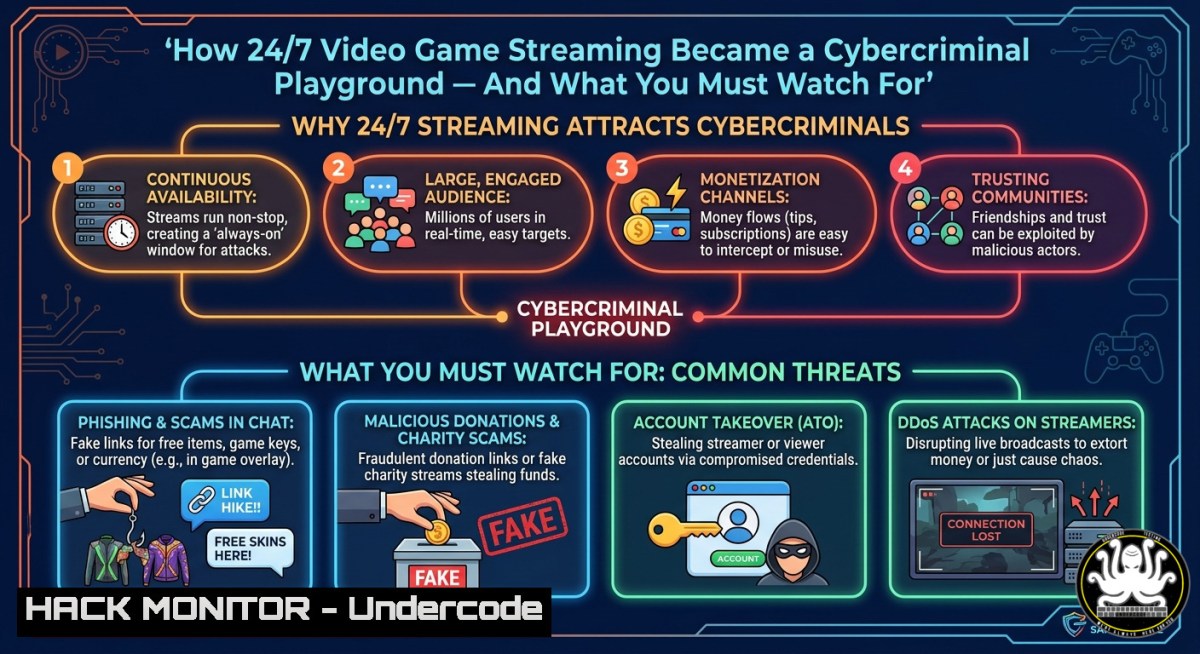
Introduction:
The rapid rise of always-on video game streaming platforms has introduced new attack surfaces for cybercriminals, from credential harvesting via fake “free game” lures to DDoS attacks on live broadcasts. While “24/7 Video Game” channels promise endless entertainment, they also attract malicious actors who exploit viewer trust and platform APIs. Understanding these risks is critical for both gamers and IT professionals managing gaming infrastructure.
Learning Objectives:
- Identify common cybersecurity threats targeting live game streaming platforms and their viewers.
- Implement network-level and host-based mitigations using Linux/Windows commands to protect against streaming-related exploits.
- Apply API security best practices and cloud hardening techniques for gaming backend services.
You Should Know:
1. Detecting and Blocking Malicious Streaming Advertisements
Many “24/7” gaming streams inject malvertising or phishing links into chat or overlays. Attackers mimic popular game giveaways to steal credentials. This step‑by‑step guide shows how to monitor and block such threats.
Step‑by‑step guide:
- On Windows (PowerShell as Admin): Monitor network connections to known malicious domains.
Get-NetTCPConnection -State Established | Where-Object {$_.RemotePort -eq 443} | Select-Object RemoteAddress, RemotePort - On Linux: Use `tcpdump` to capture traffic to/from streaming platforms and filter for suspicious patterns.
sudo tcpdump -i eth0 'tcp port 443 and (host chat.streaming.com or host cdn.badstream.net)'
- Block IP ranges using Windows Firewall:
New-NetFirewallRule -DisplayName "BlockBadStream" -Direction Outbound -RemoteAddress 192.0.2.0/24 -Action Block
- On Linux (iptables):
sudo iptables -A OUTPUT -d 192.0.2.0/24 -j DROP
- Browser extension hardening: Install uBlock Origin and enable “Block malicious ads” lists. Regularly clear cookies and site data to remove tracking tokens.
2. Securing API Endpoints for Game Streaming Backends
Streaming platforms expose REST APIs for chat, user profiles, and video metadata. Improperly secured APIs can lead to account takeover or data leaks. Use these steps to test and harden API security.
Step‑by‑step guide:
- Test for API injection using `curl` on Linux/WSL:
curl -X GET "https://api.gamingstream.com/v1/user?username=admin' OR '1'='1" -H "Authorization: Bearer YOUR_TOKEN"
- Check for rate limiting by sending rapid requests:
for i in {1..100}; do curl -s -o /dev/null -w "%{http_code}\n" https://api.gamingstream.com/v1/streams & done - Implement API gateway rules (e.g., Kong or AWS API Gateway) to enforce request quotas and IP whitelisting.
- Validate JWT tokens on the server side – never trust client‑side claims. Example Node.js middleware:
const jwt = require('jsonwebtoken'); function verifyToken(req, res, next) { const token = req.headers['authorization']; jwt.verify(token, process.env.SECRET, (err, decoded) => { if (err) return res.status(403).json({ message: 'Invalid token' }); req.user = decoded; next(); }); } - Use Web Application Firewall (WAF) rules to block SQLi and XSS attempts. For ModSecurity on Linux:
sudo apt install libapache2-mod-security2
sudo a2enmod security2
sudo systemctl restart apache2
3. Mitigating DDoS Attacks on Live Game Streams
Attackers often launch DDoS attacks against streamers to extort money or disrupt events. Protect your home network or cloud infrastructure with these techniques.
Step‑by‑step guide:
- On Linux (rate limiting with iptables): Limit incoming UDP packets (common for game traffic).
sudo iptables -A INPUT -p udp --dport 27015:27030 -m limit --limit 100/second -j ACCEPT
sudo iptables -A INPUT -p udp --dport 27015:27030 -j DROP
- On Windows (using PowerShell + netsh): Enable SYN attack protection.
netsh advfirewall set global StatefulFTP enable
netsh int tcp set global synattackprotect=normal
- Deploy a reverse proxy (e.g., Cloudflare or Nginx) to absorb volumetric attacks. Sample Nginx rate‑limiting config:
limit_req_zone $binary_remote_addr zone=stream:10m rate=10r/s; server { location /stream { limit_req zone=stream burst=20 nodelay; proxy_pass http://backend_stream; } } - Use cloud DDoS protection like AWS Shield Advanced or Azure DDoS Protection. Enable logging and set alerts for anomalous traffic patterns.
4. Hardening Cloud Infrastructure for Gaming Platforms
Many “24/7” game streams run on cloud VMs. Misconfigured S3 buckets or exposed Kubernetes dashboards can leak stream keys or user data.
Step‑by‑step guide:
- Audit S3 buckets (AWS CLI):
aws s3api get-bucket-acl --bucket my-game-stream-bucket
aws s3api put-bucket-acl --bucket my-game-stream-bucket --acl private
- Scan for open Kubernetes ports using
nmap:nmap -p 10250,10255,30000-32767 <k8s-node-ip>
- Apply security context constraints to prevent privilege escalation in pods:
securityContext:
allowPrivilegeEscalation: false
runAsNonRoot: true
- Enable VPC flow logs and set up CloudWatch alarms for unusual outbound traffic spikes.
- Use tools like kube-hunter to detect misconfigurations:
docker run --rm -it aquasec/kube-hunter --remote <k8s-api-endpoint>
- Training Gamers and IT Staff on Streaming Threats
Human error remains the weakest link. Simulate phishing campaigns targeting “free game” lures and train teams to spot fake streaming overlays.
Step‑by‑step guide:
- Set up GoPhish (Linux) to create a fake game giveaway landing page:
wget https://github.com/gophish/gophish/releases/download/v0.12.1/gophish-v0.12.1-linux-64bit.zip
unzip gophish-.zip && cd gophish- && ./gophish
- Craft an email template mimicking a popular streamer’s “watch 2 hours for a free skin” offer.
- Track clicks and credential submissions – then use the results to schedule mandatory security awareness training.
- Windows Group Policy to enforce SmartScreen and block execution of downloaded game trainers:
Set-MpPreference -EnableNetworkProtection Enabled
Set-MpPreference -PUAProtection Enabled
What Undercode Say:
- Continuous monitoring of streaming platform APIs and chat channels is non‑negotiable; attacks often begin with a single malicious link disguised as “free in‑game currency.”
- Gamers and IT pros alike must adopt a zero‑trust approach toward third‑party game launchers and “24/7” streams – always verify network traffic and never reuse passwords across gaming accounts.
Analysis: The intersection of gaming and cybersecurity is rapidly expanding as streaming platforms become prime targets for credential theft, DDoS extortion, and API abuse. While many focus on the entertainment value of 24/7 game channels, defenders must prioritize network segmentation, API hardening, and user training. The commands and configurations provided offer actionable defense layers, from iptables rate limiting to JWT validation. Ignoring these risks invites account takeovers and service disruption, especially as cloud‑native gaming infrastructure grows. Moving forward, automated threat intelligence feeds that parse streaming chat and embed detection into CDNs will become standard. Organizations should invest in red‑team exercises that simulate game‑streaming attack scenarios.
Prediction:
-
- Increased adoption of AI‑driven chat moderation to detect and block phishing URLs in real‑time, reducing successful social engineering by 60%.
- – Rise of “stream sniper DDoS” as a service on darknet markets, making attacks cheaper and more frequent against amateur streamers.
-
- Cloud providers will release specialized gaming WAF rulesets, lowering the barrier to entry for smaller gaming communities.
- – Traditional antivirus will struggle to detect in‑memory stream‑key stealers delivered via fake OBS plugins.
-
- Demand for certified “Game Security Professional” courses will surge, integrating API security and cloud hardening into mainstream IT training.
🎯Let’s Practice For Free:
IT/Security Reporter URL:
Reported By: Adrian M – Hackers Feeds
Extra Hub: Undercode MoN
Basic Verification: Pass ✅
🎓 Live Courses & Certifications:
Join Undercode Academy for Verified Certifications
🚀 Request a Custom Project:
Secure, high-velocity infrastructure and disruptive technological engineering. Contact our engineering team for high-tier development and proprietary systems:
[email protected]


