Listen to this Post
Introduction
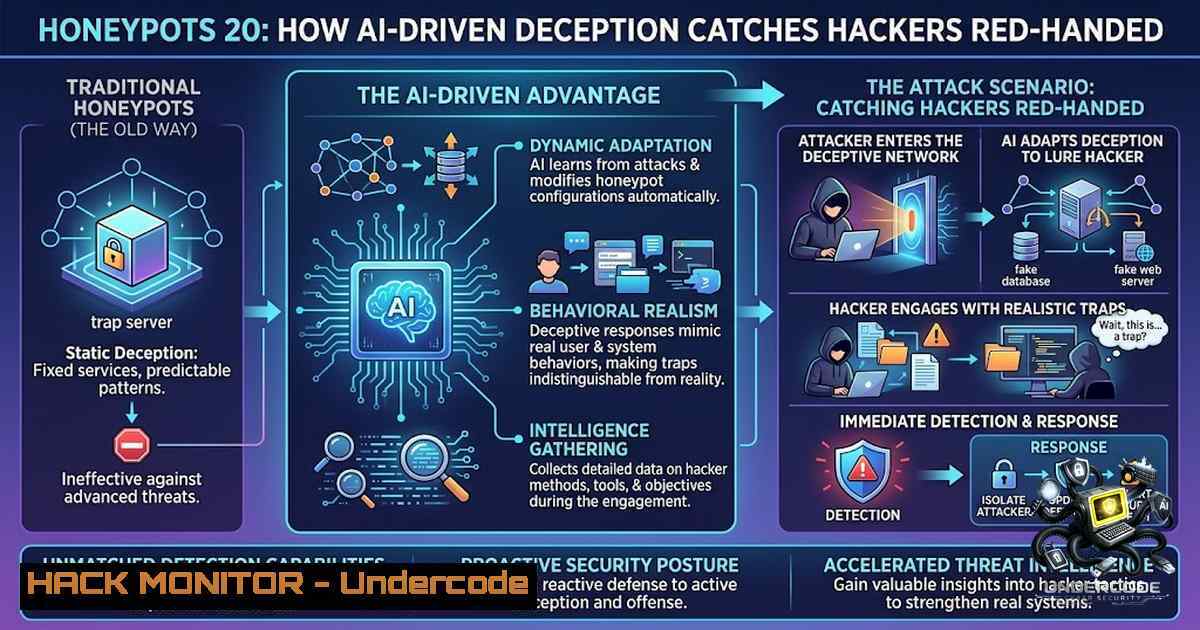
The cybersecurity industry has long operated on a reactive model—waiting for breaches to occur, then scrambling to contain damage and patch vulnerabilities. However, modern threat intelligence demands a more proactive approach: understanding attackers before they strike. Honeypots have emerged as one of the most effective deception technologies, transforming passive defense into active intelligence gathering. By deploying decoy systems that mirror real infrastructure, security teams can observe attacker behavior in real-time, collect malware samples, and map threat actor TTPs without exposing production environments to genuine risk.
Learning Objectives
- Understand the fundamental architecture and operational mechanics of modern honeypot systems
- Learn to deploy, configure, and maintain both low-interaction and high-interaction honeypots across enterprise environments
- Master techniques for analyzing captured attack data and integrating threat intelligence into security operations workflows
You Should Know
- Understanding Honeypot Architecture: From Low-Interaction to High-Interaction Deception
The effectiveness of a honeypot hinges on its ability to convincingly mimic real systems while maintaining strict isolation from production networks. Low-interaction honeypots operate at the application layer, emulating specific services like HTTP, FTP, or SSH using tools such as Honeyd or Cowrie. These are lightweight, require minimal resources, and are ideal for detecting automated scanning and common exploit attempts. However, they are relatively easy for sophisticated attackers to identify and bypass.
High-interaction honeypots, by contrast, run full operating systems and applications, allowing attackers to interact deeply with the environment. This provides richer intelligence—including zero-day exploit behavior, post-exploitation activities, and lateral movement techniques—but introduces significant risk. Proper network segmentation, traffic throttling, and outbound connection monitoring are critical to prevent compromised honeypots from being weaponized against other networks.
Deployment Example Using Cowrie (Low-Interaction SSH Honeypot):
 Install Cowrie on Ubuntu/Debian
sudo apt update && sudo apt install git python3-virtualenv python3-pip
git clone https://github.com/cowrie/cowrie.git
cd cowrie
virtualenv --python=python3 cowrie-env
source cowrie-env/bin/activate
pip install -r requirements.txt

Configure Cowrie
cp etc/cowrie.cfg.dist etc/cowrie.cfg
 Edit cowrie.cfg to set listen_port = 2222

Start the honeypot
bin/cowrie start

View logs
tail -f log/cowrie.log
Windows Equivalent: Using PowerShell to Simulate a Fake RDP Service
 Create a fake listener on port 3389 using PowerShell
$listener = [System.Net.Sockets.TcpListener]::new([System.Net.IPAddress]::Any, 3389)
$listener.Start()

Write-Host "Fake RDP honeypot listening on port 3389"
while ($true) {
$client = $listener.AcceptTcpClient()
$stream = $client.GetStream()
$reader = New-Object System.IO.StreamReader($stream)
$writer = New-Object System.IO.StreamWriter($stream)

Log the connection attempt
$timestamp = Get-Date -Format "yyyy-MM-dd HH:mm:ss"
$remoteIP = $client.Client.RemoteEndPoint.Address.IPAddressToString
Add-Content -Path "honeypot_log.txt" -Value "$timestamp - Connection from $remoteIP"

Send a generic response to keep the attacker engaged
$writer.WriteLine("Microsoft Terminal Services")
$writer.Flush()
Start-Sleep -Seconds 5
$client.Close()
}
- Deploying Cloud-1ative Honeypots on AWS, Azure, and GCP
Modern cloud environments present unique challenges for deception technologies. Attackers target misconfigured S3 buckets, exposed APIs, and overprivileged IAM roles. Cloud-1ative honeypots leverage Infrastructure as Code (IaC) to deploy decoy resources that appear as legitimate cloud assets. AWS Honeypot solutions like the Cloud Honeypot Architecture use Lambda functions, S3 buckets with suspiciously named files (e.g., credentials.csv, backup_keys.txt), and EC2 instances with intentionally weak security groups.
Setting Up an S3 Honeypot Bucket on AWS (Using Terraform):
resource "aws_s3_bucket" "honeypot" {
bucket = "honeypot-finance-backup-2024"
tags = {
Environment = "Production"  Intentionally misleading
Service = "Backup"
}
}

resource "aws_s3_bucket_public_access_block" "honeypot_public" {
bucket = aws_s3_bucket.honeypot.id

block_public_acls = false
block_public_policy = false
ignore_public_acls = false
restrict_public_buckets = false
}

resource "aws_s3_bucket_policy" "honeypot_policy" {
bucket = aws_s3_bucket.honeypot.id
policy = jsonencode({
Version = "2012-10-17"
Statement = [
{
Effect = "Allow"
Principal = ""
Action = "s3:GetObject"
Resource = "${aws_s3_bucket.honeypot.arn}/"
},
{
Effect = "Allow"
Principal = ""
Action = "s3:PutObject"
Resource = "${aws_s3_bucket.honeypot.arn}/"
}
]
})
}

Configure CloudTrail logging for the honeypot bucket
resource "aws_cloudtrail" "honeypot_trail" {
name = "honeypot-trail"
s3_bucket_name = "security-audit-bucket"
include_global_service_events = true
event_selector {
read_write_type = "All"
data_resource {
type = "AWS::S3::Object"
values = ["${aws_s3_bucket.honeypot.arn}/"]
}
}
}
Monitoring: Create Lambda to Alert on Suspicious S3 Access:
import boto3
import json
import os

def lambda_handler(event, context):
"""Process S3 event notifications from honeypot bucket"""
s3_client = boto3.client('s3')
sns_client = boto3.client('sns')

for record in event['Records']:
event_name = record['eventName']
bucket_name = record['s3']['bucket']['name']
object_key = record['s3']['object']['key']
source_ip = record['requestParameters']['sourceIPAddress']

Extract user-agent for threat intelligence
user_agent = record.get('userAgent', 'Unknown')

alert_message = f"""
🚨 HONEYPOT TRIGGERED 🚨
Event: {event_name}
Bucket: {bucket_name}
Object: {object_key}
Source IP: {source_ip}
User-Agent: {user_agent}
Time: {record['eventTime']}
"""

print(alert_message)

Send alert to SNS topic
sns_client.publish(
TopicArn=os.environ['ALERT_TOPIC_ARN'],
Subject='Honeypot Alert - S3 Access Detected',
Message=alert_message
)

Upload captured IP to threat intelligence list
capture_details = {
'timestamp': record['eventTime'],
'ip': source_ip,
'user_agent': user_agent,
'object_accessed': object_key,
'event_type': event_name
}

Store captured intelligence in DynamoDB
dynamodb = boto3.resource('dynamodb')
table = dynamodb.Table('honeypot_captures')
table.put_item(Item=capture_details)
3. API Honeypots and GraphQL Deception
Attackers increasingly target APIs as the primary attack surface in modern applications. REST API honeypots simulate endpoints that return fake authentication tokens, database records, or administrative functionality. GraphQL honeypots are particularly effective because they expose introspection queries—allowing attackers to believe they have discovered the complete API schema.
Deploying a Node.js GraphQL Honeypot:
const { ApolloServer, gql } = require('apollo-server');
const express = require('express');

// Define a deceptive GraphQL schema that looks legitimate
const typeDefs = gql`
type User {
id: ID!
username: String!
email: String!
role: String!
apiKey: String!
billing: BillingInfo
}

type BillingInfo {
creditCard: String!
expiry: String!
cvv: String!
address: String!
}

type Admin {
secretKey: String!
internalNotes: String!
databaseConnection: String!
}

type Query {
users: [User!]!
admin: Admin!
logs(level: String): [String!]!
}

type Mutation {
login(username: String!, password: String!): AuthPayload!
resetPassword(userId: ID!): Boolean!
executeCommand(command: String!): String!
}

type AuthPayload {
token: String!
refreshToken: String!
user: User!
}
`;

// Fake resolvers that log attacker queries
const resolvers = {
Query: {
users: (parent, args, context) => {
console.log(<code>[bash] Users queried from ${context.ip}</code>);
// Return fake user data with realistic-looking credentials
return [
{ id: '1', username: 'admin_smith', email: '[email protected]',
role: 'SuperAdmin', apiKey: 'sk_live_abcdefghijklmnop123456',
billing: { creditCard: '4111-1111-1111-1111', expiry: '12/28',
cvv: '123', address: '123 Main St, NYC' } }
];
},
admin: (parent, args, context) => {
console.log(<code>[bash] Admin query from ${context.ip}</code>);
return {
secretKey: 'S3CR3T_K3Y_2024',
internalNotes: 'AWS credentials stored in /root/keys.json',
databaseConnection: 'mongodb://prod-db:27017/admin'
};
},
logs: (parent, { level }, context) => {
console.log(<code>[bash] Logs queried (level: ${level}) from ${context.ip}</code>);
return [
<code>ERROR: Database connection failed at 2024-01-15 14:32:21</code>,
`WARN: Failed login attempt for admin from 10.0.0.45`
];
}
},
Mutation: {
login: (parent, { username, password }, context) => {
console.log(<code>[bash] Login attempt: ${username}:${password} from ${context.ip}</code>);
return {
token: 'eyJhbGciOiJIUzI1NiIs...fake_jwt',
refreshToken: 'fake_refresh_token',
user: { id: '1', username: 'admin_smith', email: '[email protected]',
role: 'SuperAdmin', apiKey: 'sk_live_fake_key' }
};
},
executeCommand: (parent, { command }, context) => {
console.log(<code>[bash] Command execution attempt: ${command} from ${context.ip}</code>);
// Return fake command output
return <code>Command '${command}' executed successfully. Output: (simulated)</code>;
}
}
};

const server = new ApolloServer({
typeDefs,
resolvers,
context: ({ req }) => ({ ip: req.ip || req.connection.remoteAddress })
});

server.listen(4000).then(({ url }) => {
console.log(<code>🚀 GraphQL Honeypot running at ${url}</code>);
console.log('📡 All queries will be logged for threat intelligence');
});
- Network Deception: ARP Spoofing Detection and Decoy VLANs
At the network layer, honeypots can be integrated with NAC (Network Access Control) and 802.1X to dynamically redirect suspicious endpoints into decoy VLANs. This enables deep inspection of compromised hosts without interrupting business operations. SDN (Software-Defined Networking) controllers can automatically shift suspected attacker traffic into isolated honeypot environments.
Configuring Linux Honeypot with iptables and NFQueue for Traffic Capture:
 Redirect all HTTP traffic on port 80 to honeypot application
iptables -t nat -A PREROUTING -p tcp --dport 80 -j REDIRECT --to-port 8080

Log all SSH attempts to honeypot and redirect
iptables -A INPUT -p tcp --dport 22 -m limit --limit 5/min -j LOG --log-prefix "HONEYPOT_SSH: "
iptables -t nat -A PREROUTING -p tcp --dport 22 -j REDIRECT --to-port 2222

Configure NFQUEUE to intercept packets for Python analysis
iptables -A INPUT -p tcp --dport 443 -j NFQUEUE --queue-1um 1

Python script to interact with NFQUEUE
cat > nfqueue_handler.py << 'EOF'
import nfqueue
import socket
import struct

def nfqueue_callback(payload):
data = payload.get_data()
 Parse IP and TCP headers
ip_header = data[0:20]
iph = struct.unpack('!BBHHHBBH4s4s', ip_header)
protocol = iph[bash]
src_ip = socket.inet_ntoa(iph[bash])
dst_ip = socket.inet_ntoa(iph[bash])

if protocol == 6:  TCP
tcp_header = data[20:40]
tcph = struct.unpack('!HHLLBBHHH', tcp_header)
src_port = tcph[bash]
dst_port = tcph[bash]

print(f"[bash] TCP packet: {src_ip}:{src_port} -> {dst_ip}:{dst_port}")

Log packet details for intelligence gathering
with open('/var/log/honeypot/network_capture.log', 'a') as f:
f.write(f"{src_ip}:{src_port} -> {dst_ip}:{dst_port}\n")

Accept the packet (don't drop)
payload.set_verdict(nfqueue.NF_ACCEPT)

q = nfqueue.queue()
q.set_callback(nfqueue_callback)
q.fast_open(1, socket.AF_INET)
q.set_queue_maxlen(5000)
q.try_bind(1)  Bind to queue 1

print("NFQUEUE honeypot listening...")
try:
q.run()
except KeyboardInterrupt:
q.unbind(socket.AF_INET)
EOF

Run the packet handler
python3 nfqueue_handler.py
- IoT and OT Deception Systems for Critical Infrastructure
Industrial environments require specialized honeypots due to unique protocols (Modbus, BACnet, DNP3) and legacy firmware constraints. Conpot (open-source ICS/SCADA honeypot) simulates entire industrial processes, power grids, and water treatment facilities. Attackers interacting with these systems reveal reconnaissance patterns, exploit attempts, and targeted malware that would otherwise remain invisible.
Deploying Conpot for Modbus/TCP Simulation:
 Install Conpot on Linux
sudo apt-get install python3-pip git build-essential liblua5.3-dev
git clone https://github.com/mushorg/conpot.git
cd conpot
sudo pip3 install -r requirements.txt
sudo python3 setup.py install

Create a custom template for industrial control system
mkdir -p /etc/conpot/templates/custom_plant
cat > /etc/conpot/templates/custom_plant/template.xml << 'EOF'
<?xml version="1.0" encoding="UTF-8"?>
<template>
<vendor>Industrial Automation Corp</vendor>
<device>PLC-2000</device>
<firmware>v3.1.2</firmware>
<protocols>
<protocol>modbus</protocol>
<protocol>dnp3</protocol>
<protocol>http</protocol>
</protocols>
<registers>
<holding_register address="0" value="12345" description="Temperature sensor"/>
<holding_register address="1" value="67890" description="Pressure gauge"/>
<holding_register address="100" value="1" description="Valve status"/>
<coil address="0" value="true" description="Pump activation"/>
<coil address="1" value="false" description="Alarm silencer"/>
</registers>
</template>
EOF

Configure Conpot with IP logging and JSON output
cat > /etc/conpot/conpot.cfg << 'EOF'
[bash]
enabled = true
port = 502
slave_id = 1

[bash]
enabled = true
port = 8080
web_server = true
authentication = true
credentials = admin:password123, root:letmein

[bash]
enabled = true
port = 161
community = public

[bash]
log_file = /var/log/conpot/conpot.log
json_log = /var/log/conpot/conpot.json
raw_log = /var/log/conpot/raw.log

[bash]
enable_geoip = true
enable_tcp_sensor = true
enable_http_sensor = true
EOF

Run the honeypot
sudo conpot -f -t custom_plant -p 502,8080,161
PowerShell Script to Simulate Windows IoT Device:
 Simulate a Windows IoT Core device with fake services
function Start-IotHoneypot {
$i = 0
$endpoints = @(
@{Port=1883; Service="MQTT Broker"},
@{Port=5353; Service="mDNS/DNS-SD"},
@{Port=80; Service="Web Management"},
@{Port=443; Service="HTTPS Management"}
)

foreach ($ep in $endpoints) {
Start-Job -ScriptBlock {
param($Port, $Service)
$listener = [System.Net.Sockets.TcpListener]::new([System.Net.IPAddress]::Any, $Port)
$listener.Start()
Write-Host "IoT Honeypot: $Service listening on port $Port"

while ($true) {
$client = $listener.AcceptTcpClient()
$remoteIP = $client.Client.RemoteEndPoint.Address.IPAddressToString
$timestamp = Get-Date -Format "yyyy-MM-dd HH:mm:ss"

$logEntry = "[$timestamp] IoT honeypot hit from $remoteIP on $Service (port $Port)"
Add-Content -Path "C:\honeypot\iot_captures.log" -Value $logEntry
Write-Host $logEntry

Send fake response simulating device
$stream = $client.GetStream()
$writer = New-Object System.IO.StreamWriter($stream)
$writer.WriteLine("Welcome to Industrial IoT Device v2.3.1")
$writer.WriteLine("Firmware: 2024.01.15")
$writer.WriteLine("Device ID: IIoT-${env:COMPUTERNAME}")
$writer.Flush()
Start-Sleep -Seconds 3
$client.Close()
}
} -ArgumentList $ep.Port, $ep.Service
}
}

Start-IotHoneypot
6. Automated Threat Intelligence Processing with ELK Stack
The value of a honeypot lies not in catching attackers, but in the actionable intelligence derived from captured data. Implementing a SIEM pipeline that automatically ingests, parses, and correlates honeypot logs transforms raw data into threat intelligence. The ELK Stack (Elasticsearch, Logstash, Kibana) with custom dashboards enables security analysts to identify attack patterns, geolocate threats, and generate IoCs (Indicators of Compromise).
Logstash Configuration for Honeypot Logs:
 /etc/logstash/conf.d/honeypot.conf
input {
file {
path => "/var/log/cowrie/cowrie.json"
type => "cowrie"
codec => json
}
file {
path => "/var/log/conpot/conpot.json"
type => "conpot"
codec => json
}
file {
path => "/var/log/honeypot/network_capture.log"
type => "network"
}
tcp {
port => 5000
type => "api_honeypot"
}
}

filter {
if [bash] == "cowrie" {
 Parse Cowrie events
date {
match => [ "timestamp", "ISO8601" ]
}
geoip {
source => "src_ip"
target => "geoip"
database => "/etc/logstash/GeoIP2-City.mmdb"
}
mutate {
add_field => {
"threat_category" => "ssh_bruteforce"
"confidence" => "high"
}
convert => { "session_duration" => "float" }
}
}

if [bash] == "conpot" {
 Parse ICS honeypot events
geoip {
source => "ip"
target => "geoip"
}
mutate {
add_field => {
"threat_category" => "ics_recon"
"protocol" => "modbus"
}
}
}
}

output {
elasticsearch {
hosts => ["localhost:9200"]
index => "honeypot-%{+YYYY.MM.dd}"
user => "elastic"
password => "honeypot_secure"
}

Send to threat intel platform
http {
url => "https://threatintel.corp.com/api/v1/indicators"
http_method => "post"
format => "json"
mapping => {
"source_ip" => "%{src_ip}"
"timestamp" => "%{@timestamp}"
"attack_type" => "%{threat_category}"
"details" => "%{message}"
}
}

stdout { codec => rubydebug }
}
Kibana Dashboard Configuration for Real-Time Monitoring:
{
"version": "7.17.0",
"objects": [
{
"id": "honeypot-dashboard",
"type": "dashboard",
"attributes": {
"title": "Honeypot Threat Intelligence Dashboard",
"panels": [
{
"panelIndex": "1",
"gridData": {"x": 0, "y": 0, "w": 24, "h": 8},
"panelRefName": "panel_1"
}
],
"panelsJSON": "[
{
\"panelIndex\": \"map1\",
\"panelRefName\": \"panel_1\",
\"type\": \"map\",
\"gridData\": {\"x\":0, \"y\":0, \"w\":16, \"h\":12},
\"title\": \"Attack Origin Geomap\",
\"config\": {
\"layers\": [
{
\"type\": \"choropleth\",
\"source\": {\"index\": \"honeypot-\"},
\"aggregation\": \"count\",
\"field\": \"geoip.country_name\"
}
]
}
},
{
\"panelIndex\": \"pie1\",
\"panelRefName\": \"panel_2\",
\"type\": \"pie\",
\"gridData\": {\"x\":16, \"y\":0, \"w\":8, \"h\":12},
\"title\": \"Attack Types Distribution\",
\"config\": {
\"buckets\": [
{\"field\": \"threat_category.keyword\", \"agg\": \"terms\"}
]
}
},
{
\"panelIndex\": \"table1\",
\"panelRefName\": \"panel_3\",
\"type\": \"table\",
\"gridData\": {\"x\":0, \"y\":12, \"w\":24, \"h\":12},
\"title\": \"Recent Attack Captures\",
\"config\": {
\"columns\": [
{\"field\": \"@timestamp\", \"type\": \"date\"},
{\"field\": \"src_ip\", \"type\": \"string\"},
{\"field\": \"geoip.country_name\", \"type\": \"string\"},
{\"field\": \"threat_category\", \"type\": \"string\"},
{\"field\": \"username_attempted\", \"type\": \"string\"}
],
\"sort\": [{\"field\": \"@timestamp\", \"order\": \"desc\"}]
}
}
]"
}
}
]
}
7. Ethical Considerations and Legal Compliance
Deploying honeypots requires careful attention to legal frameworks and ethical boundaries. While honeypots are legal in most jurisdictions, they must not entrap attackers into committing crimes they would not otherwise commit. Additionally, if a honeypot is compromised, the attacker may use it as a pivot point—potentially exposing the organization to liability if the attacker launches attacks against third parties from the honeypot infrastructure.
Recommended Legal and Operational Safeguards:
 Add clear warnings to honeypot banner (legal notice)
cat > /etc/honeypot_banner.txt << 'EOF'
WARNING: This system is monitored for security purposes.
Unauthorized access is prohibited and will be investigated.
All activities are logged and may be shared with law enforcement.
By continuing, you consent to monitoring.
EOF

Implement network egress filtering to prevent lateral movement
iptables -A OUTPUT -m state --state NEW -j LOG --log-prefix "HONEYPOT_EGRESS: "
iptables -A OUTPUT -m state --state NEW -j REJECT

Ensure logging includes proper chain of custody metadata
 timestamp, source IP, destination, protocol, payload hash
What Undercode Say
- Honeypots are force multipliers for threat intelligence—they convert passive monitoring into active adversary engagement, revealing TTPs that would never appear in production logs.
-
Modern deception must be adaptive and AI-driven—static honeypots are easily fingerprinted; dynamic environments that morph based on attacker behavior produce higher-quality intelligence.
Analysis: The evolution from simple port listeners to AI-powered deception grids represents a paradigm shift in defensive security. Organizations that implement comprehensive honeypot programs gain visibility into attacker pre-execution phases—scanning, reconnaissance, and initial compromise attempts—allowing them to fortify defenses before actual breaches occur. The integration of machine learning for behavioral analytics enables these systems to distinguish between automated bots and human adversaries, prioritizing alerts and reducing analyst fatigue. However, the sophistication required to maintain high-interaction honeypots without creating organizational risk remains a significant barrier. The future lies in automated, self-healing deception environments that can be spun up and torn down on demand, with intelligence immediately fed into SOAR (Security Orchestration, Automation, and Response) platforms for automated blocking.
Prediction
+1 Cloud providers will increasingly offer managed honeypot services integrated directly into SIEM platforms, democratizing access to deception technology for organizations of all sizes.
+1 AI-generated decoy systems will become indistinguishable from production environments, significantly raising the cost of reconnaissance for threat actors.
-1 Adversaries will develop AI-powered techniques to identify and fingerprint honeypots with high accuracy, triggering a cat-and-mouse arms race in deception technology.
-P Regulatory frameworks will evolve to explicitly address honeypot deployment, establishing clear guidelines that balance security intelligence gathering with privacy and entrapment concerns.
-P Open-source honeypot communities will expand to include OT, IoT, and 5G network decoys, reflecting the broadening attack surface of modern infrastructure.
-1 Attackers will increasingly use honeypots against defenders—deploying their own decoys to identify security researcher IPs and infiltrate threat intelligence sharing communities.
▶️ Related Video (92% Match):
🎯Let’s Practice For Free:
🎓 Live Courses & Certifications:
Join Undercode Academy for Verified Certifications
🚀 Request a Custom Project:
Secure, high-velocity infrastructure and disruptive technological engineering. Contact our engineering team for high-tier development and proprietary systems:
[email protected]
💎 Smart Architecture | 🛡️ Secure by Design | ⭐ Trusted by Thousands
IT/Security Reporter URL:
Reported By: How Honeypots – Hackers Feeds
Extra Hub: Undercode MoN
Basic Verification: Pass ✅


