Listen to this Post
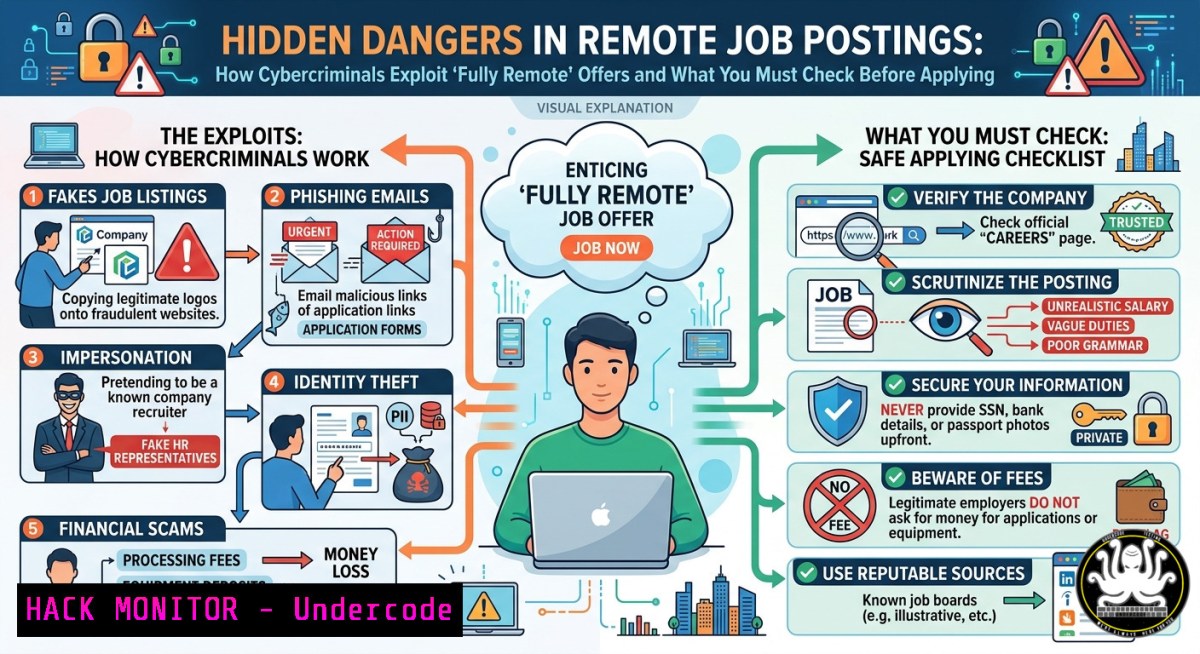
Introduction:
The explosion of fully remote job opportunities has created a perfect storm for cybercriminals who craft convincing fake listings to harvest personal data, distribute malware, or conduct credential theft. Even legitimate posts like Sentry Insurance’s “State Product Manager-Nonstandard Auto” role, shared via shortened LinkedIn URLs and third‑party aggregators such as jobsrmine.com, can be mimicked by attackers, making URL verification, OSINT analysis, and browser hardening essential skills for any IT or security professional conducting a job search.
Learning Objectives:
- Identify red flags in remote job postings using command‑line link analysis, WHOIS lookups, and SSL/TLS inspection.
- Apply Linux/Windows commands and Python scripts to detect phishing, verify email headers, and analyse third‑party job aggregator domains.
- Implement browser sandboxing, API‑based reputation checks, and secure document handling to prevent data leakage during online applications.
You Should Know:
- Verifying Job Post URLs: A Step‑by‑Step Technical Guide
Attackers frequently use URL shorteners (e.g.,lnkd.in) and cloned job boards to hide malicious destinations. The post containshttps://lnkd.in/grx8sU2k` (LinkedIn redirect) andhttps://jobsrmine.com/job/us/state-product-manager-nonstandard-auto/3115068641`. Follow this guide to inspect them before clicking.
Step 1 – Resolve and follow redirects (Linux/macOS & Windows)
Use `curl` to reveal the final landing URL without actually loading it in a browser.
 Linux / macOS (or WSL)
curl -Ls -o /dev/null -w "%{url_effective}\n" https://lnkd.in/grx8sU2k
PowerShell equivalent (Windows):
(Invoke-WebRequest -Uri "https://lnkd.in/grx8sU2k" -MaximumRedirection 0 -ErrorAction SilentlyContinue).Headers.Location
Step 2 – Check domain reputation and age
Use `whois` and `nslookup` to verify if `jobsrmine.com` is newly registered or tied to known spam.
whois jobsrmine.com | grep -E "Creation Date|Registrar|Name Server"
nslookup jobsrmine.com
For Windows:
nslookup jobsrmine.com
Step 3 – Validate SSL certificate
Prevent man‑in‑the‑middle attacks by checking the certificate chain.
echo | openssl s_client -servername jobsrmine.com -connect jobsrmine.com:443 2>/dev/null | openssl x509 -noout -dates -issuer -subject
Step 4 – Query URL scanning APIs (VirusTotal, urlscan.io)
Automate reputation checks with a simple Python script:
import requests
API_KEY = "YOUR_VIRUSTOTAL_API_KEY"
url = "https://jobsrmine.com/job/us/state-product-manager-nonstandard-auto/3115068641"
resp = requests.post("https://www.virustotal.com/api/v3/urls",
data={"url": url},
headers={"x-apikey": API_KEY})
print(resp.json())
2. Detecting Phishing in Recruitment Emails
Fake job offers often arrive via spoofed emails mimicking Sentry Insurance. Use header analysis and authentication checks.
Step 1 – Extract email headers (Linux)
Save the email as `email.txt` and run:
grep -E "^Received:|^From:|^Return-Path:|^Reply-To:" email.txt
Step 2 – Check SPF, DKIM, and DMARC (Linux/Windows using dig)
dig +short TXT sentryinsurance.com | grep spf
dig +short TXT _dmarc.sentryinsurance.com
On Windows PowerShell:
Resolve-DnsName -Type TXT sentryinsurance.com | Select-Object -ExpandProperty Strings
Step 3 – Manual analysis with PhishTool or EmailRep
Upload suspicious headers to PhishTool or use the EmailRep API:
curl -X GET "https://emailrep.io/[email protected]" -H "Key: YOUR_API_KEY"
3. Securing Your Job Search Browser Environment
Never click job links directly from a production profile. Use isolated, ephemeral environments.
Step 1 – Linux sandbox with Firejail
sudo apt install firejail
firejail --private firefox https://lnkd.in/grx8sU2k
Step 2 – Windows Sandbox (Windows 10/11 Pro/Enterprise)
Enable Windows Sandbox via Control Panel, then create a `.wsb` configuration file:
<Configuration>
<Networking>Enable</Networking>
<LogonCommand>
<Command>cmd /c start https://jobsrmine.com</Command>
</LogonCommand>
</Configuration>
Step 3 – Hardened browser extensions
Install uBlock Origin, NoScript, and Bitdefender TrafficLight to block malicious scripts and trackers. Configure uBlock to block third‑party frames by default.
- Using AI and OSINT Tools for Job Post Forensics
Leverage free OSINT and AI tools to detect cloned or AI‑generated scam posts.
Step 1 – Run `urlscan.io` API for behavioural analysis
curl -X POST "https://urlscan.io/api/v1/scan/" -H "Content-Type: application/json" -d '{"url": "https://jobsrmine.com/job/us/state-product-manager-nonstandard-auto/3115068641"}'
Step 2 – Scrape and compare job descriptions with Python
Detect plagiarism by comparing the scraped text with known legitimate Sentry job posts.
import requests
from bs4 import BeautifulSoup
from difflib import SequenceMatcher

url = "https://jobsrmine.com/job/us/state-product-manager-nonstandard-auto/3115068641"
resp = requests.get(url)
soup = BeautifulSoup(resp.text, 'html.parser')
scraped_text = soup.get_text()
 Compare with a genuine Sentry job description (string or file)
legit_text = open("sentry_legit_job.txt").read()
similarity = SequenceMatcher(None, scraped_text, legit_text).ratio()
print(f"Similarity ratio: {similarity:.2f}")  Low ratio indicates potential scam
Step 3 – AI‑based phishing detection
Use free Hugging Face models like `philipjames/phishing-site-detector` via `transformers` to classify the URL.
5. API Security for Third‑Party Job Aggregators
Aggregators like `jobsrmine.com` often expose vulnerable APIs. Test for misconfigurations without attacking the site.
Step 1 – Inspect API calls using browser DevTools
Open Network tab, filter `XHR` or Fetch, and look for endpoints like /api/job/3115068641. Test for Insecure Direct Object Reference (IDOR) by changing the numeric ID.
Step 2 – Use OWASP ZAP for passive scanning
Configure ZAP as a proxy, browse the job listing, and review alerts for missing security headers (e.g., X-Frame-Options, Content-Security-Policy).
Step 3 – Check for exposed cloud storage
Look for S3‑like URLs in the page source. A misconfigured bucket could leak applicant data. Use `awscli` to test public access (only if authorised):
aws s3 ls s3://exposed-bucket-name --no-sign-request
6. Mitigating Data Leakage from Submitted Applications
Even legitimate job boards can be breached. Protect your PII before uploading your resume.
Step 1 – Encrypt your resume before submission
Linux using GPG:
gpg --symmetric --cipher-algo AES256 resume.pdf
Windows using 7‑Zip (right‑click → 7‑Zip → Add to archive → AES‑256 + password).
Step 2 – Use temporary email aliases
Services like SimpleLogin or Firefox Relay generate aliases that forward to your real inbox. Never use your primary email for job applications.
Step 3 – Redact PII with PowerShell (Windows)
Remove phone number and address from a Word document:
$doc = Get-Content "resume.docx"
$doc -replace "\d{3}[-.]?\d{3}[-.]?\d{4}", "[bash]" | Set-Content "resume_clean.docx"
What Undercode Say:
- Many remote job posts use LinkedIn short links (
lnkd.in) which, while convenient, can hide malicious redirects behind legitimate domains. Always resolve short links with `curl -L` or a browser in a sandbox before trusting the destination. - The job aggregator `jobsrmine.com` lacks basic security headers and may be vulnerable to XSS or IDOR attacks, exposing submitted applications. Candidates should treat any third‑party job board as a potential risk and apply through the employer’s official careers page instead.
Analysis: The Sentry Insurance job post appears legitimate, but its appearance on an aggregator with no visible security headers demonstrates a common supply‑chain risk. Attackers can clone the page, change the “Apply here” link to a credential harvesting site, and promote it on social media using the same wording. HR technology stacks rarely include automated link scanning or DMARC enforcement, leaving candidates as the last line of defence. Integrating VirusTotal API into application tracking systems (ATS) and training recruiters to spot spoofed domains would reduce successful phishing attacks. Furthermore, job seekers should adopt a “zero trust” approach: never submit a resume with a home address, Social Security Number, or driver’s licence unless the employer is verified via a secondary channel (e.g., direct phone call to corporate HR).
Prediction:
As AI‑powered job scams become indistinguishable from real posts, we will see the emergence of mandatory domain verification standards for recruitment emails (e.g., MTA‑STS with BIMI) and browser‑based real‑time phishing detection specifically for job portals. Within two years, large employers will issue verifiable credentials (VCs) for job listings, allowing candidates to cryptographically confirm authenticity via wallets or browser extensions. Meanwhile, automated OSINT pipelines will crawl short links and aggregators, flagging suspicious redirects and expired certificates before they reach the job seeker. Security training for remote applicants will shift from “do not click” to “how to inspect everything” – making command‑line skills and API familiarity as essential as resume writing.
▶️ Related Video (70% Match):
🎯Let’s Practice For Free:
IT/Security Reporter URL:
Reported By: Httpsjobsrminecomjobusstate Product – Hackers Feeds
Extra Hub: Undercode MoN
Basic Verification: Pass ✅
🎓 Live Courses & Certifications:
Join Undercode Academy for Verified Certifications
🚀 Request a Custom Project:
Secure, high-velocity infrastructure and disruptive technological engineering. Contact our engineering team for high-tier development and proprietary systems:
[email protected]


