Listen to this Post
Introduction:
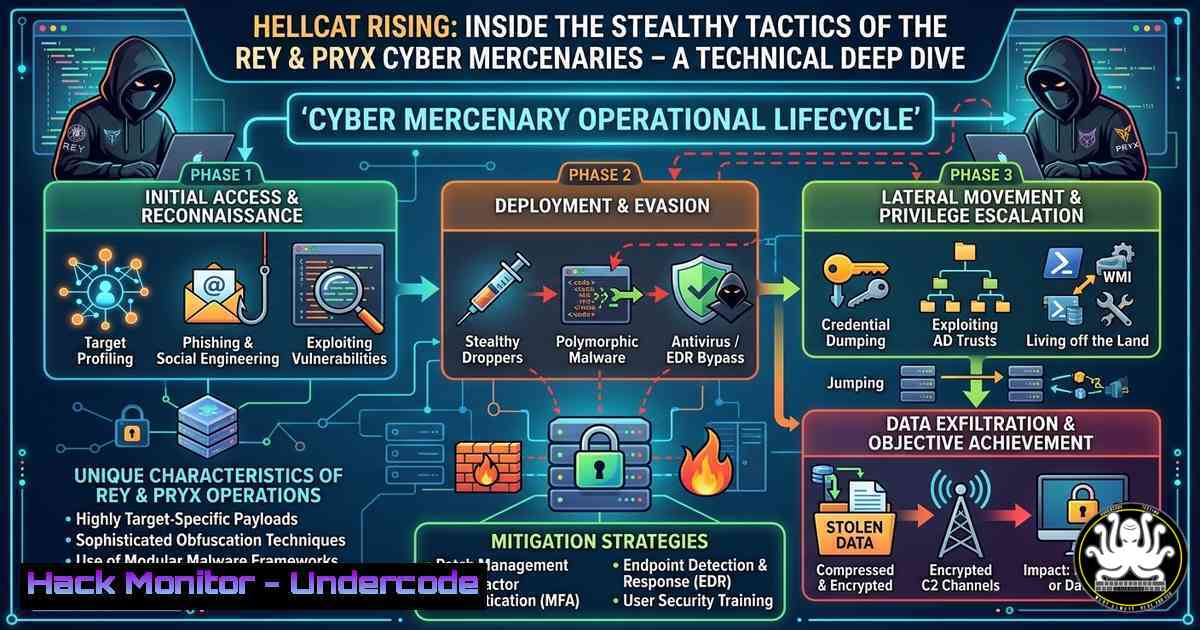
The cyber threat landscape has witnessed the emergence of a formidable adversary: the Hellcat group, operated by actors known as Rey and Pryx. Unlike traditional ransomware gangs, Hellcat combines sophisticated infostealer campaigns, repackaged data breaches, and operational security (OPSEC) measures like Tor-based exfiltration to target enterprises, telecoms, and government entities. Their recent activities, highlighted by cybersecurity researchers, demonstrate a calculated blend of old-school credential harvesting and modern malware distribution, making them a significant threat to global organizations.
Learning Objectives:
- Understand the specific tactics, techniques, and procedures (TTPs) employed by Hellcat actors, including their use of infostealers and dark web operations.
- Learn how to detect, analyze, and mitigate malware such as RedLine and Vidar on both Windows and Linux endpoints.
- Implement proactive defense measures, including credential monitoring, network traffic analysis, and collaboration tool hardening, to counter Hellcat-style attacks.
You Should Know:
- Dissecting the Hellcat Playbook: From Leaked Creds to Ransomware
Hellcat’s primary entry vector is the exploitation of leaked or stolen credentials, often obtained via infostealers or repackaged old data breaches. They specifically target collaboration tools like Jira to gain a foothold in enterprise environments. Once inside, they deploy custom payloads and crypters to evade detection, while using Telegram and X (formerly Twitter) for operational coordination and propaganda.
To defend against this, organizations must proactively monitor for credential exposures. A practical first step is to audit your own systems for any signs of compromised accounts. On Linux, you can grep through authentication logs for unusual activity:sudo grep "Failed password" /var/log/auth.log | awk '{print $1,$2,$3,$9,$11}' | sort | uniq -c | sort -nrOn Windows, use PowerShell to review security event IDs 4625 (failed logon) and 4624 (successful logon):
Get-WinEvent -FilterHashtable @{LogName='Security'; ID=4625} -MaxEvents 50 | Format-Table TimeCreated, Message -AutoSizeAdditionally, integrate with services like HaveIBeenPwned or Dehashed via their APIs to automatically check if corporate email domains appear in known breach dumps. A simple Python script can automate this:
import requests
domain = "yourcompany.com"
resp = requests.get(f"https://haveibeenpwned.com/api/v3/breaches?domain={domain}")
if resp.status_code == 200:
print(f"Domain {domain} appears in the following breaches: {resp.json()}")
2. Infostealer Malware Analysis: RedLine and Vidar
RedLine and Vidar are commodity infostealers frequently used by Hellcat to harvest credentials, browser data, cryptocurrency wallets, and system information. Analyzing these malware families in a sandbox environment helps defenders understand their behavior and create detection signatures.
Start by obtaining a sample (ensure you have proper authorization and use isolated analysis VMs). Use Process Monitor (ProcMon) on Windows to capture file system, registry, and process activity. For network analysis, run Wireshark to capture traffic. RedLine typically communicates over HTTP to its C2 server. To extract the C2 domain from a memory dump of an infected machine, use the `strings` utility:
strings memory.dmp | grep -E "http://[a-zA-Z0-9.-]+" | sort -u
For more advanced memory forensics, use Volatility:
volatility -f memory.dmp --profile=Win10x64 netscan
Create a YARA rule to detect RedLine binaries based on unique strings or patterns:
rule RedLine_Stealer {
meta:
description = "Detects RedLine Stealer"
strings:
$s1 = "RedLine Stealer" wide ascii
$s2 = "SOFTWARE\Microsoft\Windows\CurrentVersion\Run" wide ascii
$s3 = "http://" nocase
condition:
any of them
}
3. Detecting Server-Side Stealers via Tor
Hellcat actors use server-side stealers operated through the Tor network to exfiltrate data stealthily. This makes traffic analysis challenging because Tor traffic is encrypted and often blends with normal web traffic. However, you can block known Tor exit nodes at the network perimeter.
Download the list of Tor exit nodes from the Tor Project and add iptables rules on Linux:
wget -O tor-exit-nodes.txt https://check.torproject.org/exit-addresses
grep -E '^ExitAddress' tor-exit-nodes.txt | awk '{print $2}' | sort -u > tor-ips.txt
while read ip; do
iptables -A OUTPUT -d $ip -j DROP
done < tor-ips.txt
On Windows, you can use PowerShell to add firewall rules:
$ips = Get-Content tor-ips.txt
foreach ($ip in $ips) {
New-NetFirewallRule -DisplayName "Block Tor Exit $ip" -Direction Outbound -Action Block -RemoteAddress $ip
}
For detection, consider using Zeek (formerly Bro) to identify Tor traffic based on TLS handshake characteristics or by matching server names with known Tor directory authorities.
4. Securing Jira and Other Collaboration Tools
Given Hellcat’s interest in Jira credentials, hardening these platforms is critical. Start by enforcing multi-factor authentication (MFA) for all users. In Jira, this can be done via the user management settings or through third-party add-ons. Additionally, enable detailed audit logging.
On a Linux-based Jira server, monitor access logs in real time:
tail -f /var/atlassian/application-data/jira/log/atlassian-jira.log | grep -E "WARN|ERROR|login failed"
Use the Jira REST API to audit user permissions and identify dormant accounts with excessive privileges. Example curl command to list all users:
curl -u username:password -X GET "https://jira.yourcompany.com/rest/api/2/user/search?username=." | jq '.[] | {name: .name, email: .emailAddress, active: .active}'
Automate regular reviews of group memberships, especially for administrative groups.
- Monitoring Dark Web and Telegram for Leaked Data
Hellcat actively uses Telegram and underground forums to leak stolen data. Setting up automated monitoring can provide early warnings. Create a Telegram bot to monitor channels for keywords related to your organization. Using the Telethon library in Python:from telethon import TelegramClient, events api_id = YOUR_API_ID api_hash = 'YOUR_API_HASH' client = TelegramClient('session', api_id, api_hash) @client.on(events.NewMessage(chats='target_channel_username')) async def handler(event): if 'yourcompany' in event.message.text.lower(): print(f"ALERT: Potential leak: {event.message.text}") client.start() client.run_until_disconnected()For dark web monitoring, consider using tools like OnionScan or scraping .onion sites via Tor with Python’s `requests` over a SOCKS5 proxy. However, always ensure compliance with legal boundaries.
6. Defending Against Infostealers: Endpoint Hardening
Preventing infostealer execution on endpoints is a proactive defense. Implement application whitelisting using Windows Defender Application Control (WDAC) or AppLocker. A simple WDAC policy can block unsigned executables from running in user directories. Deploy via Group Policy.
On Windows, also enable PowerShell logging to detect malicious scripts:
Set-ItemProperty -Path "HKLM:\SOFTWARE\Policies\Microsoft\Windows\PowerShell\ScriptBlockLogging" -Name "EnableScriptBlockLogging" -Value 1
On Linux, use `auditd` to monitor file access and process execution. Add rules to audit changes to sensitive directories:
auditctl -w /etc/passwd -p wa -k passwd_changes
auditctl -w /bin -p x -k bin_exec
Regularly review audit logs with `ausearch`.
7. Incident Response: When Hellcat Strikes
If you suspect a Hellcat compromise, follow a structured incident response process. Isolate affected hosts from the network immediately. Then, perform memory analysis to identify running stealers. Use Volatility on a memory dump:
volatility -f memory.dmp --profile=Win10x64 pslist
volatility -f memory.dmp --profile=Win10x64 malfind
Check for persistence mechanisms: on Windows, use Autoruns from Sysinternals; on Linux, inspect crontabs and systemd services:
crontab -l
systemctl list-units --type=service --state=running
Reset all credentials that may have been exposed, and rotate API keys and tokens. Finally, engage threat intelligence to determine if any stolen data has been leaked.
What Undercode Say:
- Key Takeaway 1: Hellcat’s reliance on infostealers and leaked credentials underscores the critical need for robust credential hygiene and multi-factor authentication across all enterprise systems, especially collaboration tools like Jira.
- Key Takeaway 2: The use of Tor and encrypted messaging platforms for C2 and data exfiltration demands that security teams incorporate network traffic analysis and threat intelligence feeds to detect anomalous outbound connections, even when encrypted.
- Analysis: The group’s boldness—signaled by their “Not afraid” hashtag—suggests a well-resourced, possibly state-affiliated operation. Defenders must assume that traditional perimeter defenses are insufficient and adopt a zero-trust model, continuously validating every access request and monitoring for lateral movement. The integration of infostealer data with ransomware deployment is a growing trend, making early detection of credential theft paramount. Organizations should also invest in dark web monitoring and employee security awareness to reduce the risk of initial compromise.
Prediction:
Hellcat’s tactics will likely evolve to incorporate AI-generated phishing lures and deepfakes to bypass MFA, and we may see more collaboration between infostealer operations and ransomware groups, leading to faster and more targeted attacks. As cloud adoption grows, expect Hellcat to pivot to cloud credential harvesting, exploiting misconfigured S3 buckets and serverless functions. The cybersecurity community must respond with automated threat intelligence sharing and adaptive defense mechanisms that can keep pace with these agile adversaries.
▶️ Related Video (72% Match):
🎯Let’s Practice For Free:
IT/Security Reporter URL:
Reported By: Rohitbankoti Malwareeverywhere – Hackers Feeds
Extra Hub: Undercode MoN
Basic Verification: Pass ✅


