Listen to this Post
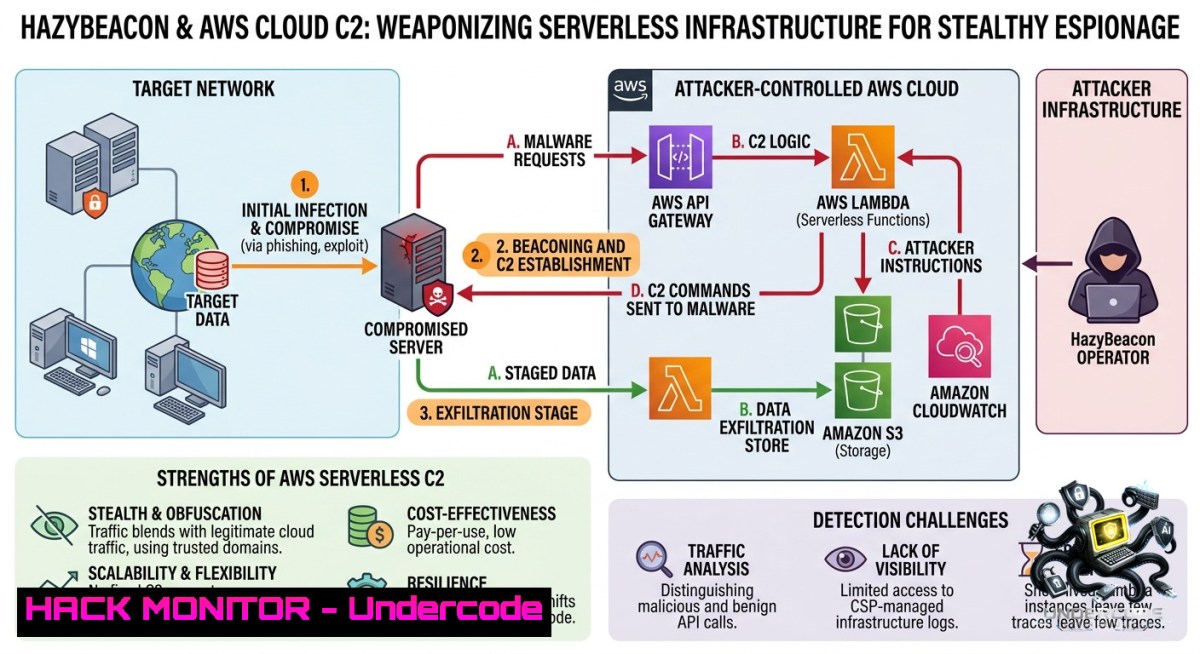
Introduction:
The conventional wisdom that blocking suspicious IP addresses suffices for command-and-control (C2) defense is dangerously outdated. The HazyBeacon campaign, documented by Palo Alto Networks Unit 42 in July 2025, demonstrates a paradigm shift: attackers no longer need to build their own infrastructure; they can simply borrow yours. By abusing legitimate AWS Lambda URLs and stolen IAM credentials, the CL‑STA‑1020 threat cluster establishes covert C2 channels that blend seamlessly with trusted cloud traffic, making traditional network detection nearly impossible.
Learning Objectives:
– Analyze the HazyBeacon attack chain, from IAM credential theft to AWS Lambda‑based C2 and data exfiltration.
– Implement proactive IAM hygiene, least‑privilege policies, and detection mechanisms to identify compromised credentials and unauthorised Lambda function deployments.
– Develop a cloud incident response playbook to contain and remediate AWS environment compromises, using CloudTrail, GuardDuty, and IAM Access Analyzer.
You Should Know:
1. The Anatomy of a Borrowed‑Infrastructure Attack: How HazyBeacon Uses AWS Lambda as a C2 Relay
The HazyBeacon campaign marks a departure from traditional C2 infrastructure, which relied on attacker‑owned VPS servers or compromised websites with tell‑tale IP signatures. Instead, CL‑STA‑1020 weaponises AWS Lambda Function URLs – a legitimate feature introduced in April 2022 that allows direct HTTPS invocation of serverless functions without API Gateway.
Attack Overview:
1. Initial Access: The exact initial vector remains unknown, but evidence suggests phishing or supply‑chain compromise. Attackers then use DLL sideloading to plant a malicious `mscorsvc.dll` in `C:\Windows\assembly\`, alongside the legitimate Windows executable `mscorsvw.exe`. When the registered Windows service triggers `mscorsvw.exe`, the malicious DLL loads instead of the genuine Microsoft library.
2. Persistence: A Windows service named `msdnetsvc` ensures the HazyBeacon DLL is loaded after every reboot, maintaining a persistent foothold.
3. C2 Communications: The backdoor beacons to an attacker‑controlled AWS Lambda URL (e.g., `
4. Execution & Exfiltration: The Lambda function acts as a relay: the malware sends encrypted HTTP POSTs to the Lambda URL, which strips headers and forwards payloads to the attacker’s real C2 server. The response returns via the same path. Attackers also use Google Drive and Dropbox to exfiltrate stolen documents, blending further into normal traffic.
Practical Detection Tutorial: Hunting for Lambda‑Based C2
To identify unauthorised Lambda URLs in your environment, use the AWS CLI to list all functions with URL configurations:
 List all Lambda functions and check for associated URLs
aws lambda list-functions --query "Functions[?URLConfig!=null].[FunctionName, URLConfig]" --output table

 Get detailed information about a specific function’s URL
aws lambda get-function-url-config --function-1ame <FUNCTION_NAME>
For Windows endpoints, monitor outbound connections to `.lambda-url..amazonaws.com`:
 PowerShell: Log connections to suspicious cloud endpoints
Get-1etTCPConnection | Where-Object { $_.RemoteAddress -like ".amazonaws.com" -and $_.State -eq "Established" } |
Select-Object LocalAddress, LocalPort, RemoteAddress, RemotePort, OwningProcess

 Query Sysmon Event ID 3 (network connection) for Lambda URLs
Get-WinEvent -FilterHashtable @{LogName='Microsoft-Windows-Sysmon/Operational'; ID=3} |
Where-Object { $_.Message -match "lambda-url" } |
Format-List TimeCreated, Message
2. IAM Credential Theft: The Primary Attack Vector for Cloud Takeover
The HazyBeacon campaign relies on stolen static IAM access keys obtained from exposed GitHub repositories or phishing campaigns. Attackers validate these keys with quiet API calls, then deploy a zipped Python or Node.js payload as a Lambda function with a benign name like “UpdateWorker” in a low‑scrutiny region. The keys also enable attackers to extend their control: they can create new IAM roles (e.g., service‑linked roles for Auto Scaling groups) and even modify instance attributes such as `DisableApiTermination=true` to hinder remediation efforts.
Step‑by‑Step Guide: Detecting and Remediating Compromised IAM Credentials
1. Detect Exposed Keys with IAM Access Analyzer
Use IAM Access Analyzer’s Unused Access Analyzer to identify access keys that have never been used or have fallen into disuse – these are prime targets for compromise.
 Generate an IAM credential report for all users
aws iam generate-credential-report
aws iam get-credential-report --output text --query "Content" | base64 -d > credential_report.csv

 Search for keys older than 90 days and unused for 30+ days
 (Use the 'access_key_1_last_used_date' and 'access_key_2_last_used_date' columns)
2. Monitor for Unauthorised IAM Activity
Configure Amazon GuardDuty to alert on `UnauthorizedAccess:IAMUser/InstanceCredentialExfiltration` and similar findings.
 Boto3: Query CloudTrail for IAM changes by a specific user
import boto3
client = boto3.client('cloudtrail')
response = client.lookup_events(
LookupAttributes=[{'AttributeKey': 'Username', 'AttributeValue': 'suspicious-user'}],
StartTime='2025-12-01T00:00:00Z',
EndTime='2025-12-08T23:59:59Z'
)
for event in response['Events']:
print(event['EventName'], event['Resources'])
3. Immediate Containment Steps
– Deactivate the compromised access key immediately: go to IAM Console → Users → Security credentials → Make inactive.
– Apply the AWSCompromisedKeyQuarantineV3 policy to the affected IAM user to limit blast radius.
– Check for and revoke any temporary session tokens issued by the attacker using STS `get-session-token`. Those tokens can remain valid for up to 36 hours after the original key is deactivated.
 List all active sessions for a user (requires CloudTrail logs)
 AWS CLI does not directly list active sessions, but you can query CloudTrail:
aws cloudtrail lookup-events --lookup-attributes AttributeKey=EventName,AttributeValue=GetSessionToken \
--start-time "2025-12-08T00:00:00Z" --end-time "2025-12-09T00:00:00Z"
– Add a deny policy to block all temporary credentials issued after the compromise time:
{
"Version": "2012-10-17",
"Statement": [{
"Sid": "DenyTemporaryCredentialsAfterCompromise",
"Effect": "Deny",
"Action": "",
"Resource": "",
"Condition": {
"DateGreaterThan": {"aws:TokenIssueTime": "2025-12-08T16:00:00Z"}
}
}]
}
4. Rotate and Harden
– Create brand new access keys (never reuse the compromised ones).
– Enforce MFA for all human IAM users.
– Migrate to temporary credentials using IAM roles and AWS SSO wherever possible.
3. Hardening Cloud Environments Against C2 Relay Abuse
Beyond IAM hygiene, defenders must enforce strict boundaries on how AWS services can be used. The HazyBeacon campaign’s success hinges on the ability to create Lambda URLs with `AuthType: NONE`, allowing any internet caller to reach the serverless function.
Step‑by‑Step Guide: Preventing Unauthorised Lambda URL Creation
1. Use Service Control Policies (SCPs) to Restrict Lambda URL Creation
Attach an SCP that denies the `lambda:CreateFunctionUrlConfig` action unless specific conditions are met (e.g., only from a trusted VPC or with required tagging).
{
"Version": "2012-10-17",
"Statement": [
{
"Sid": "DenyLambdaUrlsWithoutApproval",
"Effect": "Deny",
"Action": "lambda:CreateFunctionUrlConfig",
"Resource": "",
"Condition": {
"StringNotEquals": {
"aws:RequestTag/Approved": "true"
}
}
}
]
}
2. Audit Existing Lambda URLs for AuthType: NONE
aws lambda list-functions --query "Functions[?URLConfig!=null].[FunctionName, URLConfig.AuthType]" --output table
For any function with `AuthType=NONE`, either delete the URL configuration or switch to `AWS_IAM` authentication.
3. Network Segmentation: Restrict Outbound Access to AWS Control Plane APIs
Use VPC endpoints and endpoint policies to limit which principals can invoke Lambda functions from inside your VPC.
4. Enable AWS CloudTrail for All Regions and Log to CloudWatch / SIEM
Create a CloudWatch alarm for `CreateFunctionUrlConfig` events:
aws events put-rule --1ame "LambdaUrlCreated" --event-pattern "{\"source\":[\"aws.lambda\"],\"detail-type\":[\"AWS API Call via CloudTrail\"],\"detail\":{\"eventName\":[\"CreateFunctionUrlConfig\"]}}"
aws events put-targets --rule "LambdaUrlCreated" --targets "Id"="1","Arn"="arn:aws:sns:us-east-1:123456789012:SecurityAlerts"
4. Advanced Detection: C2 Behavioural Analytics and AI‑Powered Defense
Traditional signature‑based detection fails against encrypted C2 traffic over TLS 1.3. Attackers now use modular frameworks like Sliver, Havoc, and Mythic, which offer encrypted, multi‑protocol C2 channels. Palo Alto Networks’ Advanced Threat Prevention now includes a Precision AI deep learning model that detects unknown, encrypted Sliver C2 traffic with 99% accuracy without requiring decryption.
Step‑by‑Step Tutorial: Deploying Behavioural Analytics for Cloud C2
1. Endpoint: Use Sysmon + EDR to Detect DLL Sideloading
Monitor for the loading of unexpected DLLs by trusted system binaries. Create a Sigma rule:
title: Detection of DLL Sideloading of mscorsvc.dll
status: experimental
logsource:
product: windows
service: sysmon
detection:
selection:
EventID: 7
Image: 'C:\Windows\Microsoft.NET\Framework\\mscorsvw.exe'
ImageLoaded: '\mscorsvc.dll'
condition: selection
2. Network: Flag Unusual Cloud Endpoint Connections
Use Zeek (Bro) to alert on executable files connecting to `.lambda-url..amazonaws.com`:
event http_request(c: connection, method: string, original_uri: string, ...)
{
if ( /\.lambda-url\..\.amazonaws\.com/ in c$http$host &&
( /\.exe/ in c$http$uri || /\.dll/ in c$http$uri ) )
NOTICE([$note=CloudC2_Beaconing, $conn=c, $msg=fmt("Potential C2 to Lambda URL: %s", c$http$host)]);
}
3. Cloud: Correlate IAM Activity with Lambda Deployments
Query AWS CloudTrail for sequential events: `GetCallerIdentity` (credential validation) followed by `CreateFunction` and `CreateFunctionUrlConfig` from the same source IP within a short time window.
-- Using CloudTrail Lake
SELECT
userIdentity.principalId,
sourceIPAddress,
eventName,
eventTime
FROM
$EDS(datasets)
WHERE
eventName IN ('GetCallerIdentity', 'CreateFunction', 'CreateFunctionUrlConfig')
AND eventTime > '2025-12-01 00:00:00'
ORDER BY
sourceIPAddress, eventTime;
5. Incident Response Playbook for Compromised AWS Environments
When a compromise is suspected, follow this structured response:
Phase 1 – Containment (0–15 minutes)
– Deactivate the compromised IAM credentials (access keys + passwords).
– Apply the AWSCompromisedKeyQuarantineV3 policy.
– Isolate any EC2 instances with suspicious Lambda URL outbound connections.
Phase 2 – Investigation (15–60 minutes)
– Use CloudTrail to reconstruct the attacker’s timeline: every API call made with the compromised keys.
– Review GuardDuty findings for `Backdoor:EC2/DenialOfService.Dns` or `UnauthorizedAccess:IAMUser/MaliciousIPCaller`.
– Search for unauthorised IAM roles, users, and policies created by the attacker.
Phase 3 – Eradication (60–120 minutes)
– Delete all unauthorised Lambda functions (especially those with public URL endpoints).
– Revoke any temporary session tokens issued by the attacker.
– Remove suspicious Windows services (e.g., `msdnetsvc`) and delete the planted DLLs from compromised endpoints.
– Rotate all credentials for any affected IAM user.
Phase 4 – Recovery & Post‑Mortem
– Rebuild compromised workloads from clean images.
– Implement missing IAM guardrails: MFA, least‑privilege policies, and regular key rotation (at least every 90 days).
– Enable CloudTrail in all regions and feed logs into a SIEM for continuous monitoring.
What Undercode Say:
– The HazyBeacon campaign is a textbook example of “living off trusted services” – attackers no longer need to build noisy C2 infrastructure when they can hide inside the very cloud platforms defenders trust.
– Defensive strategies must shift from IP‑reputation blocking to identity‑centric controls. If IAM hygiene fails, even the best network firewalls become irrelevant because the malicious traffic looks exactly like legitimate cloud API calls.
– Small oversights – such as an unused access key committed to GitHub or a Lambda URL left open to the internet – can enable a full‑scale compromise. Organisations must treat cloud credentials as the new perimeter and enforce zero‑standing privilege.
Prediction:
– -1 As AI‑assisted attack automation matures (evidenced by threat actors using LLMs to escalate privileges in under 10 minutes), the window between credential theft and full cloud takeover will shrink from minutes to seconds, overwhelming manual incident response.
– +1 The widespread adoption of IAM Access Analyzer, CloudTrail, and GuardDuty, combined with AI‑powered detection models, will eventually enable near‑real‑time automated revocation of compromised credentials and quarantine of malicious Lambda functions. Organisations that embrace cloud‑native security posture management (CSPM) and identity threat detection (ITDR) will significantly reduce their exposure to borrowed‑infrastructure attacks.
▶️ Related Video (80% Match):
🎯Let’s Practice For Free:
🎓 Live Courses & Certifications:
[Join Undercode Academy for Verified Certifications](https://undercode.co.uk/certifications/)
🚀 Request a Custom Project:
Secure, high-velocity infrastructure and disruptive technological engineering. Contact our engineering team for high-tier development and proprietary systems:
[[email protected]](mailto:[email protected])
💎 Smart Architecture | 🛡️ Secure by Design | ⭐ Trusted by Thousands
IT/Security Reporter URL:
Reported By: [Varshu25 Threat](https://www.linkedin.com/posts/varshu25_threat-actors-abuse-amazon-web-services-in-share-7468259958900539392-ViDo/) – Hackers Feeds
Extra Hub: Undercode MoN
Basic Verification: Pass ✅
🔐JOIN OUR CYBER WORLD [ CVE News • HackMonitor • UndercodeNews ]
[💬 Whatsapp](https://undercode.help/whatsapp) | [💬 Telegram](https://t.me/UndercodeCommunity)
📢 Follow UndercodeTesting & Stay Tuned:
[𝕏 formerly Twitter 🐦](https://x.com/undercodeupdate) | [@ Threads](https://www.threads.net/@undercodetesting) | [🔗 Linkedin](https://www.linkedin.com/company/undercodetesting/) | [🦋BlueSky](https://bsky.app/profile/undercode.bsky.social)


