Listen to this Post
Introduction:
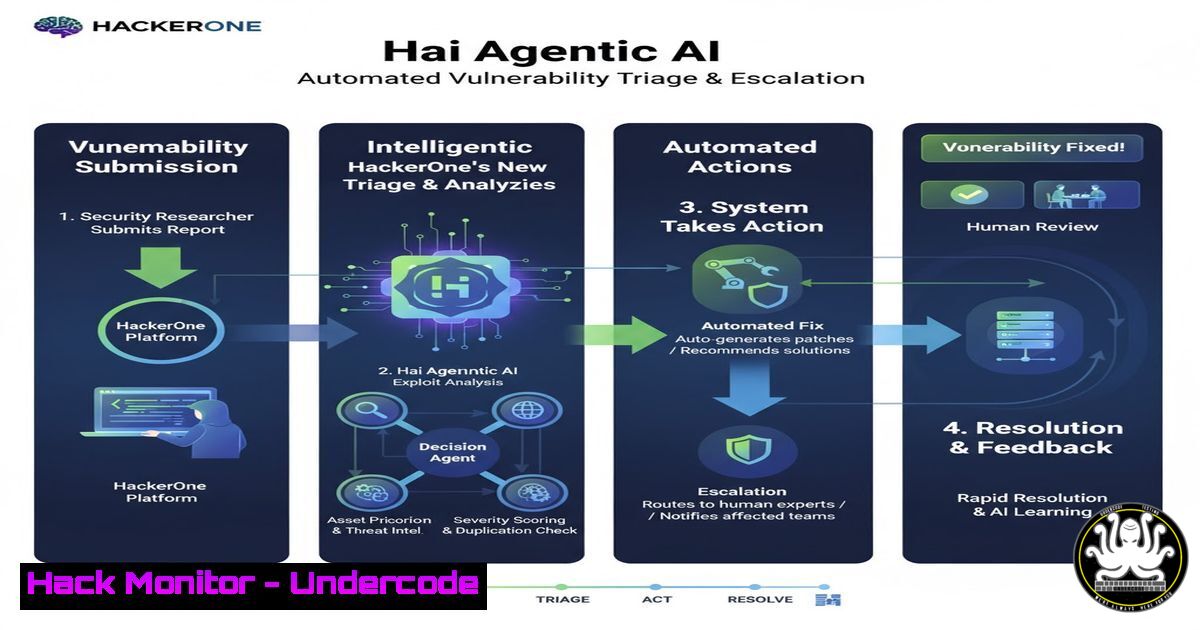
HackerOne has launched the Hai Agentic AI System, a coordinated ensemble of intelligent agents designed to revolutionize how security teams manage vulnerability reports. This move signifies a major shift towards AI-driven automation in offensive security, aiming to accelerate triage, reduce noise, and provide deeper historical context for faster and more accurate risk mitigation.
Learning Objectives:
- Understand the core functions of the four specialized AI agents within the HackerOne Hai ecosystem.
- Learn practical command-line and security tool configurations that parallel the automated tasks performed by these AI agents.
- Develop skills to implement complementary security automation and validation checks within your own environment.
You Should Know:
- Emulating the Priority Escalation Agent with Nmap & Scripting
The Priority Escalation Agent surfaces critical risks rapidly. Security teams can emulate this proactive scanning by using Nmap’s powerful scripting engine to flag high-severity issues automatically.
 Nmap command to scan for critical vulnerabilities and open risky ports
nmap -sV -sC --script "vuln and safe" -p- --top-ports 1000 -T4 -oA critical_scan <target_ip>

Cross-reference with a custom severity list (critical_services.txt)
grep -f critical_services.txt critical_scan.nmap | awk '{print "CRITICAL: " $0}'
Step-by-step guide:
- The `nmap -sV -sC` command performs a version detection and default script scan.
- The `–script “vuln and safe”` flag runs NSE scripts categorized as vulnerability checks but excludes intrusive ones.
3. `-p- –top-ports 1000` scans the most common 1000 ports. For a full scan, use `-p-` but be aware of the time cost.
4. `-T4` sets the timing template for a faster scan.
5. `-oA critical_scan` outputs the results in all formats (normal, XML, grepable) with the filename prefix “critical_scan”. - The subsequent `grep` command filters the results against a predefined file containing service names or ports you deem critical (e.g.,
ssh,mysql,8080), automatically flagging them in the output.
2. Automating Deduplication with Log Analysis & Hashing
The Deduplication Agent clears noise by removing duplicate reports. A similar principle can be applied to log analysis by using cryptographic hashing to identify and filter duplicate error messages or attack signatures.
 Using awk and sha256sum to deduplicate application logs based on error message
awk '{print $5, $6, $7}' /var/log/apache2/error.log | sort | uniq -c | sort -nr

A more advanced method to fingerprint and count unique log lines
cat /var/log/nginx/access.log | awk -F'"' '{print $2}' | sort | sha256sum | uniq -c
Step-by-step guide:
- The first command uses `awk` to extract specific fields (e.g., columns 5,6,7 which might contain the error code and message) from an Apache error log.
2. `sort` orders the lines so that duplicates are adjacent.
3. `uniq -c` counts the occurrences of each unique line.
4. `sort -nr` sorts the output numerically and in reverse order, showing the most frequent errors first. - The second, more robust, command takes the entire NGINX access log, uses `awk` to isolate the request URI (field between quotes), sorts them, and then generates a SHA256 hash for each unique line. This creates a unique fingerprint for each type of request, which `uniq -c` can then count.
-
Leveraging the Report Assistant Agent with Burp Suite and `jq`
The Report Assistant Agent builds clear, consistent reports. Penetration testers can automate the initial stages of report generation by exporting data from tools like Burp Suite and formatting it with command-line utilities.
 Format a raw JSON Burp Suite issue export into a readable markdown list using jq
cat burp_issues.json | jq -r '.issues[] | "- (.name): Severity: (.severity), Host: (.host)"' > initial_findings.md

Count findings by severity for an executive summary
jq -r '.issues[].severity' burp_issues.json | sort | uniq -c
Step-by-step guide:
- Export your issues from Burp Suite (e.g., the Scanner results) in JSON format to a file named
burp_issues.json. - The `jq` command `’.issues[]’` iterates over each issue in the array.
- The `-r` flag outputs raw strings, not JSON-encoded text.
- The string template `”- \(.name): Severity: \(.severity), Host: \(.host)”` constructs a markdown-formatted list item for each finding, pulling the name, severity, and host.
- The output is redirected to a file
initial_findings.md, creating a well-structured draft for your report. - The second command extracts just the severity fields, sorts them, and counts occurrences, providing quick stats for a summary.
-
Unlocking Historical Data with the Insight Agent via Git and `grep`
The Insight Agent uses historical data to speed up validation. Developers and security engineers can use version control history to track when a vulnerability was introduced or if it has recurred.
 Search git history for a specific keyword (e.g., a vulnerable function)
git log -S "exec(" --oneline --all

Blame a specific file to see who last modified a line containing a specific string
git blame config.php | grep "api_key"
Step-by-step guide:
1. `git log -S “exec(“` searches the entire commit history for changes that added or removed the string `exec(` (a potentially dangerous function in many languages).
2. The `–oneline` flag condenses the output to a concise format.
3. The `–all` flag ensures the search is performed across all branches.
4. This helps answer “Was this vulnerability just introduced, or has it been here for a long time?”
5. `git blame config.php` shows line-by-line revision information for the file config.php.
6. Piping this to `grep “api_key”` helps identify the commit and author responsible for adding or changing a hardcoded API key, which is a common security misstep.
- API Security Hardening with Curl and Validation Scripts
While AI agents validate exposures, proactive API hardening is crucial. Use these commands to test your API endpoints for common misconfigurations.
 Test for missing security headers on an API endpoint
curl -I -X GET https://api.example.com/v1/users | grep -iE "(x-frame-options|x-content-type-options|strict-transport-security)"

Test for insecure HTTP methods (PUT, DELETE, TRACE)
curl -X OPTIONS -i https://api.example.com/v1/users
Step-by-step guide:
- The first command uses `curl -I` to fetch only the headers from the API endpoint.
2. `grep -iE` performs a case-insensitive extended regex search for critical security headers like `X-Frame-Options` (clickjacking protection), `X-Content-Type-Options` (MIME sniffing prevention), and `Strict-Transport-Security` (HSTS). - Their absence in the output indicates a potential security misconfiguration.
- The second command uses `curl -X OPTIONS` to request the allowed HTTP methods from the server.
- The response will contain an `Allow` header listing methods like GET, POST, PUT, etc. If unnecessary methods like PUT, DELETE, or TRACE are enabled, they could be exploited and should be disabled.
-
Cloud Asset Discovery & Hardening with AWS CLI
Maintaining a visible inventory of cloud assets is the first step to keeping them under control, a task the Hai system aims to automate.
 List all EC2 instances across all regions
for region in $(aws ec2 describe-regions --query "Regions[].RegionName" --output text); do
echo "=== Region: $region ==="
aws ec2 describe-instances --region $region --query 'Reservations[].Instances[].[InstanceId,State.Name,PublicIpAddress]' --output table
done

Check for publicly accessible S3 buckets
aws s3api list-buckets --query "Buckets[].Name" --output text | tr '\t' '\n' | xargs -I {} aws s3api get-bucket-acl --bucket {} --query "Grants[?Grantee.URI=='http://acs.amazonaws.com/groups/global/AllUsers']" --output table
Step-by-step guide:
- The first script iterates through every AWS region. `aws ec2 describe-regions` fetches the list of regions.
- For each region, it runs `aws ec2 describe-instances` with a specific `–query` to filter the output to show only the Instance ID, its current State, and Public IP address in a clean table format.
- This provides a comprehensive, multi-region view of your compute assets.
- The second command first lists all S3 bucket names using
aws s3api list-buckets. - It then pipes this list, converting tabs to newlines (
tr '\t' '\n'), and uses `xargs` to run the `get-bucket-acl` command on each bucket. - The `–query` parameter checks for a grant where the grantee is “AllUsers” (the public), which would indicate the bucket is world-readable. Any output from this command requires immediate investigation.
7. Windows Command Line for Quick Security Audits
On Windows systems, powerful command-line tools can provide rapid security insights, mimicking the quick analysis of an AI agent.
:: Check for active network connections and listening ports
netstat -anob | findstr "LISTENING"

:: Query the local system for applied hotfixes (patches)
wmic qfe list brief

:: Audit local user accounts
net user
Step-by-step guide:
1. `netstat -anob` shows all active network connections (-a), in numerical form (-n), and most importantly, the executable (-b) responsible for each. Piping this to `findstr “LISTENING”` filters the output to show only services listening for incoming connections, which is crucial for identifying unauthorized services.
2. `wmic qfe list brief` uses the Windows Management Instrumentation Command-line to list all installed Quick Fix Engineering (QFE) updates, i.e., Windows patches. This is essential for verifying patch levels against known vulnerabilities.
3. `net user` simply lists all local user accounts on the system, helping to audit for unauthorized or dormant accounts that should be disabled.
What Undercode Say:
- The integration of specialized, coordinated AI agents marks a fundamental evolution from single-task AI helpers to a cohesive, automated security workforce.
- This technology will inevitably force a recalibration of the security analyst’s role, shifting focus from manual triage and data correlation to strategic oversight, complex case investigation, and orchestration.
The Hai system represents more than a feature update; it is a strategic move to embed AI as the core operational layer of a bug bounty platform. By delegating the repetitive, high-volume tasks of deduplication, initial prioritization, and report drafting to AI, HackerOne is betting that human analysts will become more effective force multipliers. The key analysis for security teams is not just if the AI is accurate, but how its “context window” is defined—what data it can access and correlate. The true value of the Insight Agent, for example, hinges on the breadth and depth of the historical data it can analyze. The long-term impact will be a faster, more scalable vulnerability management lifecycle, but it also raises the bar for the quality of data that organizations must feed into such systems.
Prediction:
The widespread adoption of agentic AI systems like Hai will compress the vulnerability disclosure-to-patch timeline from weeks to days for common issues, forcing attackers to develop more sophisticated, novel zero-day exploits. This will create a bifurcated threat landscape where automated, scalable defenses handle known-variant attacks, while human red teams and threat hunters focus exclusively on advanced persistent threats (APTs) and novel attack chains, ultimately escalating the quality, but reducing the quantity, of successful cyber attacks.
🎯Let’s Practice For Free:
IT/Security Reporter URL:
Reported By: Stevenjliu Hai – Hackers Feeds
Extra Hub: Undercode MoN
Basic Verification: Pass ✅


