Listen to this Post
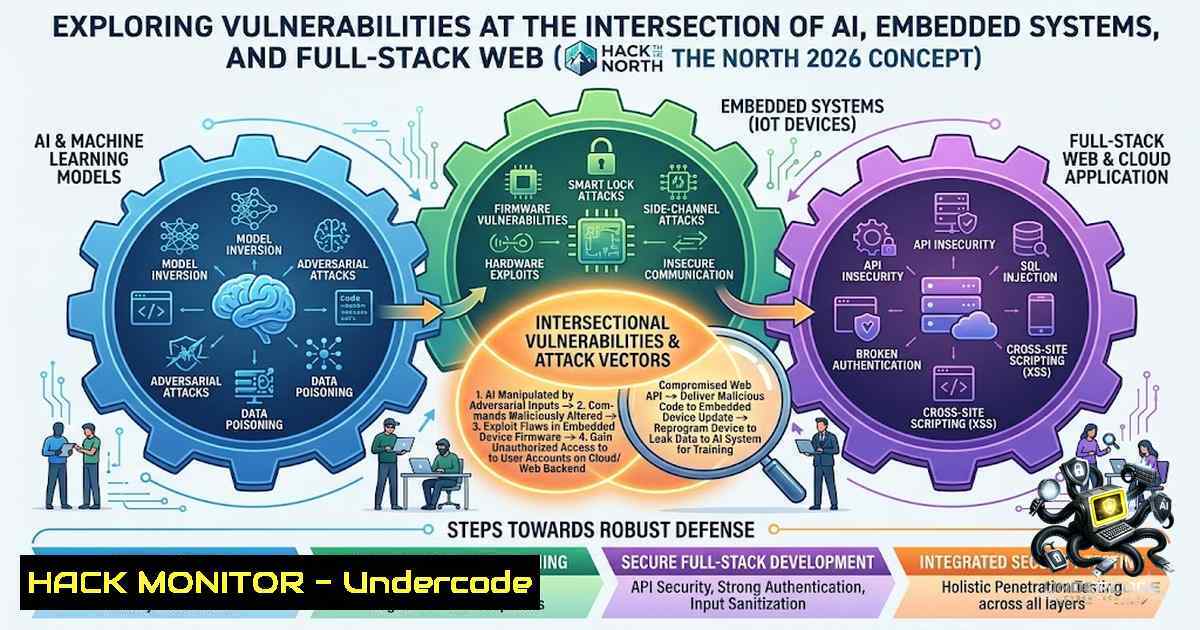
Introduction:
The modern hackathon environment, particularly at events like the University of Waterloo’s Hack the North, represents a microcosm of enterprise DevOps: rapid iteration, diverse technology stacks (AI, robotics, embedded systems), and tight deadlines. However, this velocity often introduces significant security debt. As participants integrate pre-trained PyTorch models with hardware peripherals and cloud APIs, they inadvertently expose attack surfaces ranging from adversarial machine learning (ML) to insecure firmware updates and exposed environment variables. This article serves as a technical deep-dive into securing the “ambitious” full-stack project, ensuring that your 3 AM debugging session isn’t precipitated by a data exfiltration attack or a botnet compromise of your embedded device.
Learning Objectives:
- Objective 1: Implement secure coding practices for Python-based AI/ML pipelines, including input sanitization and model serialization validation.
- Objective 2: Harden embedded Linux systems (Raspberry Pi, Jetson Nano) against physical and network-based attacks.
- Objective 3: Secure full-stack API endpoints (Node.js/Flask) with proper authentication, rate limiting, and environment variable management.
You Should Know:
1. Securing PyTorch Models from Adversarial Inputs
When deploying AI models in a hackathon project, especially those interfacing with hardware, adversarial attacks can cause catastrophic failures (e.g., misclassifying a stop sign for a robot). The primary vector is unsanitized input data fed into the `torch.load()` function, which can execute arbitrary code if a pickle file is maliciously crafted.
Step-by-Step Guide:
- Validate Input Shape and Type: Ensure the incoming tensor matches the expected dimensions before passing it to the model.
- Use
weights_only=True: In PyTorch, `torch.load(model_path, weights_only=True)` restricts the unpickling process to tensors and primitive types, preventing malicious code execution. - Implement Input Normalization: Standardize inputs to prevent gradient-based adversarial attacks (e.g., Fast Gradient Sign Method). While not a complete defense, normalization reduces the effectiveness of noise injection.
Commands/Tutorials (Linux):
To verify the integrity of a PyTorch model checkpoint, use cryptographic hashing:
 Generate SHA-256 hash of the model file
sha256sum your_model.pth > model_hash.txt
 Verify the hash against a known good value
sha256sum -c model_hash.txt
For runtime monitoring, utilize `torch.jit.trace` to convert models to TorchScript, which allows for static analysis and tighter input constraints:
import torch
traced_model = torch.jit.trace(model, example_input)
traced_model.save("secured_model.pt")
2. Hardening Embedded Systems (Linux/ARM)
Embedded devices are often the weakest link in a robotics stack. Default passwords, open SSH ports, and unencrypted storage are common pitfalls. Securing the OS layer is critical to prevent attackers from pivoting to the cloud infrastructure.
Step-by-Step Guide:
- Disable Unused Services: Run `systemctl list-units` to identify active services. Disable Bluetooth, Wi-Fi (if wired), and default web interfaces using
sudo systemctl disable</code>.</li> <li>Enable Mandatory Access Control: Install AppArmor or SELinux. For Debian-based systems (Raspberry Pi OS), `sudo apt install apparmor apparmor-utils` and enforce profiles for critical applications.</li> <li>Secure Boot Configuration: While full Secure Boot is complex, ensure the boot partition is read-only and restrict modifications via <code>sudo mount -o remount,ro /boot</code>.</li> </ul> <h2 style="color: yellow;">Linux Commands:</h2> <h2 style="color: yellow;">To harden SSH access on the embedded device:</h2> [bash] Generate a secure Ed25519 key instead of RSA ssh-keygen -t ed25519 -a 100 Copy the public key to the device ssh-copy-id -i ~/.ssh/id_ed25519.pub user@device_ip On the device, edit /etc/ssh/sshd_config: PermitRootLogin no PasswordAuthentication no PubkeyAuthentication yes sudo systemctl restart sshd
For firewall configuration, use `ufw`:
sudo ufw default deny incoming sudo ufw default allow outgoing sudo ufw allow from [bash] to any port 22 proto tcp sudo ufw enable
3. API Security and Environment Variable Management
The bridge between the embedded hardware and the frontend is typically a RESTful API (Flask, FastAPI, Express). Exposed API keys, lack of rate limiting, and insecure Cross-Origin Resource Sharing (CORS) policies are leading causes of data breaches.
Step-by-Step Guide:
- Avoid `.env` in Repositories: Always use a `.env.example` file without secrets. Ensure `.env` is in
.gitignore. - Implement Rate Limiting: Prevent brute-force attacks on endpoints. Use `flask-limiter` or
express-rate-limit. - Validate CORS: Restrict allowed origins to specific domains (e.g., your frontend URL). Avoid wildcard (``) in production.
Code Snippet (Node.js/Express):
const rateLimit = require('express-rate-limit'); const limiter = rateLimit({ windowMs: 15 60 1000, // 15 minutes max: 100, // limit each IP to 100 requests per windowMs message: "Too many requests from this IP" }); app.use(limiter); // Secure CORS setup const cors = require('cors'); const corsOptions = { origin: 'https://your-frontend-domain.com', optionsSuccessStatus: 200 }; app.use(cors(corsOptions));Windows Commands (For local dev):
When testing API security locally on Windows, use `curl` to simulate attacks and verify responses:
Test rate limiting by sending multiple requests in a loop for /l %i in (1,1,200) do curl -X GET http://localhost:3000/api/test Verify CORS headers curl -H "Origin: https://malicious-site.com" -I http://localhost:3000/api/data
4. Securing the CI/CD Pipeline (GitHub Actions)
Hackathon projects often utilize GitHub Actions or similar for automated deployment. This pipeline is a primary target for supply chain attacks. If compromised, attackers can inject malicious code into your build artifact, affecting all downstream users.
Step-by-Step Guide:
- Use OIDC (OpenID Connect) for Cloud Access: Avoid storing long-lived AWS/GCP keys. Configure GitHub OIDC to issue short-lived tokens.
- Pin Third-Party Actions to SHAs: Instead of using
actions/checkout@v3, use `actions/checkout@8e5e7e5...` (full commit SHA) to ensure integrity. - Scan Dependencies: Integrate `Dependency Check` or `Snyk` into the workflow to identify known vulnerabilities in `requirements.txt` or
package.json.
Linux/CI Commands:
Using `trivy` to scan the Docker image in the pipeline:
Install Trivy sudo apt-get install wget apt-transport-https gnupg lsb-release wget -qO - https://aquasecurity.github.io/trivy-repo/deb/public.key | sudo apt-key add - echo deb https://aquasecurity.github.io/trivy-repo/deb $(lsb_release -sc) main | sudo tee -a /etc/apt/sources.list.d/trivy.list sudo apt-get update && sudo apt-get install trivy Scan the built image trivy image your-username/your-repo:latest --severity HIGH,CRITICAL --exit-code 1
5. Cloud Infrastructure Hardening (AWS/Azure/GCP)
For projects utilizing IoT Core or cloud databases, misconfigured S3 buckets or insecure VPCs are a disaster waiting to happen. The principle of least privilege must be applied rigorously.
Step-by-Step Guide:
- Restrict Inbound Ports: In your security group rules, ensure that ports 22 (SSH) and 27017 (MongoDB) are only accessible from specific IP addresses.
- Enable Encryption: Enable default encryption on S3 buckets and databases using KMS (Key Management Service).
- Audit Logging: Enable CloudTrail (AWS) or Activity Log (Azure) to monitor API calls for anomalous behavior.
Linux Commands (CLI):
Using AWS CLI to verify bucket policies:
List buckets and check encryption status aws s3api get-bucket-encryption --bucket your-bucket-1ame Check public access block aws s3api get-public-access-block --bucket your-bucket-1ame If not configured, set it aws s3api put-public-access-block --bucket your-bucket-1ame --public-access-block-configuration "BlockPublicAcls=true,IgnorePublicAcls=true,BlockPublicPolicy=true,RestrictPublicBuckets=true"
- Vulnerability Exploitation and Mitigation: The "3 AM Debug"
Despite best efforts, vulnerabilities exist. The most common exploit in hackathons is the "Local File Inclusion" (LFI) attack due to improper file path sanitization when uploading configuration files for the robot.
Step-by-Step Guide:
- Path Sanitization: Use `os.path.basename` and `os.path.join` to prevent directory traversal (
../../etc/passwd). - File Type Validation: Check the MIME type and magic bytes of uploaded files, not just the extension.
Code Snippet (Python - Flask):
import os from werkzeug.utils import secure_filename UPLOAD_FOLDER = '/var/uploads' ALLOWED_EXTENSIONS = {'json', 'yaml'} def allowed_file(filename): return '.' in filename and filename.rsplit('.', 1)[bash].lower() in ALLOWED_EXTENSIONS @app.route('/upload', methods=['POST']) def upload_file(): file = request.files['file'] if file and allowed_file(file.filename): Secure filename filename = secure_filename(file.filename) file.save(os.path.join(UPLOAD_FOLDER, filename)) return "Success" return "Invalid file", 400What Undercode Say:
- Integration is the Enemy of Security: Combining AI, robotics, and full-stack web creates a massive attack surface. A vulnerability in the web frontend can allow an attacker to send malicious commands to the physical robot. The security of the chain is the strength of its weakest link.
- Shift Left is Critical: You cannot bolt on security at the end of the hackathon. Implementing input validation during the AI training phase and using `secrets` scanners (
trufflehog,git-secrets) as a pre-commit hook prevents credential leaks from the start.
Prediction:
- -1 The rapid adoption of Large Language Models (LLMs) in hackathons will lead to a surge in "prompt injection" attacks, where malicious inputs corrupt the project's decision-making logic, potentially causing physical damage to hardware.
- +1 The focus on "ambitious" hardware/AI projects will drive the development of real-time, on-device security protocols (e.g., TEEs - Trusted Execution Environments) as participants seek to protect their proprietary models from being stolen or reversed.
- +1 Hackathons like HTN 2026 will increasingly partner with security vendors to provide threat modeling workshops, shifting the culture from "just build" to "build securely," ultimately producing more resilient codebases that are ready for production.
- -1 The convenience of public repositories for collaboration will continue to be exploited by malicious actors using "dependency confusion" attacks, where they publish malicious packages with the same names as private internal packages, hoping the pipeline accidentally pulls the public version.
▶️ Related Video (80% Match):
🎯Let’s Practice For Free:
🎓 Live Courses & Certifications:
Join Undercode Academy for Verified Certifications
🚀 Request a Custom Project:
Secure, high-velocity infrastructure and disruptive technological engineering. Contact our engineering team for high-tier development and proprietary systems:
[email protected]
💎 Smart Architecture | 🛡️ Secure by Design | ⭐ Trusted by ThousandsIT/Security Reporter URL:
Reported By: https://lnkd.in/p/e7sU3Suv - Hackers Feeds
Extra Hub: Undercode MoN
Basic Verification: Pass ✅🔐JOIN OUR CYBER WORLD [ CVE News • HackMonitor • UndercodeNews ]
📢 Follow UndercodeTesting & Stay Tuned:
- Avoid `.env` in Repositories: Always use a `.env.example` file without secrets. Ensure `.env` is in


