Listen to this Post
Introduction:
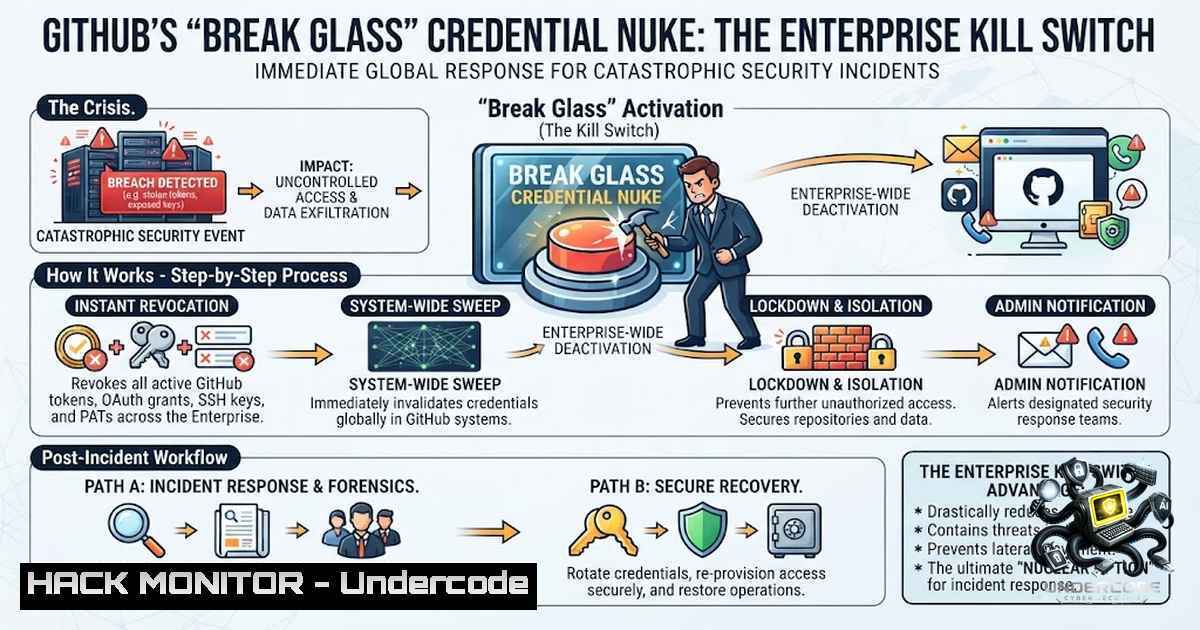
In the chaotic aftermath of a credential compromise, every second counts—yet security teams have traditionally wasted precious minutes hunting through scattered menus to revoke individual tokens one by one. GitHub just changed that calculus entirely. On June 24, 2026, the platform unveiled a self-service credential revocation feature for GitHub Enterprise that allows organizations to instantly terminate all credentials for a user or an entire organization with a single action, effectively rendering exfiltrated secrets useless to threat actors. This “break glass” capability represents a paradigm shift in incident response, transforming what was once a frantic scavenger hunt into a one-click containment strategy.
Learning Objectives:
- Understand the three bulk revocation actions available to GitHub Enterprise owners and how to trigger them during a security incident
- Master the new self-service credential revocation workflow for individual enterprise members
- Learn to implement credential revocation via REST APIs for programmatic incident response at scale
- Develop a comprehensive incident response runbook that incorporates break-glass revocation without breaking production workflows
You Should Know:
1. Understanding the Break-Glass Credential Revocation Architecture
GitHub’s new credential revocation feature is fundamentally a “kill switch” designed for high-impact security incidents involving compromised accounts or stolen credentials. Unlike traditional token rotation that requires methodical, per-credential management, this approach embraces the reality that during an active breach, speed trumps precision. The feature enables enterprise owners and members with the fine-grained “Manage enterprise credentials” permission to trigger immediate, atomic revocation actions.
The architecture supports three distinct bulk actions. First, enterprise-wide SSO authorization revocation removes SSO authorizations for personal access tokens (PATs), SSH keys, and OAuth tokens across the entire enterprise. This action effectively cuts off all programmatic access to SSO-protected resources for the targeted user or users. Second, for Enterprise Managed Users (EMU) accounts, administrators can delete user tokens and SSH keys entirely, even those without SSO authorization—a more aggressive action that permanently destroys credentials. Third, organization-level revocation allows listing and revoking SSO authorizations for user credentials within a specific organization, supported programmatically through org-level REST APIs.
What makes this particularly powerful is the self-service component for individual users. Every enterprise member now has a centralized Credentials view under Settings that displays counts of all credentials generated or authorized via SSO. From this single dashboard, users can revoke or delete all credentials and authorizations in one action, eliminating the tedious token-by-token or key-by-key process.
2. Step-by-Step: Enterprise-Wide Credential Revocation for Administrators
When a major security incident strikes, here is the exact workflow for GitHub Enterprise administrators to execute a break-glass revocation:
Step 1: Navigate to Authentication Security Settings. From your enterprise dashboard, click Settings in the top navigation, then select “Authentication security” from the left sidebar. This page displays the “Credentials” section showing counts of fine-grained PATs, classic PATs, user SSH keys, and GitHub App/OAuth user access tokens that have at least one SSO authorization within your enterprise.
Step 2: Review Credential Counts. Before pulling the trigger, assess the blast radius. The dashboard shows exact counts for token types with 10,000 or fewer instances; above that threshold, it displays “10k+ tokens”. This visibility helps you understand the scale of what you are about to revoke.
Step 3: Select the Appropriate Bulk Action. Scroll to the “Danger zone” section where two primary actions are available:
– Revoke SSO Authorizations: Removes SSO authorizations for user tokens and SSH keys across all organizations in your enterprise. This action is available for EMU enterprises or those with SAML SSO enabled.
– Delete Keys and Tokens: Permanently removes user tokens and SSH keys across the enterprise, available exclusively for EMU accounts.
Step 4: Target Specific Users or All Users. You can apply these actions to all users in the enterprise or target a specific user account. Targeting an individual suspected of compromise minimizes collateral damage.
Step 5: Confirm and Execute. These are destructive, high-impact actions that GitHub explicitly warns will “break automations” and could require “months of work to restore your original state”. Confirmation is required before execution.
Step 6: Monitor Audit Logs and Notifications. Every revocation action generates audit log entries and sends email notifications to affected users. Review these logs to track what was revoked and communicate with impacted teams.
3. Programmatic Revocation via REST APIs
For organizations requiring automated incident response, GitHub provides REST API endpoints for credential revocation at scale. The org-level REST APIs support listing and revoking SSO authorizations for user credentials across a specific organization.
The Credentials Revocation API accepts a list of up to 1,000 credentials per request and supports multiple credential types including personal access tokens (classic and fine-grained), OAuth app access tokens, user-to-server tokens from GitHub Apps, and refresh tokens from GitHub Apps. Here is the curl command structure:
curl -L -X POST \
-H "Accept: application/vnd.github+json" \
-H "X-GitHub-Api-Version: 2026-03-10" \
https://api.github.com/credentials/revoke \
-d '{"credentials":["ghp_1234567890abcdef1234567890abcdef12345678","github_pat_0A1B2C3D4E5F6G7H8I9J0K_ABCDEFGHIJKLMNOPQRSTUVWXYZabcdefghijklmnopqrstuvwxyz0123456"]}'
This endpoint returns a 202 Accepted status for successful submissions. Importantly, GitHub cannot reactivate revoked credentials—new credentials must be generated. The API is rate-limited to 60 unauthenticated requests per hour to prevent abuse.
For enterprise-level programmatic revocation, administrators with the “Manage enterprise credentials” permission can leverage endpoints that revoke all credential authorizations for all organizations within the enterprise, including guest, outside, and repository collaborators. For EMU enterprises, setting the `revoke_credentials` parameter to true optionally destroys all credentials owned by enterprise members.
4. Self-Service Credential Revocation for Individual Users
The individual user experience has been radically simplified. Previously, revoking credentials meant navigating multiple menus: PATs under Developer Settings, SSH keys in a separate tab, OAuth apps hidden in different submenus, and SSO authorizations in yet another location. During an incident, this fragmentation meant users inevitably forgot at least one credential—often the one attackers actually wanted.
Now, users access Settings → Credentials to see a unified view showing counts of every credential generated or authorized via SSO. From this screen, a single action revokes or deletes all credentials and authorizations. This is the user equivalent of kubectl delete ns prod—destructive by design, but precisely what is needed when containment is the priority.
Critical Pre-Incident Preparation: Before a user ever needs to press this button, organizations should inventory all integrations that depend on user-scoped credentials. If CI pipelines still run as Alice’s PAT, the day Alice presses the button is the day deployments stop. Migration to workload identity, OIDC-to-cloud, or machine accounts should happen before incident day, not after. Similarly, organizations should write a post-revoke checklist specifying which scoped tokens get re-minted, in what order, and by whom.
- Why This Matters Now: Learning from Recent Supply Chain Attacks
The timing of this release is no coincidence. Recent months have demonstrated the catastrophic consequences of incomplete credential revocation. In March 2026, the Trivy compromise came back for a second round because the initial cleanup left at least one credential alive, and that cascade reached Checkmarx days later. In June, Microsoft’s durabletask repositories were compromised through an account that was never fully cleaned up after an earlier attack.
On May 19, attackers used previously stolen credentials to push three malicious versions of Microsoft’s durabletask package to PyPI as part of the Miasma worm campaign. While Microsoft pulled the packages within hours, on June 5 the same account pushed a malicious commit, demonstrating that the attacker still had valid credentials. This recurring pattern of incomplete revocation underscores why GitHub’s break-glass capability is essential—it guarantees that once you pull the kill switch, nothing remains accessible.
6. Limitations and Considerations
GitHub Actions tokens are explicitly out of scope for this revocation feature because they are minted per job and expire when the job ends. To limit damage from Actions during an incident, administrators should disable Actions on the affected repository.
The feature is currently available only to GitHub Enterprise users. While this makes sense for large organizations where revoking tokens across hundreds or thousands of users is exponentially more complex, many in the security community wish this capability were available more broadly. For non-Enterprise users, the Credentials Revocation API provides some programmatic capability, but lacks the one-click bulk actions available to Enterprise administrators.
Revocation is irreversible. GitHub cannot reactivate any credentials that have been revoked; new credentials must be generated. This finality is intentional—it ensures that threat actors cannot regain access through reauthorization—but it also means organizations must have robust credential regeneration processes in place.
What Undercode Say:
- The “Atomic Kill Switch” Changes the Game: Incident response has always suffered from the “Swiss cheese” problem—multiple layers of defense, each with holes that sometimes align. Break-glass revocation eliminates the credential layer entirely by making revocation atomic and complete. No more wondering if you missed a token hidden in a forgotten OAuth app.
-
Preparation Is Non-1egotiable: This feature is a double-edged sword. Organizations that adopt it without proper preparation—inventorying credential dependencies, migrating automations to workload identity, and documenting regeneration procedures—will find that their “solution” becomes a self-inflicted outage. The power to instantly revoke everything demands the discipline to know what “everything” actually is.
Prediction:
-
+1 The credential revocation pattern will become industry-standard across all major code forges and cloud platforms within 18 months. GitLab, Bitbucket, and cloud providers like AWS and Azure will implement similar break-glass capabilities, recognizing that atomic revocation is the only reliable response to credential-based attacks.
-
+1 GitHub’s move will accelerate the shift toward workload identity and OIDC-based authentication. Organizations will realize that user-scoped credentials in CI/CD pipelines are unacceptable liabilities, driving adoption of machine identities that can be managed and revoked independently of human users.
-
-1 The ease of revocation will lead to increased false positives and unnecessary outages. Security teams, empowered with a one-click kill switch, may overreact to suspicious activity, revoking credentials prematurely and causing widespread disruption. This will necessitate stricter change management and approval workflows around break-glass usage.
-
-1 Attackers will adapt by targeting the revocation mechanism itself. If threat actors can compromise the “Manage enterprise credentials” permission or the user’s Settings page, they could execute denial-of-service attacks by revoking all credentials across an organization. This shifts the attack surface from individual tokens to the credential management infrastructure.
-
+1 Open-source ecosystems will benefit significantly. The ability to rapidly revoke all credentials for a compromised maintainer will prevent supply chain attacks that rely on lingering access, reducing the window of opportunity for attackers from days or weeks to minutes.
🎯Let’s Practice For Free:
🎓 Live Courses & Certifications:
Join Undercode Academy for Verified Certifications
🚀 Request a Custom Project:
Secure, high-velocity infrastructure and disruptive technological engineering. Contact our engineering team for high-tier development and proprietary systems:
[email protected]
💎 Smart Architecture | 🛡️ Secure by Design | ⭐ Trusted by Thousands
IT/Security Reporter URL:
Reported By: Githubs On – Hackers Feeds
Extra Hub: Undercode MoN
Basic Verification: Pass ✅


