Listen to this Post
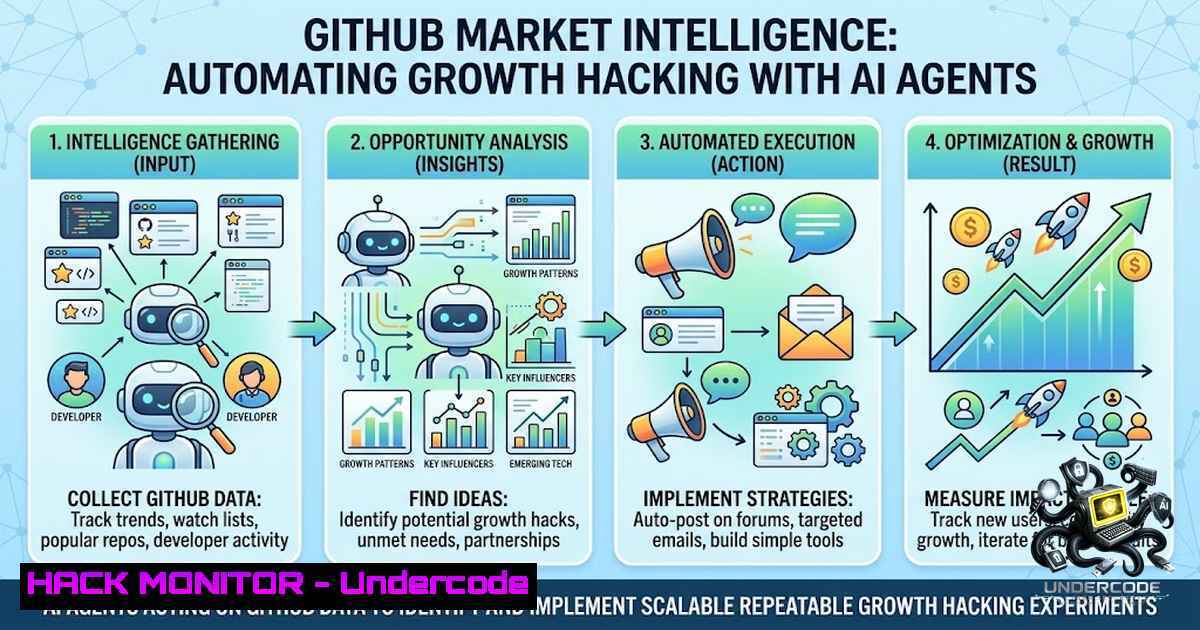
Introduction:
In the modern cybersecurity and product development landscape, open-source repositories are not just codebases—they are live, unfiltered signals of user frustration, feature gaps, and competitor weaknesses. By deploying AI agents to scan GitHub issues, organizations can transform passive code hosting into an active market intelligence engine. This approach shifts the paradigm from reactive bug fixing to proactive acquisition, using natural language processing (NLP) to detect churn signals and interception points before they become public crises.
Learning Objectives
- Objective 1: Implement AI-driven repository scanning to identify competitor churn signals and user intent in real time.
- Objective 2: Configure automated workflows to extract and categorize “alternative to” and “giving up” phrases across multiple GitHub projects.
- Objective 3: Deploy trend analysis tools to forecast niche movements and prioritize security/patching efforts based on user-reported vulnerabilities.
You Should Know
- GitHub as a Threat Intelligence and Market Sensor
Most cybersecurity teams focus on CVEs and exploit databases, but GitHub issues often contain zero-day indicators and practical workarounds before they are formally disclosed. Treating these threads as a market sensor means parsing not only technical bugs but also emotional language that signals product abandonment.
Step‑by‑step guide to building a basic issue scraper:
- Set up a GitHub Personal Access Token (classic) with `repo` and `public_repo` scopes.
- Use the GitHub REST API to query for issues mentioning keywords like
alternative to,slow,crash, orgiving up.
– Example endpoint: `GET /repos/{owner}/{repo}/issues?state=open&labels=bug`
3. Integrate NLP filtering using Python libraries (e.g., `spaCy` or transformers) to classify negative sentiment.
4. Log results into a structured format (JSON/CSV) for trend analysis.
Linux/macOS command to fetch all open issues from a repository:
curl -H "Authorization: token YOUR_GITHUB_TOKEN" \
-H "Accept: application/vnd.github.v3+json" \
"https://api.github.com/repos/OWNER/REPO/issues?state=open&per_page=100" \
| jq '.[] | {title: .title, body: .body, url: .html_url}'
Windows PowerShell alternative:
$token = "YOUR_GITHUB_TOKEN"
$headers = @{ Authorization = "token $token"; Accept = "application/vnd.github.v3+json" }
Invoke-RestMethod -Uri "https://api.github.com/repos/OWNER/REPO/issues?state=open" -Headers $headers |
Select-Object title, body, html_url
2. Extracting Churn Signals via AI Agents
The core of this methodology is automating pattern recognition. Instead of manual keyword grepping, deploy an autonomous agent that watches multiple repositories and flags when users mention “migrating to” or “switching from”.
Step‑by‑step guide to implement churn signal tracking:
- Define a “churn dictionary” containing phrases like
"moved to","better alternative","we are leaving","last straw". - Use a webhook to listen for new issue creation events (GitHub webhook payloads include issue body).
- Run the agent on a scheduled basis (cron job / Task Scheduler) to scan for patterns not caught by immediate webhooks.
- Store flagged issues in a database and set up alerts when a threshold (e.g., 5 mentions per week) is crossed.
Example Python snippet using PyGithub:
from github import Github
g = Github("YOUR_TOKEN")
repo = g.get_repo("owner/repo")
for issue in repo.get_issues(state="open"):
if "alternative to" in issue.body.lower() or "giving up" in issue.body.lower():
print(f"Churn signal detected: {issue.html_url}")
Windows scheduled task (using PowerShell) to run this daily:
$action = New-ScheduledTaskAction -Execute "python.exe" -Argument "C:\scripts\churn_scanner.py"
$trigger = New-ScheduledTaskTrigger -Daily -At 9am
Register-ScheduledTask -TaskName "GitHubChurnScan" -Action $action -Trigger $trigger
3. API Security and Hardening in Automated Scraping
When deploying AI agents that interact with GitHub’s API, rate limiting and token rotation become critical. Misconfigured agents can expose tokens or flood endpoints, leading to IP bans or accidental data leaks.
Step‑by‑step guide to secure your agent:
- Store tokens in environment variables or a secrets manager (e.g., AWS Secrets Manager, HashiCorp Vault) rather than hardcoding.
- Implement exponential backoff for retries to avoid hitting secondary rate limits.
- Use OAuth2 with scoped permissions instead of personal tokens when possible.
- Encrypt logs that contain issue content if they include user PII or proprietary business logic.
Linux command to set environment variable securely:
export GITHUB_TOKEN=$(cat /run/secrets/github_token | tr -d '\n')
Windows (PowerShell) encrypted environment variable:
$secpass = Read-Host "Enter token" -AsSecureString
$cred = New-Object System.Management.Automation.PSCredential("user", $secpass)
$env:GITHUB_TOKEN = $cred.GetNetworkCredential().Password
4. Cloud Hardening for Continuous Scanning Workloads
Running an AI agent continuously requires cloud infrastructure (e.g., AWS Lambda, Azure Functions). Hardening this environment involves restricting outbound access, monitoring for anomalous API calls, and rotating credentials automatically.
Step‑by‑step guide to harden a cloud-based scanner:
- Deploy inside a VPC with no public internet access except for a whitelisted GitHub API endpoint.
- Use IAM roles to grant minimal permissions—only read access to public repositories.
- Enable CloudTrail/Activity Logs to audit every API call made by the agent.
- Set up alerting for sudden spikes in request volume (potential token theft or misconfiguration).
Azure CLI command to create a function app with managed identity:
az functionapp create --resource-group myRG --1ame gh-scanner --storage-account mystorage --runtime python --identity-system-assigned
AWS Lambda policy to restrict to GitHub API:
{
"Version": "2012-10-17",
"Statement": [
{
"Effect": "Allow",
"Action": "lambda:InvokeFunction",
"Resource": "",
"Condition": {
"IpAddress": {
"aws:SourceIp": "140.82.112.0/20"
}
}
}
]
}
5. Exploitation and Mitigation of Competitor Insights
While tracking churn signals, teams may discover that competitors have unfixed security flaws. This creates a strategic opportunity: you can anticipate how attackers might target those weaknesses and proactively harden your own stack.
Step‑by‑step guide to turn competitor bugs into internal patches:
- Monitor competitor issue trackers for CVE-like descriptions (e.g., “unauthenticated access”, “RCE in endpoint X”).
- Build a local test environment mimicking the competitor’s architecture to verify the flaw.
- If relevant, patch your own equivalent feature before any public exploit is released.
- Consider responsible disclosure if you find a critical issue—this builds goodwill and possibly bug bounties.
Linux command to spin up a Dockerized test environment quickly:
docker run --rm -it --1ame test-env -p 8080:80 vulnerable/competitor-app:latest
Windows PowerShell to check open ports on a competitor service:
Test-1etConnection -ComputerName competitor-api.com -Port 443
6. Automating Reports and Dashboards
To make the intelligence actionable, feed the scraped data into a visualization tool like Grafana or Power BI. This helps product teams see trends over time—when are users most frustrated? Which features are mentioned alongside “alternative”?
Step‑by‑step guide to build a real-time dashboard:
- Export processed issue data to a time‑series database (e.g., InfluxDB).
- Create queries that group sentiment scores by repository and label.
- Set up alerts for when a certain keyword frequency exceeds a weekly moving average.
- Embed the dashboard into internal wikis for daily standups.
Example InfluxDB query:
SELECT mean(sentiment) FROM issues WHERE time > now() - 7d GROUP BY repo, label
Linux cron job to refresh data hourly:
0 /usr/bin/python3 /opt/gh-scanner/export_to_influx.py
7. Ethical Considerations and Rate Limit Compliance
While scraping public data is legal, organizations must respect GitHub’s terms and not overwhelm the API. Additionally, using this data to poach customers directly from issue threads may violate anti‑poaching or data usage policies.
Step‑by‑step guide to stay compliant:
- Set a user‑agent header that identifies your organization and purpose.
2. Cache responses to minimize repeated calls.
3. Respect robots.txt and GitHub’s `X-RateLimit-` headers.
- Anonymize data before sharing insights across teams to avoid targeting specific individuals.
Bash script to check rate limit before scraping:
curl -H "Authorization: token $GITHUB_TOKEN" \
https://api.github.com/rate_limit | jq '.resources.core'
What Undercode Say
- Key Takeaway 1: GitHub is an underutilized source of competitive intelligence—AI agents can automate the detection of churn signals that human teams often miss, turning bug reports into strategic roadmaps.
- Key Takeaway 2: Combining NLP with API security best practices is essential; without proper token rotation and network hardening, these agents become a liability rather than an asset.
Analysis: The shift toward AI-driven market intelligence reflects a broader trend in DevSecOps: treating every data source as a potential attack surface or strategic asset. Organizations that embed these scanners into their CI/CD pipelines will gain early warning of competitor weaknesses and user dissatisfaction, allowing them to pivot faster. However, the same tools can be misused for unethical competitor surveillance, so governance and transparency are non‑negotiable. As these agents become more sophisticated (e.g., using LLMs to summarize issue threads), the line between market research and corporate espionage will blur—requiring legal and compliance teams to be involved from day one. The technical implementation is straightforward, but the cultural adoption of GitHub as a “customer voice” channel requires a mindset change from engineering‑only to product‑growth integration.
Prediction
+1 GitHub Market Intelligence will become a standard module in product management toolkits within 24 months, with SaaS vendors offering off‑the‑shelf agents.
+1 AI agents will evolve to not only detect churn but also suggest code patches that address competitor vulnerabilities, creating a new class of “defensive innovation.”
-1 Increased scraping will lead GitHub to enforce stricter API tiers and potentially charge for high‑volume commercial scanning, increasing operational costs for startups.
-1 Misinterpretation of user sentiment (due to sarcasm or contextual nuances) could lead to false positives, wasting engineering cycles on non‑critical issues.
+1 The data gathered will enable more ethical “win‑back” campaigns by understanding what users genuinely need, reducing aggressive sales tactics.
-1 Without proper anonymization, teams risk GDPR/CCPA violations if they store and analyze issue data that contains personal frustrations linked to identifiable users.
+1 Open‑source communities will benefit, as maintainers can use these tools to triage issues based on user urgency, improving project health.
-1 Malicious actors will also adopt these scanners to identify and weaponize disclosed vulnerabilities faster, shortening the window for responsible patching.
+1 Integration with CI/CD will allow automatic environment hardening based on competitor issue patterns, creating a self‑healing infrastructure.
-1 The reliance on AI for market sensing may desensitize teams to direct user feedback, making them over‑reliant on algorithmic outputs and losing the human touch.
▶️ Related Video (90% Match):
🎯Let’s Practice For Free:
🎓 Live Courses & Certifications:
Join Undercode Academy for Verified Certifications
🚀 Request a Custom Project:
Secure, high-velocity infrastructure and disruptive technological engineering. Contact our engineering team for high-tier development and proprietary systems:
[email protected]
💎 Smart Architecture | 🛡️ Secure by Design | ⭐ Trusted by Thousands
IT/Security Reporter URL:
Reported By: https://lnkd.in/p/ek_CixuQ – Hackers Feeds
Extra Hub: Undercode MoN
Basic Verification: Pass ✅


