
Listen to this Post
Introduction:
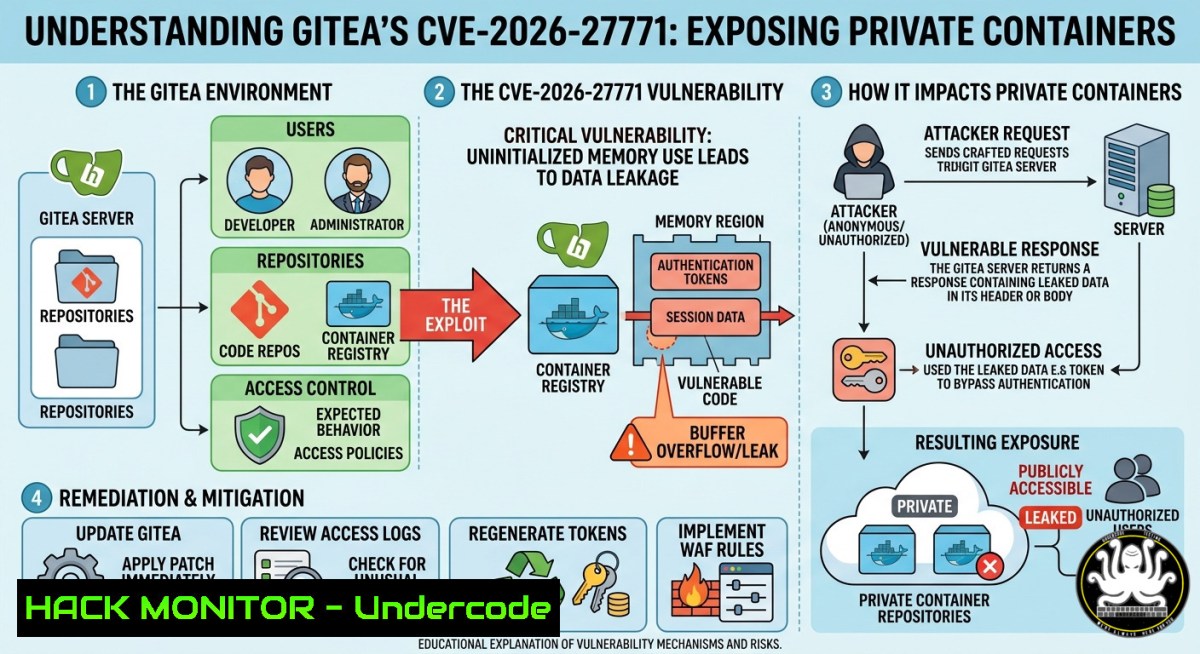
A critical vulnerability, identified as CVE-2026-27771, has been discovered in the widely-used self-hosted Git service, Gitea. This flaw allows unauthenticated attackers to pull private container images from a vulnerable Gitea instance, bypassing all authentication and access controls without needing a password or an account. With over 30,000 deployments potentially affected across critical sectors like healthcare, aerospace, and retail infrastructure, the unauthorized exposure of proprietary code, secrets, and configurations represents a massive supply chain risk that has silently persisted for nearly four years.
Learning Objectives:
- Understand the Root Cause: Learn how Gitea’s container registry failed to enforce privacy for container images, leading to unrestricted access.
- Identify Exploitation Methods: Recognize how an attacker would exploit this flaw using standard Docker tools to download private artifacts.
- Master Remediation: Acquire the skills to apply the official patch, implement temporary workarounds, and harden your Gitea deployment post-fix.
You Should Know:
- The Anatomy of the Container Leak: Exploiting the Flaw
This vulnerability, which has existed for nearly four years, stems from a critical misconfiguration in how the Gitea container registry handles the “private” designation. The registry features that manage access control for container packages did not properly validate permissions, allowing any internet user to retrieve images intended to be private.
To understand the impact, imagine you have a private image named `internal-api` owned by a user johnappleseed. An attacker could pull this image without any credentials using the standard Docker CLI, as if it were a public image. The exploitation is terrifyingly simple:
- Step 1: An attacker identifies a vulnerable Gitea instance (e.g., `https://gitea.target.com`).
- Step 2: The attacker attempts to pull a target image directly. Gitea’s container registry should require authentication for private images but fails to do so in vulnerable versions.
- Step 3: A successful pull would give the attacker the entire filesystem of that container, exposing any secrets, proprietary code, or configuration files packaged inside.
 Linux Command - The Attacker's Perspective
 The attacker doesn't need to log in with 'docker login'. They simply issue:
docker pull gitea.target.com/johnappleseed/internal-api:latest
 On a vulnerable Gitea instance, this command will succeed, downloading the private container.

Windows Command (PowerShell)
 The same principle applies using the Docker CLI on Windows.
docker pull gitea.target.com/johnappleseed/internal-api:latest
2. Immediate Mitigation: Patching vs. The Workaround
The official and most secure resolution is to update your Gitea instance immediately to version 1.26.2 or later. This version contains the official security patch for CVE-2026-27771, among several other critical security fixes.
If an immediate update is impossible due to operational constraints, Gitea has provided a temporary workaround. The `REQUIRE_SIGNIN_VIEW` option, when enabled, blocks all unauthenticated access to the web interface. However, this is a blunt instrument; it will also break public access to any repositories or container images you intentionally want to be public.
Step-by-Step Guide to Remediation:
- Option A: Apply the Official Patch (Recommended)
1. Stop your Gitea service.
- Backup your Gitea database and the `gitea` directory.
- Download the latest version (1.26.2) from the official Gitea downloads page.
- Replace your current Gitea binary with the new one.
5. Start the service.
- Option B: Apply the Temporary Workaround
- Locate your Gitea configuration file, typically named
app.ini. - Within the `
` section, add or modify the following line:
[bash]
REQUIRE_SIGNIN_VIEW = true
- Save the file and restart your Gitea service.
 Linux Workflow for Updating Gitea (Option A)
 1. Stop Gitea
sudo systemctl stop gitea

<ol>
<li>Backup your data (example paths)
sudo cp -r /var/lib/gitea /var/lib/gitea.backup
sudo cp /etc/gitea/app.ini /etc/gitea/app.ini.backup</p></li>
<li><p>Download and replace the binary (check for the latest URL)
cd /usr/local/bin
sudo wget -O gitea https://dl.gitea.com/gitea/1.26.2/gitea-1.26.2-linux-amd64
sudo chmod +x gitea</p></li>
<li><p>Restart Gitea
sudo systemctl start gitea
3. Post-Incident Hardening and Auditing
After patching, it’s crucial to assume that your environment has already been compromised, given the four-year exposure window. Security researchers have confirmed that forks of Gitea, such as Forgejo, are also impacted by this vulnerability and should be treated as compromised until they are independently verified and patched.
You should immediately conduct a forensic review to determine if any unauthorized access occurred. Since the vulnerability leaves few direct logs (as the attack doesn’t require a login), a proactive audit of your container images is your best line of defense. The goal is to rotate any secrets that may have been exposed.
 Audit Script to Find Potential Secrets in Exposed Images
 Run this on a local copy of the container you suspect may have been leaked.

<ol>
<li>Pull the image (if you have a backup or from a production registry)
docker pull your-registry.com/your-private-image:latest</p></li>
<li><p>Run a temporary container and scan for hardcoded secrets
docker run --rm -it your-registry.com/your-private-image:latest \
bash -c "grep -r -E 'API_KEY|SECRET_KEY|PASSWORD|TOKEN' /app/ 2>/dev/null"

Windows (PowerShell) Alternative:
This is more complex; consider using a tool like truffleHog in a Docker container.
docker run --rm -v ${PWD}:/pwd trufflesecurity/trufflehog:latest filesystem /pwd
- Hardening the Gitea Infrastructure: A Deeper Configuration Guide
Beyond patching and the `REQUIRE_SIGNIN_VIEW` flag, a hardened Gitea installation is a multi-layered defense. The default configuration of Gitea may leave other doors open. This section provides a systematic hardening checklist to implement after you have updated to version 1.26.2. These steps are crucial because the container registry is just one component; other API endpoints and authentication methods have also had vulnerabilities (e.g., CVE-2026-28699, CVE-2026-28744).
- Restrict Registration and New Users: By default, Gitea may allow public registration. Unless you’re running a public service, disable this.
- Enforce Strong Password Policies and MFA: Force users to use strong passwords and enable two-factor authentication (2FA). Gitea supports TOTP (e.g., Google Authenticator) and U2F (e.g., YubiKey).
- Secure Connections with a Reverse Proxy: Never expose Gitea directly to the internet. Place it behind a reverse proxy like Nginx or Caddy that terminates TLS (HTTPS). This ensures traffic is encrypted in transit, mitigating man-in-the-middle attacks.
- Implement Network-Level Access Control: Use a firewall or a service mesh to restrict access to the Gitea server. If you’re on a cloud platform, use security groups to allow inbound traffic only from your reverse proxy or specific IP ranges.
 Example Snippet for app.ini - Essential Hardening Settings
 These settings should be reviewed after patching to CVE-2026-27771.

[bash]
REQUIRE_SIGNIN_VIEW = true ; Temporary workaround, remove if not needed
DISABLE_REGISTRATION = true ; Prevents new account creation
SHOW_REGISTRATION_BUTTON = false ; Hides the registration link
; Enable email confirmation and admin approval for new users (if registration is open)
REGISTER_EMAIL_CONFIRM = true
REGISTER_MANUAL_CONFIRM = true

[bash]
; Enforce strong password rules
MIN_PASSWORD_LENGTH = 12
PASSWORD_COMPLEXITY = lower,upper,digit,spec

[bash]
; Ensure cookies are secure, preventing session hijacking over HTTP
COOKIE_SECURE = true
; Rotate tokens and secret keys regularly
INTERNAL_TOKEN = <your-rotated-secure-token>
JWT_SECRET = <your-rotated-secure-token>
SECRET_KEY = <your-rotated-secure-token>
LOGIN_REMEMBER_DAYS = 7 ; Reduce session lifetime

[bash]
; Prevent Gitea from being used to attack internal networks (SSRF)
ALLOWED_DOMAIN_LIST = your-allowed-domain.com, .your-allowed-domain.com
SKIP_TLS_VERIFY = false ; Never skip TLS verification for webhooks
This configuration goes beyond the immediate patch, building a robust defense-in-depth posture around your Gitea service.
What Undercode Say:
- Key Takeaway 1: The silent four-year lifespan of CVE-2026-27771 is a stark reminder that even fundamental features like access control in mature projects can fail in catastrophic ways.
- Key Takeaway 2: Container images are not just artifacts; they are deployment blueprints containing sensitive production data. Treat your container registry with the same security rigor as your production environment, not as a dumping ground.
Analysis: The extended duration of this vulnerability highlights the need for proactive security testing, not just reactive patching. The fact that it was discovered by an automated pentesting agent (“NoScope”) points to the future of vulnerability research, where systematic and exhaustive testing will outpace manual audits. Organizations cannot rely solely on human-led, periodic penetration tests; security must be an automated and continuous part of the software development lifecycle, especially for critical supply chain infrastructure like code forges and container registries.
Prediction:
In the wake of CVE-2026-27771, we will likely see a significant increase in similar disclosures, particularly within CI/CD and artifact storage tools. As software supply chain attacks become the primary vector for threat actors, any service that stores proprietary code or artifacts will be under intense scrutiny. Expect regulatory bodies to propose new standards for artifact registry security, potentially mandating immutable audit logs and default-deny access models. Furthermore, the success of AI-driven discovery will likely accelerate the weaponization of automated pentesting, leading to a flood of new vulnerability reports across all open-source ecosystems.
▶️ Related Video (84% Match):
🎯Let’s Practice For Free:
IT/Security Reporter URL:
Reported By: Hackermohitkumar Gitea – Hackers Feeds
Extra Hub: Undercode MoN
Basic Verification: Pass ✅
🎓 Live Courses & Certifications:
Join Undercode Academy for Verified Certifications
🚀 Request a Custom Project:
Secure, high-velocity infrastructure and disruptive technological engineering. Contact our engineering team for high-tier development and proprietary systems:
[email protected]


