Listen to this Post
Introduction:
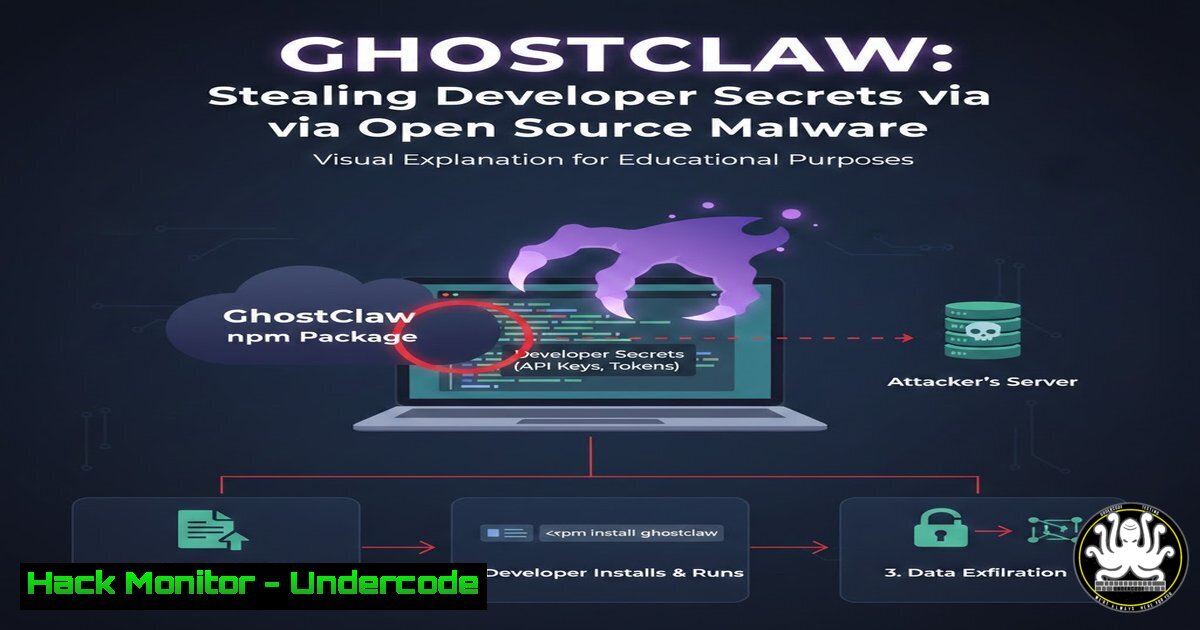
A sophisticated supply chain attack has been uncovered in the npm ecosystem, where a malicious package named @openclaw-ai/openclawai masquerades as the legitimate OpenClaw CLI tool. Dubbed “GhostClaw” by researchers, this threat deploys a full-featured infostealer and remote access trojan (RAT) against developers’ machines. By exploiting the trust in open-source dependencies and using a stealthy postinstall hook, attackers can exfiltrate SSH keys, cloud credentials, AI agent configurations, and live browser sessions. This article dissects the attack vector, provides step‑by‑step detection and mitigation techniques, and outlines future implications for software supply chain security.
Learning Objectives:
- Understand how malicious npm packages use postinstall scripts to deliver malware.
- Learn to inspect npm package metadata and scripts for suspicious indicators.
- Gain hands‑on commands to detect and remove GhostClaw‑like threats on Linux and Windows.
- Implement preventive measures to secure developer environments against supply chain attacks.
- Develop incident response steps for credential theft and persistence removal.
You Should Know:
1. Anatomy of the GhostClaw Attack
The GhostClaw package (@openclaw-ai/openclawai) impersonates a legitimate tool by presenting a clean package.json and a benign src/index.js export, with no listed dependencies—making it appear low‑risk during a quick review. The malicious behavior is triggered by a postinstall hook defined in the package’s scripts section. When a developer installs the package (e.g., via npm install), npm automatically executes the postinstall script. In this case, the script silently reinstalls the package globally, ensuring the openclaw binary lands on the system PATH and points to an obfuscated dropper (scripts/setup.js). This dropper then decrypts and executes the final payload: an infostealer and RAT that collects SSH keys, cloud provider credentials (AWS, Azure, GCP), AI agent configuration files, and browser session cookies.
2. Inspecting npm Package Metadata and Scripts
To identify such threats before installation, always examine the package.json and scripts of any new dependency.
Linux/macOS example (using curl and jq):
 Fetch package metadata from npm registry
curl -s https://registry.npmjs.org/@openclaw-ai%2fopenclawai | jq '.versions["latest"].scripts'
 Check if a postinstall script exists
npm view @openclaw-ai/openclawai scripts
 List all files in the package tarball without downloading
npm pack @openclaw-ai/openclawai --dry-run
Windows (PowerShell):
 Use npm view to inspect scripts
npm view @openclaw-ai/openclawai scripts
 Download and extract the tarball safely in a sandbox
npm pack @openclaw-ai/openclawai
tar -xzf openclaw-ai-openclawai-.tgz
Get-Content package/scripts/setup.js
If you see a suspicious postinstall script (e.g., obfuscated code, base64 strings, or commands that download further payloads), treat the package as malicious.
3. Detecting Postinstall Malware on Your System
If you suspect you’ve installed a malicious package, immediately check for postinstall activity and persistence mechanisms.
Linux:
 List all globally installed npm packages and their scripts
npm list -g --depth=0
 Check for recently modified files in npm global directories
find $(npm root -g) -type f -name ".js" -mtime -1
 Look for suspicious processes and network connections
ps aux | grep -i node
netstat -tulpn | grep ESTABLISHED
 Check for unauthorized cron jobs (persistence)
crontab -l
sudo crontab -l
Windows:
 List globally installed npm packages
npm list -g --depth=0
 Search for recently created JavaScript files in npm global folder
Get-ChildItem -Path $(npm root -g) -Recurse -Filter .js | Where-Object { $_.LastWriteTime -gt (Get-Date).AddDays(-1) }
 Check running Node processes
Get-Process -Name node
 Inspect network connections
netstat -ano | findstr ESTABLISHED
 Look for scheduled tasks (persistence)
schtasks /query /fo LIST /v
If you find unknown processes or outbound connections to suspicious IPs, the system is likely compromised.
4. Manual Removal and Credential Revocation
If GhostClaw or similar malware is detected, act immediately to contain the damage.
Step 1: Remove the malicious package.
npm uninstall -g @openclaw-ai/openclawai
npm uninstall @openclaw-ai/openclawai  if installed locally
Step 2: Kill any rogue Node.js processes.
pkill -f "node.openclaw"
Step 3: Delete related files.
rm -rf $(npm root -g)/@openclaw-ai
rm -rf ~/.npm/_cacache  clear npm cache
Step 4: Rotate all exposed credentials. This includes:
- SSH keys: regenerate and update authorized_keys on servers.
- Cloud provider keys: revoke and create new ones via AWS IAM, Azure AD, GCP IAM.
- AI agent configs: reset API tokens and secrets.
- Browser sessions: log out of all accounts and clear cookies/cache.
5. Hardening Against Future npm Supply Chain Attacks
Prevent similar threats by adopting secure development practices.
- Use npm audit and npm outdated regularly.
npm audit
npm audit fix
- Implement lockfiles (package-lock.json) to ensure consistent, verified versions.
- Employ sandboxed environments for testing new packages (e.g., Docker containers, virtual machines).
- Verify package integrity using npm’s built-in integrity checking (SHA hashes in lockfiles).
- Consider using tools like Snyk, Socket.dev, or Sonatype to automatically scan for malicious packages.
- For CI/CD pipelines, use `npm ci` instead of `npm install` to enforce lockfile integrity.
6. Incident Response Checklist for Compromised Developer Machines
If a machine is confirmed infected, follow these steps:
1. Isolate the machine from the network immediately.
- Capture a memory dump and disk image for forensics (use tools like LiME, FTK Imager).
- Identify all stolen data types (search for file access logs, network exfiltration patterns).
- Notify security teams and affected service providers (cloud platforms, code repositories).
- Perform a full system reimage if backdoors are deeply embedded.
- Review and rotate all credentials used on the machine since the infection date.
- Monitor for any unauthorized activities using the stolen credentials.
7. Tools for Continuous Monitoring
- Open Source: OWASP Dependency-Check, retire.js, npm audit.
- Commercial: Snyk, WhiteSource, Sonatype Nexus Lifecycle.
- Behavioral: Sysmon (Windows), Auditd (Linux) to monitor process creation and file access.
What Undercode Say:
- Key Takeaway 1: Supply chain attacks via npm are escalating; a single malicious package can compromise an entire organization’s development pipeline. The GhostClaw incident underscores the need for rigorous package vetting and runtime monitoring.
- Key Takeaway 2: Postinstall scripts remain a favored attack vector because they execute automatically. Developers must treat any package with a postinstall hook as high‑risk and inspect it in a sandbox before use.
The attack’s sophistication—combining social engineering, encrypted payloads, and credential theft—shows that attackers are now targeting developer machines as high‑value entry points. Organizations should enforce least‑privilege access, use ephemeral build environments, and implement automated package scanning. Additionally, the open‑source community must improve transparency by requiring maintainers to justify postinstall scripts and sign packages.
Prediction:
As software supply chains become more complex, we will see a surge in attacks that impersonate popular developer tools and libraries. Attackers will increasingly leverage AI‑generated code to create convincing malicious packages that bypass traditional signature‑based detection. The future of defense lies in behavioral analysis, real‑time monitoring of package behavior during installation, and community‑driven threat intelligence sharing. Expect npm and other registries to adopt stricter verification measures, such as mandatory two‑factor authentication for publishers and automated dynamic analysis of new packages.
🎯Let’s Practice For Free:
IT/Security Reporter URL:
Reported By: Mayura Kathiresh – Hackers Feeds
Extra Hub: Undercode MoN
Basic Verification: Pass ✅


