Listen to this Post
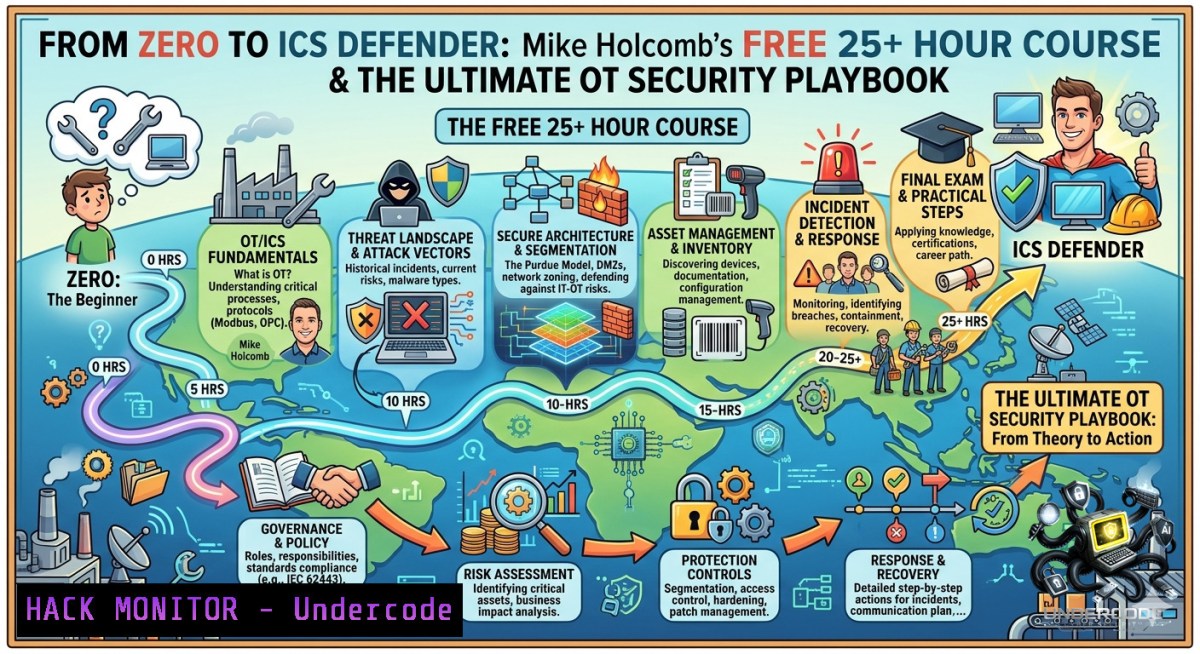
The convergence of Information Technology (IT) and Operational Technology (OT) has created a vast, exposed attack surface on critical infrastructure. As threat actors increasingly target industrial control systems (ICS), there is a massive skills gap for cybersecurity professionals who understand the unique safety, reliability, and protocol constraints of OT environments. This article breaks down Mike Holcomb’s free, comprehensive 25+ hour course—which has already reached over 110,000 learners—and provides a complete field manual for securing ICS/OT environments.
Learning Objectives:
- Understand OT/ICS Fundamentals: Grasp the critical differences between IT and OT, including safety constraints, Purdue Model architecture, and legacy protocol risks.
- Master Security Controls: Implement secure network architecture, asset inventories, and vulnerability management tailored for industrial environments.
- Conduct OSINT and Penetration Testing: Use specialized techniques and tools like Shodan, Nmap, and Metasploit to discover and secure exposed ICS assets.
- Build an Incident Response Playbook: Develop OT-specific incident response strategies to ensure safety and operational continuity during a cyberattack.
You Should Know:
- Getting Started: Build Your Own OT/ICS Virtual Lab with Labshock
You can’t learn to secure a power grid on a live one. The best practice is to deploy a virtual ICS environment. Labshock is a free, open-source platform that builds a complete OT cyber range, including PLCs, SCADA, Human-Machine Interfaces (HMIs), and Engineering Workstations (EWS), in under ten minutes using real industrial protocols. The following guide will walk you through installing and verifying your first OT lab.
Step‑by‑step guide explaining what this does and how to use it:
1. Install Prerequisites: Ensure you have a hypervisor like VMware Workstation or VirtualBox installed on a machine with at least 16GB of RAM.
2. Clone the Repository: Open a terminal on your Linux workstation (or WSL on Windows) and clone the Labshock project from GitHub.
 Linux / macOS / WSL Command
git clone https://github.com/zakharb/labshock.git
This command downloads all the necessary configuration files and scripts for the lab environment.
3. Navigate to the Directory:
cd labshock
4. Review the Setup Script: Before running, inspect the main setup script to understand what it does.
cat setup.sh
This script will automatically pull pre-configured virtual machine images for various industrial components.
5. Execute the Deployment Script: Run the main installation script.
chmod +x setup.sh
sudo ./setup.sh
`chmod +x setup.sh`: Makes the script executable.
sudo ./setup.sh: Runs the script with administrative privileges to configure networking and import VMs.
6. Verify Deployment: After completion, verify all virtual machines are running.
VBoxManage list runningvms If using VirtualBox
You should see entries for “PLCs”, “HMI”, and “Engineering Workstation”, confirming your OT cyber range is active and ready for attack simulation and defense testing.
- OSINT for ICS/OT: Hunting Exposed Assets with Shodan
Attackers don’t wait for a formal penetration test. Using specialized search engines, they can discover your internet-facing OT assets in minutes. Shodan is the primary OSINT tool for this purpose, indexing millions of internet-connected devices, including those using SCADA and ICS protocols. This tutorial provides a set of defensive “dork” queries for you to discover your own external attack surface.
Step‑by‑step guide explaining what this does and how to use it:
1. Create an Account: Navigate to Shodan.io and sign up for a free account to perform basic searches.
2. Search for Modbus Devices: Enter the following search query in the search bar. This finds all devices accessible on the internet that are speaking the Modbus protocol on its default port.
port:502 modbus
Modbus is a common industrial protocol that often lacks authentication, making this a top target for attackers.
3. Discover Siemens PLCs (S7 Protocol): Siemens S7 PLCs are widely used in critical manufacturing and energy. Use this query to find them.
"Siemens" "S7" port:102
4. Find Default Credentials on HMIs: Look for human-machine interfaces (the dashboards that control industrial processes) that are still using default login pages.
"Login" "CIMPLICITY" or "FactoryTalk View" "login"
5. Locate Vulnerable Camera Systems: IP cameras in industrial settings can be a pivot point into the OT network.
"GHAPv1" or "H264" "DVR"
6. Use the Shodan Command-Line Interface (CLI): For automation, install the Shodan CLI on your Linux machine to run searches from a script. This is essential for continuous monitoring.
 Install the Shodan Python library
pip install shodan

Initialize the CLI with your API key (found on your Shodan account page)
shodan init YOUR_API_KEY

Run a search for exposed Niagara Fox devices (common in building automation)
shodan search --fields ip_str,port,org "niagara fox"
- Network Segmentation: Defending the Purdue Model with VLANs
The Purdue Model is the foundational architecture for securing OT networks. It divides the network into logical “levels” (Levels 0-5), from physical processes to the enterprise IT network. The golden rule is to strictly control traffic between these levels, preventing an IT breach from spreading to your factory floor. The following instructions demonstrate how to implement a basic segmentation rule on a Cisco switch.
Step‑by‑step guide explaining what this does and how to use it:
1. Access the Switch CLI: Connect to your managed Cisco switch via console or SSH and enter privileged EXEC mode.
Switch> enable
2. Enter Global Configuration Mode:
Switch configure terminal
3. Create VLANs for Segmentation: Create one VLAN for your OT “Cell/Area Zone” (Level 3) and one for your “Enterprise Zone” (Level 4/5). For example, VLAN 30 for OT and VLAN 40 for IT.
Switch(config) vlan 30
Switch(config-vlan) name OT_Safety_Zone
Switch(config-vlan) vlan 40
Switch(config-vlan) name Enterprise_Network
Switch(config-vlan) exit
4. Assign Switch Ports to VLANs: Assign the physical port connected to a critical PLC (e.g., port GigabitEthernet 0/1) to the OT VLAN.
Switch(config) interface GigabitEthernet0/1
Switch(config-if) switchport mode access
Switch(config-if) switchport access vlan 30
Switch(config-if) exit
5. Create an Access Control List (ACL): This ACL will block all traffic from the Enterprise network to the OT network, except for a specific management server, enforcing the unidirectional “conduit” principle of the Purdue Model.
Switch(config) access-list 110 deny ip any 192.168.30.0 0.0.0.255
6. Apply the ACL to an Interface: Apply the ACL inbound on the interface connected to the Enterprise network.
Switch(config) interface GigabitEthernet0/24
Switch(config-if) ip access-group 110 in
Switch(config-if) end
- ICS Protocol Security: Hands-On with Modbus and Wireshark
Much of OT security relies on understanding the “plain text” nature of legacy industrial protocols. Modbus/TCP, one of the most widely used protocols, sends commands in clear text without any built-in authentication. By analyzing this traffic, you can see exactly what commands an attacker could send. This guide shows you how to capture and interpret this traffic using Wireshark.
Step‑by‑step guide explaining what this does and how to use it:
1. Launch Wireshark: Open Wireshark on a computer that is mirrored to your OT switch port or already on the OT network.
2. Select the Network Interface: Choose the network interface connected to your OT network (e.g., `eth0` or enp0s3) to begin packet capture. Press the blue “shark fin” button to start.
3. Filter for Modbus Traffic: In the filter bar at the top of the window, type the following filter to isolate only Modbus traffic.
tcp.port == 502 or modbus
This captures all packets using the standard Modbus port (502).
4. Identify a “Read” Command: Find a packet in the list where the “Info” column says something like “Query” or “Read Holding Registers”. Click on it.
5. Analyze the Modbus Payload: In the middle “Packet Details” pane, expand the “Modbus/TCP” section. You can now see the exact command being sent, such as:
Function Code: Read Holding Registers (0x03). This reveals the action being taken.
Reference Number: 0. This is the starting memory address being accessed.
Quantity of Registers: 10. This specifies how many data points are being read.
6. Simulate an Attack:
In your Labshock environment, use a tool like `ModbusPal` or a Python script to write a “Stop” command to a simulated motor.
Go back to Wireshark and look for a packet with the Function Code `Write Single Coil (0x05)` or Write Multiple Registers (0x10). This shows an attacker manipulating a physical process in real-time.
5. Building an OT Incident Response (IR) Playbook
When an incident occurs on a factory network, disconnecting a server can be more dangerous than the attack itself—it could trigger a physical safety event. An OT IR playbook prioritizes safety over containment and focuses on maintaining operational visibility. This is an example of a “Network Isolation” procedure, a cornerstone of OT IR.
Step‑by‑step guide explaining what this does and how to use it:
1. Verify the Incident: Immediately confirm the scope of the suspicious activity with the OT engineering team. Do not act on IT threat intelligence alone without operational context.
2. Engage the Emergency Response Team: Activate your pre-defined OT incident response team, which includes engineering, safety, and control system experts. Ensure the physical process is in a safe state.
3. Identify Compromised Zone: Using your asset inventory and network maps, determine which specific Purdue Model zone or conduit is affected.
4. Perform Logical Isolation (The `shutdown` Command): As a first step, shut down the network interface on the compromised asset (if it’s safe to do so) to stop lateral movement. Do not pull the power unless it’s a life-safety emergency.
Linux based engineering workstation:
sudo ifconfig eth0 down
Windows based engineering workstation:
netsh interface set interface "Ethernet0" admin=disable
5. Isolate at the Conduit (Firewall Rule): If shutting down an asset is too risky, implement a temporary block on the firewall or managed switch at the zone’s conduit. This prevents traffic from entering or leaving the entire compromised zone.
 Example iptables rule on an OT firewall to block traffic from the compromised zone (192.168.1.0/24)
iptables -A FORWARD -s 192.168.1.0/24 -j DROP
This command adds a rule to the firewall’s forward chain, dropping all packets originating from the compromised network.
6. Document Every Action: Your primary goal is to collect evidence for forensics while maintaining safe operations. Record every command run and every action taken in a secure log for post-incident analysis.
7. Transition to Eradication and Recovery: Once the threat is contained at the network level, work with engineering to plan the eradication and safe recovery of the affected systems.
What Undercode Say:
- The Accessibility Factor: The fact that a comprehensive, 25+ hour course from a recognized industry expert is available for free is a game-changer. It lowers the barrier to entry for IT professionals looking to transition into OT, a field desperate for talent.
- Hands-On is Non-1egotiable: Post highlights the importance of tools like Labshock and Nmap. OT security is not a theoretical discipline; you cannot secure what you cannot see. The commands and playbooks provided here are the exact tasks you will perform on the job.
Prediction:
- +1: Proliferation of accessible, free training like Holcomb’s will lead to a surge in qualified OT security professionals over the next 3-5 years, significantly shrinking the industry’s talent gap.
- -1: However, increased awareness via OSINT tools like Shodan is a double-edged sword. As more defenders learn to find exposed ICS assets, so do more threat actors. We will see a correlated rise in attacks on unsecured, internet-connected industrial control systems.
▶️ Related Video (74% Match):
🎯Let’s Practice For Free:
🎓 Live Courses & Certifications:
Join Undercode Academy for Verified Certifications
🚀 Request a Custom Project:
Secure, high-velocity infrastructure and disruptive technological engineering. Contact our engineering team for high-tier development and proprietary systems:
[email protected]
💎 Smart Architecture | 🛡️ Secure by Design | ⭐ Trusted by Thousands
IT/Security Reporter URL:
Reported By: Https: – Hackers Feeds
Extra Hub: Undercode MoN
Basic Verification: Pass ✅


