Listen to this Post
Introduction
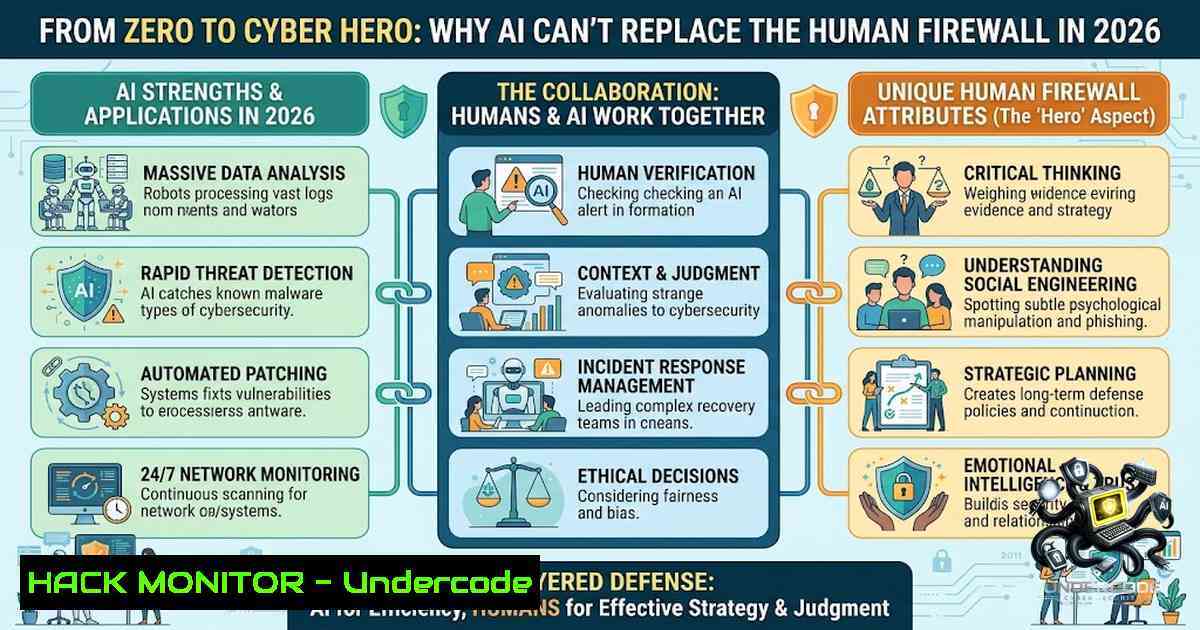
The cybersecurity landscape is evolving at an unprecedented pace, with AI-powered tools and automated threat detection systems becoming the new standard. However, as we integrate more artificial intelligence into our defense mechanisms, a critical question emerges: in an age of ChatGPT and endless YouTube tutorials, do we still need human teachers and mentors? The answer, as any seasoned professional will attest, is a resounding yes. While AI can process vast amounts of data and identify patterns, it lacks the human intuition, contextual understanding, and ethical judgment required to navigate the complex, ever-shifting battlefield of cyber threats. This article explores the irreplaceable value of mentorship in cybersecurity, provides a structured roadmap for career transition, and offers practical, hands-on commands to fortify your digital defenses.
Learning Objectives
- Understand the fundamental difference between information access (AI) and directional guidance (human mentorship) in cybersecurity education.
- Master essential Linux and Windows commands for network analysis, system hardening, and basic penetration testing.
- Learn how to structure a self-guided learning path that combines online resources with practical, real-world application.
- Identify key tools and configurations for API security and cloud hardening.
- Develop a mindset focused on continuous learning and ethical application of security skills.
You Should Know
1. The Mentorship Imperative: Why Guidance Trumps Google
In the vast ocean of online resources, it’s easy to feel lost. You can watch 100 videos on network protocols and still feel confused until someone breaks it down in a way that finally clicks. A true teacher doesn’t just share knowledge; they guide you, motivate you, and simplify the complex—something no algorithm can fully replicate. This is especially true in cybersecurity, where the stakes are high and the margin for error is zero.
Step‑by‑step guide to finding and leveraging mentorship:
- Identify Your Niche: Cybersecurity is vast. Determine if you’re interested in penetration testing, security operations (SOC), cloud security, or governance, risk, and compliance (GRC).
- Engage in Online Communities: Participate in forums like Reddit’s r/cybersecurity, Discord servers, and LinkedIn groups. Don’t just lurk—ask thoughtful questions.
- Attend Virtual and Local Events: Webinars, conferences (like Black Hat or DEF CON), and local BSides events are goldmines for networking.
- Seek Structured Programs: Look for courses that offer instructor feedback or cohort-based learning. The human element of peer review and expert critique is invaluable.
- The “DM” Approach: As Eyambe Victory suggests, don’t be afraid to reach out directly to professionals whose work you admire. A simple, respectful message can open doors.
-
Building Your Lab: Essential Linux Commands for the Aspiring Analyst
A strong foundation in Linux is non-1egotiable for any cybersecurity professional. Most servers, security tools, and penetration testing frameworks (like Kali Linux) run on Linux. Here’s how to start.
Step‑by‑step guide to mastering basic Linux for security:
- Install a Virtual Machine: Download VirtualBox and install a Linux distribution like Ubuntu or Kali Linux. This provides a safe sandbox for experimentation.
2. Navigation and File Management:
– `pwd` (Print Working Directory): Shows your current location in the file system.
– `ls -la` (List): Displays all files and directories, including hidden ones, with detailed permissions.
– `cd /etc` (Change Directory): Navigates to the `/etc` directory, where many configuration files live.
3. Network Reconnaissance:
– `ifconfig` or ip a: View network interfaces and IP addresses.
– ping -c 4 google.com: Sends 4 ICMP packets to test connectivity.
– netstat -tulpn: Shows active network connections and listening ports. This is crucial for identifying suspicious services.
4. Process Management:
ps aux: Lists all running processes. Pipe it with `grep` to find specific ones (e.g.,ps aux | grep apache).kill -9 [bash]: Force-stops a process by its Process ID.
- Permissions: `chmod 755 script.sh` changes file permissions. Understanding `rwx` (read, write, execute) is vital for securing files.
Windows Command Line Equivalents:
ipconfig /all: Displays detailed IP configuration.netstat -ano: Shows active connections and associated process IDs.tasklist: Lists all running processes.
3. API Security: The New Frontline
As applications become more interconnected, APIs are a primary attack vector. Securing them requires a shift in mindset and specific tooling.
Step‑by‑step guide to basic API security testing:
- Understand the OWASP API Security Top 10: Familiarize yourself with common vulnerabilities like Broken Object Level Authorization (BOLA) and Broken Authentication.
- Tool Setup – Postman: Use Postman to interact with APIs. Inspect request and response headers.
- Tool Setup – Burp Suite: This is an intercepting proxy. Configure your browser to route traffic through Burp to capture and modify API requests.
- Test for Injection: Try injecting SQL or NoSQL queries into API parameters. Use tools like `sqlmap` for automation.
- Check for Excessive Data Exposure: Look at API responses. Are they returning more data than necessary (e.g., user passwords or PII)? This is a common flaw.
- Rate Limiting: Attempt to send a high volume of requests to an endpoint to see if it crashes or if rate limiting is implemented. This helps prevent brute-force attacks.
4. Cloud Hardening: Securing the Virtual Sky
With the mass migration to cloud platforms (AWS, Azure, GCP), misconfigurations are the leading cause of data breaches.
Step‑by‑step guide to hardening a cloud environment (AWS focus):
- Enable Multi-Factor Authentication (MFA): Mandate MFA for all user accounts, especially the root user.
- Implement Least Privilege: Use AWS Identity and Access Management (IAM) to grant users only the permissions they need. Avoid using the root account for daily tasks.
- Configure Security Groups: These are virtual firewalls. Ensure you only open necessary ports (e.g., port 443 for HTTPS) and restrict source IPs to known ranges.
- Enable Logging: Turn on AWS CloudTrail and VPC Flow Logs. This creates an audit trail of all actions and network traffic.
- Encrypt Data at Rest: Use AWS Key Management Service (KMS) to encrypt data stored in S3 buckets and EBS volumes.
- Regular Audits: Use tools like AWS Trusted Advisor and AWS Config to continuously monitor for misconfigurations.
5. Vulnerability Exploitation and Mitigation (The Defender’s Mindset)
To defend, you must think like an attacker. Understanding common exploits helps you patch them effectively.
Step‑by‑step guide to understanding a basic SQL Injection:
- The Concept: SQL Injection occurs when an attacker inserts malicious SQL code into a query.
- The Exploit: Imagine a login form. The query might be:
SELECT FROM users WHERE username = 'admin' AND password = 'password'. An attacker could input `’ OR ‘1’=’1` as the password, making the querySELECT FROM users WHERE username = 'admin' AND password = '' OR '1'='1', which always returns true, bypassing authentication.
3. The Mitigation:
- Parameterized Queries (Prepared Statements): This is the most effective defense. It separates SQL logic from data, treating user input as data only.
- Input Validation: Whitelist allowed characters for input fields.
- Least Privilege: The database account used by the application should have minimal permissions (e.g., no `DROP TABLE` privileges).
- Command Example (Linux – using
sqlmap): `sqlmap -u “http://example.com/page?id=1” –dbs` This attempts to enumerate databases. Note: Only use this on systems you own or have explicit permission to test.
What Undercode Say
- Mentorship Over Memorization: In the AI era, the ability to ask the right questions and apply knowledge contextually is more valuable than rote memorization. A mentor provides that context.
- Practical Application is Key: Watching tutorials is passive. Setting up a home lab and running commands (like `netstat` or
sqlmap) builds muscle memory and true understanding. - Cybersecurity is a People Problem: Technology provides the tools, but security fundamentally relies on human behavior. Training and culture are as important as firewalls.
Analysis
The core message from Eyambe Victory resonates deeply within the cybersecurity community. There is a growing chasm between the abundance of information and the scarcity of wisdom. Many aspiring professionals suffer from “tutorial hell,” where they consume endless content without ever building practical skills. Victory’s emphasis on direction and structure addresses this critical bottleneck. Furthermore, the rise of AI in cybersecurity—while powerful—creates a new dependency. As AI tools become more sophisticated, so do the attacks against them. The human element, encompassing ethical hacking, critical thinking, and strategic decision-making, becomes the differentiator. The future of cybersecurity education lies not in replacing teachers with algorithms, but in augmenting the learning experience with AI while relying on human mentors to provide the “why” behind the “how”.
Prediction
- +1 The demand for cybersecurity mentors and structured bootcamps will skyrocket as AI-generated content floods the market, making quality, human-curated education a premium asset.
- +1 Hands-on, lab-based learning will become the gold standard, with virtualized environments and simulated attacks replacing traditional textbook study for technical roles.
- -1 Organizations that over-rely on automated AI security tools without investing in human expertise will face increased breach risks due to sophisticated, AI-generated social engineering attacks.
- -1 The “tutorial hell” phenomenon will worsen for self-learners who lack guidance, leading to a wider skills gap and increased burnout in the industry.
- +1 The integration of AI into SIEM (Security Information and Event Management) tools, like those from Exabeam, will enhance human analysts’ capabilities, allowing them to focus on complex threat hunting rather than mundane log review.
▶️ Related Video (80% Match):
🎯Let’s Practice For Free:
🎓 Live Courses & Certifications:
Join Undercode Academy for Verified Certifications
🚀 Request a Custom Project:
Secure, high-velocity infrastructure and disruptive technological engineering. Contact our engineering team for high-tier development and proprietary systems:
[email protected]
💎 Smart Architecture | 🛡️ Secure by Design | ⭐ Trusted by Thousands
IT/Security Reporter URL:
Reported By: Eyambe Victory – Hackers Feeds
Extra Hub: Undercode MoN
Basic Verification: Pass ✅


