Listen to this Post
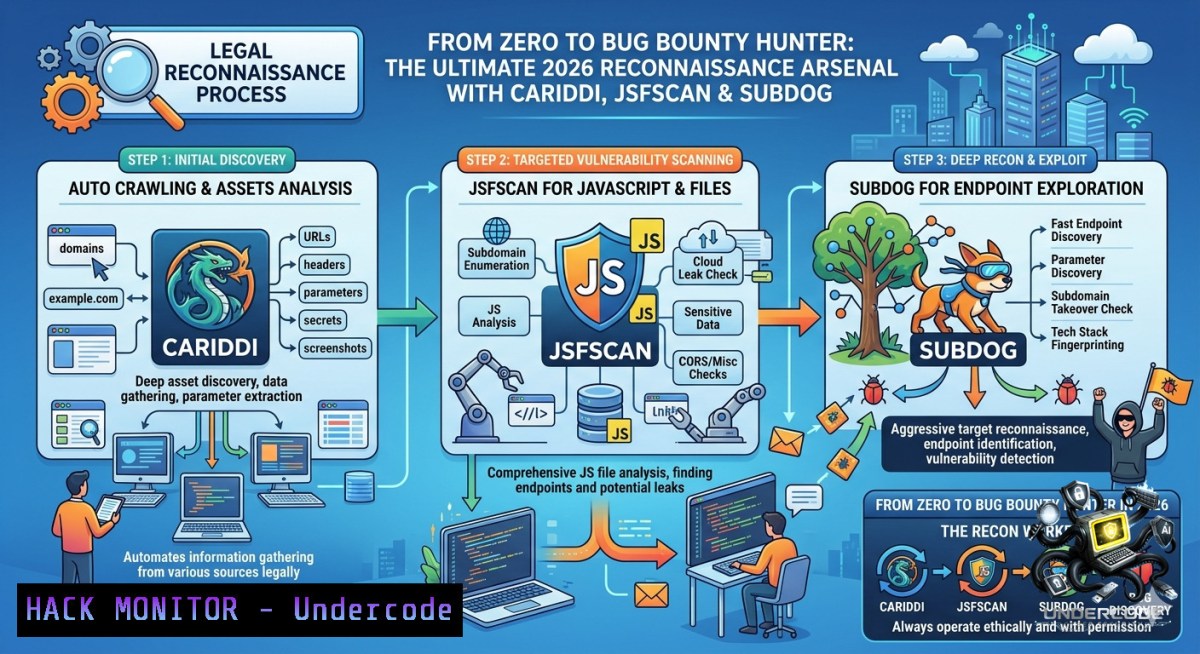
Introduction:
In the world of bug bounty hunting and penetration testing, the reconnaissance phase isn’t just a preliminary step; it’s the very foundation upon which every successful exploit is built. By leveraging the Wayback Machine to uncover forgotten historical paths and aggressively crawling JavaScript files for hidden endpoints, a hunter can transform a seemingly secure web application into a map riddled with potential entry points. This guide builds a structured, professional workflow to move from blind brute-force to surgical data extraction, using tools like Cariddi, WayBackLister, JSFScan.sh, and SubDog to maximize asset discovery and minimize wasted time.
Learning Objectives:
– Master Passive Subdomain Enumeration: Utilize tools like SubDog and Subfinder to aggregate data from 16+ (or 48+) public sources, uncovering hidden subdomains without directly touching the target server.
– Automate JavaScript Reconnaissance: Deploy JSFScan.sh to extract live endpoints, secrets, and variable names from JavaScript files, generating structured HTML reports for DOM-based XSS analysis.
– Extract API Endpoints via Wayback & Crawling: Use Cariddi and custom Python scripts to hunt for “juicy” endpoints (e.g., `/wp-json/`), API documentation, and sensitive data leaks from historical archives.
You Should Know:
1. Subdomain Harvesting: Passive vs. Active Intelligence
Start by mapping the target’s entire digital terrain. Passive enumeration allows you to gather massive amounts of data (subdomains, IPs, metadata) without ever sending a packet directly to the target, making it stealthy and effective against rate limits. The post details the use of `SubDog`, which aggregates data from 16+ sources, but reminds us that combining it with `Subfinder` (48+ sources) yields the most comprehensive results. This broad approach ensures you don’t miss subdomains that might be vulnerable due to forgotten services or misconfigurations.
Step‑by‑Step Guide:
1. Subdomain Enumeration with SubDog: Download and prepare the binary:
wget https://github.com/rix4uni/subdog/releases/download/v0.0.5/subdog-linux-amd64-0.0.5.tgz
tar -xvzf subdog-linux-amd64-0.0.5.tgz
mv subdog ~/go/bin/subdog
Run a scan against a single domain:
echo "target.com" | subdog --parallel --output target_subs.txt
This queries sources like AlienVault OTX, Certificate Transparency logs (crt.sh), and Shodan to build a subdomain list.
2. Advanced Enumeration with Subfinder (for comparison):
subfinder -d target.com -all -o subfinder_results.txt
The article reveals a critical insight: while Subfinder leverages more sources (48), Subdog often finds unique subdomains that Subfinder misses. For a complete picture, combine the unique results from both tools. A comparison in the post showed Subdog finding `126,509` subdomains compared to Subfinder’s `58,654` on a specific dataset, highlighting that `no single tool is enough`.
3. Merging and Automating Discovery:
cat subdog_results.txt subfinder_results.txt | sort -u > all_subs.txt
The recommendation is to run this combination weekly via a cron job, feeding new results into a `notify` script that pushes discoveries to a Slack or Discord channel for real-time alerts.
2. Cariddi: The “Juicy Endpoint” Crawler
Once you have the subdomains, you need to find hidden web pages and API endpoints that aren’t linked in the main navigation. Instead of blindly brute-forcing directories, `Cariddi` functions as an aggressive crawler. It takes a list of URLs, follows every link, parses JavaScript, and looks for specific patterns. The “-e” flag specifically hunts for “juicy endpoints” like admin panels, backup files, and API documentation—areas where developers often leave security flaws.
Step‑by‑Step Guide:
1. Installation via Snap:
sudo apt update
sudo apt install snapd
sudo snap install cariddi
2. Basic Single Domain Scan: Test a single subdomain for hidden paths.
echo "https://sub.target.com" | cariddi
3. Intensive Crawling & Juicy Endpoint Hunting:
cat subdomains.txt | cariddi -e -intensive | tee cariddi_juicy_endpoints.txt
– The `-intensive` flag forces Cariddi to explore every link it finds recursively.
– The `-e` flag enables the “endpoint” mode, searching for specific API paths (e.g., `/graphql`, `/swagger`, `/v2/api-docs`).
4. Hunting for Secrets (API Keys, Tokens):
cat subdomains.txt | cariddi -s
The `-s` flag runs regex patterns against page responses to detect hardcoded secrets, a common oversight in large codebases.
3. JSFScan.sh: Automating JavaScript Endpoint Extraction
Modern web applications are thick with JavaScript, which contains a treasure trove of exposed API endpoints, internal URLs, and even sensitive keys. Manually reviewing thousands of lines of JS is impossible at scale. `JSFScan.sh` automates the entire process: it gathers JS links from sources, downloads the files, extracts all endpoints and variable names, and even tests for DOM-based XSS. Its final HTML report organizes this data, giving you a filtered attack surface ready for testing.
Step‑by‑Step Guide:
1. Installation:
git clone https://github.com/KathanP19/JSFScan.sh.git
cd JSFScan.sh
chmod +x JSFScan.sh install.sh
./install.sh
Note: This script requires dependencies like `gau`, `httpx`, and `interlace`. Ensure they are installed or run `install.sh` as root.
2. Full Automation:
./JSFScan.sh -l subdomains.txt -all -r -o js_scan_results
– `-l subdomains.txt` passes your list of live hosts.
– `-all` runs the full suite (gather JS links, extract endpoints, find secrets, generate wordlists).
– `-r` recursively processes the gathered data.
– `-o js_scan_results` specifies the output directory.
3. Review the HTML Report: Open `js_scan_results/report.html` in a browser. The tool generates an organized view separating JS links, extracted endpoints, identified secrets, and potential DOM XSS candidates, allowing you to prioritize the most critical issues first.
4. WordPress REST API Endpoint Extraction (Python)
Many targets run on WordPress. By default, WordPress exposes a REST API at `/wp-json/`. While this API is intended for developers, it often reveals hidden “routes” that an attacker can call directly. The blog provides a custom Python script to query this endpoint, parse the JSON response, and save all discovered routes categorized by HTTP method (GET, POST, DELETE). This gives you a precise map of the application’s backend functions without any fuzzing.
Step‑by‑Step Guide:
1. Save the Python script provided in the article as `wp_extract.py`.
2. Run the script against a target:
python3 wp_extract.py https://targetsite.com
3. Choose extraction method:
– Option 1: Detailed (includes routes, namespaces, and HTTP methods).
– Option 2: Simple list (just the endpoint URLs).
– Option 3: Grouped by HTTP method (ideal for testing write/delete permissions).
4. Analyze Output: The script generates a `targetsite.com.txt` file. Manually review the `DELETE` and `POST` endpoints first, as these represent high-risk functionality. One example from the post is discovering `/wp-json/xyz/abc…` routes that might be vulnerable to privilege escalation or information disclosure.
5. Google Dorking & URLScan for Mass API Discovery
Sometimes the most direct path to sensitive data is simply searching for it. Modern search engines and security scanners index vast amounts of the web, including exposed API documentation and JSON objects. The article provides specific “dorks” (search operators) to find WordPress REST API schemas and uses URLScan.io to collect all endpoints returned for a particular domain. This technique transforms search engines into a massive, passive reconnaissance tool.
Step‑by‑Step Guide:
1. Google Dork for WordPress APIs:
inurl:/wp-json/ "}" "DELETE" "methods" "namespace" -site:stackoverflow.com -site:github.com
This query finds live `/wp-json/` endpoints that contain JSON with “DELETE” methods, filtering out code repositories to focus on actual websites.
2. Extract API Subdomains via Grep:
cat subdomains.txt | grep -i "api\."
This simple command filters your subdomain list down to only those with “api.” in the name (e.g., `api.target.com`), instantly narrowing a list of thousands down to a few hundred high-value targets.
3. Utilize URLScan.io Dorking:
Navigate to `urlscan.io` and use the search:
domain:target.com
Review the results to find pages containing API calls that other tools might have missed. The post recommends using the browser console to run a JavaScript one-liner that extracts all API names from the documentation page for immediate download.
What Undercode Say:
– Passive Aggregation Wins the Race: The key to effective reconnaissance isn’t a single tool but the intelligent aggregation of results. By combining Subdog and Subfinder, you increase coverage from 58k to 127k subdomains. This shift from “fuzzing” to “harvesting” dramatically expands the attack surface without alerting the target.
– Automation Must Lead to Actionable Data: Tools like Cariddi and JSFScan.sh are useless unless they reduce manual work. The value lies in their ability to output structured reports (like HTML or categorized text files) that allow a hunter to immediately test for privilege escalation or XSS, transforming raw data into a prioritized vulnerability checklist.
Prediction:
– +1 Intelligence-Driven Hunting: As targets harden against active scanning, passive intelligence gathering (Wayback, JS parsing, Cert streams) will become the primary method for finding vulnerabilities. Hunters will move from running generic tools to assembling custom pipelines that correlate data in real-time.
– -1 Tool Sprawl & Overwhelm: New hunters will face a deluge of overlapping tools. Without a standardized workflow like the one described, they risk analysis paralysis, focusing on installing tools rather than understanding the data. The most critical skill will shift from “using a tool” to “curating and interpreting its output.”
▶️ Related Video (76% Match):
🎯Let’s Practice For Free:
🎓 Live Courses & Certifications:
[Join Undercode Academy for Verified Certifications](https://undercode.co.uk/certifications/)
🚀 Request a Custom Project:
Secure, high-velocity infrastructure and disruptive technological engineering. Contact our engineering team for high-tier development and proprietary systems:
[[email protected]](mailto:[email protected])
💎 Smart Architecture | 🛡️ Secure by Design | ⭐ Trusted by Thousands
IT/Security Reporter URL:
Reported By: [Abhirup Konwar](https://www.linkedin.com/posts/abhirup-konwar-a626201a6_recon-tools-workflows-for-bug-bounty-share-7469705724906926080-b1RJ/) – Hackers Feeds
Extra Hub: Undercode MoN
Basic Verification: Pass ✅
🔐JOIN OUR CYBER WORLD [ CVE News • HackMonitor • UndercodeNews ]
[💬 Whatsapp](https://undercode.help/whatsapp) | [💬 Telegram](https://t.me/UndercodeCommunity)
📢 Follow UndercodeTesting & Stay Tuned:
[𝕏 formerly Twitter 🐦](https://x.com/undercodeupdate) | [@ Threads](https://www.threads.net/@undercodetesting) | [🔗 Linkedin](https://www.linkedin.com/company/undercodetesting/) | [🦋BlueSky](https://bsky.app/profile/undercode.bsky.social)


