Listen to this Post
Introduction:
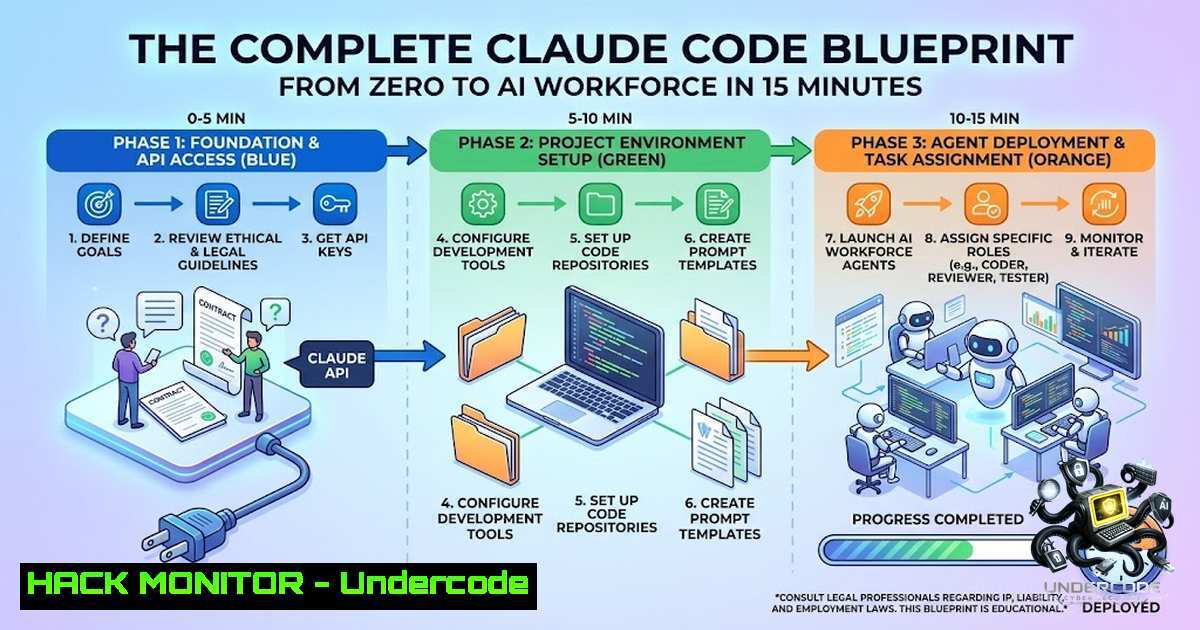
The artificial intelligence landscape has undergone a seismic shift from passive chatbots to active digital employees capable of executing complex workflows with minimal human intervention. At the forefront of this revolution is Claude Code, Anthropic’s developer-first platform that transforms how we interact with AI through persistent memory, reusable skills, and autonomous agents. The ability to deploy a personalized AI workforce within minutes is no longer science fiction—it is a tangible reality that democratizes AI engineering for data scientists, developers, and non-technical professionals alike. This article dissects the six-step methodology for building production-ready AI agents, providing verified commands, security considerations, and actionable insights for implementing an autonomous digital workforce.
Learning Objectives:
- Master the installation and configuration of Claude Code across multiple platforms (Terminal, Desktop, VS Code)
- Understand how to establish persistent context and adaptive memory systems using CLAUDE.md and memory files
- Learn to create reusable skills and multi-agent teams with specialized roles and quality gates
- Implement cloud-based automation through Claude Routines for 24/7 unattended operations
- Apply security best practices and configuration validation techniques for enterprise-grade deployments
You Should Know:
1. Installation and Environment Validation
Claude Code serves as the foundational infrastructure for your AI workforce, available through three primary deployment channels. Terminal installation via npm provides universal access across macOS, Linux, and WSL environments, while native Desktop applications offer streamlined experiences for Mac and Windows users. For developers preferring integrated development environments, the VS Code extension embeds Claude directly within the editor sidebar.
The installation process requires system compatibility checks: macOS 13.0+, Windows 10 1809+/Server 2019+, or Ubuntu 20.04+/Debian 10+/Alpine 3.19+, with a minimum of 4 GB RAM and x64 or ARM64 architecture. After installation, validation commands ensure proper setup:
 Verify successful installation and version
claude --version
 Expected output example: 2.1.211 (Claude Code)

Run diagnostic health check (read-only)
claude doctor
 Validates installation integrity and configuration file structure
The `claude doctor` command performs a comprehensive read-only diagnostic of your installation health and validates your settings file without initiating a session. Version gates exist across releases (v2.1.198, v2.1.200, v2.1.203, v2.1.208, v2.1.211), with behavior variations between minor versions that may affect workflow compatibility. For first-time users, this validation step is non-1egotiable—it prevents hours of debugging caused by incomplete installations or incompatible configurations.
2. Building Persistent Context with CLAUDE.md
The `~/.CLAUDE.md` file functions as your AI’s onboarding document—a persistent context layer that Claude reads before EVERY session. This file establishes your professional identity, communication preferences, banned terminology, and operational defaults, effectively embedding your organizational DNA into every interaction.
To initialize your CLAUDE.md from scratch, paste this prompt into Claude Code:
Help me build my CLAUDE.md from scratch. Ask me about my business, voice, banned words, and how I want you to work.
For a structured starting point, use Boris Cherny’s CLAUDE.md as a template, then customize with your specific role, voice rules, banned words, and output defaults. Best practices recommend keeping configuration under 600 words to fit cleanly within context windows.
A well-structured CLAUDE.md includes:
- Role Definition: “You are a senior AI engineer specializing in Python data pipelines and ML infrastructure”
- Voice Guidelines: “First-person perspective, no markdown bold, numbered lists use ①②③”
- Banned Patterns: Specific phrases that make writing sound artificial—em-dashes, rhetorical patterns, generic transitions
- Platform Quirks: “No tables here, emoji-heavy there, H3 max somewhere else”
- Operational Defaults: “Use pnpm, not npm. Run tests before committing”
The `claude doctor` command validates this file’s structure, confirming that your settings load correctly before any session begins. Once configured, this context persists across all future interactions, eliminating repetitive explanations and ensuring consistency in AI outputs.
3. Implementing Adaptive Memory Systems
Unlike traditional chatbots that forget previous interactions, Claude Code implements a memory system where every correction becomes a persistent `.md` file. This approach ensures that the same mistake never occurs twice—the agent literally learns from you over time.
To activate this memory system, paste:
From now on, whenever I correct you or tell you to remember something, save it as its own .md file at ~/.claude/projects/{project}/memory/, prefixed feedback_, user_, project_, or reference_. Index everything in MEMORY.md so the right rule loads next session.
This command establishes a structured memory hierarchy:
- feedback_: Corrections and improvements you provide
- user_: Personal preferences and working styles
- project_: Project-specific constraints and requirements
- reference_: Documentation and reference materials
Each memory file loads in future sessions, creating a compounding knowledge base. Production implementations often accumulate 100-200 memory files, each representing a lesson learned or preference established. The `MEMORY.md` index file ensures the right rules load contextually based on the current project and task.
For security-conscious deployments, the `brand-voice` plugin offers PostToolUse hooks that check every Write, Edit, or MultiEdit operation against brand guidelines, signaling Claude to fix violations before saving—no manual review required. This enforcement layer prevents sensitive information from leaking into memory files and ensures compliance with organizational standards.
4. Creating Reusable Skills with MCP Integration
Skills transform complex multi-step workflows into single-command invocations, eliminating the need to retype 200-word prompts. A skill packages instructions, knowledge, and MCP connectors into a reusable workflow that fires from any chat.
To create a skill, paste:
Turn this workflow into a /(name) skill. Wire the MCP connectors I need and make it fire-able from any chat.
[Describe the workflow in plain English: what triggers it, what data it pulls, what it produces]
Skills are stored in `~/.claude/skills/{name}/SKILL.md` and can wire MCP connectors to external services like Notion, Gmail, Drive, databases, and APIs. The Model Context Protocol (MCP) is an open standard enabling AI assistants to connect to hundreds of external tools and data sources.
MCP Installation and Configuration:
 Add a remote HTTP MCP server
claude mcp add --transport http <name> <url>

Real example: Connect to Notion
claude mcp add --transport http notion https://api.notion.com/v1

Verify MCP servers are running
claude mcp list
MCP servers expose “tools” that Claude can call—reading databases, calling APIs, managing files, automating workflows. A modern Claude Code installation often has 10-30 MCP servers wired in. The MCP protocol uses JSON-RPC 2.0 over stdio, SSE, or HTTP, enabling integration with virtually any API or service.
Security Note: Verify you trust each server before connecting it. Servers that fetch external content can expose you to prompt injection risk. Use the official mcp-server-dev plugin to scaffold and test servers in isolated environments.
Example Skill Use Cases:
– `/today` → pulls calendar, inbox, and Notion, drafts your day
– `/deploy` → runs deployment checklist with automated verification
– `/review-pr` → performs security, performance, and style checks on pull requests
5. Deploying Multi-Agent Teams with Quality Gates
Agents represent specialized AI workers, each with a distinct role and model assignment. The agent team architecture follows a tiered model routing approach:
| Agent Role | Model | Purpose |
||-||
| Strategist | Opus | Analysis, planning, architecture decisions |
| Builder | Sonnet | Execution, implementation, coding |
| QA Gate | Haiku/Sonnet | Validation, testing, quality assurance |
To build an agent team, paste:
Build me an agent team for [bash]. Use Opus for analysts, Sonnet for executors. Add a 95/100 QA gate.
The agentcohort dispatcher reads your task, classifies complexity, and automatically selects the right team—strong models (Opus) for hard work, cheap models (Haiku/Sonnet) for easy work. This tiered approach optimizes cost, quality, and speed.
Agent Configuration Example (Windows/Linux):
 Windows PowerShell - Set up agent workspace
New-Item -ItemType Directory -Path ~.claude\agents\ -Force
New-Item -ItemType Directory -Path ~.claude\agents\strategist\ -Force
New-Item -ItemType Directory -Path ~.claude\agents\builder\ -Force
New-Item -ItemType Directory -Path ~.claude\agents\qa\ -Force

Linux/macOS - Set up agent workspace
mkdir -p ~/.claude/agents/{strategist,builder,qa}
Each agent configuration file specifies:
- Role: Specific function within the team
- Model: Opus, Sonnet, or Haiku assignment
- Tools: MCP servers and skills accessible
- Constraints: Context limits, output requirements, approval gates
The QA gate enforces a 95/100 quality threshold—nothing ships without passing validation. This multi-party adversarial review process ensures production-ready outputs before they reach users. For enterprise deployments, the claude-agents-kit provides production-ready specialized agents for architecture, product management, frontend, backend, QA, deployment, and operations.
6. Automating with Cloud-Based Routines
Routines transform Claude Code from an interactive assistant into an autonomous digital employee that runs 24/7 on Anthropic-managed cloud infrastructure. Unlike `/loop` commands that require an open session, routines persist independently and continue working when your laptop is closed.
Creating a Routine:
 From CLI - Create a scheduled routine
claude routine create --1ame "Daily Report" \
--prompt "Generate weekly analytics report and drop into Notion" \
--schedule "0 9   1" \
--repo "your-org/analytics"

Alternative: Create via web at claude.ai/code/routines
Routines support multiple trigger types:
- Scheduled: Recurring cadence (hourly, nightly, weekly) or one-time future execution
- API: On-demand HTTP POST triggers with bearer token authentication
- GitHub: Automatic execution on repository events (pull requests, releases)
Trigger Configuration Examples:
 API trigger - endpoint with bearer token authentication
POST https://api.claude.ai/routines/{routine-id}/trigger
Authorization: Bearer {token}
Body: {"payload": "alert data"}

GitHub trigger - runs on pull_request.opened
 Configure via routine web interface or YAML
Use Cases for Routines:
- Backlog Maintenance: Reads issues opened since last run, applies labels, assigns owners, posts Slack summary
- Alert Triage: Monitoring tool calls API endpoint when error threshold crossed; routine pulls stack trace, correlates with recent commits, opens draft PR with proposed fix
- Code Review: GitHub trigger on pull_request.opened; applies review checklist, leaves inline comments for security/performance/style
- Deploy Verification: CD pipeline calls API after production deploy; runs smoke checks, scans error logs, posts go/no-go decision
- Docs Drift: Weekly routine scans merged PRs, flags documentation referencing changed APIs, opens update PRs
Routine Security Considerations:
- Routines run autonomously with no permission-mode picker and no approval prompts during execution
- Team and Enterprise Owners can disable routines for all members via admin settings
- Routines access fresh clones of repositories—no local file access
- MCP connectors configured per task inherit from routine settings
- Minimum scheduled interval is 1 hour for cloud routines
What Undercode Say:
- The Democratization of AI Engineering: Claude Code’s six-step framework eliminates the traditional barrier between AI concepts and practical implementation. What previously required extensive Python knowledge, API integration expertise, and weeks of development now completes in minutes. This shifts the bottleneck from technical capability to strategic thinking—professionals can focus on what to build rather than how to build it.
-
Memory as Competitive Advantage: The adaptive memory system represents a paradigm shift in AI interaction. Traditional chatbots start fresh each session, forcing users to re-explain context repeatedly. Claude’s persistent memory compounds knowledge over time, meaning the system becomes exponentially more valuable with each interaction. Organizations that adopt early will develop institutional AI knowledge that late adopters cannot replicate quickly.
-
Security Implications of Autonomous Agents: While routines and skills dramatically increase productivity, they introduce new attack surfaces. Prompt injection risks, unauthorized MCP server connections, and autonomous cloud execution require robust governance frameworks. Organizations must implement validation layers, approval gates, and monitoring systems before deploying agents in production environments. The 95/100 QA gate is a minimum standard—enterprise deployments should consider multi-stage validation with human review checkpoints.
-
The Rise of the AI-First Organization: Claude Code represents more than a developer tool—it signals the emergence of AI-first organizational structures where digital employees handle routine tasks while humans focus on strategic direction. The ability to deploy specialized agents (Strategist, Builder, QA) mirrors traditional organizational hierarchies but operates at machine speed. This will accelerate the shift from “AI as assistant” to “AI as colleague” across industries.
Prediction:
-
+1 The six-step Claude Code framework will become the industry standard for AI agent deployment within 18 months, with major cloud providers (AWS, Google Cloud, Azure) offering integrated Claude Code services that reduce setup time from minutes to clicks.
-
+1 The adaptive memory system will spawn a new category of “AI knowledge management” tools that organize, index, and retrieve memory files across teams, creating institutional AI memory that persists beyond individual sessions and survives employee turnover.
-
-1 Organizations that deploy Claude Code without implementing proper security controls (MCP server validation, routine approval workflows, memory file audits) will face significant data leakage incidents within the first year, prompting regulatory scrutiny and forcing industry-wide security standards for AI agents.
-
+1 The tiered model routing approach (Opus for strategy, Sonnet for execution, Haiku for validation) will optimize cost-performance ratios dramatically, making enterprise-grade AI accessible to startups and SMBs that previously couldn’t justify premium model costs for every interaction.
-
-1 The “no code” promise will create a false sense of accessibility, leading non-technical users to deploy agents for mission-critical workflows without understanding failure modes, context limitations, or cost implications—resulting in high-profile failures that temporarily erode trust in autonomous AI systems.
-
+1 Claude Routines will evolve into a full-featured workflow automation platform competing directly with Zapier, Make, and GitHub Actions, but with the distinct advantage of natural language configuration and adaptive learning that reduces the need for manual workflow maintenance.
-
+1 The MCP ecosystem will become the universal standard for AI-tool integration, with thousands of connectors available within 24 months, effectively creating an “app store” for AI capabilities that dramatically reduces integration costs and accelerates time-to-value for AI implementations.
-
-1 The concentration of AI agent infrastructure within a single provider (Anthropic) creates vendor lock-in risks that may limit flexibility and increase costs over time. Organizations should develop abstraction layers that enable multi-provider agent orchestration to maintain bargaining power and avoid single points of failure.
-
+1 The agent team architecture will inspire new organizational models where human teams are augmented by AI agents with defined roles, performance metrics, and continuous improvement cycles—creating a blended workforce that outperforms either humans or AI operating independently.
-
+1 Within five years, the ability to deploy personalized AI agents will be as common as creating email accounts, fundamentally transforming how knowledge work is structured, measured, and delivered across all industries.
▶️ Related Video (82% Match):
https://www.youtube.com/watch?v=5tgHMa2Z3jc
🎯Let’s Practice For Free:
🎓 Live Courses & Certifications:
Join Undercode Academy for Verified Certifications
🚀 Request a Custom Project:
Secure, high-velocity infrastructure and disruptive technological engineering. Contact our engineering team for high-tier development and proprietary systems:
[email protected]
💎 Smart Architecture | 🛡️ Secure by Design | ⭐ Trusted by Thousands
IT/Security Reporter URL:
Reported By: Muhammad Qasim – Hackers Feeds
Extra Hub: Undercode MoN
Basic Verification: Pass ✅


