Listen to this Post
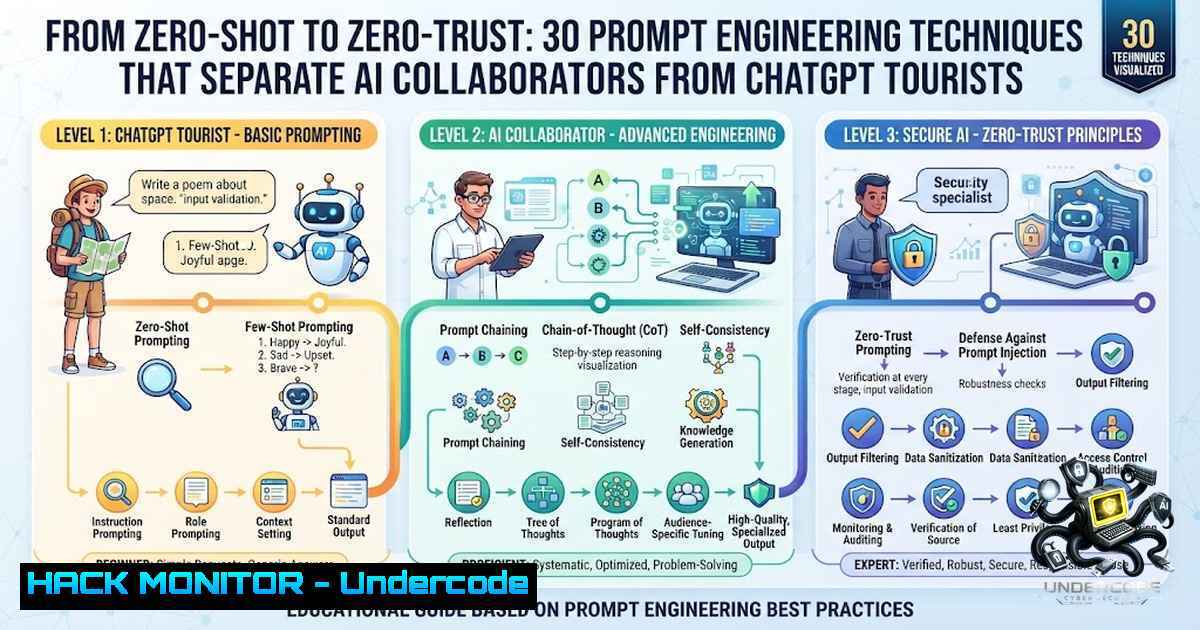
Introduction:
The gap between a mediocre AI output and a production-ready deliverable is almost never the model’s fault — it is the input’s. Most users treat ChatGPT like a search engine, firing off zero-shot instructions and hoping for the best, when in reality, large language models (LLMs) are reasoning engines that thrive on structure, context, and iterative refinement. The difference between a basic prompt and a well-engineered one is not marginal; it is the difference between copy that requires four rounds of editing and output that goes straight to the brief. In cybersecurity, IT operations, and AI-driven development, where precision is non-1egotiable, mastering these 30 prompting techniques is no longer optional — it is a core competency.
Learning Objectives:
- Master 30 advanced prompting techniques — from Chain-of-Thought to Meta-Prompting — to consistently generate production-grade AI outputs.
- Apply prompt engineering to real-world cybersecurity workflows, including threat intelligence triage, log analysis, and vulnerability assessment.
- Harden AI toolchains against prompt injection and adversarial attacks using Linux/Windows security commands and configuration hardening.
You Should Know:
1. The 30-Prompt Toolbox: Moving Beyond Zero-Shot
The default prompting mode for most users is Zero-Shot: give the model an instruction and hope for the best. When the output underwhelms, the assumption is that the model is not capable enough. That is rarely the problem. The problem is that most people never learned how to actually talk to it.
Jonathan Parsons, a marketing executive who tested different prompting approaches across an entire quarter, found that the gap between a basic prompt and a structured one was the difference between unusable drafts and brief-ready copy. Here are the 30 techniques that actually move the needle:
Simplify & Summarize:
- ELI5 — Explain like I’m 5 for kid‑friendly clarity.
- /TLDL — Too Long, Didn’t Listen for short summaries.
- /STEP-BY-STEP — Breaks reasoning into sequential steps.
- /CHECKLIST — Converts information into an actionable list.
- /EXEC SUMMARY — Concise executive‑level summary.
Adopt Roles & Voices:
- /ACT AS — Make ChatGPT role‑play (e.g., lawyer, coach, penetration tester).
- /BRIEFLY — Ultra‑minimal answers.
- /JARGON — Force technical or industry‑specific language.
- /AUDIENCE — Tailor output to a specific reader.
- /TONE — Change tone (formal, funny, dramatic, etc.).
Work Styles:
- /DEV MODE — Raw, technical developer‑style output.
- /PM MODE — Project‑management perspective.
- /SWOT — Strengths, Weaknesses, Opportunities, Threats analysis.
- /FORMAT AS — Output in table, JSON, Markdown, etc..
- /COMPARE — Side‑by‑side comparisons.
Analysis & Thinking:
- /MULTI-PERSPECTIVE — Examine from different viewpoints simultaneously.
- /CONTEXT STACK — Layer multiple contexts for richer responses.
- /BEGIN WITH / END WITH — Control the start or finish of the response.
- /ROLE: TASK: FORMAT — Explicit role + task + output style.
- /SCHEMA — Generate structured outlines and data models.
Rewriting & Reflection:
- /REWRITE AS — Rephrase content in a new style.
- /REFLECTIVE MODE — Make the model reflect on its own response.
- /SYSTEMATIC BIAS CHECK — Identify possible biases.
- /DELIBERATE THINKING — Force slow, careful reasoning.
- /NO AUTOPILOT — Avoid generic, surface‑level answers.
- /EVAL-SELF — Critically review its own answer.
Deep Perspectives:
- /PARALLEL LENSES — Examine from multiple analytical angles.
- /FIRST PRINCIPLES — Build reasoning from fundamentals.
- /CHAIN OF THOUGHT — Show intermediate reasoning steps.
- /PITFALLS — Highlight common mistakes and edge cases.
Pro Tip: Stack commands for sharper outputs. For example, `/SWOT + /EXEC SUMMARY` delivers a strategic analysis with an executive summary in one go.
2. Chain-of-Thought: The Reasoning Multiplier
Chain-of-Thought (CoT) prompting instructs the model to generate intermediate reasoning steps before delivering the final answer. For non-reasoning models, prepending “Let’s reason step by step” or “Think step by step before answering” often improves accuracy on multi-step problems dramatically. CoT produces more accurate and defensible answers for complex or multi-step tasks by exposing the model’s internal logic.
Step‑by‑step guide:
- Identify the complex problem — e.g., “Analyze this firewall log and identify the root cause of the anomaly.”
- Add the CoT trigger — Prepend: “Think step by step before answering.”
- Provide structured context — Paste the log data or relevant documentation.
- Request intermediate reasoning — Ask the model to show its work: “Walk me through each stage of your analysis.”
- Review the reasoning chain — Verify each step for logical consistency before accepting the final output.
Example prompt:
Think step by step before answering. Given the following firewall logs from 2026-07-12, identify:
1. Which IP addresses triggered the most alerts
2. The time correlation between alerts
3. Whether this pattern matches known CVE signatures
4. A recommended mitigation strategy

[Paste log data here]
3. Few-Shot and Role Prompting: Teaching Through Examples
Few-Shot prompting provides 2 to 5 examples of what “good” looks like before asking for the output. This is particularly effective in enterprise prompts where consistency and format adherence are critical. Role Prompting tells the model exactly who it is before it writes a single word — “Act as a senior SOC analyst” or “Act as a cloud security architect” — which immediately shifts the model from a generic answer machine into a narrower, more useful expert mode.
Step‑by‑step guide:
- Define the role — Be specific: “Act as a senior penetration tester with 10 years of experience in web application security.”
- Provide 2–3 examples — Show the model the exact format, tone, and depth you expect.
- Set constraints — Add hard rules: word limits, banned phrases, required angles.
- Deliver the task — Present the problem or data to be analyzed.
- Iterate — Treat the first output as a draft, then give specific critique instructions.
Example prompt:
Act as a senior cloud security engineer. Here are three examples of how I want vulnerability reports formatted:

Example 1: [CVE-2026-1234] - AWS S3 bucket misconfiguration - Risk: High - Mitigation: Enable bucket policies...
Example 2: [CVE-2026-5678] - Kubernetes RBAC over-privilege - Risk: Medium - Mitigation: Apply least-privilege...

Now analyze the following CloudTrail logs and generate a similar report for any anomalies detected.
4. Prompt Injection Defense: Hardening Your AI Toolchain
Prompt injection is an emerging attack vector where adversaries embed malicious instructions in data that an AI agent reads. Tools like SecureClaw scan files for 28 known prompt injection patterns across three severity levels — CRITICAL (exfiltration, identity hijacking, jailbreak attempts), HIGH (instruction overrides, hidden text, credential requests), and ADVISORY (suspicious patterns worth reviewing).
Linux / macOS Installation & Scanning:
 Install via pipx (recommended — isolated, no conflicts)
brew install pipx  macOS
pipx install git+https://github.com/sparkst/secureclaw.git

Or install via pip in a virtual environment
python3 -m venv ~/.secureclaw-venv
source ~/.secureclaw-venv/bin/activate
pip install git+https://github.com/sparkst/secureclaw.git

Scan your current directory
secureclaw scan .

Scan specific AI tool directories
secureclaw scan ~/.claude ~/.cursor ~/Documents

Check your AI tool security posture
secureclaw posture

Generate an HTML report
secureclaw scan . --format html -o report.html

JSON output for CI/CD pipelines
secureclaw scan . --format json --fail-on-high
Windows Installation (PowerShell):
 Install via pipx
python -m pip install --user pipx
pipx install git+https://github.com/sparkst/secureclaw.git

Or via virtual environment
python -m venv %USERPROFILE%.secureclaw-venv
.secureclaw-venv\Scripts\activate
pip install git+https://github.com/sparkst/secureclaw.git

Scan
secureclaw scan .
Security Hardening for AI Servers (Ubuntu/Linux):
For production AI deployments, implement defense-in-depth:
 Keep the sandbox on — limits what a successful injection can do
 Configure network allowlists to restrict outbound connections
 Run AI agents in containers with reduced privileges
 Enable kernel hardening parameters
5. AI-Powered Cybersecurity Workflows: From Triage to Reporting
Prompt engineering can supercharge cybersecurity workflows by improving speed, clarity, and consistency. Structured prompting enables SOC analysts, threat intelligence teams, and GRC professionals to produce reliable, auditable outputs.
Step‑by‑step guide for phishing triage:
- Role prompt — “Act as a senior SOC analyst specializing in phishing detection.”
- Provide context — Paste the email headers and body.
- Chain-of-Thought — “Think step by step: analyze SPF/DKIM/DMARC, check URLs against known threat feeds, evaluate language patterns.”
- Constraint prompt — “Output must be under 300 words, include a risk score (1–10), and provide a clear recommendation.”
- Iterative refinement — “Revise your analysis focusing only on the most critical indicators.”
Structured log and CVE analysis:
- Use the RTCF prompting pattern (Role, Task, Context, Format) for consistent outputs.
- Generate compliance checks, control mappings, and executive communications.
- Create training materials and awareness content for security teams.
6. Meta-Prompting and Prompt Chaining: Building Complex Workflows
Meta-prompting asks the model to write the ideal prompt for your task first, then use that prompt to generate the final output. Prompt Chaining uses the output of one prompt as the direct input to the next, creating a pipeline of reasoning.
Step‑by‑step guide for prompt chaining:
- Prompt 1 (Discovery) — “List all potential attack vectors for a public-facing web application.”
- Prompt 2 (Prioritization) — “From the list above, rank the top 5 most critical vectors based on CVSS scores and exploitability.”
- Prompt 3 (Mitigation) — “For each of the top 3 vectors, provide a detailed mitigation strategy with specific configuration commands.”
- Prompt 4 (Reporting) — “Format the above as an executive summary with a technical appendix.”
This technique is particularly powerful for generating comprehensive security assessments, incident response playbooks, and compliance documentation.
7. Least-to-Most and Skeleton-of-Thought: Breaking Down Complexity
Least-to-Most prompting breaks a hard problem into its smallest parts and solves each in sequence. Skeleton-of-Thought gets the outline first, then expands each section separately.
Step‑by‑step guide for vulnerability assessment:
- Skeleton — “Provide an outline for a comprehensive web application security assessment.”
- Expand Section 1 — “Expand the ‘Authentication Testing’ section with specific test cases.”
- Expand Section 2 — “Expand the ‘API Security’ section with OWASP Top 10 API risks.”
- Expand Section 3 — “Expand the ‘Data Protection’ section with encryption and masking recommendations.”
- Synthesize — “Combine all sections into a single, cohesive report with an executive summary.”
What Undercode Say:
- Key Takeaway 1: The gap between basic and structured prompting is not marginal — it is the difference between unusable drafts and production-ready deliverables. Most users are stuck in zero-shot mode, treating AI like a search engine when they should be treating it like a collaborator.
- Key Takeaway 2: Prompt injection is a real and growing threat. With tools like PromptLock (first-ever ransomware leveraging AI for file encryption) using prompt injection techniques to manipulate AI models into performing malicious tasks, security teams must scan their AI toolchains for adversarial patterns and harden their deployments with the commands above.
Analysis: The professional landscape is bifurcating. On one side, users who treat ChatGPT like a search engine will continue to get mediocre, generic outputs that require extensive editing. On the other side, those who master structured prompting — Chain-of-Thought, Few-Shot, Role Prompting, Prompt Chaining, and Meta-Prompting — will generate outputs that go straight to production. In cybersecurity, where precision is life-or-death, this gap is even more pronounced. The same techniques that generate better threat intelligence reports also defend against prompt injection attacks. The future belongs to those who can talk to AI with the same precision they talk to their engineering teams. Training courses like SANS AI Security Training, Pluralsight’s Prompt Engineering for Cyber Security, and GitHub repositories like Prompt-Engineering-for-Ethical-Hackers are emerging to close this skills gap — but the window to gain a competitive advantage is closing fast.
Prediction:
- +1 Organizations that invest in prompt engineering training for their security and IT teams will see a 40–60% reduction in time spent on threat intelligence triage, log analysis, and report generation within the next 12 months.
- +1 The rise of agentic AI frameworks (Flow Engineering, Agentic Orchestration) will make prompt engineering a core competency for all cybersecurity roles, not just data scientists.
- -1 Prompt injection attacks will become the dominant vector for AI-enabled ransomware and data exfiltration by 2027, with automated scanners like SecureClaw becoming as essential as antivirus software.
- -1 Organizations that fail to adopt structured prompting and AI security hardening will experience at least one significant AI-related security incident within the next 18 months, as adversaries increasingly target poorly secured AI toolchains.
- +1 The commoditization of prompt engineering techniques — through slash commands, templates, and meta-prompts — will democratize advanced AI capabilities, enabling smaller security teams to punch above their weight class.
▶️ Related Video (78% Match):
🎯Let’s Practice For Free:
🎓 Live Courses & Certifications:
Join Undercode Academy for Verified Certifications
🚀 Request a Custom Project:
Secure, high-velocity infrastructure and disruptive technological engineering. Contact our engineering team for high-tier development and proprietary systems:
[email protected]
💎 Smart Architecture | 🛡️ Secure by Design | ⭐ Trusted by Thousands
IT/Security Reporter URL:
Reported By: Jonathan Parsons – Hackers Feeds
Extra Hub: Undercode MoN
Basic Verification: Pass ✅


