Listen to this Post
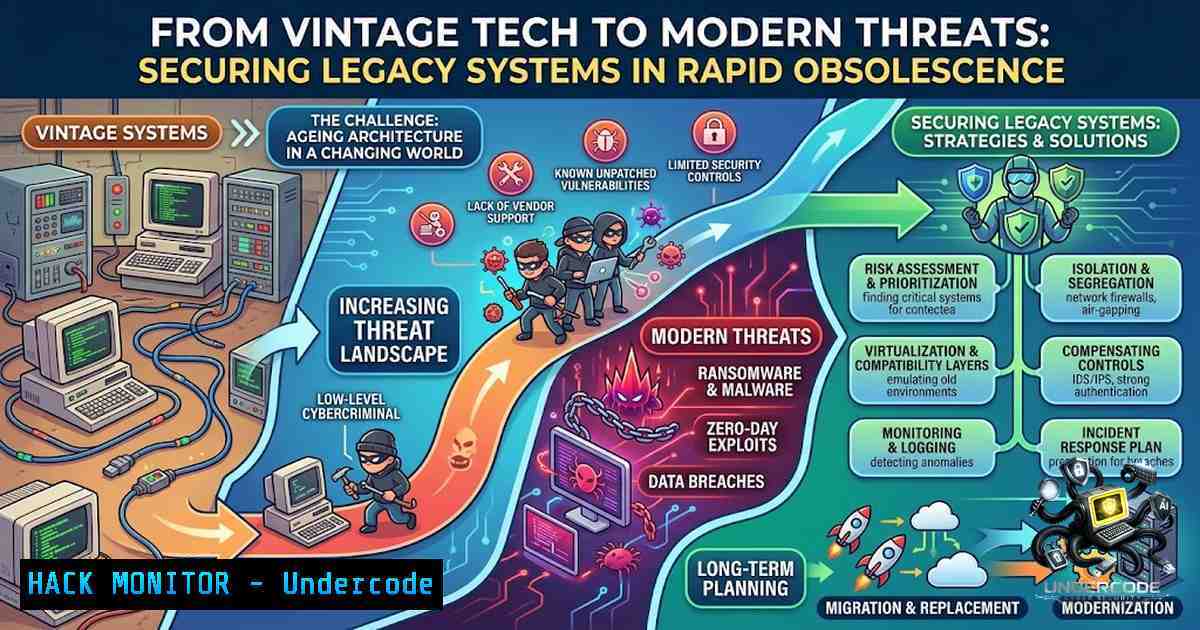
Introduction
The rapid evolution of technology has transformed yesterday’s cutting-edge innovations into today’s security liabilities. As organizations continue to operate legacy systems—from Windows XP workstations to outdated network protocols—cybersecurity professionals face the challenge of protecting infrastructures that were never designed to withstand modern threats. Understanding the security implications of technological obsolescence is crucial for developing robust defense strategies that bridge the gap between vintage architectures and contemporary cybersecurity frameworks.
Learning Objectives
- Identify security vulnerabilities inherent in legacy operating systems and outdated hardware
- Implement compensating controls and isolation strategies for unsupported systems
- Master migration techniques and secure retirement procedures for end-of-life technology
- Develop risk assessment frameworks for mixed-environment infrastructure
- Apply modern security tools to protect legacy assets without disrupting operations
You Should Know
1. Windows XP Legacy and Continued Risk Assessment
Despite being officially end-of-life since April 2014, Windows XP persists in numerous critical infrastructure environments, from healthcare devices to industrial control systems. The operating system lacks modern security features including ASLR, DEP, and secure boot, making it particularly vulnerable to remote exploitation. Attackers continue to develop malware specifically targeting XP’s architectural weaknesses, with notable examples including WannaCry’s exploitation of EternalBlue (MS17-010) that devastated XP systems globally.
Step-by-step guide to assessing XP vulnerabilities:
- Network discovery: Identify XP hosts using network scanning
– Linux: `nmap -O –osscan-guess 192.168.1.0/24 | grep “Windows XP”`
– Windows: `net view /domain` to enumerate domain members
2. Vulnerability scanning: Deploy specialized scanning
- Linux: `nmap –script smb-vuln- -p 445 192.168.1.10`
– Windows: Use MBSA (Microsoft Baseline Security Analyzer) legacy version
3. Patch status verification: Check for missing patches
- Command: `wmic qfe list brief /format:texttable` (on XP system)
- Linux alternative: Use Nessus or OpenVAS for comprehensive assessment
4. Mitigation strategies: Implement network segmentation
- Create isolated VLANs for XP systems
- Deploy application whitelisting using Software Restriction Policies
- Enable firewall restrictions allowing only essential ports
2. Legacy Storage Media and Data Security Implications
The transition from physical storage media to cloud-based solutions has introduced new security paradigms while eliminating certain risks associated with removable media. Floppy disks, CD-RWs, and early USB drives presented unique security challenges including data remanence, physical theft, and malware propagation through autorun features. Modern equivalents—cloud storage, SSDs, and encrypted drives—require different security controls.
Step-by-step guide for secure data migration from legacy media:
1. Forensic imaging of legacy media:
- Linux: `dd if=/dev/fd0 of=floppy_image.img bs=512` (floppy disk)
- Linux: `dd if=/dev/cdrom of=cd_image.iso` (optical media)
- Windows: Use WinImage or FTK Imager for media acquisition
2. Secure data extraction and validation:
- Verify integrity using hash verification: `sha256sum floppy_image.img`
– Extract contents using appropriate tools: `7z x floppy_image.img -o/extracted_data/`
3. Data sanitization of retired media:
- Degaussing for magnetic media (physical destruction recommended)
- Overwrite operations: `dd if=/dev/urandom of=/dev/fd0 bs=512 count=2880` (Linux)
- Windows: Use `cipher /w:C:\` for overwriting free space
4. Implementation of modern access controls:
- Deploy Azure Information Protection or AWS Macie
- Implement data loss prevention (DLP) policies
- Enable end-to-end encryption for storage and transit
3. Modern Authentication Evolution from Legacy Passwords
The transition from simple password-based authentication to multi-factor authentication (MFA) represents a critical security advancement. Legacy password hashing algorithms such as LM and NTLM have been thoroughly compromised, while modern protocols like OAuth 2.0, SAML, and WebAuthn provide significantly stronger security postures.
Step-by-step guide to modernizing authentication infrastructure:
1. Audit existing authentication mechanisms:
- Linux: `cat /etc/passwd` and `/etc/shadow` to review user accounts
- Windows: `net user` and review Local Security Policy settings
- Evaluate password policies and complexity requirements
2. Implement multi-factor authentication:
- Deploy Microsoft Authenticator or Google Authenticator for TOTP
- Configure RADIUS or LDAP servers for centralized authentication
- Example configuration for FreeRADIUS: `/etc/freeradius/3.0/mods-enabled/eap`
3. Migrate to modern hashing algorithms:
- Use bcrypt: `htpasswd -B -C 10 filename username`
– Implement Argon2id: `argon2 password -t 3 -m 15 -p 1`
– Windows: Enable Credential Guard and Windows Hello for Business
4. Configure privileged access management:
- Implement Just-In-Time (JIT) access
- Deploy PAM solutions like CyberArk or open-source alternatives
- Monitor authentication logs: Windows Event ID 4624 (successful logon)
4. Network Protocols from Dial-Up to Zero-Trust Architecture
The evolution from dial-up connections to modern network architectures mirrors the development of security frameworks. Early networking lacked inherent security, while modern implementations incorporate encryption, authentication, and continuous validation. Zero-Trust Architecture (ZTA) represents the culmination of this evolution, assuming breach and requiring explicit verification.
Step-by-step guide to implementing zero-trust controls:
1. Network segmentation and micro-segmentation:
- Design VLANs and subnets for workload isolation
- Linux: Use `iptables` or `nftables` for host-based firewalling
- Windows: Configure Windows Firewall with Advanced Security
2. Implement identity-aware proxies:
- Deploy forward and reverse proxies with authentication
- Example nginx configuration for basic auth:
location / {
auth_basic "Restricted";
auth_basic_user_file /etc/nginx/.htpasswd;
}
3. Continuous monitoring and analytics:
- Deploy SIEM solutions: Splunk, ELK Stack, or Azure Sentinel
- Linux: Configure `auditd` for comprehensive system auditing
- Windows: Enable Advanced Audit Policy Configuration
4. Application of least-privilege principle:
- Remove unnecessary local administrator rights
- Implement Windows: Restricted Groups policy
- Linux: Remove sudo access where not required
5. Mobile Device Security Evolution
The transition from feature phones to modern smartphones has introduced unprecedented attack vectors. Modern security challenges include sideloaded applications, malicious mobile device management (MDM) profiles, and OS fragmentation across Android versions. Implementing comprehensive mobile security requires balancing usability with protection.
Step-by-step guide for mobile security hardening:
1. Mobile device management deployment:
- Configure Intune or VMware Workspace ONE policies
- Enforce minimum OS version requirements
- Implement compliance policies for device encryption and password complexity
2. Application security controls:
- Deploy mobile application management (MAM)
- Whitelist approved applications only
- Implement application vetting processes
3. Network security for mobile devices:
- Enable VPN for all corporate traffic
- Configure DNS-over-HTTPS (DoH) for privacy
- Block connections to known malicious domains
4. User awareness training:
- Simulated phishing campaigns targeting mobile users
- Education on sideloaded application risks
- Guidance on secure Wi-Fi usage and Bluetooth risks
What Undercode Say
- Key Takeaway 1: Legacy systems represent significant security liabilities but can be effectively managed through network isolation, application whitelisting, and compensating controls. Organizations must prioritize a structured modernization roadmap that balances operational requirements with security imperatives.
-
Key Takeaway 2: The evolution from vintage technology to modern infrastructure demonstrates the importance of security-by-design principles. Each technological advancement has introduced new security paradigms, from basic password hashing to zero-trust architecture. Understanding this progression helps security professionals anticipate future challenges.
Analysis: The security landscape continues to evolve rapidly, with AI-powered attacks and quantum computing threats on the horizon. Organizations operating legacy systems face the compounding challenge of protecting against modern threats while managing outdated architectures. The nostalgic technologies mentioned represent security lessons learned through decades of adversarial evolution. Organizations should adopt a proactive approach, implementing continuous monitoring, regular vulnerability assessments, and phased migration strategies to maintain security posture. Investments in modern identity management, encryption, and zero-trust frameworks provide the foundation for resilient infrastructure. The key is recognizing that yesterday’s solutions cannot protect against tomorrow’s threats—continuous adaptation is essential for effective cybersecurity.
Prediction
- +1 Increased regulatory frameworks will mandate phased retirement of legacy systems, driving modernization investments across critical infrastructure sectors by 2028.
-
+1 AI-powered security automation will significantly reduce the attack surface of mixed-environment infrastructures by enabling real-time threat detection and automated response mechanisms.
-
-1 Legacy systems will continue to be exploited through unpatched vulnerabilities, with critical infrastructure attacks increasing by 35% over the next three years due to delayed modernization efforts.
-
-1 The skills gap in managing legacy technology security will widen, creating hiring challenges as experienced professionals retire while younger experts focus on modern architectures.
-
+1 Zero-trust architecture will become the standard security model by 2027, effectively mitigating many risks associated with outdated technologies through comprehensive verification and least-privilege enforcement.
▶️ Related Video (82% Match):
https://www.youtube.com/watch?v=7qK6WawJuRE
🎯Let’s Practice For Free:
🎓 Live Courses & Certifications:
Join Undercode Academy for Verified Certifications
🚀 Request a Custom Project:
Secure, high-velocity infrastructure and disruptive technological engineering. Contact our engineering team for high-tier development and proprietary systems:
[email protected]
💎 Smart Architecture | 🛡️ Secure by Design | ⭐ Trusted by Thousands
IT/Security Reporter URL:
Reported By: https://lnkd.in/p/e7NBPVEW – Hackers Feeds
Extra Hub: Undercode MoN
Basic Verification: Pass ✅


